Envoy: Unable to build Envoy with Bazel
Title: Unable to build Envoy with Bazel
Description:
I was getting started with Envoy, and followed the Quick start build for developers.
Installed bazel, golang, buildifier, other required dependencies with Homebrew, fetched the source and built all the external dependencies successfully.
Upon running bazel build //source/exe:envoy-static from Envoy directory, the build doesn't complete successfully, I get:
gcc: error: unrecognized command line option '-fobjc-link-runtime'.
Below is the screenshot of the verbose version:

I guess the issue is with gcc and not with Envoy, is there any known fix for this?
 anirudhmurali
All 16 comments
Updated gcc to 7.3.0 and ran again. Still the same.
gcc: error: unrecognized command line option '-fobjc-link-runtime'; did you mean '-fgnu-runtime'?
anirudhmurali
on 19 Feb 2018
@zuercher this looks like an OS X issue, any idea?
 htuch
on 19 Feb 2018
htuch
on 19 Feb 2018
I've never tried to build with homebrew-installed gcc, but it looks like bazel is assuming clang and passing clang-specific flags to gcc.
 zuercher
on 20 Feb 2018
zuercher
on 20 Feb 2018
It first caused in homebrew-installed gcc 4.9, and then I downloaded the gcc 7.3.0 source, ran configure, make and installed it. The error still persisted. I'll see if it is possible to use clang by default instead of gcc.
anirudhmurali
on 20 Feb 2018
I remember seeing a similar error when upgrading the local Clang toolchain. IIRC the C compiler configuration won't automatically get regenerated if $PATH changes.
Try running bazel clean --expunge ; bazel shutdown, make sure which gcc is the path you expect, and then try building again.
 jmillikin-stripe
on 21 Feb 2018
jmillikin-stripe
on 21 Feb 2018

@jmillikin-stripe Tried it, and ran the build. ^ is what I get. Upon googling c++: error: unrecognized command line option ‘-stdlib=libc++’, came to know that this is clang specific flag again.
Uninstalled the homebrew installed one, and ran it again. Still the same.
The docs say: Envoy compiles and passes tests with the version of clang installed by XCode 8.3.3: Apple LLVM version 8.1.0 (clang-802.0.42).
Now I'm with Xcode 9.2: Apple LLVM version 9.0.0 (clang-900.0.39.2).
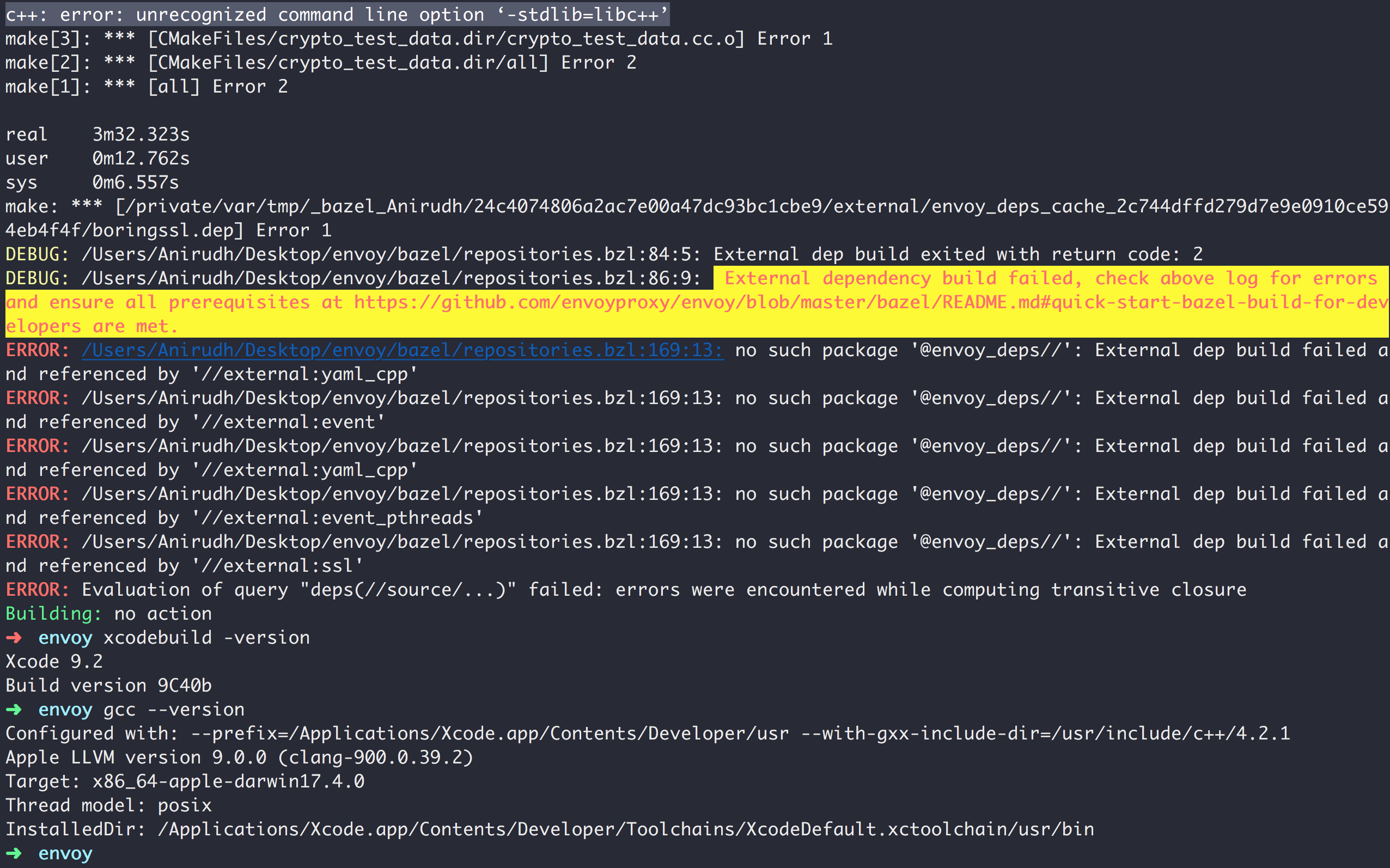
anirudhmurali
on 21 Feb 2018
Hmm, the BoringSSL build's cmakefile is invoking /usr/local/bin/c++. I've never seen that on a Mac before -- is it from Homebrew? I'm also confused about where -stdlib=libc++ could be coming from, it's not set by Bazel or Envoy and grep didn't have any hits in the BoringSSL code.
I feel like there must be a disconnect between the CC and CXX environment variables, vs your path. I'll try installing gcc 7.3 locally and attempt to reproduce the issue.
jmillikin-stripe
on 21 Feb 2018
Found the issue. BoringSSL's cmake config hardcodes -stdlib=libc++ when building on Apple platforms. This will be fixed for Envoy when we stop using cmake to build BoringSSL (https://github.com/envoyproxy/envoy/pull/2652).
Note that there are other problems that will prevent you from building Envoy on MacOS with a self-installed compiler. Libevent depends on some MacOS system headers, which use macros not supported by stock GCC. I didn't try using Homebrew-managed Clang, but expect similar issues will be hit there.
My recommendation is to stick with the compiler installed by XCode. It may be possible to make libevent build on a MacOS platform with non-standard compilers, but you're going to spend a lot of time digging around in low-level compiler flags to make it happen.
jmillikin-stripe
on 21 Feb 2018
Great. I'm okay with using the default compiler which comes with XCode. I've run brew uninstall gcc, deleted the gcc at usr/local/bin/gcc which was installed manually.
Now running gcc --version shows me Apple LLVM version 9.0.0 (clang-900.0.39.2).
I hope this is the default compiler that comes by XCode? I still get the error though. Isn't my uninstallation complete?
anirudhmurali
on 21 Feb 2018
You may need to bazel clean --expunge if you've changed your C/C++ toolchain to something else. You should also verify that g++ --version matches, since BoringSSL and Envoy use g++. And finally, since the log above shows /usr/local/bin/c++ being invoked, consider moving or removing whatever that is.
jmillikin-stripe
on 21 Feb 2018
Removed, cleaned, and tried. Now this,
ld: symbol(s) not found for architecture x86_64. Am I missing any particular XCode dependency?

anirudhmurali
on 21 Feb 2018
Maybe you've got ld from homebrew and it's not compatible with XCode's clang?
At this point, I recommend trying to clean anything Homebrew-related out of your path. There's no way you can get a working build when half of your toolchain is Apple's heavily-modified Clang, and half is stock GNU.
You might also try following https://docs.bazel.build/versions/master/tutorial/cpp.html to see if you can get a working C++ "hello world" compiled, then proceed from there to Envoy.
jmillikin-stripe
on 21 Feb 2018
I followed the bazel hello world tutorial, all 3 exercises run smoothly.
I uninstalled entire Homebrew related packages, and installed just these coreutils, wget, cmake, libtool, automake alone, and ran it, still the same ld error.
anirudhmurali
on 22 Feb 2018
Were you ever able to get this working?
zuercher
on 12 Mar 2018
Sadly no, the same error still persists. Using Ubuntu in VirtualBox to play with Envoy as of now.
anirudhmurali
on 12 Mar 2018
Closing for now. Please hop into Slack #osx-dev room for futher help.
 mattklein123
on 13 Mar 2018
mattklein123
on 13 Mar 2018
Related issues
 roelfdutoit
·
3Comments
roelfdutoit
·
3Comments
 sabiurr
·
3Comments
sabiurr
·
3Comments
 phlax
·
3Comments
phlax
·
3Comments
 justConfused
·
3Comments
justConfused
·
3Comments
 jeremybaumont
·
3Comments
jeremybaumont
·
3Comments