Entitas-csharp: Feature request: both dll and src version in releases
Tried copy/paste sources from this repository as alternative to dll release, things didn't work.
Can there be separate zip with source version?
 c0ffeeartc
All 14 comments
Hi, I made the switch to deploy Entitas as dlls as of Entitas 0.41.0
Deploying Entitas as Dlls instead of source code which has multiple benefits, e.g.
- Entitas Unity menu appears even if code doesn't compile
- Enables 3rd party Addons and Plugins
- Enables command line code generator
It's been a while, so I can't recall what is not working with the sources, but I think with some minor changes I should work (I might be wrong, this change is almost half a year ago :))
Is there a specific reason you want to use the sources?
If you want to make changes, I recommend forking and building Entitas locally. This enables you to run the tests too. See CONTRIBUTING.md
 sschmid
on 4 Sep 2017
sschmid
on 4 Sep 2017
-- UPDATE : initial conclusions about DLL turned out to be wrong, please read all the subsequent comments ---
I've found a huge downside of DLL version.
As all game code goes through the DLL which is not debuggable by default, Unity fails to connect its profiler correctly on a target device. All code of systems get's "squished" into one line of general "Update" loop with overall time. There's no way to expand it and see what's going on inside, thus making profiling on a target device very hard.
Editor profiling is not representative because of the Debug Systems that generate some overhead (additional allocations and execution time)
Target device profiling is hard (almost impossible) because DLLs are not expandable.
I see two ways around it.
First - provide an additional debug version of DLLs along with the release ones. I still need to check whether it will work for the profiler or not
Second - use a source version.
I've checked my considerations with a few people and each of them had the same result.
https://imgur.com/wu3nPFt.png
 KumoKairo
on 29 Sep 2017
KumoKairo
on 29 Sep 2017
You can disable the visual debugging in the preferences window. That should help with profiling in the editor, shouldn't it?
 kdrzymala
on 29 Sep 2017
kdrzymala
on 29 Sep 2017
Not really, it still has side effects. And anyways, profiling in the Editor is just a first step. Devices have different runtimes and different behavior, not to mention that devices are usually more picky to some code that may run good in the Editor and not so good on the target device. Rule of thumb is to actually profile on a target device.
KumoKairo
on 29 Sep 2017
What side effects? I'm doing it this way and didn't notice overhead.
I hear you, though I tend to profile in the editor since deep profile isn't working on devices reliably anyway.
kdrzymala
on 29 Sep 2017
I'll get back to this issue once I have the numbers. Stay tuned
KumoKairo
on 29 Sep 2017
I did some digging with visual debugging turned off and it looks like there's really no additional overhead in the editor. However, I can't really check it on a device to compare non-visual debugging version in the editor and actual release version on a device.
@kdrzymala it really seems that the editor profiling with visual debuggin turned off is the only option for now, thanks for the feedback.
I'll need to try a few more things:
- Build a debuggable version of Entitas
.dllfiles (not visual debugging, just script debugging so it may display in the Unity profiler) - Get back to making a working copy of sourced Entitas version
KumoKairo
on 1 Oct 2017
I can imagine providing an additional debug version of DLLs along with the release ones . Would that fix it?
sschmid
on 5 Oct 2017
I'll try it in the following week and write here on the results
KumoKairo
on 5 Oct 2017
Ok, rebuilding the core Entitas project as a debuggable version doesn't change anything, it's still doesn't show a full callstack in the profiler.
I'll try rebuilding the whole set of Entitas projects and see if it makes a difference.
KumoKairo
on 5 Oct 2017
I've rebuilt the whole Entitas library as a Debug version but it doesn't change anything.
I guess the only way left is to use SRC version. I'll try to "sourcify" the core Entitas project first, the one that contains all the systems and common execution logic.
KumoKairo
on 6 Oct 2017
Ok, I've made a working source version of Entitas.
As it turns out, Entitas doesn't have a lot of dependency on .dlls. It just needs to load Data Providers Plugins, Code and Data generators from assemblies. It also checks the current Entitas version by the Entitas .dll.
I've made it look for certain interfaces in the currently loaded assembly instead and provided a fake version for it (it just needs it to suggest updating)
But you know what - sourced version of Entitas doesn't really help a lot either. Profiler shows the same picture as it is with the .dll version of Entitas. So the root of the problem is not really in it's "dllness", it's somewhere else. I've double checked that the built project doesn't contain separate .dlls and it's all in one usual Assembly-CSharp.dll:
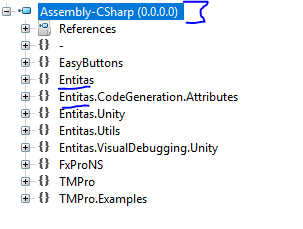
I'll continue digging further
--- UPDATE
The root of the problem lies in nature of the Unity profiler itself. Editor has support for deep profiling, and this is where we get the most full callstack down to the actual thing that slows down the game. Deep profiling is not available on target devices. It allows you to check the "deep profile" button in the profiler window but it really doesn't do anything on a device.
Right now I see a solution that's similar to current DebugSystems, but uses Profiler.BeginSample and Profiler.EndSample instead of the Stopwatch
I'll try implementing it and will write back here with the results.
KumoKairo
on 6 Oct 2017
I've implemented a simple extension of Systems class, DevelopmentSystems, which use Profiler.BeginSample(<system name>) and Profiler.EndSample() on builds with a "development build" tick. The results are promising-profiler shows the whole deep callstack down to almost every call, even if running it on a target device. It works both with source version of Entitas and with a built .dll version so I guess we don't really need a sourced version after all. But just in case, I have a working solution for a sourced version too.
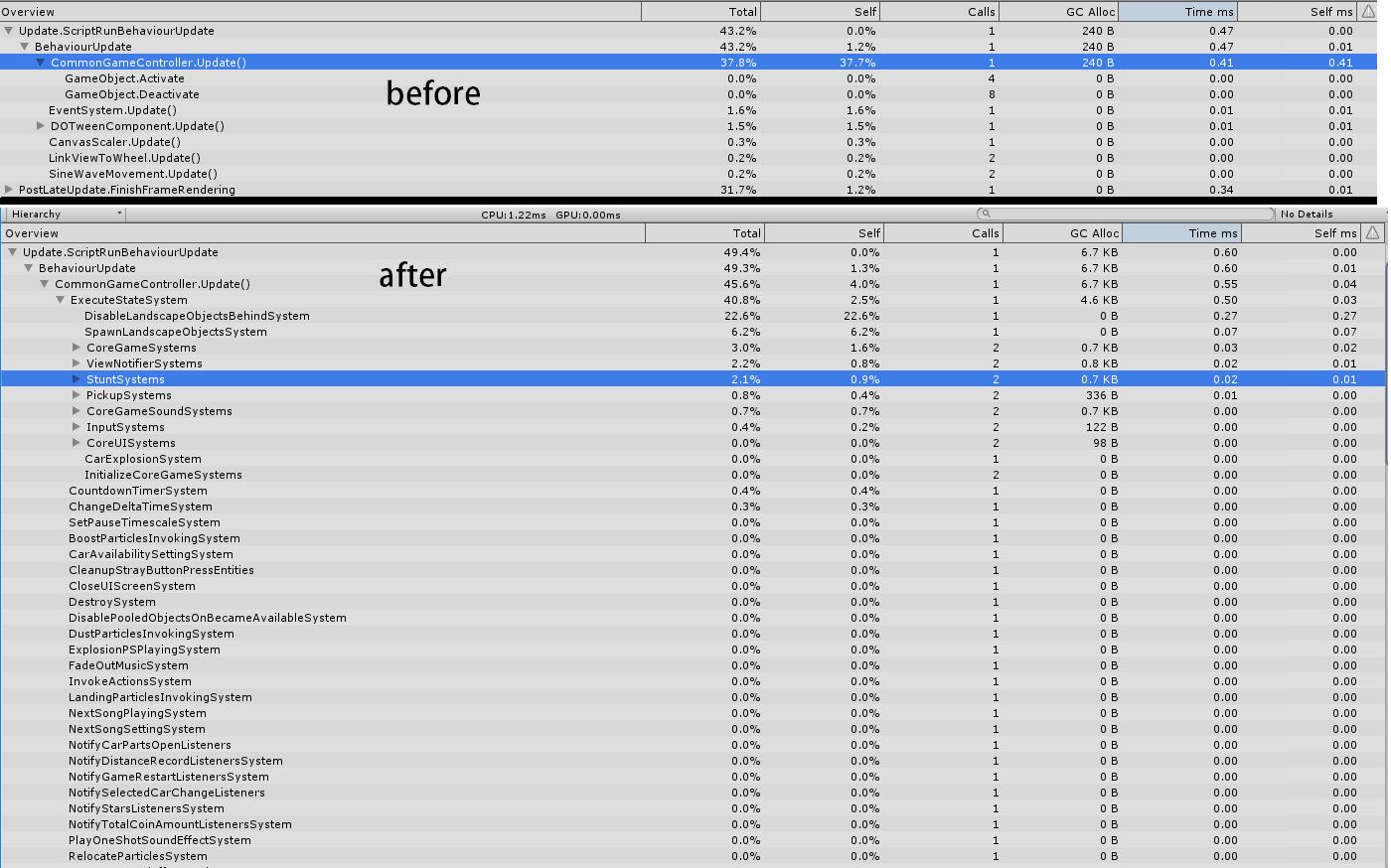
KumoKairo
on 7 Oct 2017
@KumoKairo It's really nice and must have feature. Kindly submit a PR.
 optimisez
on 8 Nov 2017
optimisez
on 8 Nov 2017
Related issues
 FNGgames
·
5Comments
sschmid
·
4Comments
FNGgames
·
5Comments
sschmid
·
4Comments
 yuchting
·
4Comments
yuchting
·
4Comments
 zhuchun
·
4Comments
zhuchun
·
4Comments
 FiveP
·
3Comments
FiveP
·
3Comments
Most helpful comment
I've implemented a simple extension of

Systemsclass,DevelopmentSystems, which useProfiler.BeginSample(<system name>)andProfiler.EndSample()on builds with a "development build" tick. The results are promising-profiler shows the whole deep callstack down to almost every call, even if running it on a target device. It works both with source version of Entitas and with a built .dll version so I guess we don't really need a sourced version after all. But just in case, I have a working solution for a sourced version too.