Enterprise: DatePicker: Incorrect validation message for invalid value scenario
Describe the bug
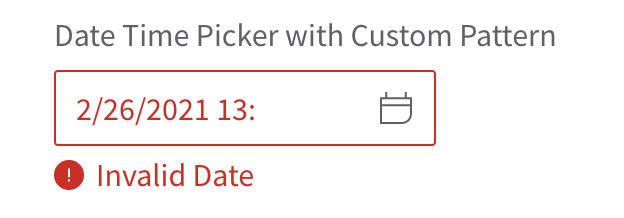
When using date picker with time, the validation message is not correct for invalid value scenario.
To Reproduce
Steps to reproduce the behavior:
- Go to https://design.infor.com/code/ids-enterprise/latest/demo/components/datepicker/example-timeformat?theme=uplift&variant=light
- The first input field, fill in a value like this 2/26/2021 13:
- Blur and observe the validation message appears and says "Invalid Date"
Expected behavior
The validation message should be Invalid Date Time instead of Invalid Date because I am using date picker with time
Version
- ids-enterprise: 4.37.0
Screenshots
Platform
- Infor Application/Team Name: ION
- Device: (if applicable) N.A.
- OS Version: MacOS Big Sur, Windows 10
- Browser Name: Chrome
- Browser Version: Version 88.0.4324.192 (Official Build) (x86_64)
Additional context
N.A.
 ahnpnl
All 6 comments
I dont think "Date Time" makes sense. A date can have time. Can we think of a better description all together? What about "Invalid Value" or "Invalid Date or Time"?
Technically this isnt wrong. Its an invalid date
 tmcconechy
on 26 Feb 2021
tmcconechy
on 26 Feb 2021
Let's go for "Invalid Date or Time", our QA accepts that :)
ahnpnl
on 26 Feb 2021
Ok we'll have to check there is a time and then show that message (or the previous). Seems minor but makes sense
tmcconechy
on 26 Feb 2021
@danielortiz1982 so what we decided on this is to change the message but only if the date format has time associated with it
http://localhost:4000/components/datepicker/example-timeformat.html
vs
http://localhost:4000/components/datepicker/example-index.html
When you top a bad date tab out of the field it should now say "Invalid Date or Time" if there is a time involved.
The validation code is here for the dates https://github.com/infor-design/enterprise/blob/master/src/components/validation/validation.js#L109
To add a new translation string you just add an entry into th en-US locale file https://github.com/infor-design/enterprise/blob/master/src/components/locale/cultures/en-US.js#L64
tmcconechy
on 11 Mar 2021
Thanks for this update @tmcconechy
 danielortiz1982
on 11 Mar 2021
danielortiz1982
on 11 Mar 2021
the issue is now resolved. v4.39.0-dev. thank you
https://master-enterprise.demo.design.infor.com/components/datepicker/example-index.html
https://master-enterprise.demo.design.infor.com/components/datepicker/example-timeformat.html
 jbrcna
on 17 Mar 2021
jbrcna
on 17 Mar 2021
Related issues
jbrcna
·
3Comments
jbrcna
·
3Comments
 CindyMercadoReyes
·
3Comments
jbrcna
·
3Comments
CindyMercadoReyes
·
3Comments
jbrcna
·
3Comments
 swetteinfor
·
3Comments
swetteinfor
·
3Comments