Enterprise: List Builder: How to implement a custom add and edit events
I'm using the List Builder control and I want to change the add and edit events so that instead of the user entering the text manually, they are presented with a dialog that has a drop down list to select a pre-defined value.
I can see there are before and after events for add and edit, but I don't know how to stop the current "inline editor" behaviour and how to insert a new element into the list (with an ID, value and description).
Do you have any more advanced examples of the List Builder that you could share so that I can see how this may be achieved without resorting to bespoke code?
 sanx72
All 8 comments
All the examples we have are here https://master-enterprise.demo.design.infor.com/components/listbuilder maybe you can customize the toolbar similar to https://master-enterprise.demo.design.infor.com/components/listbuilder/test-modal.html adding your own add button?
If you dont add the action in the custom toolbar it wont wire in the add / inline edit functionality https://github.com/infor-design/enterprise/blob/master/app/views/components/listbuilder/test-modal.html#L18
Then add the item like this example https://master-enterprise.demo.design.infor.com/components/listbuilder/test-update-dataset.html by updating the dataset.
Seems like that might do it? Any other ideas @deep7102
 tmcconechy
on 27 May 2020
tmcconechy
on 27 May 2020
Thanks for the quick reply. So if I remove the data-action then it will render the icon, but not apply the list builder's own add/edit function and I can just put my own event onto each button.
The updateDataset method should help, but is there a method to extract the whole dataset from the UI in its current order (i.e. with user changes in the same order as the UI) which I can then manipulate in my code? Need to allow the user to change the order then add or edit a value and when I put the dataset back the user's current order should not get reset.
Also, other than tracking using the "selected" event, is there a method to get the selected row (or even better data for selected row)?
Also, I was trying to do dynamic enable/disable of the edit button using the selected event. The button is being enabled/disabled but when it is disabled (has the disabled HTML attribute), the icon doesn't change as it does in say the Data Grid toolbar. Is there some other method I can call to re-render the toolbar?
sanx72
on 27 May 2020
Yes, that will detach the functionality.
The api.settings.dataset should also be updated and in sync so you can get the current data with that
The settings.dataset also has a selected property which i think should be in sync... Or use the event selected.
But for disabled i just added the html disabled attribute and this seemed ok?
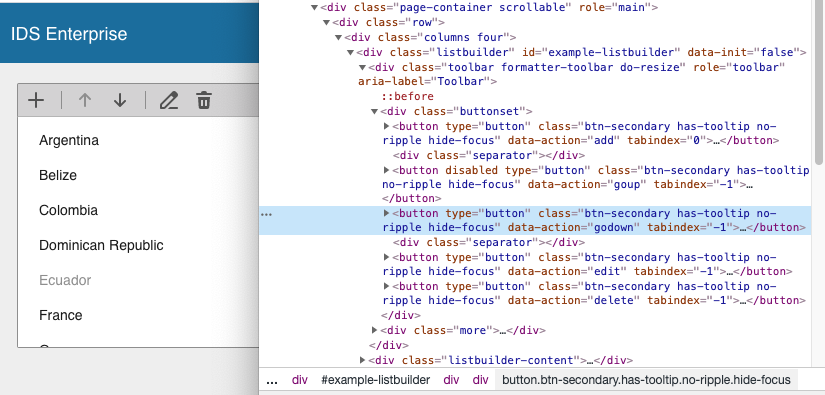
tmcconechy
on 27 May 2020
Yes, @sanx72 as @tmcconechy describe looks the best way to go for and you can try the stuff you looking as:
// listbuilder api
const listbuilderApi = $('#example-listbuilder').data('listbuilder');

// extract the whole dataset from the UI in its current order
const currentDataset = listbuilderApi.dataset;

// get the selected row
const selectedItem = listbuilderApi.listApi.selectedItems[0];

// edit button disabled/enabled
const editButton = listbuilderApi.element.find('[data-action="edit"]');
editButton.disable();
editButton.enable();
 deep7102
on 27 May 2020
deep7102
on 27 May 2020
Thanks for the dataset info and examples @tmcconechy and @deep7102 I can see how I can add my own fixed data options now, much appreciated!
Still got a problem with the enabled/disabled state. We are at IDS 4.26.0 (in case there has been a recent fix in this area). The listbuilder is on a modal, just in case that is the issue...
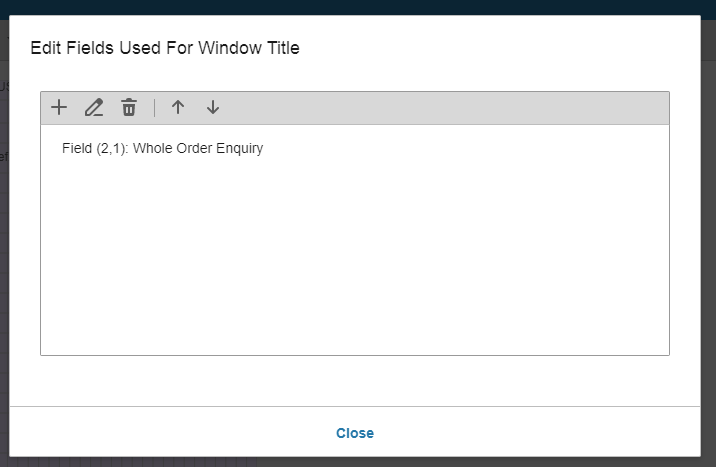
In the above example, all the buttons look and act enabled (i.e. mouse over changes the icon state to a darker colour), but even if I put the disabled tag in the HTML, it still doesn't show as disabled...
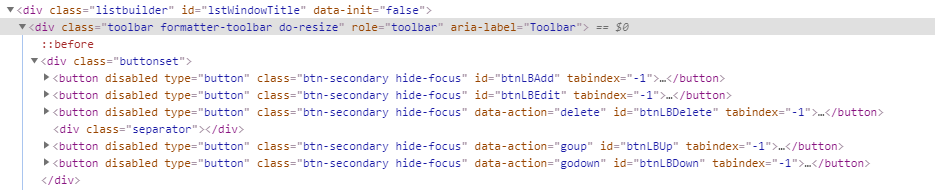
The button itself is disabled, whether by HTML attribute or the API, it just doesn't show as such.
This isn't a major issue, so if it is working for you, I'll leave the code as-is and when we upgrade to a later IDS version I'll test it again.
sanx72
on 28 May 2020
Yes, i can see that the disabled is broken in 4.6.0 and was later fixed as confirmed by @deep7102 :)
You can try it here (latest 4.28.1) https://latest-enterprise.demo.design.infor.com/components/listbuilder/example-index.html by changing in the dom and it is working.
But one thing you might check. We made a change so icons would use color not css fill. So maybe your css and svg is out of sync? You can try to redownload https://github.com/infor-design/enterprise/releases again or use npm and ensure the svh html and css file are the same from that version. Its possible... But this is definitely working now and 4.6 is rather old.
Will close this support issue for now but feel free to comment
tmcconechy
on 28 May 2020
@tmcconechy we are at 4.26.0, not 4.6, so not too far out of date I hope! :)
We replace the entire IDS enterprise control file set each time we upgrade so should have any icon changes (we dynamically include the SVG icons used in the page from the html pages in the IDS svg folder).
I'll get 4.28.1 and check it is resolved.
sanx72
on 28 May 2020
Wow yes your right https://4260-enterprise.demo.design.infor.com/components/listbuilder/example-index.html i cant set disabled and https://4281-enterprise.demo.design.infor.com/components/listbuilder/example-index.html I can.
So at least its a verified fixed bug although i dont recall this issue.
tmcconechy
on 28 May 2020
Related issues
 EdwardCoyle
·
4Comments
EdwardCoyle
·
4Comments
 awbuboltz
·
3Comments
awbuboltz
·
3Comments
 jbrcna
·
3Comments
jbrcna
·
3Comments
sanx72
·
3Comments
jbrcna
·
3Comments
jbrcna
·
3Comments
sanx72
·
3Comments