Enterprise: Tree: The blue selection for previous node should go away on clicking another node (Chrome, Safari on Mac)
Describe the bug
https://design.infor.com/code/ids-enterprise/latest/demo/components/tree/example-ajax.html
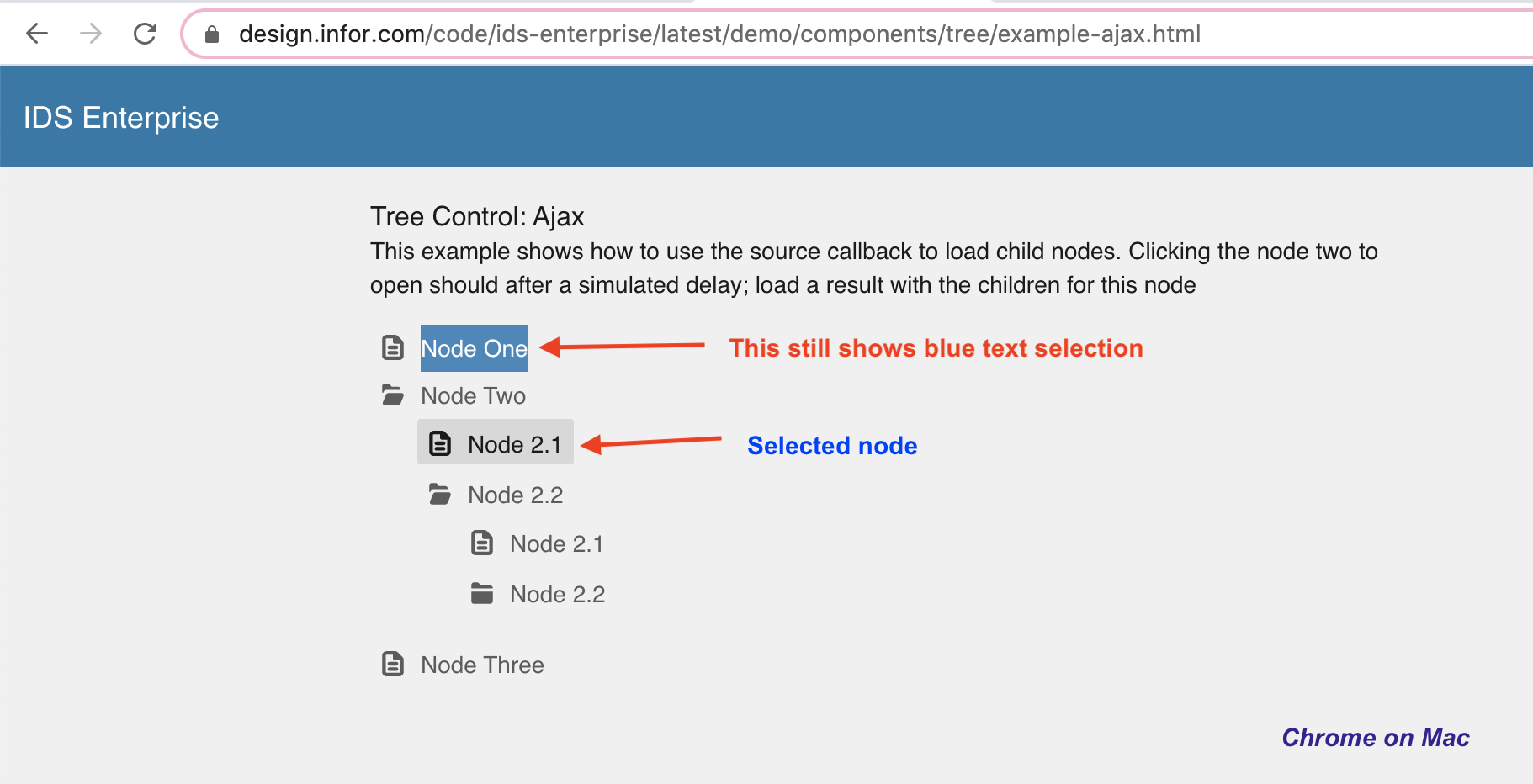
To Reproduce
Steps to reproduce the behaviour:
- Go to any tree with more than one nodes. e.g. https://design.infor.com/code/ids-enterprise/latest/demo/components/tree/example-ajax.html
- Right click on a node on Mac OS. The node text will have blue selection colour.
- Now without clicking anywhere else, click on another node.
- The blue selection for previous node stays.
Expected behaviour
The blue selection for previous node should go away.
Version
- ids-enterprise used on for https://design.infor.com/code/ids-enterprise/latest/demo/components/tree/example-ajax.html
Platform
- Device: MacBook Pro
- OS Version: MacOS Mojave 10.14.6
- Browser Name: Chrome Version 81.0.4044.113 (Official Build) (64-bit), Safari 13.1 (Note: Firefox doesn't have this issue)
Additional context
Infor PIM cc @karinthulin
 hemantg05
All 15 comments
Not sure if its a good idea to change this or not. The blue text is what the browser does anytime your right click text. It allows you to copy the text. So this is just the text being selected.
We probably dont want to take that ability away you will no longer be able to copy the text of tree nodes.
For now for discussion but i think its not a bug.
 tmcconechy
on 23 Apr 2020
tmcconechy
on 23 Apr 2020
It's fine to show the blue text on right click. But it should go away when user clicks on another node.
Also the ability to copy the text of tree nodes is missing on Firefox on Mac. It works only on Chrome and Safari.
hemantg05
on 23 Apr 2020
Hmm yeah i guess your right it does go away clicking normal browser text. Ok lets go with that.
And your right firefox decided to do it differently right clicking a piece of text does not select it unless you actively select it.
So will fix the first part (reset the text selection on clicking a node) not the second (firefox).
tmcconechy
on 23 Apr 2020
Sure.
hemantg05
on 23 Apr 2020
@tmcconechy We noticed that this behavior seems to differ a bit depending on the OS as well. On windows a rightclick will do this blue text selection. However, the rightclick seems to have unexpected effects on the focus state.
What i observed:
When I rightclick to open the context menu no selection or focus is present.
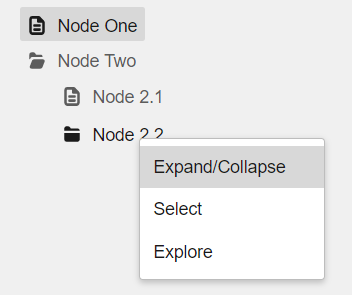
But if I then left click another node it properly selects the new node but also puts focus state on the node i previously opened the context menu for.
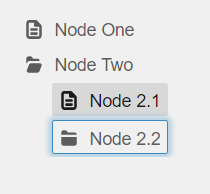
Platform
OS Version: Windows 10 Enterprise 1809
Browser: Google Chrome Version 81.0.4044.113 (Official Build) (64-bit)
CC: @hemantg05
 Carlfjord
on 23 Apr 2020
Carlfjord
on 23 Apr 2020
Hmm yeah i guess the problem is that right click doesnt change focus. You think maybe?
- if there is a context menu
- right click sets focus to that node?
Not sure if that would be a risky change or not. Its also pretty hard to level this across OS and browsers unless you do something specific like that. if you just leave it to the browser it can vary
tmcconechy
on 23 Apr 2020
Yes, if right clicking sets focus to highlight the item you are about to perform actions on that would be a better experience.
But I think the other part where the focus will be set on another item upon selection due to a previous context menu is a bigger issue. (This image from previous post)
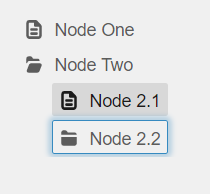
This leaves the user with one selected node and one focused node which looks a bit strange.
So if the focus state where to reset upon node selection that would not be an issue.
Yea that is pretty much why we wanted to bring this to your attention, we were discussing local changes to try and address states but it is as you say, not sure if it would be risky changes or not due to the amount of different scenarios and browser behavior. My take is that messing with focus states usually should be avoided when possible as it is typically handled by browsers and will align with the user experience for that user on other sites. That being said, multiple differently highlighted nodes simultaneously looks unintended and a tad strange.
Carlfjord
on 28 Apr 2020
OK lets go with that. Some browsers do it and some dont. So i think leveling that would address some inconsistency as well.
tmcconechy
on 28 Apr 2020
QA Passed. This issue is now resolved.
Verified in
https://master-enterprise.demo.design.infor.com/components/datagrid/test-row-reorder-paging.html?theme=uplift&variant=light&colors=0066D4
 janahintal
on 9 Jun 2020
janahintal
on 9 Jun 2020
@janahintal, isn't the link you mentioned for datagrid and the bug was raised for tree? So shouldn't it be verified in tree component?
hemantg05
on 9 Jun 2020
Good catch @hemantg05 one PR for #3749 was linked by mistake. Can you QA this issue according to the steps on https://github.com/infor-design/enterprise/pull/3998 please @janahintal ?
tmcconechy
on 9 Jun 2020
Hi @tmcconechy , my bad I paste the wrong link.
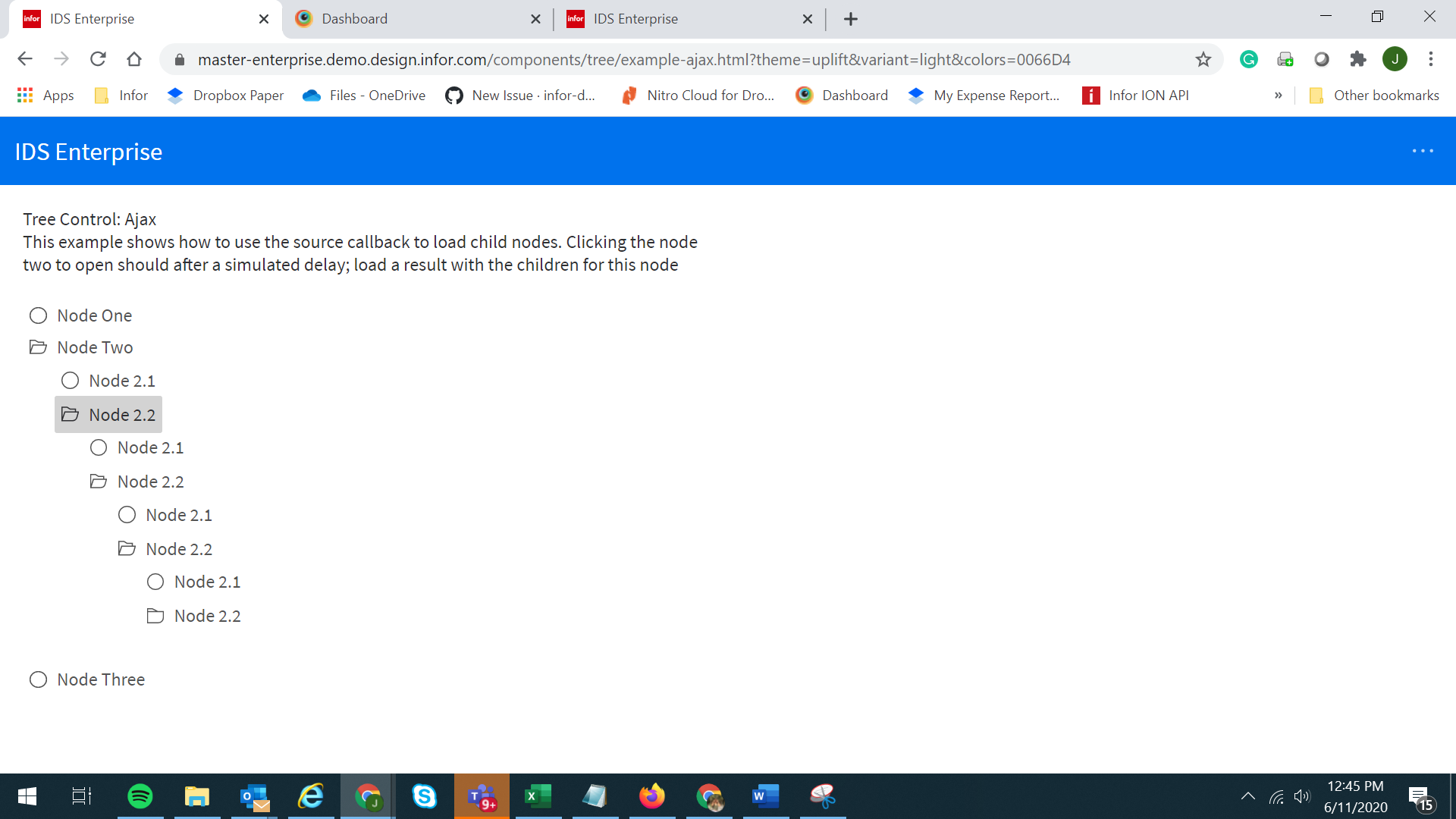
However, I just retested the issue now and the blue focus is not appearing already. And the context menu is not working when I right-clicked the node.
The PR says below:
- Right click on a node
- Node text should have blue selection
- If context menu opened click somewhere else, or press esc key to close context menu
- Node text should still have blue selection
- Now without clicking anywhere else, click on another node
- The blue selection for previous node should go away
Other than the observation above, the nodes were working well on my end.
https://master-enterprise.demo.design.infor.com/components/tree/example-ajax.html?theme=uplift&variant=light&colors=0066D4
janahintal
on 11 Jun 2020
@deep7102 is that clear to you? To me everything seems ok here on this fix?
tmcconechy
on 11 Jun 2020
Yes, I retested looks all working fine.
 deep7102
on 11 Jun 2020
deep7102
on 11 Jun 2020
yeah i tihnk this is done. Its minor anyways
tmcconechy
on 11 Jun 2020
Related issues
 CindyMercadoReyes
·
3Comments
CindyMercadoReyes
·
3Comments
 sanx72
·
3Comments
sanx72
·
3Comments
 fitzorama
·
3Comments
fitzorama
·
3Comments
 SasiPalanati
·
3Comments
SasiPalanati
·
3Comments
 dubde
·
4Comments
dubde
·
4Comments