Enterprise: Colorpicker: Some issues with selection in iOS
Describe the bug
There are 2 things we thought of when using the color picker in phones, first if you miss the color and click between the colors in iOS the color picker is closed without selecting any value. This does not seem to happen in Android where it seems to be easier to touch the color.
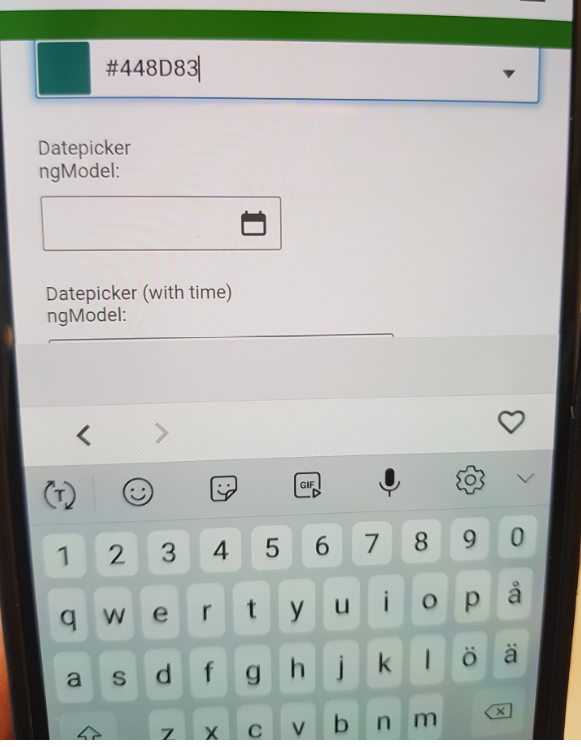
Second issue actually happens in Android as well, is there a way to stop the color picker from opening the keyboard after selecting the color. I do not think that it's necessary to leave the cursor in the color picker after selecting the color. It is quite annoying on the phone/tablet when the keyboard shows up when I do not intend to use it and after a color has been selected it is not probable that I want to write in the color picker field.
To Reproduce
Steps to reproduce the behavior:
- Go to 'https://design.infor.com/code/ids-enterprise/latest/demo/components/colorpicker/example-index.html' in an Ipad/Iphone
- Click on the color picker
- Click right next to a color
- Notice that the color picker is closed without selecting any value (or keeping the old one), also notice in this case the keyboard is not opened, which would be nice in step 6
- Click the color picker again
- Select a color
- Notice that the cursor is within the color picker and the Keyboard is opened
Expected behavior
In step 4 I think either the closest color should be selected or the color picker should not close when you missed the colors.
//Removed - In step 7 the color picker input should be updated as before but the keyboard should not pop up so I suppose the focus needs to behave differently.
Version
- ids-enterprise: v 4.24
Screenshots
Platform
- Device: Ipad, (Samsung Galaxy S7 (Second issue)
- OS Version: IpadOS 13.3.1 / Android 8.0.0
- Browser Name: Chrome
- Browser Version: 79.0.3945.73 / 79.0.3945.136
Additional context
-
 SofiK
SofiK
All 7 comments
Im not 100% sure we can do anything about this. The keyboard is there in case you want to type.
Possibly we can see if it can be hidden "automatically" when you select? Not sure if thats possible or not.
Otherwise you could just use the https://master-enterprise.demo.design.infor.com/components/colorpicker/test-states.html "Normal (Non-Editable)" colorpicker for this use case?
 tmcconechy
on 28 Feb 2020
tmcconechy
on 28 Feb 2020
That's a good idea to use the non-editable variant. I think I will bring that back to the team. Thank you!
SofiK
on 28 Feb 2020
Hi @tmcconechy do you think you will do something regarding the first part of the issue where it closes when you click in between colors? My suggestion is that either the colorpicker should not close if you miss or the color that currently has focus/is closest should be applied.
SofiK
on 19 Aug 2020
I'd think that can probably be addressed. I dont think the keyboard is though. But maybe we can see if we can make an incorrect click not close it?
tmcconechy
on 19 Aug 2020
Great, Thanks!
Please ignore the keyboard issue, that part seems to be working better now :)
SofiK
on 19 Aug 2020
QA Passed
will retest once beta is deployed.
v4.33.0-dev
https://master-enterprise.demo.design.infor.com/components/colorpicker/example-index.html
 jbrcna
on 28 Sep 2020
jbrcna
on 28 Sep 2020
Test passed. verified in v4.33.0-beta1
https://4330-beta1-enterprise.demo.design.infor.com/components/colorpicker/example-index.html
jbrcna
on 29 Sep 2020
Related issues
jbrcna
·
3Comments
 sanx72
·
3Comments
sanx72
·
3Comments
 CindyMercadoReyes
·
3Comments
CindyMercadoReyes
·
3Comments
CindyMercadoReyes
·
3Comments
CindyMercadoReyes
·
3Comments
 guoliang
·
3Comments
guoliang
·
3Comments