Enterprise: Module Tabs: No selected/opened tab indicator after changing color
Describe the bug
Pre-condition:
Module tabs should be open.
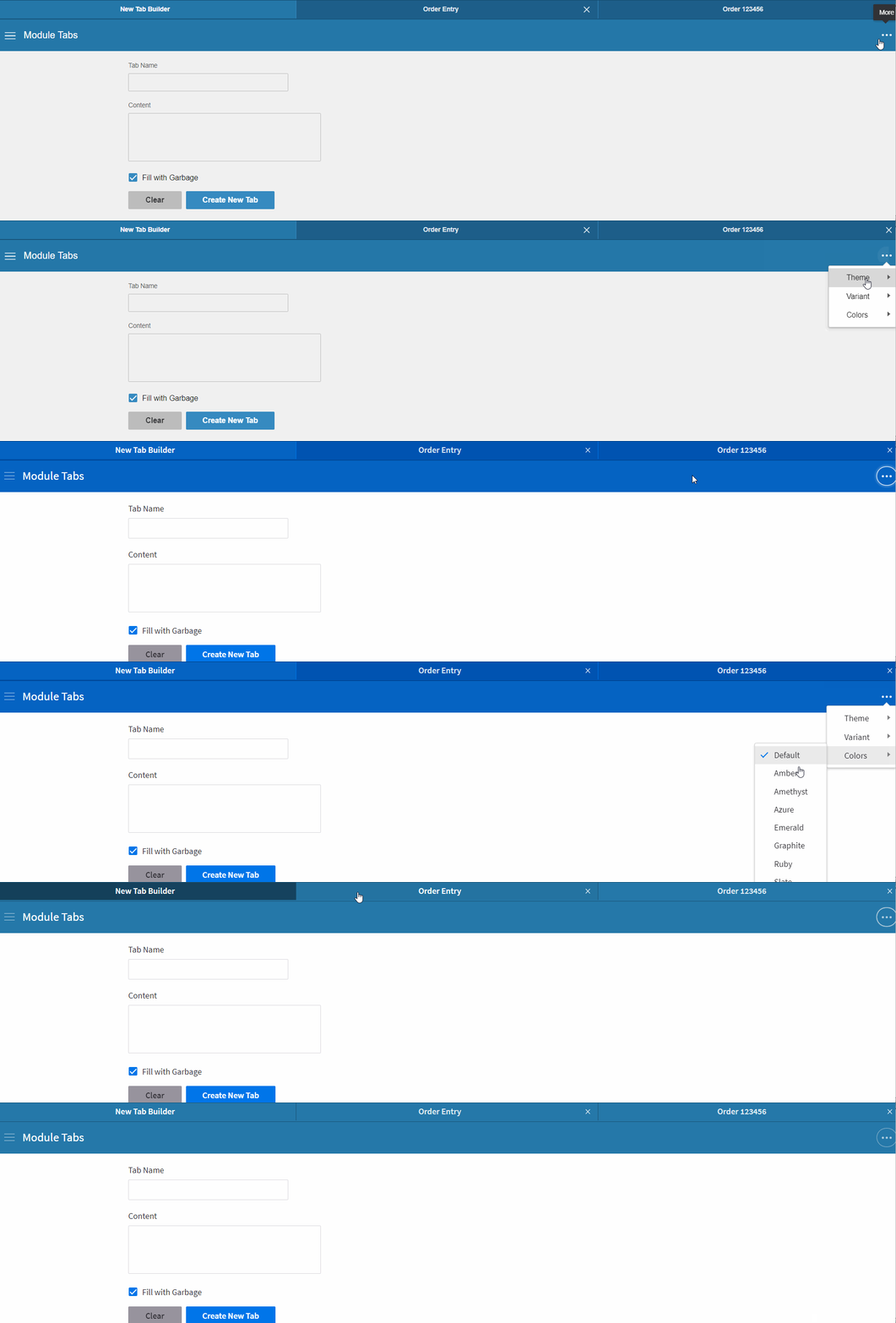
After changing theme to uplift and then a color, there is no obvious indicator on which of the multiple tabs is selected/opened.
To Reproduce
Steps to reproduce the behavior:
- Open http://master-enterprise.demo.design.infor.com/patterns/module-tabs.html?colors=db7726&theme=soho&variant=light#order-123456
- Change the theme to uplift
- select a color
- notice all tabs are the same color (and notice the line below the Tab) is not correctly styled
Or simply go to http://master-enterprise.demo.design.infor.com/patterns/module-tabs.html?colors=db7726&theme=soho&variant=light#order-123456
Expected behavior
After changing the theme, there should be an indicator in the color of the tabs to identify which is selected/open at the moment.
Version
- ids-enterprise: 4.20.1
Screenshots
See attached gif file for reference
Platform
- OS Version: Windows 10
- Browser Name: chrome
- Browser Version: 79.0.3945.88
 sheilamaejornadal
All 8 comments
Selected tabs are now indicated or have different color from the unselected tabs after changing Color. Tested in http://master-enterprise.demo.design.infor.com/patterns/module-tabs.html.
However, I found a related minor issue. It seems like after changing the Color, unselected tabs remember the previously selected color in the Color menu.
- Go to http://master-enterprise.demo.design.infor.com/patterns/module-tabs.html
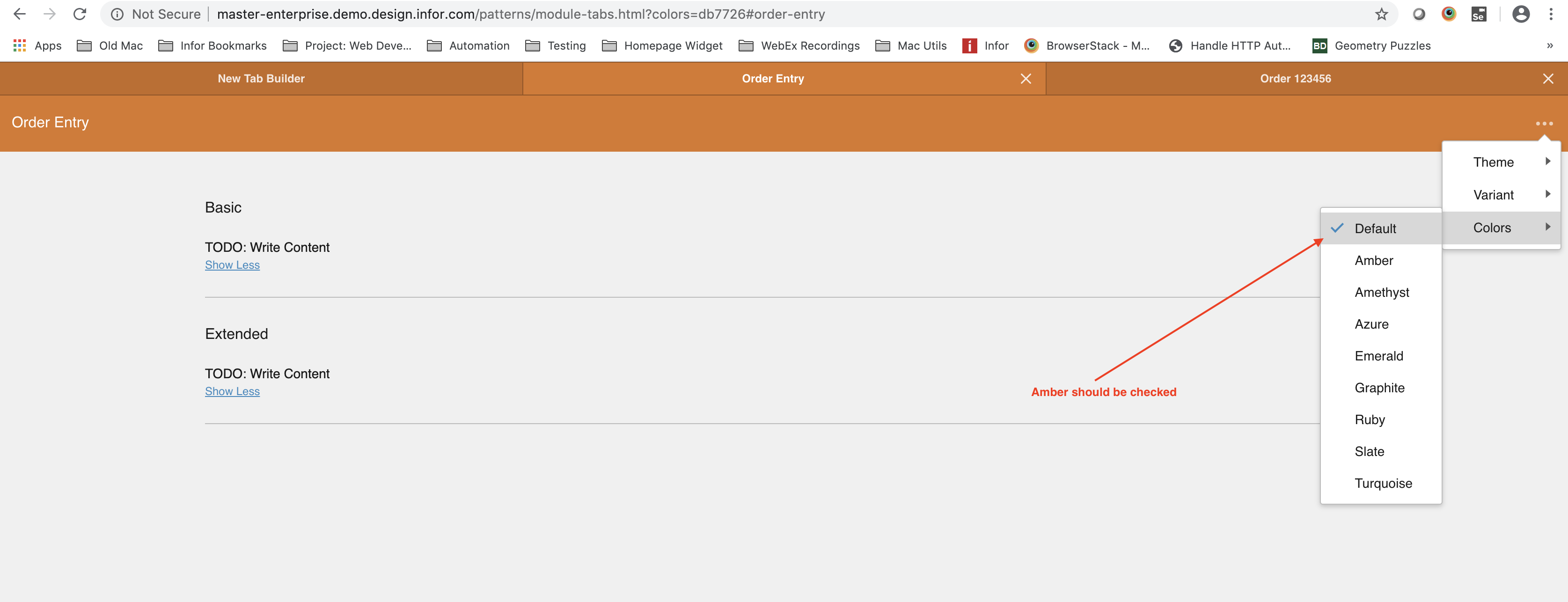
- Change the Color to Amber
- Click the unselected tab "Order Entry"
- Open the ... menu > Colors, See issue: Default is still checked instead of Amber
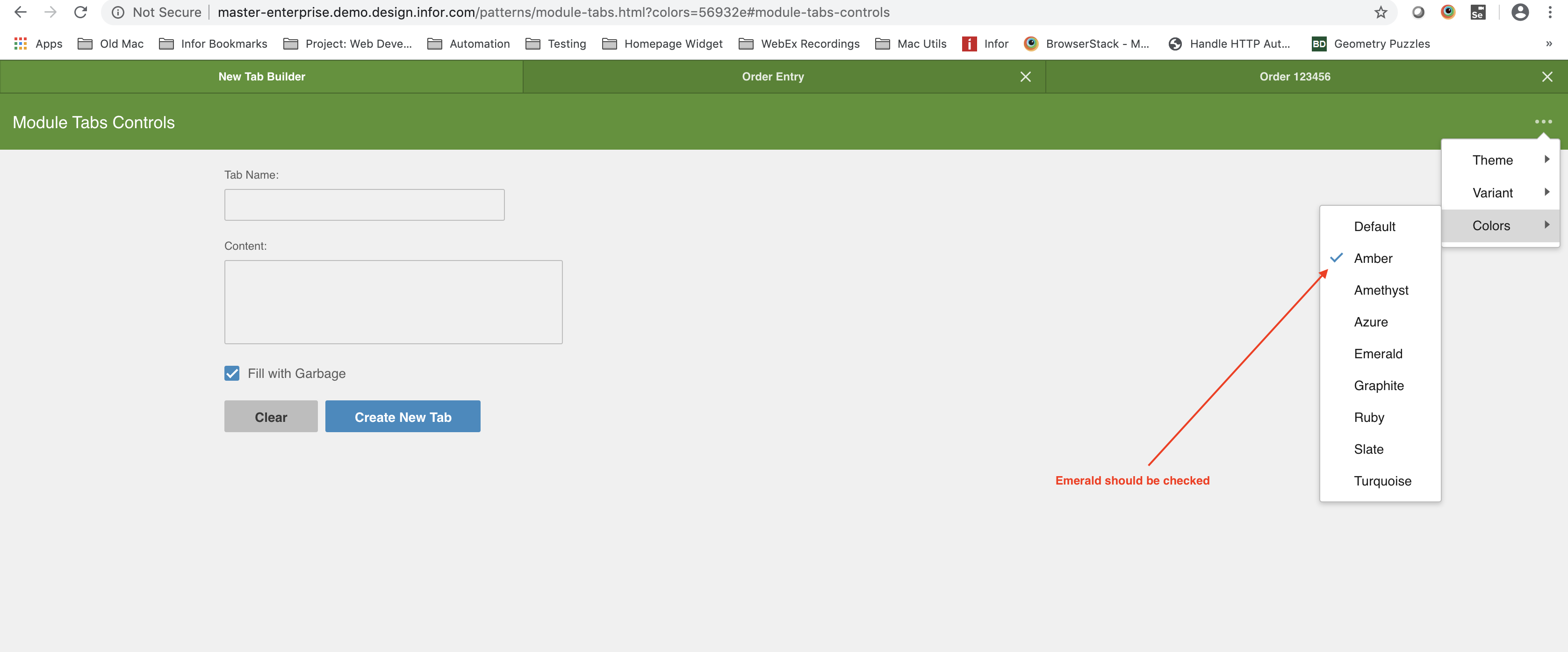
- Change the Color again to Emerald
- Click the unselected tab "New Tab Builder"
- Open the ... menu > Colors, See issue: Amber is still checked instead of Emerald
Same issue also happens when changing Theme or Variant.
 brianjuan
on 4 Feb 2020
brianjuan
on 4 Feb 2020
@ericangeles - see if its possible to correct that case by @brianjuan
Perhaps the code needs to change to check/change multiple menus - this is here in the demo app https://github.com/infor-design/enterprise/blob/master/app/views/includes/head.html#L152
 tmcconechy
on 4 Feb 2020
tmcconechy
on 4 Feb 2020
OK, with moving the switcher to be just on the first page if that helps?
tmcconechy
on 10 Feb 2020
I was looking at this too... the Theme Switcher itself is specific to the demoapp, and the demoapp doesn't really have any kind of serious state management built in at the moment. If we wanted to show the menu in multiple places, ideally we'd have a shared state object somewhere that would be aware of the theme/color/etc that this info could be pulled from.
Making the menu available on the first page is definitely easier for now.
 EdwardCoyle
on 10 Feb 2020
EdwardCoyle
on 10 Feb 2020
@tmcconechy @EdwardCoyle should we create a separate ticket for the switcher?
 ericangeles
on 10 Feb 2020
ericangeles
on 10 Feb 2020
I'd say lets not worry about it for now. Lets let it go. Its just this one case so far i've seen where it might make sense.
tmcconechy
on 10 Feb 2020
Alright then. Will create another PR with just a single switcher.
ericangeles
on 10 Feb 2020
This issue is now resolved. Moving this ticket to the Done column.
 CindyMercadoReyes
on 11 Feb 2020
CindyMercadoReyes
on 11 Feb 2020
Related issues
 jbrcna
·
3Comments
jbrcna
·
3Comments
jbrcna
·
3Comments
jbrcna
·
3Comments
 SofiK
·
3Comments
SofiK
·
3Comments
 janahintal
·
3Comments
janahintal
·
3Comments
 sanx72
·
3Comments
sanx72
·
3Comments