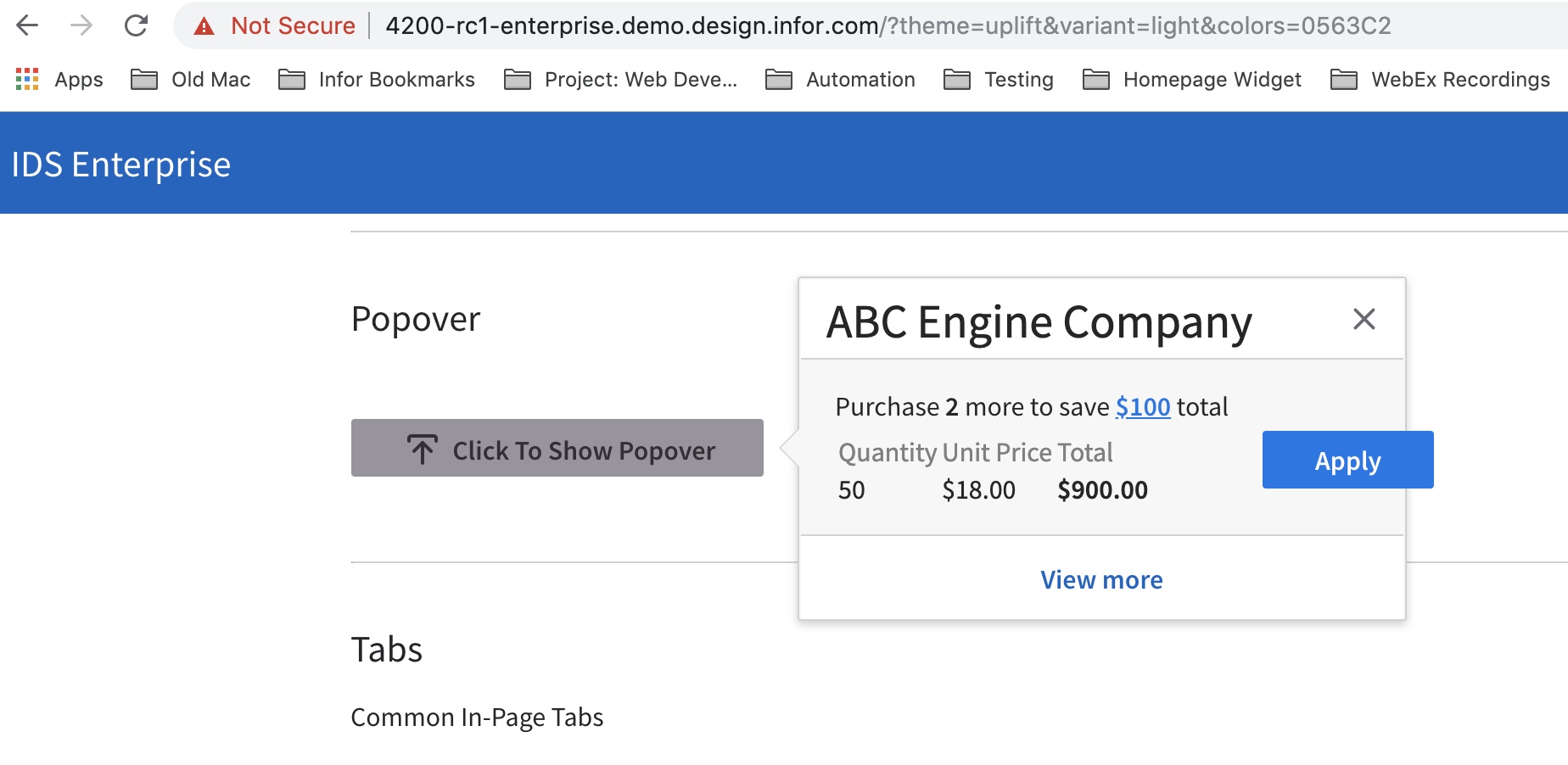
Enterprise: Sink Page Uplift: Button is outside the popover
Describe the bug
Sink Page Uplift: Button is outside the popover
To Reproduce
Steps to reproduce the behavior:
- Go to http://4200-rc1-enterprise.demo.design.infor.com/
- Change the theme to Uplift
- Scroll down then click the "Click to Show Popover" button
- See issue: button is outside the popover
Expected behavior
Button should be inside the popover.
Version
- ids-enterprise: v4.20.0
Screenshots
Platform
- All devices, OS, and browsers.
Additional context
No additional context.
 brianjuan
All 6 comments
I thought this was fixed. But this can still be reproduced on http://master-enterprise.demo.design.infor.com/components/popover/example-index.html?theme=uplift&variant=light&colors=0563C2 as well as the kitchen sink page.
This is only a demo app issue so not critical.
 tmcconechy
on 7 Aug 2019
tmcconechy
on 7 Aug 2019
Hi @tmcconechy, yeah it was fixed on this page https://master-enterprise.demo.design.infor.com/components/popover/example-alternate-positions.html as part of the other ticket.
brianjuan
on 7 Aug 2019
Ok, thanks @brianjuan I think we just need to fix the example-index as well. Not very important just a demo issue
tmcconechy
on 7 Aug 2019
Thanks @tmcconechy!
brianjuan
on 7 Aug 2019
Lets fix this because it has been raised at least 5 -6 times. I suggest removing the button from the popup and simplifying the example
tmcconechy
on 2 Jan 2020
This was fixed on another ticket
tmcconechy
on 18 Feb 2020
Related issues
 dubde
·
4Comments
dubde
·
4Comments
 sanx72
·
3Comments
brianjuan
·
3Comments
sanx72
·
3Comments
brianjuan
·
3Comments
 janahintal
·
3Comments
janahintal
·
3Comments
janahintal
·
3Comments
janahintal
·
3Comments