Enterprise: Applicationmenu: infor logo overlap on a larger menu
Describe the bug
If there is a menu longer that the screen the Infor icon will be placed within the menu instead of the bottom.
To Reproduce
Steps to reproduce the behavior:
- Go to 'http://master-enterprise.demo.design.infor.com/components/applicationmenu/example-index.html'
- Make the screen small so that there is an overflow
- Scroll up and down
- See error
- Or just go to https://design.infor.com/code/ids-enterprise/latest/demo/components/applicationmenu/test-filterable-many-items.html
Expected behavior
The icon should be placed at the bottom of the menu even if the menu is long or short.
Version
v4.18.0
Screenshots
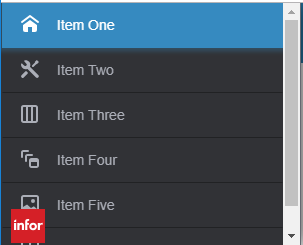
 marknolaninfor
All 6 comments
We should probably fix this for the original case but as a workaround we introduced a header and footer http://master-enterprise.demo.design.infor.com/components/applicationmenu/example-personalized-roles.html?colors=2578a9 so you could put it in the footer.
Also related is https://github.com/infor-design/enterprise/pull/2112 which changes the way the footer scrolls so it will be more like what your expecting here if you used it
 tmcconechy
on 8 May 2019
tmcconechy
on 8 May 2019
@tmcconechy
We have corrected our menu by using the footer
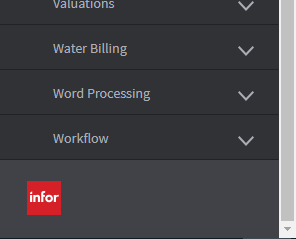
marknolaninfor
on 13 May 2019
Workaround approved 👍
Edit: workaround approved, but bug is a regression, so still substantial.
 clepore
on 14 May 2019
clepore
on 14 May 2019
I think we should reopen this as the example noted on https://teams.microsoft.com/l/message/19:[email protected]/1557850861892?groupId=4f50ef7d-e88d-4ccb-98ca-65f26e57fe35
Is more obvious then I first expected here
tmcconechy
on 14 May 2019
Cc @EdwardCoyle I’m wondering what broke this maybe an accordion change? Maybe we can track this down tomorrow.
To reproduce see https://design.infor.com/code/ids-enterprise/latest/demo/components/applicationmenu/test-filterable-many-items.html
And just scroll around...
tmcconechy
on 14 May 2019
This issue is now resolved.
 CindyMercadoReyes
on 21 May 2019
CindyMercadoReyes
on 21 May 2019
Related issues
 SasiPalanati
·
3Comments
SasiPalanati
·
3Comments
 jbrcna
·
3Comments
jbrcna
·
3Comments
 sanx72
·
3Comments
sanx72
·
3Comments
 dubde
·
4Comments
jbrcna
·
3Comments
dubde
·
4Comments
jbrcna
·
3Comments