Enterprise: Accessibility: Datagrid does not announce selected row
Describe the bug
The selected column in the datagrid is announced by AT as "row selected" instead of what user is selecting. It may be advisable to add the name of the item user is selecting to the select span name.
To Reproduce in Landmark
Steps to reproduce the behavior:
- Go to https://hcm-tampm01-prd.inforcloudsuite.com/hcm/EmployeeSelfService/form/Employee%287004,700417%29.LRCFullEmployeeProfile?csk.showusingxi=true&csk.JobBoard=INTERNAL&csk.HROrganization=7004&menu=LRCEmployeeMenu.MyProfile
- Click on any magnifying glass icon to launch a modal dialog
- While using AT, select a row within the datagrid
- AT does not announce the selected row.
How to Fix for EP
- This example has the same problem: http://master-enterprise.demo.design.infor.com/components/datagrid/example-mixed-selection.html
- Fix this so that selected row is announced with some setting like a primary id column, that is specified and that is read when the user tried to select a row.
Expected behavior
AT should announce the selected option and not just that a row is selected.
Additional context
- component library example has the same problem: http://master-enterprise.demo.design.infor.com/components/datagrid/example-mixed-selection.html
- see also: https://jira.lawson.com/browse/LMCLIENT-24215
 508it
508it
All 7 comments
Can i get a screen shot of this screen in Landmark?
Also how can i reproduce it on http://master-enterprise.demo.design.infor.com/components/datagrid/example-mixed-selection.html (actually for these issues thats the primary thing for US)
 tmcconechy
on 25 Apr 2019
tmcconechy
on 25 Apr 2019
Below is an example of the datagrid in a modal dialog in Landmark:
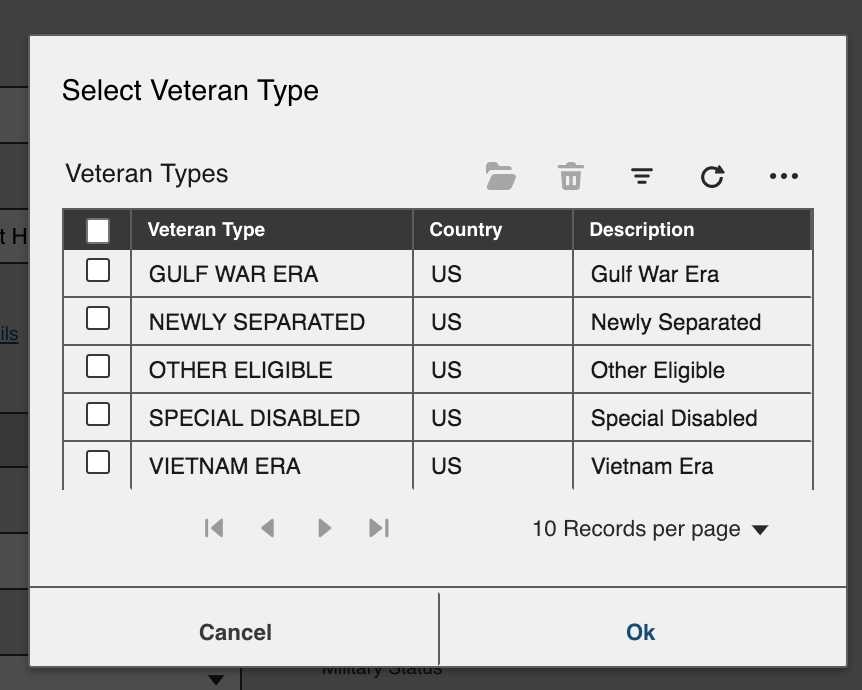
To recreate in the component library, follow the same steps from Landmark:
- While using AT, select a row within the datagrid
- AT does not announce the selected row
508it
on 25 Apr 2019
So meaning..
- go to http://master-enterprise.demo.design.infor.com/components/datagrid/example-mixed-selection.html
- Tab into the grid to the checkbox color
- Listen for indication you can select
- Hit space to select
tmcconechy
on 25 Apr 2019
Those steps are correct. The suggestion here is that we add a short metadata descriptor to append to the aria-label to give it more context when selecting. For example, rather than just saying "Select", we could say "Select 52106 Monitor"
508it
on 28 Apr 2019
I'm skeptical that this is a good idea to implement. What if the columns are different or reordered? Happy to be convinced otherwise, but it seems like a one-off example and for Accessibility one can arrow through the row to discover the different pieces of information.
 davidcarlsonberg
on 19 Aug 2019
davidcarlsonberg
on 19 Aug 2019
I was thinking that maybe..
- we add a settings.columId that is the id of the column that is the "important" one (i thought we had a grid "id" column setting but not seeing one on quick glance
- then this is added to the message in an audible span
tmcconechy
on 20 Aug 2019
Tested this on Chrome Vox and it's working correctly. This issue is now resolved.
 CindyMercadoReyes
on 29 Aug 2019
CindyMercadoReyes
on 29 Aug 2019
Related issues
 pwpatton
·
3Comments
pwpatton
·
3Comments
 SasiPalanati
·
3Comments
SasiPalanati
·
3Comments
 janahintal
·
3Comments
janahintal
·
3Comments
 brianjuan
·
3Comments
brianjuan
·
3Comments
 guoliang
·
3Comments
guoliang
·
3Comments
Most helpful comment
Those steps are correct. The suggestion here is that we add a short metadata descriptor to append to the aria-label to give it more context when selecting. For example, rather than just saying "Select", we could say "Select 52106 Monitor"