Enterprise: DataGrid: tabbing through a new row moves focus to next line for a lookup column
Describe the bug
A datagrid with actionableMode: true and cellNavigation: true is setting focus to the next cell in the next row when tabbing from a lookup column where the user has typed in a value.
To Reproduce
Steps to reproduce the behavior:
- Using the attached test-addrow-tabbing.html
- Click on the 'Add Row' button
- Use the tab key to tab across to the Product Id column
- Enter a Product Id value of 1
- Hit the tab key
Expected behavior
When tabbing from the Product Id column, the focus should move to the Price column of the existing row (the newly added row)
Actual behavior
When tabbing from the Product Id column, the focus is moving to the Price column of the next row. Jumping out of the newly added row.
 claudenbach
All 8 comments
claudenbach
on 19 Mar 2019
Assuming that the enter key still move down then the following will correct the issue.
  /**
   * Sets focus to the next active cell, depending on a key.
   * @private
   * @param {object} e The event object
   */
  setNextActiveCell(e) {
    const self = this;
    if (e.type === 'keydown') {
      if (this.settings.actionableMode) {
        const keyCode = (e.keyCode === 13) ? 40: e.keyCode;
        setTimeout(() => {
          const evt = $.Event('keydown.datagrid');
          evt.keyCode = keyCode;

          self.activeCell.node.trigger(evt);
        }, 0);
      } else {
        this.setActiveCell(this.activeCell.row, this.activeCell.cell);
      }
    }
  },
"F2 toggles actionable mode. Pressing the Tab key while in actionable mode moves focus to the next actionable cell. There is no wrap at the end or beginning of columns. While in actionable mode you can do things like type + enter. This will move you down a row when you hit enter. If the cell has a control that uses down arrow (like the dropdowns or lookups that are editable). Then the user needs to hit enter to enable the edit mode on that cell."
 marknolaninfor
on 21 Mar 2019
marknolaninfor
on 21 Mar 2019
Moved to the board for QA purposes.
 tmcconechy
on 22 Mar 2019
tmcconechy
on 22 Mar 2019
Hi @tmcconechy, upon testing in http://localhost:4000/components/datagrid/test-addrow-tabbing the focus didn't moved to the Price column of the current row after clicking tab in the Product Id column yet, the focus moved in the Order date column of the current row.
To Reproduce
Steps to reproduce the behavior:
Using the attached test-addrow-tabbing.html
Click on the 'Add Row' button
Use the tab key to tab across to the Product Id column
Enter a Product Id value of 1
Hit the tab key
Expected behavior
When tabbing from the Product Id column, the focus should move to the Price column of the existing row (the newly added row)
Actual
Skipped the Price column of the current row and the focus moved in Order Date column
 janahintal
on 1 Apr 2019
janahintal
on 1 Apr 2019
@marknolaninfor please see the previous comments. Is this anything you can look into and fix?
tmcconechy
on 8 Apr 2019
@tmcconechy
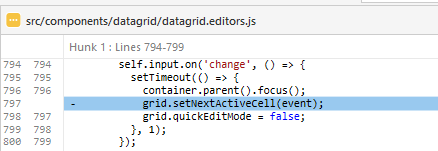
I found the additional setNextActiveCell call that was causing the issue within the change event for the lookup editor. I can check it in once my existing pull request is accepted.
marknolaninfor
on 9 Apr 2019
✅ FYI, this (https://github.com/infor-design/enterprise/pull/1887) has been merged.
 clepore
on 9 Apr 2019
clepore
on 9 Apr 2019
QA Passed. Will Move to Done. Thanks!
Tested in : http://master-enterprise.demo.design.infor.com/components/radios/example-horizontal.html
janahintal
on 15 Apr 2019
Related issues
 CindyMercadoReyes
·
3Comments
CindyMercadoReyes
·
3Comments
 sanx72
·
3Comments
sanx72
·
3Comments
 jbrcna
·
3Comments
jbrcna
·
3Comments
 fitzorama
·
3Comments
jbrcna
·
3Comments
fitzorama
·
3Comments
jbrcna
·
3Comments