Enterprise: Context Menu breaks touch interaction in iOS
Describe the bug
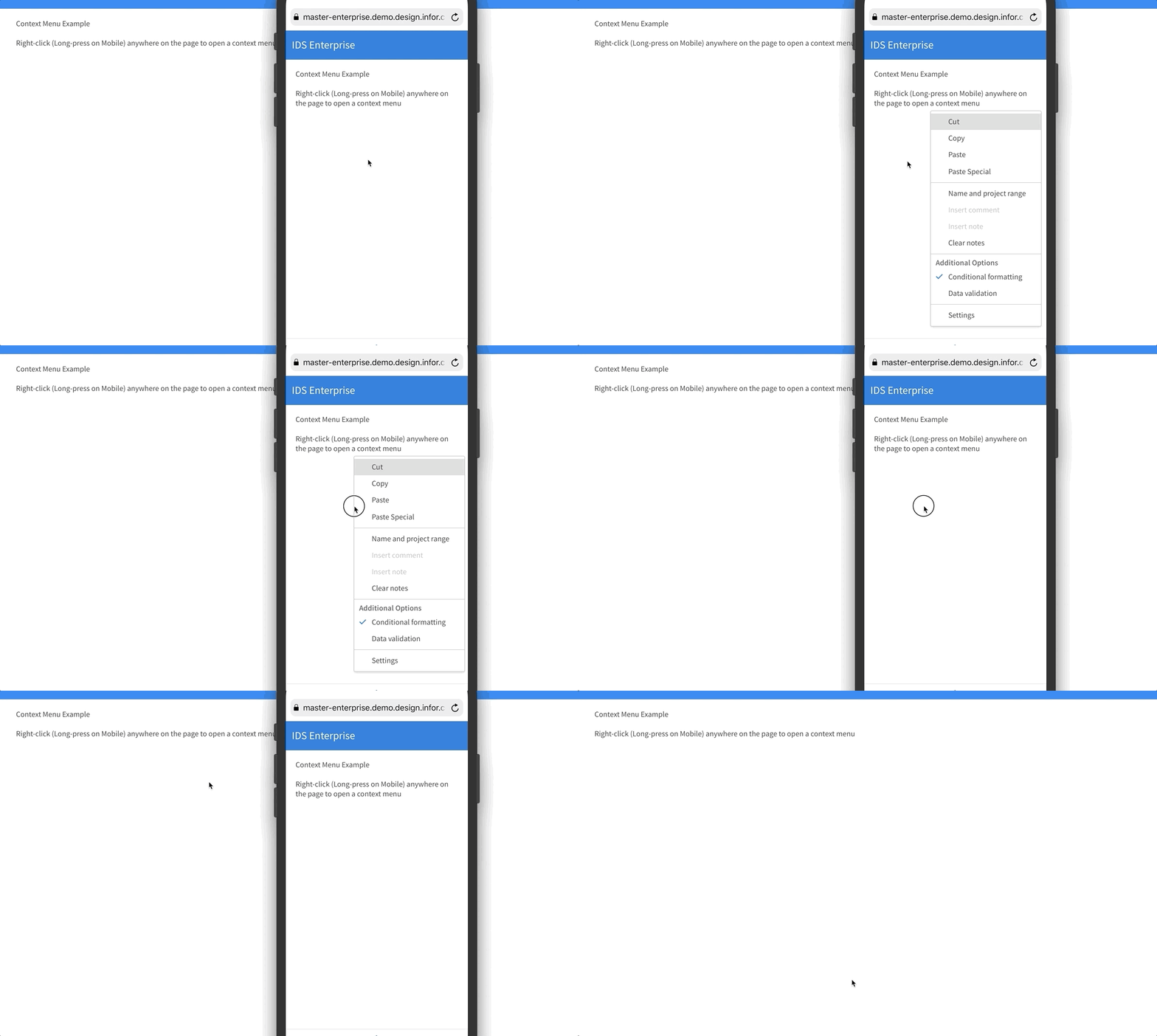
When an area has a soho-context-menu, nothing in that area is scrollable or clickable in iOS (webview, chrome & safari)
To Reproduce
https://github.com/anhallbe/ids-repro/blob/context-menu/src/app/app.component.html
Given a site with the code above:
- Try to scroll in the widget
- Try to click an item
Nothing happens, unless the context menu is opened (long-click then scroll).
Expected behavior
Can scroll and click.
Version
- ids-enterprise-ng: 4 & 5
Platform
- Device: iPhone & iPad
- Browser Name: Safari, Chrome, WebView
Additional context
Works fine on Android, Windows and MacOS. Safari & Chrome.
Related: https://jira.infor.com/browse/LIME-4269
 anhallbe
All 8 comments
Caused by the following loc in popupmenu.js?
 // Touch-based operation on a mobile device
this.element
  .on('touchstart.popupmenu', (e) => {
      // iOS needs this prevented to prevent its own longpress feature in Safari
      if (env.os.name === 'ios') {
         e.preventDefault();
      }
...
 volante007
on 30 Jan 2019
volante007
on 30 Jan 2019
Which link do i need to run? Do i need to fork your project and run it?
Not totally clear on how to reproduce. But maybe it can be reproduced in enterprise directly?
We did recently add long press support for context menus.
 tmcconechy
on 30 Jan 2019
tmcconechy
on 30 Jan 2019
@tmcconechy you'll need to clone and run it locally (npm install, ng serve etc.).
Or just copy the template to some other project that's using ids (e.g the samples project).
I'll try to set up a static site for easier access.
Edit: Here it is: https://anhallbe.github.io/ids-repro/ios-context-menu
anhallbe
on 31 Jan 2019
Im pretty sure we would be able to make a list view + context menu example and reproduce this in IDS.
And im not certain if the long press to open and the swipe down can go exist but that would be ideal.
tmcconechy
on 31 Jan 2019
@clepore Lets move this to the Enterprise project. I can reproduce with this example which you can name test-rightclick-scrollable.html and drop in the popupmenu (or alias contextmenu) folder
<div class="row">
  <div class="twelve columns">
      <h2 class="fieldset-title">ListView  - Readonly / No Select</h2>
  </div>
</div>

<div class="row">
  <div class="one-third column">
    <div class="card" >
      <div class="card-header">
        <h2 class="card-title">Tasks</h2>
        <button class="btn-actions" type="button">
          <span class="audible">Actions</span>
          <svg class="icon" focusable="false" aria-hidden="true" role="presentation">
            <use xlink:href="#icon-more"></use>
          </svg>
        </button>
        <ul class="popupmenu">
          <li><a href="#">Add new action item</a></li>
          <li><a href="#">Regular action</a></li>
          <li><a href="#">Individual Action</a></li>
        </ul>
      </div>

      <div class="card-content">
        <div class="listview" id="task-listview" data-options="{'source': '{{basepath}}api/inventory-tasks', 'template': 'task-tmpl', 'selectable': 'false'}"></div>
      </div>
    </div>

  </div>
</div>

<ul id="action-popupmenu" data-init="false" class="popupmenu">
  <li><a id="cut" href="#">Cut</a></li>
  <li><a id="copy" href="#">Copy</a></li>
  <li><a id="paste" href="#">Paste</a></li>
  <li>
    <a id="paste-special" href="#">Paste Special</a>
    <ul class="popupmenu">
      <li><a id="sub-menu-1" href="#">Sub Menu 1</a></li>
      <li><a id="sub-menu-2" href="#">Sub Menu 2</a></li>
      <li class="separator"></li>
      <li>
        <a id="settings-1" href="#">
          <svg class="icon" focusable="false" aria-hidden="true" role="presentation">
            <use xlink:href="#icon-settings"></use>
          </svg>
          Settings
        </a>
      </li>
    </ul>
</ul>

{{={{{ }}}=}}
<script id="task-tmpl" type="text/html">
  <ul>
    {{#dataset}}
      {{#disabled}}
        <li class="is-disabled">
      {{/disabled}}
      {{^disabled}}
        <li>
      {{/disabled}}
        <p class="listview-heading">Task #{{task}}</p>
        <p class="listview-subheading">{{desc}} </p>
        <p class="listview-micro">Due: {{date}}</p>
      </li>
    {{/dataset}}
  </ul>
</script>

<script id="test-script">
  $('#task-listview').on('rendered', function () {
    $('#task-listview li').popupmenu({
      menu: 'action-popupmenu',
      trigger: 'rightClick',
      appendToBody: true
    });
  });
</script>
@anhallbe this is older - sorry.
But tested this and it seems ok now. Probably because at some point we changed this line
tmcconechy
on 3 Sep 2020
note to QA: to test long press is opening the context menu you must use a real device or xcode simulator (browserstack does not allow this)
tmcconechy
on 3 Sep 2020
QA Passed
v4.33.0-dev
https://master-enterprise.demo.design.infor.com/components/contextmenu/example-page-rightclick.html?
 jbrcna
on 18 Sep 2020
jbrcna
on 18 Sep 2020
Related issues
 pwpatton
·
3Comments
pwpatton
·
3Comments
 janahintal
·
3Comments
pwpatton
·
3Comments
janahintal
·
3Comments
pwpatton
·
3Comments
 guoliang
·
3Comments
guoliang
·
3Comments
 CindyMercadoReyes
·
3Comments
CindyMercadoReyes
·
3Comments