Enterprise: Dropdown validation occasionally fails in modals
Describe the bug
I have a modal window with a dropdown list that is required and some required text boxes. In the right sequence of events, a value in the dropdown list doesn't set the modal submit button to enabled. Behind the scenes, the isValid property of the dropdown list is set to False when it clearly has a value, and that's causing the modal to think that not all required fields are populated. I first saw this in Xi 4.10. I've upgraded to 4.12.1 (4.13?) and still see it.
To Reproduce
I've modified test-validation-prefilled.html to create this.
Steps to reproduce the behavior:
- Go to http://usalvwaldevd16:4000/components/modal/MLtest-validation-prefilled.html
- Click on 'Add Context.'
- CLEAR OUT text from one of the text boxes.
- select an item in the dropdown list - note that the isValid property is False.
- Add text to the textbox, so all required fields are now populated.
- Note that the submit button is disabled.
Expected behavior
Submit button be enabled when all required fields are populated
 mlick27
All 9 comments
Definitely seems like a bug, as a workaround you could disable validation on the modal
 tmcconechy
on 14 Nov 2018
tmcconechy
on 14 Nov 2018
I need the modal validation to work. The workaround I use is to fix the isValid property on the change event of the dropdown list:
        function ddlModalRelationshipToLicensee_change() {
            if ($("#ddlModalRelationshipToLicensee").val() != "") {
                $("#ddlModalRelationshipToLicensee").data('dropdown').element.data('isValid', true);
            }
            else {
                $("#ddlModalRelationshipToLicensee").data('dropdown').element.data('isValid', false);
            }
      }
But I shouldn't have to.
mlick27
on 14 Nov 2018
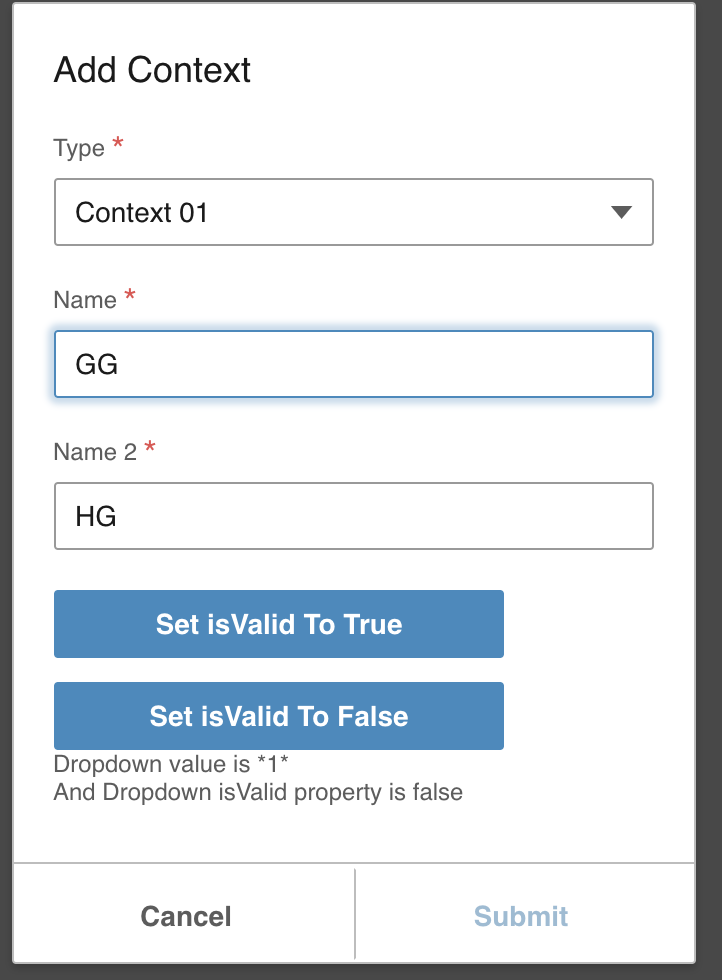
Moving to QA Failed.
Issue still exist. The submit button is still not enabled when all fields are populated.
 janahintal
on 14 Dec 2018
janahintal
on 14 Dec 2018
@deep7102 Can you check into why this is doing that - for 4.14
tmcconechy
on 14 Dec 2018
@janahintal http://usalvwaldevd16:4000/components/modal/MLtest-validation-prefilled.html is on the reports server and we dont control that. Maybe they didnt fix that page.
Try testing only on https://4140-beta0-enterprise.demo.design.infor.com/components/modal/example-validation.html where we have a fix for the dropdown issue.
tmcconechy
on 14 Dec 2018
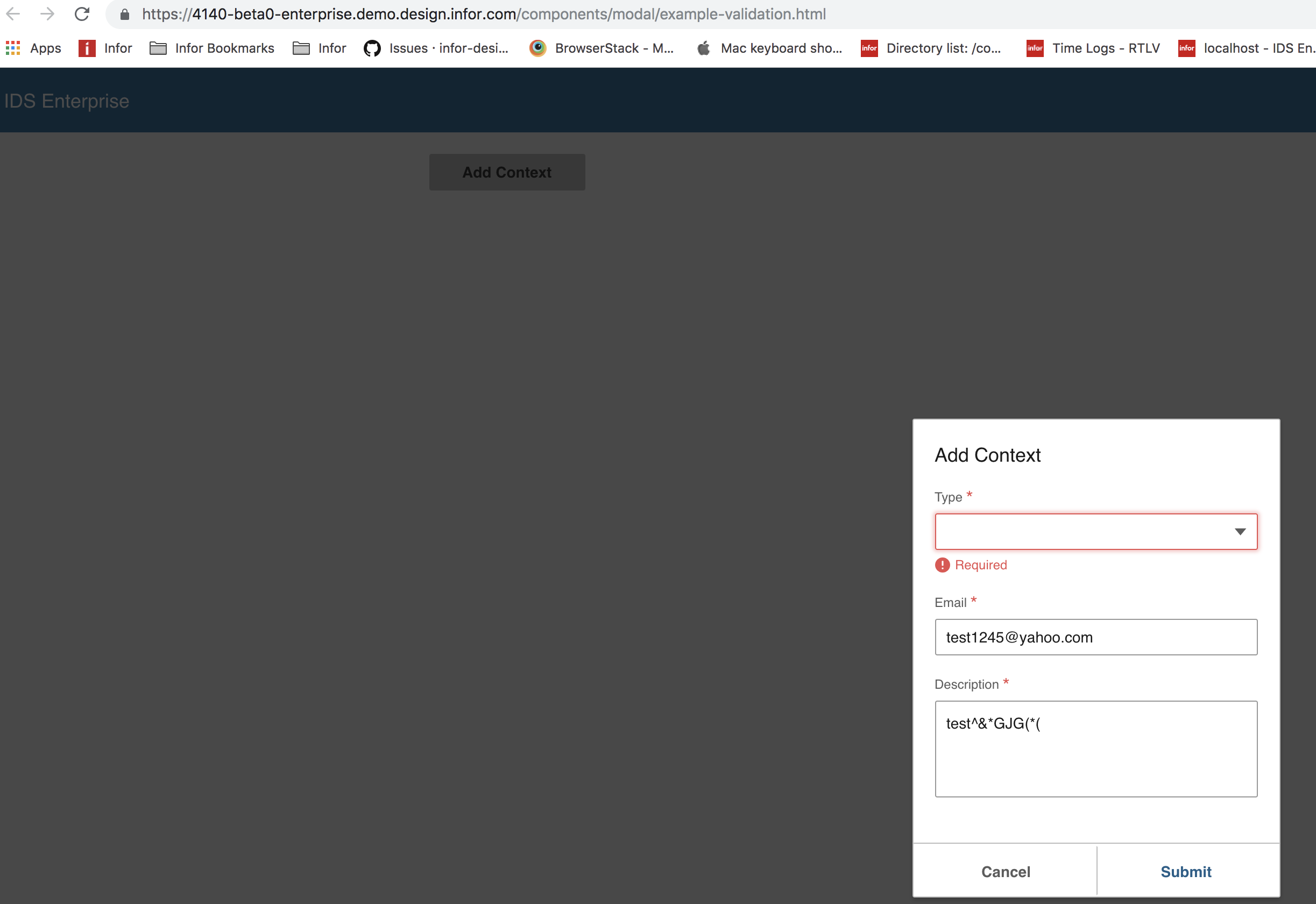
Hi, @tmcconechy moving this ticket to QA failed for the scenario below.
Tested in: https://4140-beta0-enterprise.demo.design.infor.com/components/modal/example-validation.html
Steps to replicate:
- Populate Email
- Populate Description
- Leave the Dropdown list blank
- Click > Cancel
- Open the Modal again
_Actual_: Submit is Enabled
Expected: Submit button is Disabled
janahintal
on 17 Dec 2018
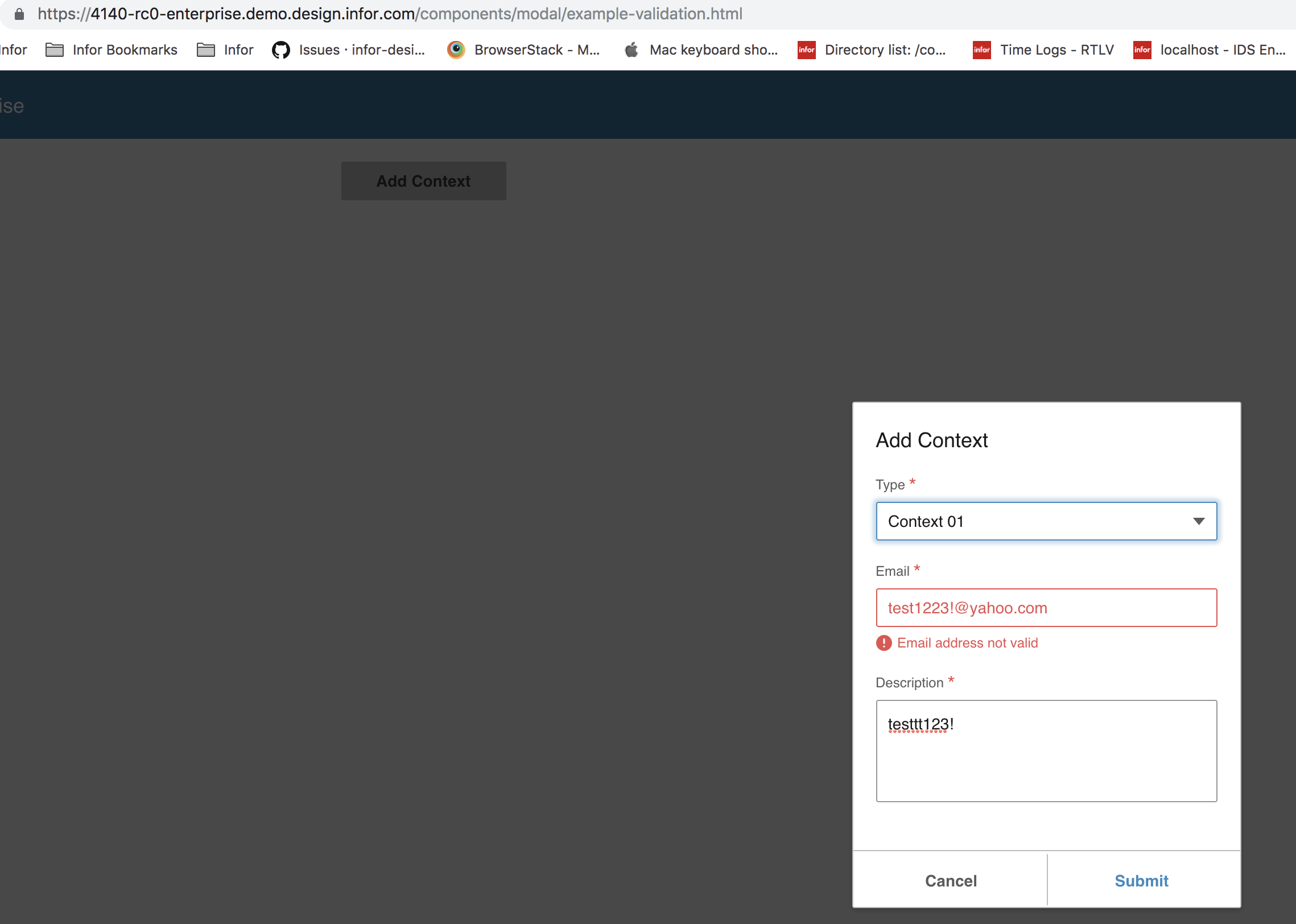
Hi, @tmcconechy moving this ticket to QA failed for the scenario below.
Tested in: https://4140-rc0-enterprise.demo.design.infor.com/components/modal/example-validation.html
Steps to replicate:
Populate Email with INVALID email e.g _'[email protected]'_
Populate Description
Populate Dropdown List
Click > Cancel
Open the Modal again
Actual: Submit is Enabled
Expected: Submit button is Disabled
janahintal
on 19 Dec 2018
@deep7102 can you have another look for 4.14.x. Maybe just need to rerun the logic on modal load again.
tmcconechy
on 19 Dec 2018
This issue is now resolved.
 CindyMercadoReyes
on 31 Dec 2018
CindyMercadoReyes
on 31 Dec 2018
Related issues
 pwpatton
·
3Comments
pwpatton
·
3Comments
pwpatton
·
3Comments
pwpatton
·
3Comments
 awbuboltz
·
3Comments
awbuboltz
·
3Comments
 jbrcna
·
3Comments
jbrcna
·
3Comments
 dubde
·
4Comments
dubde
·
4Comments