Enterprise: Dropdown control: Cannot open dropdown when destroy() method is called for another dropdown
Describe the bug
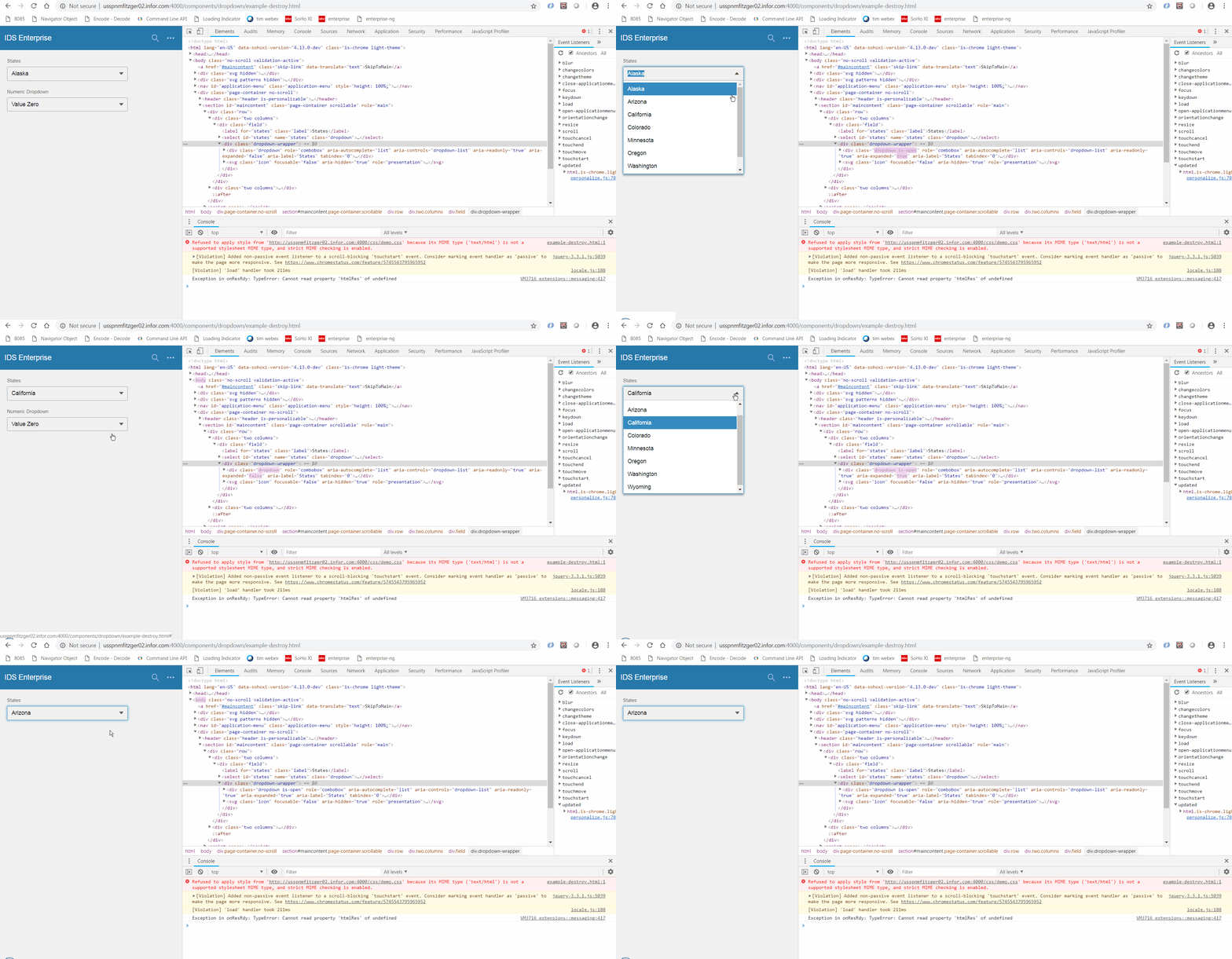
When the destroy() method for a dropdown control is executed from another dropdown control, the is-open class is not removed from the executing dropdown and the executing dropdown can no longer be opened.
This functionality is required as the soho-dropdown.component in ids-enterprise-ng will execute the destroy() method when the component is removed from a template. In Landmark, there is functionality to dynamically show or remove controls based on some criteria. In this instance, a dropdown is set to be visible when a certain value is selected from another dropdown; otherwise, a text component is set to be visible.
Would like this change to be in 4.13.
To Reproduce
Steps to reproduce the behavior:
- Using the attached dropdown/example-destroy.html
- Arizona is setup to destroy the Numeric dropdown
- Click on the States dropdown and select Arizona
- The Numeric dropdown should be removed
- Click on the States dropdown
- The States dropdown does not open
Expected behavior
Expect the dropdown to open
Screenshots
Additional context
example-destroy.zip
 fitzorama
All 5 comments
Are you working on this @fitzorama , or so you need us to assign it to a developer?
 tmcconechy
on 13 Nov 2018
tmcconechy
on 13 Nov 2018
I think your folks are better situated to make the change. I came up with something, but believe it to be more of a work around.
fitzorama
on 13 Nov 2018
http://localhost:4000/components/dropdown/example-destroy.html
http://master-enterprise.demo.design.infor.com/components/dropdown/example-destroy.html
File not found when accessing the URLs above.
 brianjuan
on 16 Nov 2018
brianjuan
on 16 Nov 2018
Try:
http://localhost:4000/components/dropdown/test-destroy.html
http://master-enterprise.demo.design.infor.com/components/dropdown/test-destroy.html
My fault, as i asked @davidcarlsonberg to rename these as these are more tests than front facing examples. Also there is a unit test for this.
tmcconechy
on 16 Nov 2018
This issue is now resolved. Moving this ticket to the Done folder.
 CindyMercadoReyes
on 19 Nov 2018
CindyMercadoReyes
on 19 Nov 2018
Related issues
 EdwardCoyle
·
4Comments
EdwardCoyle
·
4Comments
 dubde
·
4Comments
CindyMercadoReyes
·
3Comments
dubde
·
4Comments
CindyMercadoReyes
·
3Comments
 pwpatton
·
3Comments
CindyMercadoReyes
·
3Comments
pwpatton
·
3Comments
CindyMercadoReyes
·
3Comments