Enterprise-ng: Flex Toolbar Height when used with Datagrid
Describe the bug
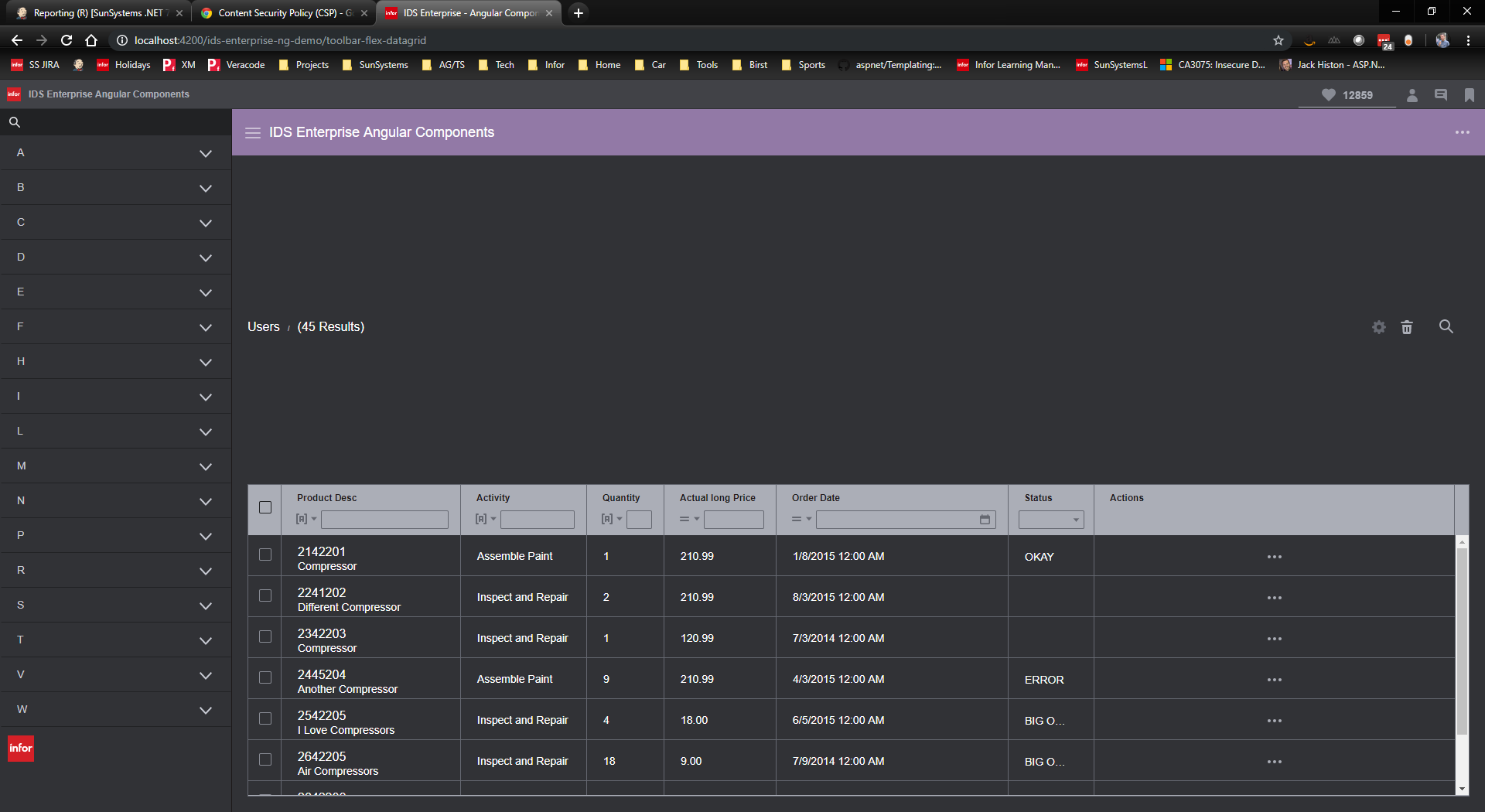
When adding a bespoke toolbar (soho-toolbar-flex) above a datagrid, the size of the toolbar is not calculated correctly in all circumstances.
To Reproduce
Steps to reproduce the behavior:
- Clone the current master of
ids-enterprise-ng - Checkout branch
flex-toolbar-datagrid npm run build:libnpm run start- Navigate to
http://localhost:4200/ids-enterprise-ng-demo/toolbar-flex-datagrid
Expected behavior
Expect the toolbar to be of the correct height.
Version
- ids-enterprise-ng: 5.2.1
Screenshots
Platform
- Device (if applicable) [e.g. iPhone 6 or Samsung Galaxy S6]
- OS Version: [e.g. Windows 10 or iOS 8]
- Browser Name [e.g. chrome, safari, stock browser]
- Browser Version [e.g. 22, 66.0.3359.181 (Official Build) (64-bit)]
Steps to Fix
- [x] Remove the CSS rule
- [ ] Re-check all Flex Toolbar samples for accuracy
- [ ] Re-examine what's been completed against infor-design/enterprise#1120 to make sure higher-level components accurately set the height when they encapsulate the toolbar.
 bthharper
All 12 comments
@tmcconechy part of the issue here, is that we are trying to make the datagrid fill the available space, and also to ensure the scrollbars on the datagrid appear below the filter bar.
The issue appears the moment a parent div is added as follows:
<div class="full-height">
Yeah and that the flex-toolbar has height: 100%. cc @EdwardCoyle
 tmcconechy
on 9 May 2019
tmcconechy
on 9 May 2019
The problem is that we need the height on the parent otherwise the scrollbars appear in unexpected places.
bthharper
on 9 May 2019
Also not sure why toolbar would have 100% height it could maybe have a fixed height like the old toolbar
tmcconechy
on 9 May 2019
Yes - the height: 100% is being added somewhere. I've committed the code to the branch now.
bthharper
on 10 May 2019
I also have a bit issue with that height 100% on toolbar flex but under other scenarios
 ahnpnl
on 11 May 2019
ahnpnl
on 11 May 2019
My workaround (at this time) is to add the following:
<div soho-toolbar-flex style="height: auto;">
As far as the in-page context goes, I don't think the Flex Toolbar needs the height: 100%;. That rule is only necessary when the toolbar is contained by things like a Header or an expandable Contextual toolbar. It should be safe to remove.
 EdwardCoyle
on 13 May 2019
EdwardCoyle
on 13 May 2019
So we should remove it in a PR then?
tmcconechy
on 13 May 2019
I'd say so, yes. It would involve:
- [x] Remove the CSS rule
- [ ] Re-check all Flex Toolbar samples for accuracy
- [ ] Re-examine what's been completed against infor-design/enterprise#1120 to make sure higher-level components accurately set the height when they encapsulate the toolbar.
EdwardCoyle
on 13 May 2019
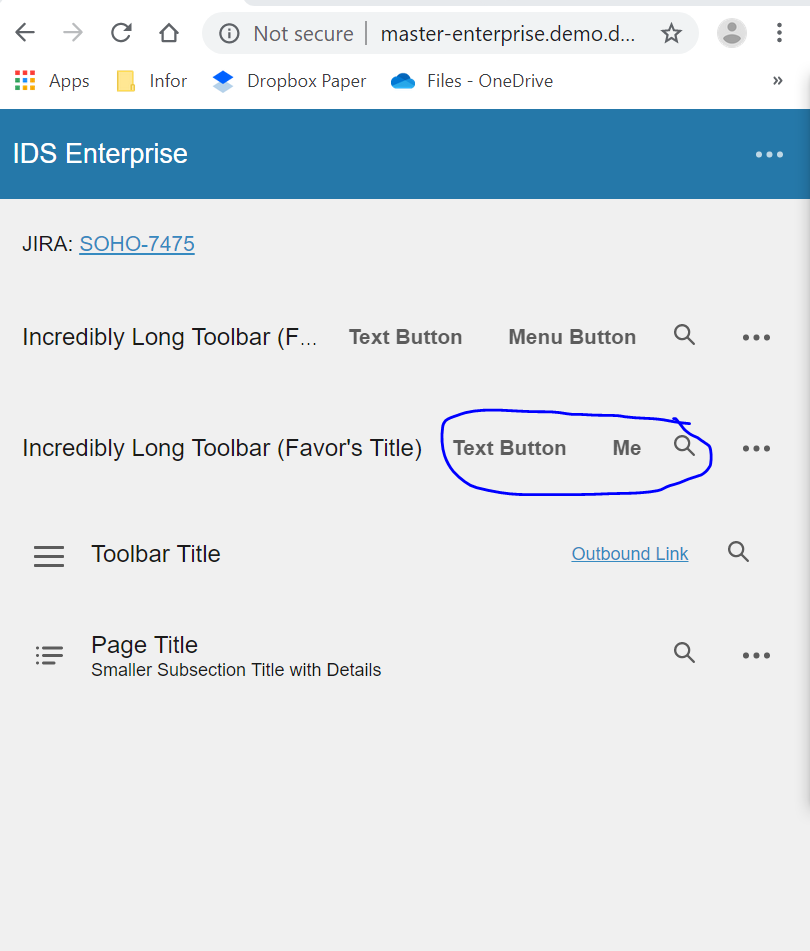
Hi @tmcconechy. Tested in: http://master-enterprise.demo.design.infor.com/components/toolbar-flex/example-index.html
Noticed that the arrow down button doesn't show up when in responsive view.
Also, i there any way I can test #549
 janahintal
on 22 Jul 2019
janahintal
on 22 Jul 2019
@janahintal What your seeing is normal. With flex toolbar we decided to just cut off the button if it does not fit. You just have to make the window wider if you want to see the whole button or live with it as is. This is the same as all previous versions.
Also you cant test #549 because its Angular so just moving to Done.
tmcconechy
on 22 Jul 2019
Related issues
 volante007
·
3Comments
volante007
·
3Comments
 Fruko
·
4Comments
Fruko
·
4Comments
 clepore
·
3Comments
clepore
·
3Comments
 ayoayco
·
3Comments
ayoayco
·
3Comments
 edgarinfor
·
7Comments
edgarinfor
·
7Comments