Enterprise-ng: Icons on Cap/modal are missing when using base tag
Describe the bug
Icons are missing in angular with <base href="/"> in use. Only appended icons like on a modal or cap (and datepicker popup).
To Reproduce
- edit src/index.html and un comment
<base href="/"> - open http://localhost:4200/contextual-action-panel && open the CAP
- http://localhost:4200/datepicker && Open the datepicker
Icons are missing.
Expected behavior
Icons should work even with a base tag in place.
Platform
- All browsers
- NG 6 (latest sample app)
Additional context
- Reported by Dan McOdrum and some others on MS Teams. Dan's workaround is to retest with no base tag.
- See also https://github.com/angular/angular-cli/issues/10447
- So this may be because of angular version changes (Dan is updating from 4.3.5 to latest)
- Possible fix is in logic in icons.js in enterprise project (is adding a bad URL when it should leave it alone)
- See https://jira.infor.com/browse/SOHO-8031
 tmcconechy
All 13 comments
@krishollenbeck are we having similar problems or did we do something to mitigate this issue?
 pwpatton
on 25 Jul 2018
pwpatton
on 25 Jul 2018
@pwpatton @tmcconechy , Just realized I was mentioned on this. A little late to the party. I don't remember what it was specifically. If I recall we had issues with using <base href=""> in the html . Might have been an icon issues? Not sure. But ultimately we ended up moving base href to app.module.
{ provide: APP_BASE_HREF, useValue: '/' },
That might have been what fixed it for us?
 krishollenbeck
on 16 Aug 2018
krishollenbeck
on 16 Aug 2018
All our apps require an href to be set in production (installation), as they are deployed in IIS. For example: http://ukfantharper1/sunsystems-deployment and the icons are working.
However, in development my index.html has <base href="/"> which is also working using ng s.
However, in my main.ts I have:
import { enableProdMode } from '@angular/core';
import { platformBrowserDynamic } from '@angular/platform-browser-dynamic';
import { AppModule } from './app/app.module';
import { environment } from './environments/environment';
export function getBaseUrl() {
return document.getElementsByTagName('base')[0].href;
}
const providers = [
{ provide: 'BASE_URL', useFactory: getBaseUrl, deps: [] }
];
if (environment.production) {
enableProdMode();
}
platformBrowserDynamic(providers).bootstrapModule(AppModule)
.catch(err => console.log(err));
The advantage of this is that the provide statement will always match the set base href which can be set when built:
ng build --extract-css --base-href /sunsystems-deployment/
 bthharper
on 16 Aug 2018
bthharper
on 16 Aug 2018
I have just tried this with the latest code from https://github.com/infor-design/enterprise-ng/pull/143 and I get the following when specifying:
<head>
<meta charset="utf-8">
<title>SohoXI - Angular Components</title>
<base href="/">
<meta name="viewport" content="width=device-width, initial-scale=1">
<link rel="icon" type="image/x-icon" href="favicon.ico">
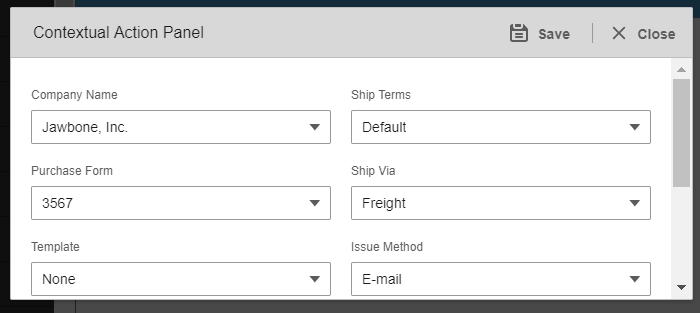
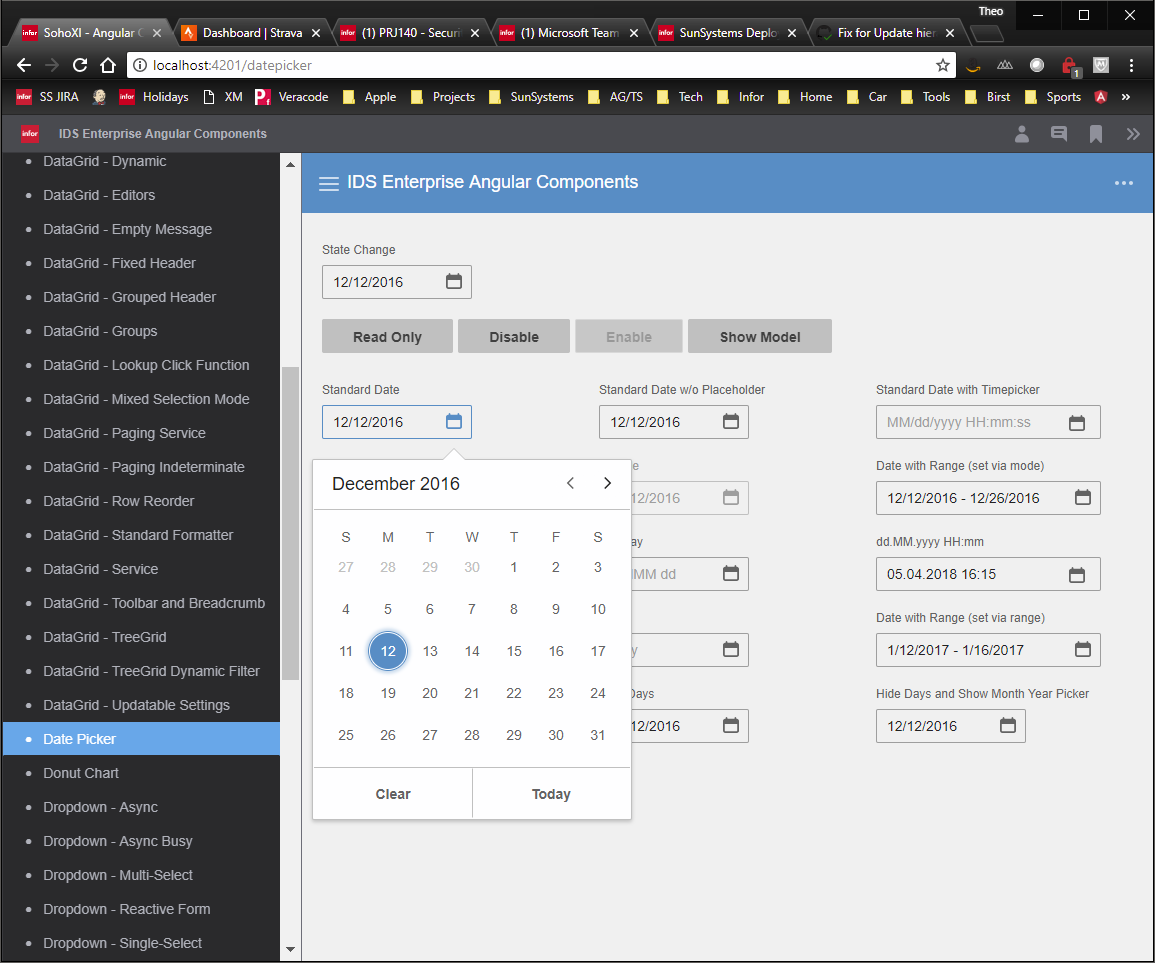
bthharper
on 16 Aug 2018
Interesting, the CAP worked for me on that branch but not the datepicker. I think this is really an "enterprise" issue as its changing this...
<svg class="icon" focusable="false" aria-hidden="true" role="presentation"><use xlink:href="http://localhost:4200/contextual-action-panel#icon-caret-left"></use></svg>
In the basepath code. We need a way to optionally disable it from doing this.
tmcconechy
on 16 Aug 2018
I can make it fail if I go to the default page first and then select Contextual Action Panel from the menu. If I go straight to the demo for CAP it works.
Basically, it's a little hit and miss if it works.
bthharper
on 16 Aug 2018
I get the following for CAP:
<svg class="icon" focusable="false" aria-hidden="true" role="presentation">
<use xlink:href="http://localhost:4201/#icon-save">
</use>
</svg>
At when it does work:
<svg class="icon" focusable="false" aria-hidden="true" role="presentation"><use xlink:href="http://localhost:4201/contextual-action-panel#icon-save"></use></svg>

bthharper
on 16 Aug 2018
Yeah thats the spot, im thinking either add a setting to disable this or check if the href = '/' and ignore but not 100% sure about the latter if that will work all the time
tmcconechy
on 16 Aug 2018
One thing to also note, is that this error also occurs when using angular module routing - I get this when navigating between pages in my application (which is the case with CAP),
My base href is set to /sunsystems-
bthharper
on 24 Aug 2018
Hello, from a discussion started on teams, I have the same problem but with company-logo. It seams related to angular routing and the href as said in previous posts. The solution that we are adopting is the following. (in case for company logo, but can be used on any icon)
@Component({
  selector: 'company-logo',
  template: '<svg class="icon icon-logo" focusable="false" aria-hidden="true" role="presentation">
  <use #icon xlink:href="#icon-logo"></use>
  </svg>'
})
export class CompanyLogoComponent implements AfterViewChecked {
@ViewChild('icon') icon: ElementRef;

  constructor(private renderer: Renderer2) {}

  ngAfterViewChecked() {
    if (this.icon && this.icon.nativeElement.attributes['0'].nodeValue.indexOf('#icon-logo') > 0) {
      this.renderer.setAttribute(this.icon.nativeElement, 'xlink:href', '#icon-logo');
    }
  }
and seems to be working for now.
 dubde
on 7 Sep 2018
dubde
on 7 Sep 2018
I raised infor-design/enterprise#766 for the EP portion of this. @tmcconechy, check that ticket out. I think the solution might be changes in the actual Base Tag utility and not necessarily in the icon component.
 EdwardCoyle
on 7 Sep 2018
EdwardCoyle
on 7 Sep 2018
Related issues
tmcconechy
·
7Comments
 edgarinfor
·
7Comments
edgarinfor
·
7Comments
 swuendri
·
7Comments
swuendri
·
7Comments
 clepore
·
3Comments
clepore
·
3Comments
 volante007
·
3Comments
volante007
·
3Comments
Most helpful comment
Hello, from a discussion started on teams, I have the same problem but with company-logo. It seams related to angular routing and the href as said in previous posts. The solution that we are adopting is the following. (in case for company logo, but can be used on any icon)
and seems to be working for now.