Endless-sky: Changing illumination direction?
While working on the Remnant ships, I played around with the ship illumination and found that part of why ES ships tend to look flat and cartoony is because they are rendered with the illumination coming from nearly overhead. I've created a plugin with the ships re-rendered with the light coming in at a sharper angle, and I'm interested in what others think of the results.
For example, here are the Kor Sestor ships using the current sprites:

Here's what they would look like with a sharper illumination angle:

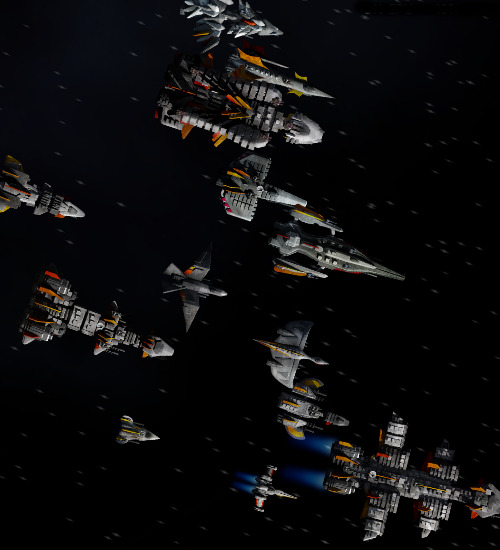
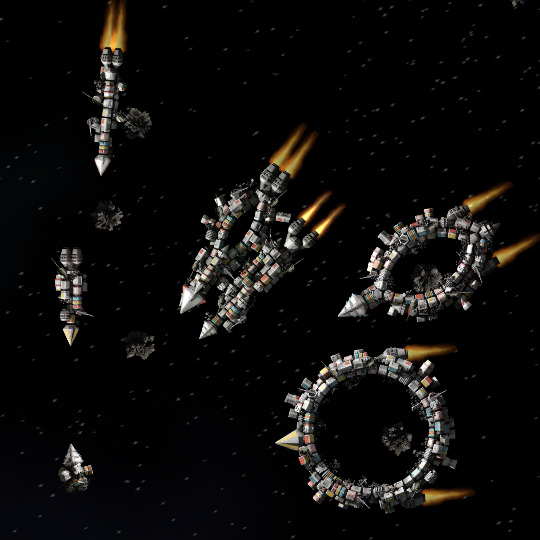
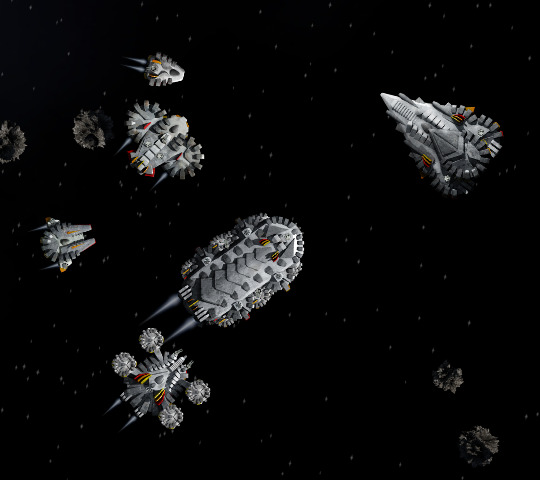
And, here's a big fleet of human ships, using the plugin:

The exact illumination angle and the strength of the "fill lights" added to keep the shadows from being pure black might need some tweaking, but I wanted to get more feedback before putting too much more time into this.
 endless-sky
All 78 comments
Yes please.
 Lineth
on 3 Sep 2017
Lineth
on 3 Sep 2017
Uh, link broken. nevermind https://github.com/endless-sky/endless-sky.github.io/blob/master/dark-ships-plugin.zip
 Bladewood
on 3 Sep 2017
Bladewood
on 3 Sep 2017
Should make this a DLC
 Rob59er
on 3 Sep 2017
Rob59er
on 3 Sep 2017
Fixed the link. Sorry about that.
endless-sky
on 3 Sep 2017
The ships definitely look a lot more 3D, the shadows are really nice on the Sestor ships, but my concern would be that the ships would become _too_ dark, and some of the shadows would blend the ship with the black of space.
 Kryes-Omega
on 4 Sep 2017
Kryes-Omega
on 4 Sep 2017
@comnom @Elyssaen
Care to share the before/after for the Trin assets with these possible changes? I know the existing sun angle had caused some rather prominent reflections on some of the larger ships.
Personally, I'm for any changes that remove "cartoony" and replace it with "gritty" or "realistic."
The last cartoony bit is of course the issue of statically rendered shadows, and a discussion on changing the default graphics would be remiss without questioning if/how we could add support for, but not require, dynamic renders of the ship shadows and lighting (e.g. #595 plus more).
 tehhowch
on 4 Sep 2017
tehhowch
on 4 Sep 2017
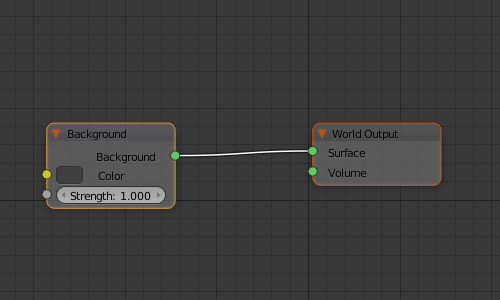
I think it helps the Sestor ships; I'm not quite sold on the human ones. I think because they have so many fins in the screenshot, the shadows end up over harsh on those. Not sure how blender internal does ambient lighting, but in cycles all you'd need to do is use a lighter background or adjust the strength if you don't want to fiddle with fill lamps:
I'm not too keen on rerendering all my own plugin ships to match, nor having Elyssaen rerender the Trin ships since my toaster would take hours. (to say nothing of all the other plugins out there, some of which are no longer maintained but still functional)
That's one of the big reasons I'm against things like 595, along with raising the barrier on new creators, but a lighting adjustment and rerender isn't all that bad honestly. Just drudge work.
That said, do I think it looks better? Yeah it does. Am I eager to redo a bunch of stuff? Na. Would it kill me? Na.
@tehhowch I would rerender a couple to see, but they take too long. I've actually switched to using something called filmic blender which eliminates most of the glare on glossy materials, just havent decided if I wanted to redo the Trin ships to take advantage of it.
 comnom
on 4 Sep 2017
comnom
on 4 Sep 2017
Part of the issue with the human ships is that many of them have the fins made really tall so they'd cast a decent shadow with the previous, nearly-overhead lighting. So, doing this right would involve tweaking the models a bit.
Since this was just a "rough sketch" to give an idea of how it would look, I didn't do quite enough fine-tuning on some of the human ships. In particular, the first half of the alphabet probably needs more fill lighting. And, I think I should make the sun brighter and at slightly less of an angle to avoid the muddy grey look that some of the ships end up with.
endless-sky
on 4 Sep 2017
I see that (nonminable) asteroids are included in the plugin as well; excluding the large metal asteroid, I think the asteroids look fine with the new lighting. As for the ships included in the plugin, the only one that I found overly dark is the Dreadnought. Some ships though (e.g. Modified Argosy and Vanguard) look AMAZING with this new lighting.
 Amazinite
on 4 Sep 2017
Amazinite
on 4 Sep 2017
Yeah they do. It does highlight how dated some of the human ships look though (The rainmaker stood out a fair bit on this to me). But overall this is a fantastic change.
Lineth
on 4 Sep 2017
@comnom, if you're worried about render times, we can all SheepIt together. I'm sure the whole Discord (+more) will be willing to help, amirite? :)
While we're at it, do we know of any content creators that are NOT using blender to generate their sprites (apart from Phil, who eventually started Blendering anyways)? Relevant to 595.
 MessyMix
on 4 Sep 2017
MessyMix
on 4 Sep 2017
The sestor fighters look a bit odd as they don't cast a shadow, it is most noticeable when docked on the right.
I think this is a good time to reconsider dynamic lighting, that would easily make 3Dness stand out and it would make running lights work better on all ships.
While I agree that it moves the bar higher for new content creators I think it would be a worthwhile investment especially if a good way of doing the normal maps (or what ever other method is used) can be found.
 jafdy
on 4 Sep 2017
jafdy
on 4 Sep 2017
the 349 really shows how good this feature will be if done right, maybe a lot of ships will need individual attention, but if done right the ships should look way better and a lot more 3D, this feature really needs to happen
also @endless-sky can you please tell us what you changed w/ the lights? (or at least link us to a new template for this) so modders can try this out with their own ships?
 Lorantine
on 4 Sep 2017
Lorantine
on 4 Sep 2017
To be honest, I'm not sold. Changing the shadow angle like this just makes the static lighting more obvious and visually awkward _in actual play with moving and rotating ships_. I agree with @jafdy: the real solution is on-the-fly normal mapped dynamic lighting, as was proposed in https://github.com/endless-sky/endless-sky/issues/595
That would have enabled fantastic lighting:


And if you're going to require a re-do/re-render of all ship graphics anyway, why not do it that way, and get full dynamic lighting?
 Pointedstick
on 4 Sep 2017
Pointedstick
on 4 Sep 2017
My personal opinion was that #595 looks ugly for a lot of ships (particularly the Bactrian example above) because it doesn't allow one part of the ship to cast a shadow on other parts. It also means you can't manually add shadows and highlights to simulate chrome-like materials. At any particular rotation the ships end up looking really "flat":
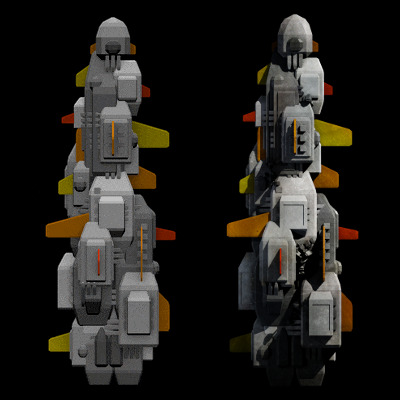
Does anyone think that the version on the left there looks better than the version on the right?
endless-sky
on 4 Sep 2017
I'm still experimenting to find the ideal settings, but the best I've found so far is:
- Change the sun angle from 0 / 30 / 45 to 0 / 70 / 50.
- Change the sun energy from 1.0 to 1.5.
- Turn on ambient occlusion (multiply) at strength 1.0.
- Add "fill lights" with a very slight blueish tinge wherever areas of the ship would be totally black. (Make sure these are set to cast ray shadows.)
In the process I've also been tweaking some of the models, in particular to add bevels to everything so that edges look less artificial and catch the light in interesting ways.
endless-sky
on 4 Sep 2017
@endless-sky
I maintain that the Bactrian on the left looks better _as an actual sprite used in the game_. Such bold lighting looks really weird when it doesn't actually change as the ship rotates.
The _cast shadows_ on the Bactrian on the right look better, but the shadowing in general is too bold and harsh, especially if it's static.
Regardless, ambient occlusion will help a lot.
Pointedstick
on 4 Sep 2017
The difference between dynamic lighting and dynamic shadowing is indeed rather large, and you are correct that at any one angle with an off-screen light source, the better-looking ship is going to be the one that has true shadows and not dynamic lighting.
As soon as there are multiple ships though, the uniformity of sense - the shading on every ship shows that the light source is in that single direction - can win out, especially when the preshadowed ships are in a variety of facings and each indicates a different position of the light source.
I do agree that the prerendered shadowed sprite allows for much greater control over the apparent material composition of the ship.
tehhowch
on 4 Sep 2017
That's exactly it. You can't judge this from a single pre-rendered frame, even if it looks great. In game, where everything is moving, the bolder the static lighting, the weirder everything looks.
Pointedstick
on 4 Sep 2017
but that change would be a lot more work, and it would be hard for newer modders, adding that it'll probably increase CPU usage because the shadows have to be calculated(? not really sure how that dynamic stuff is done), and ships would look ugly from certain angles
this "static" thing does look fake when you see ships face in different directions, but it does the job with better 3D-ish looks
unless someone can make something that easily does this for ship builders, and even then it's hoping it looks better
to me static vs dynamic is basically quality looks vs realism
Lorantine
on 4 Sep 2017
@dplepage did call out that 595 was not true dynamic shadows, and that such accuracy would probably relegate us to using an existing graphics engine rather than trying to composite our own solution for sprite + normal map + height map + internal lighting = lit & shaded ship.
@KiLEdEnNis He did also post several tools that would convert .blend into the normal map, and the internal lighting layers.
tehhowch
on 4 Sep 2017
can't someone try to combine this new feature with dynamic shadows? just a couple of ships to show if merging that quality with the realism would look good
if it does, ES would really improve visually
Lorantine
on 4 Sep 2017
I think this is a significant improvement and one that holds up even with many ships facing multiple directions (looking a the sestor fleet) Perhaps once you reduce the fins, the ships will be lighter.
I don't know if it's possible to have light sources rendered that are located on the ship itself: that would give coherent shadows regardless of the orientation of the ship
 ph2000bis
on 4 Sep 2017
ph2000bis
on 4 Sep 2017
As far as I know #595 never progressed to the point of an actual in-game demo, so it's really hard to say whether or not it would have looked good. But I have seen other games that used normal maps for ship lighting, and the effect was rather artificial-looking.
I've also tried modifying the asteroid code so that they are always drawn with their lit side facing the sun, and honestly unless I was specifically looking for it I couldn't even notice the difference. The human visual system primarily uses shadows as a way to determine the shape of things, not to extrapolate where the light is coming from.
endless-sky
on 4 Sep 2017
for now this change is good enough; I really love the looks (especially on the Sestor; the human ships, if lowering the fins doesn't do it, could be a little bit brighter), and it really makes ships look 3D
once ya look at the new Sestor & human ships, once you look back all you see is flat 2D ships
Lorantine
on 4 Sep 2017
As an additional comparison, here's the "dynamic" Bactrian, the Bactrian from the plugin above (70° illumination) and a "remastered" version with 65° illumination, higher sun energy, more fill light, and the manual shadow layer redone:

I agree that a lot of the ships in the plugin have too dark shadows and a slightly muddy grey appearance, but I think the tweaks I suggested above can fix most of that.
endless-sky
on 4 Sep 2017
the one on the right can use a tad darker shadows, but it's already a lot better, and giving it a tiny bit darker shadows isn't that important
also if it's not too much trouble, upload the plugin .blends so we have an example of how you did it (for me mainly for those blue "fill lights")
Lorantine
on 4 Sep 2017
The far right bactrian is by far the best looking. The fills lights cut the ugly pure black right out, and the brighter sun allows the gradiant of grey tones on various sections to really stand out, which makes the grunge more noticable shipwide as well. I've got no complaints.
On the 595 debate: I've stated my opinion on it before, but it basically boils down to what tehhowch pointed out. That is, without a full suite of true dynamic lighting (not just shading) I think the ships look worse not better.
comnom
on 4 Sep 2017
I can't seem to get the blue "fill lights" their properties right: I end up with a dark blue shade
what color numbers did you use (between 0 and 1) for red, green and blue, and how much energy did you make the points? @endless-sky (the Lamp property where you pick the color and how much energy that light source gives)
if I know that I know everything I need to know to do what you did to my plugin, and I can tell others if they need to
Lorantine
on 4 Sep 2017
I'm using a blue very close to white - say, about .75, .83, 1.00. The energy depends on the scale of each individual model, but I'm putting them a good distance away so they create wide illumination instead of a hot spot.
endless-sky
on 4 Sep 2017
The only reason 595 hasn't progressed to a game-demo level is because you never let it.


But I sense that we're not going to see dynamic shading until we get full dynamic lighting. Which I'm looking forward to.
MessyMix
on 4 Sep 2017
thanks for the help, I'm in love with this shading mode, and modders that want to can try it on their own ships
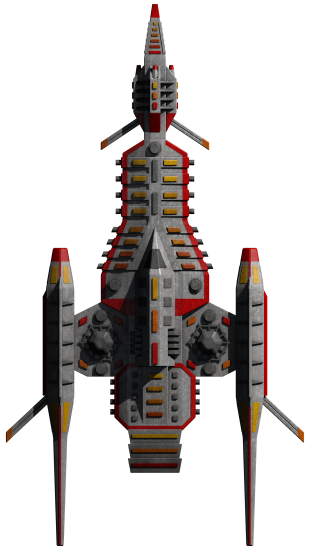
so I think this is gonna be a thing? due to the generally positive feedback and the fact that once we saw this the older versions suddenly looked very 2D
Lorantine
on 4 Sep 2017
Here's a few more examples of ships with less-severe illumination, but still coming in from a significant angle (65° instead of the 25° currently used in the game):
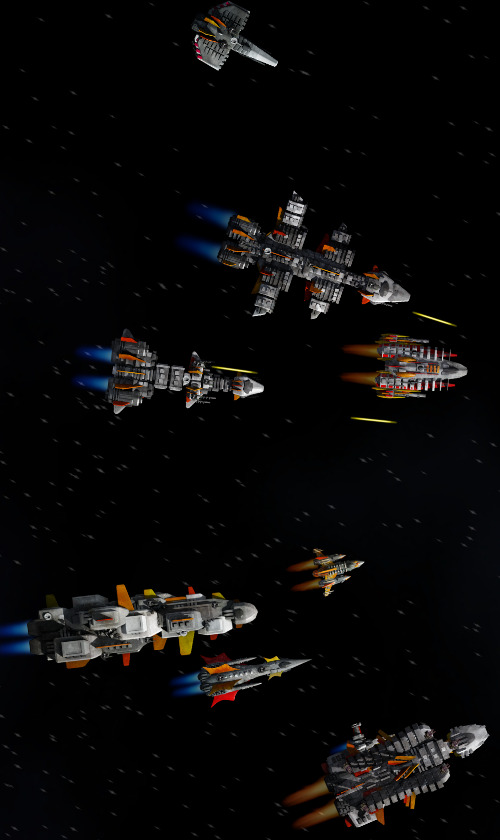
I think that fixes the issue of shadowed ship edges blending in with the background (although of course, it will look a bit different on each person's monitor). Compare that to the original plugin version:
endless-sky
on 4 Sep 2017
The Dreadnought is much better with this most recent example.
Amazinite
on 4 Sep 2017
there's no way to make all edges perfectly clear from the background, but this new lighter shading looks really good (better on some ships than others though), I'm a little bit worried about doing it with the Pug and Wanderers, but the Coalition/Heliarch should look good with them, and I think the Hai would also look better with it
Lorantine
on 4 Sep 2017
All right you got me, that looks pretty sweet.
Pointedstick
on 4 Sep 2017
Would anyone be able to get in touch with @dplepage and see if he can get a working PR for dynamic lighting so we can get a better view of how it would look in game? I'm sure It could be tweaked as well to yield better looking results; it seems like the gifs he posted on the PR were more of a proof-of-concept than a final product.
Amazinite
on 5 Sep 2017
I haven't thought about this project since I stopped working on #595, but this thread showed up in my inbox as soon as somebody @'d me, so consider me gotten in touch with.
It's been a long time since I've worked with shaders (the mockups on the PR were just rendered in python), but I can see about getting a PR up to demonstrate the dynamic lighting in-game.
 dplepage
on 5 Sep 2017
dplepage
on 5 Sep 2017
@endless-sky you should really look at cycles instead of BI especially with 2.79 coming out which incorporates a new shader called principled. I would also recommend looking at using Filmic Blender to help get rid of your issues with being over exposed at high light levels.
 Nechochwen-D
on 6 Sep 2017
Nechochwen-D
on 6 Sep 2017
Agreed however the human ships seem a little bit dark a lighter shadowing might help that
 KyroFirehammer
on 6 Sep 2017
KyroFirehammer
on 6 Sep 2017
it's the top 1 in MZ's last comment in case ya didn't know
if ya look there, the Dreadnought & Bactrian don't have very dark shadows, lighter shadows will basically make them non-visible
Lorantine
on 7 Sep 2017
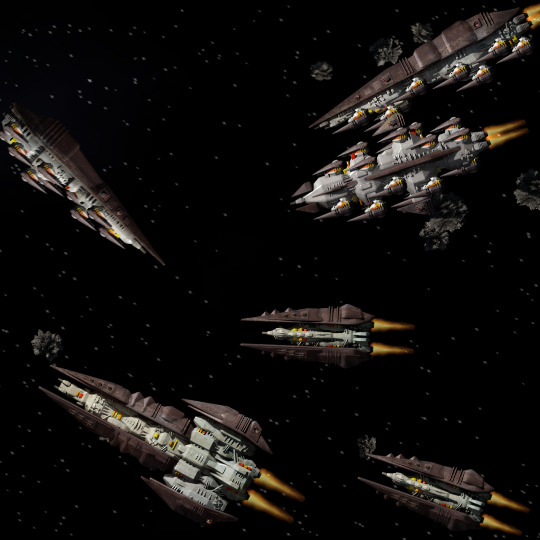
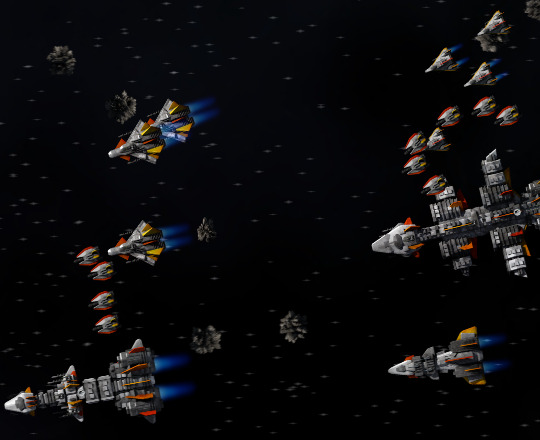
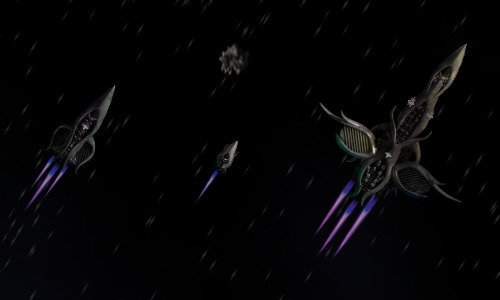
I've updated the plugin so that all the sample ships are rendered with 65° illumination instead of 70° and with more fill lighting. Here are some more screenshots:
endless-sky
on 9 Sep 2017
is it gonna stay as a plugin or eventually gonna be added to the base game? (just to be sure)
Lorantine
on 9 Sep 2017
Beautiful.
Bladewood
on 9 Sep 2017
It will go in the game eventually, I just want to make sure there are no show-stopping complaints about it before I redo the graphics for the other 60% of the ships.
endless-sky
on 9 Sep 2017
That is much better that what we have today, definitely.
Still would really like to see full dynamic lighting and shadowing someday.
Pointedstick
on 9 Sep 2017
It will be a while until the next release so I would hold off on it (as it seems to be an overall improvement) and explore full dynamic lighting and shadows as well. Put this into the next release if dynamic isn't ready in time.
jafdy
on 9 Sep 2017
the only ships I wonder about if they will work:
Wanderers and Hai a little
Quarg ships (quite a bit)
and of course the Raider; it's not even made from Blender
(also don't forget Marauder and Author ships, not sure if ya have the Marauder blends but I think someone can get them)
Lorantine
on 10 Sep 2017
I have the marauders and pointed's blend and gimp files.
jafdy
on 10 Sep 2017
if MZ wants it, I can use his "new template" to do the Marauders & Pointed's Vanguard for him; saves him some work
@endless-sky want me to do the Marauders & Pointed's Vanguard for you?
Lorantine
on 10 Sep 2017
@KiLEdEnNis Sure, that'd definitely be helpful. The only tricky part is the number, position, and intensity of the fill lights - I didn't have a particular pixel value or anything that I was shooting for, so it's just a subjective judgment.
I found it fastest to just work with the existing .blend files in a pipeline where I opened each file, adjusted the sun angle and intensity, checked that ambient occlusion was on, then added a fill light and duplicated it as needed. Occasionally a model will need adjustment, e.g. to bevel a surface so it will catch light in more interesting ways, to flatten a vertical fin that's now casting too big a shadow, or to tweak the specular intensity on a material that catches the new sun a bit too brightly.
endless-sky
on 10 Sep 2017
I can look at existing ships from your plugin if I need to, once I'm done I'll put all files in Google Drive and put the link here, if you have any feedback after that I'll update them, but I think I'll do fine
edit: these files are so messy; started with the Pointed Vanguard, first had to fix the interface, have to recut the render to fit the size of the current Vanguard in GIMP etc. and after that, the very edge of the GIMP file contains the tip of the engines of the Vanguard, so I'm not sure if I'll be able to keep the hardpoints correct, but I think I'll manage to
Lorantine
on 10 Sep 2017
first one in @2x format, does this seem good? if so, I'll have a ship to compare the rest to in GIMP (like a template)
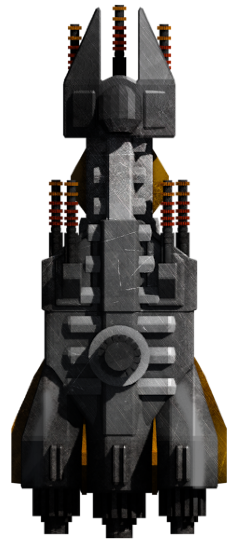
I guess a bit too dark? I'll probably have to redo the shadow layer a bit then
Lorantine
on 10 Sep 2017
I'm curious as to the height of the turret mount that it casts such a long shadow... never thought of the vanguard as a "shark".. more of a MCRN Corvette to me.
I agree that the fill lighting from the SW corner of the sprite could use a little buffing, (see the "remastered" bac in the above post).
tehhowch
on 10 Sep 2017
I don't see that much difference, so I think if I redo the shading in GIMP it'll look good
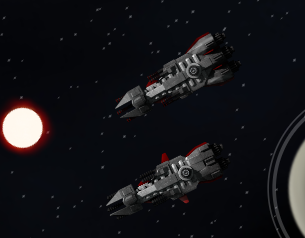
EDIT: I changed the shadow layers' alpha from 100 to 50, should do the trick compared to the regular Vanguard
old
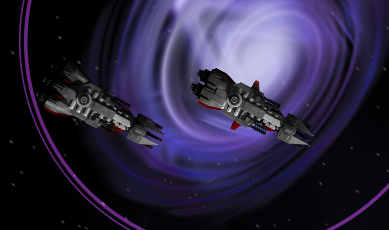
vs new
as for the height of the turret;
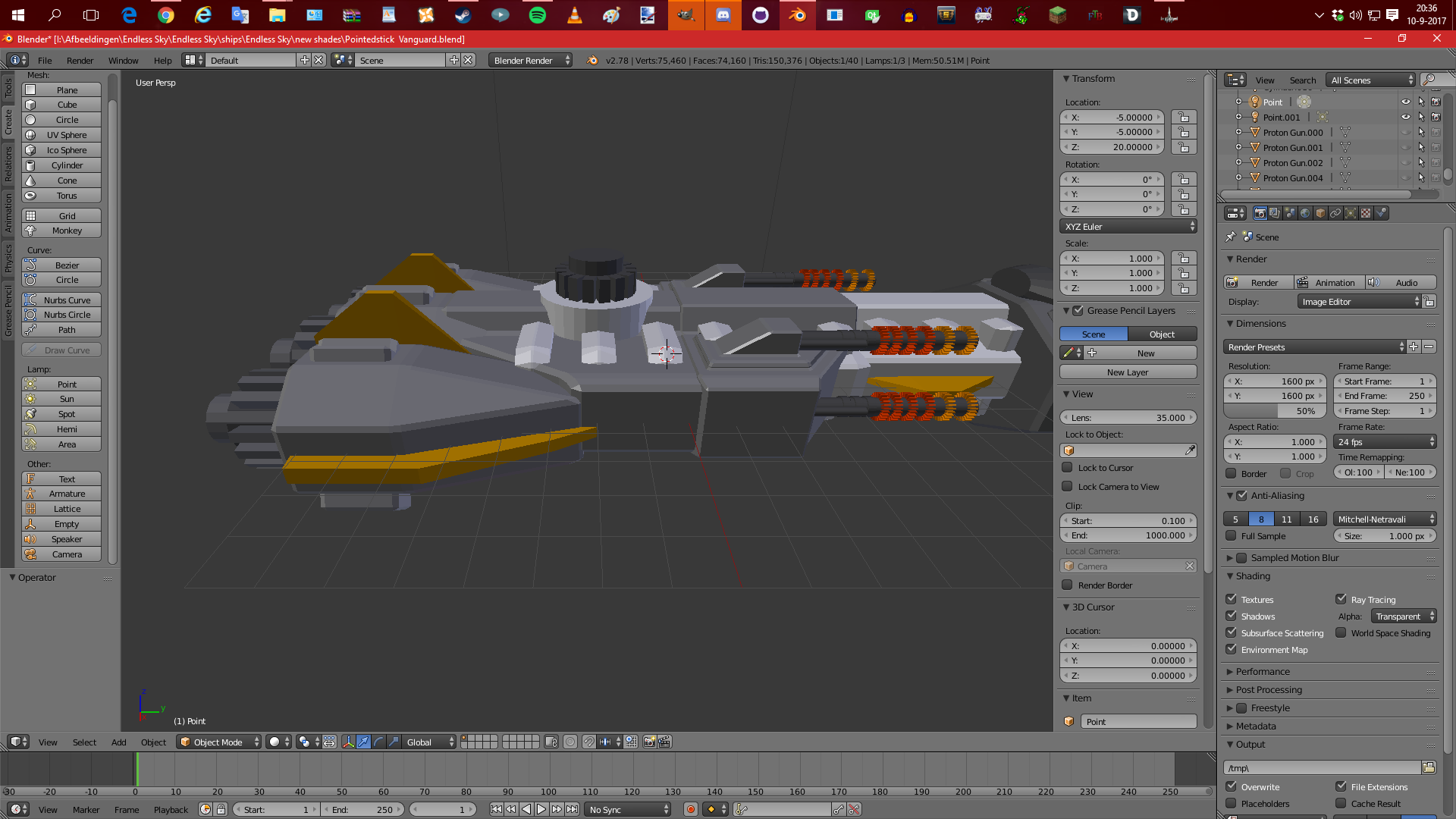
Lorantine
on 10 Sep 2017
One trick might be to use the "threshold" tool in GIMP to look for how many areas of the ship itself are very dark, say less than 10 intensity levels. Here's the first 2x image you posted side by side with my dark version of the ordinary Vanguarg, with the areas under 10 grey values highlighted in red:
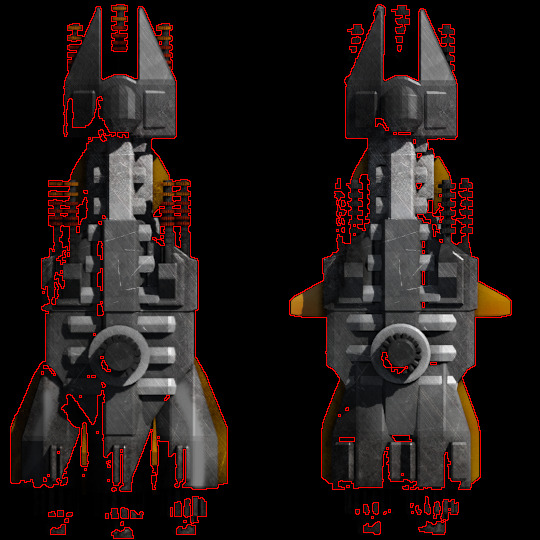
Large parts of the engine section, plus one corner of the "head" of the ship, are in danger of blending in completely with the background. So, it might need a bit more fill lighting there unless what is causing it is the shadow layer in GIMP. (Note that I ended up redoing the shadow layer for the majority of the ships to look better with the new illumination angle.)
endless-sky
on 10 Sep 2017
that picture was with the shadow on 100% alpha, I toned it down, but I'll redo the shadow and I'll use that trick, thanks
how long it'll take to do the 29 ships depends how messy the GIMP & Blend files are
Lorantine
on 10 Sep 2017
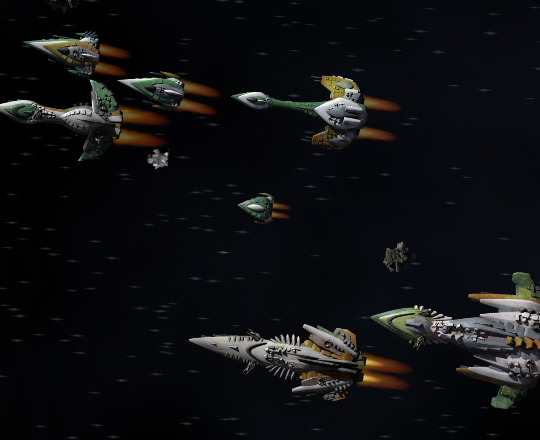
A few more factions done:
endless-sky
on 11 Sep 2017
😍
can we has soon please
Lineth
on 11 Sep 2017
I think I got the shading right?
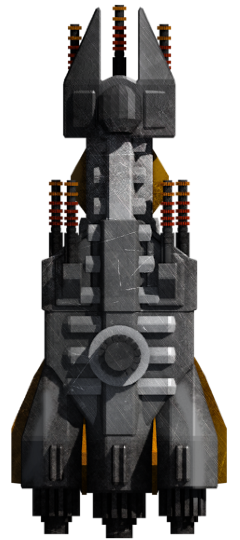
this is the threshold (on 10, all black is under that threshold)
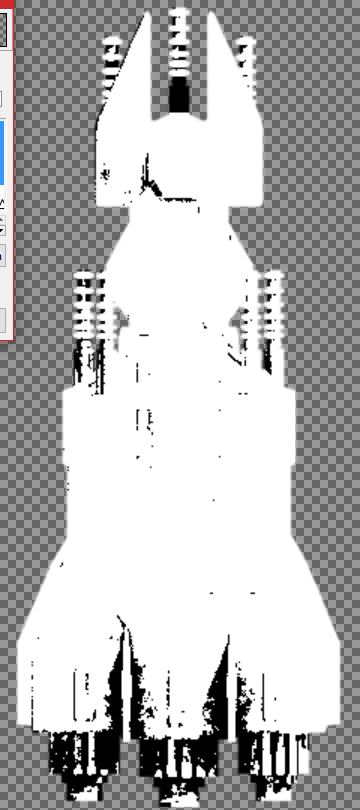
if it's still too dark just reply & tell me, if not I'll use this one as a template for the rest, and I'll do the threshold test for all ships
Lorantine
on 11 Sep 2017
1 more comment, I hope I don't have to make any more comments until I'm done
I ran into a big problem with the Marauder Fury (I checked the other Marauder ships, they should be fine)
the problem: this is 1 layer in GIMP, the base layer w/o post-processing

this is the render, as you can see, quite some differences
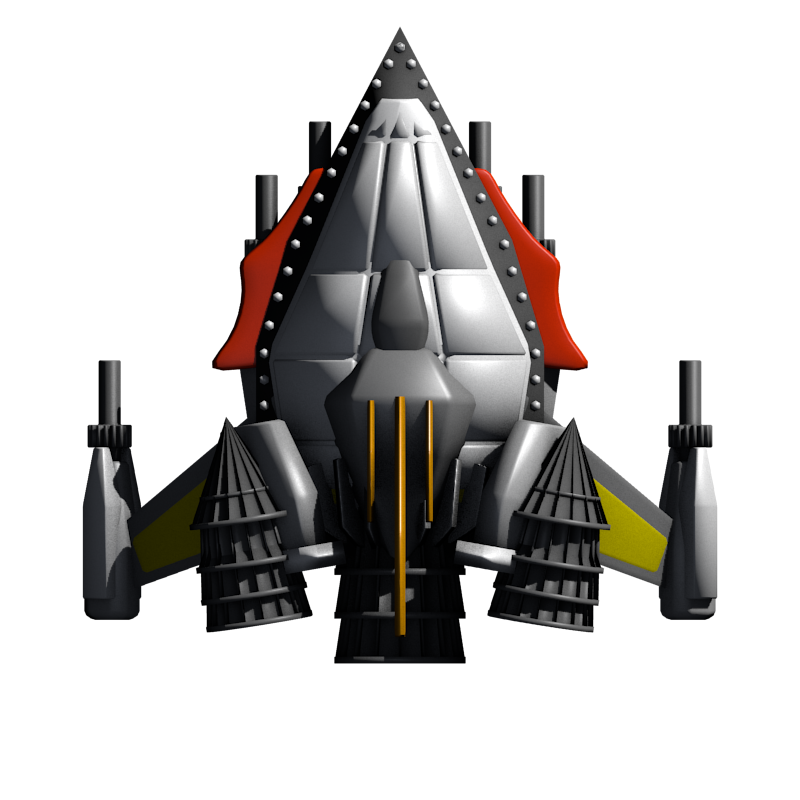
it's impossible to update the Marauder Fury without changing the armor patches, hoping I can even find some good new layer for the armor patches, so how should I approach that @endless-sky ??
it also uses some weird-ass complex stuff in the blend, maybe it has those textures IN the blend but I can't seem to find them, so if you want I can keep the Fury like this for you to do later? (I'll add it to the google drive)
Lorantine
on 11 Sep 2017
@Wrzlprnft did that one for himself, if he can't supply the layer just find one that is similar, it's quite a small sprite so I doubt anyone will notice the difference.
jafdy
on 11 Sep 2017
it took over an hour, BUT:
I figured it was some kind of texture, and it had a piece of the image name in the texture map on those objects, I tracked it on google and found the creators' devianart (he basically had 2 textures and only 1 matched), I saved that image and applied it, and got the metal layers ON the Fury
as in I'm a wizard and the MFury can stay the same

done (mid engine a bit dark but seems good, plus it's a hell to redo it)
I'll do the other 9 (+ 2 variants = 27) Marauders this week, I hope 3 full Marauders+variant a day if I have the time, hopefully at most end this week, and of course not gonna post every single ship I have on here, I'll just do all of them & look for feedback after I upload them to a google drive
Lorantine
on 11 Sep 2017
quick update; I'm about halfway; Pointed Vanguard, MFury, MArrow, MBounder, MFalcon & MFirebird (S, E & W versions, and @ 2x) all done, with saved GIMP & Blend files too
all that's left is the MLeviathan, MManta, MQuicksilver, MRaven & MSplinter, I'll probably have everything done Sunday, but have some irl stuff to do, I think in any case I'll be done next Tuesday (did the Falcon & Firebird today, took over an hour due to some messy work, but 2 at a day is do-able)
Lorantine
on 14 Sep 2017
I've got all but 12 ships done out of all the rest, so I should wrap it up in around the same time frame.
endless-sky
on 15 Sep 2017
With the plugin I noticed that if you zoom in enough it reverts to the original. Bug? Or is that the x2 vs normal sized version?
Lineth
on 15 Sep 2017
That's the 2x images coming in.
jafdy
on 15 Sep 2017
If you have the high-DPI plugin loaded too, just rename the dark ships one to something that comes after "high-dpi" alphabetically.
endless-sky
on 15 Sep 2017
spent over 2 hours finishing the last 4 Marauders
https://drive.google.com/drive/u/0/folders/0B5-qbs9LtB26ZGRnaTlVLXlaMlk
edit 2 hours later:
- I remember by head I put a point way behind the Firebird engines to fix the smooth shading making it pitch-black
the Arrow's front touches the border in the pics, and thus leaves no 1-pixel border, this is already the case in the base game, I even tested the new shaded sprite and it gave me no issues, this is also the case for the engine Falcon, and I think the non-weapon Bounders
the Leviathan in the files jafdy sent me was different than the current Marauder Leviathan (mostly the front), even the Blend & GIMP files were different, so the Marauder Leviathan changes a bit (the flat front looks a bit... too flat), and in GIMP all 3 versions weren't exactly on top of each other (fixed that), but check the hardpoints (engine maybe, but at least the weapons, especially on the weapon version)
the Raven was extremely hard to do because of all the patches and modifications giving a lot of shadings, it's near-impossible to do it better without getting black spots
the Splinter has a triangular form in the Blend (never knew), the 2 side-bottom ones gave dark shadings so I did a mild fix with 2 dim points in there, it's not really possible to do that better without ruining shadows in general
Lorantine
on 16 Sep 2017
@endless-sky just got the mail to grant ya access to the drive (gave ya full access)
if there's anything that should be changed, ya can do it yourself or tell me what to change, whichever ya want
Lorantine
on 17 Sep 2017
On this subject, is a remodel of the Korath Raider in the works? It looks really, really flat. I dunno how much the illumination change affected this however.
Lineth
on 19 Sep 2017
it has been remade in Blender for the new lighting, the tubes look a bit meh but it's quite good
Lorantine
on 19 Sep 2017
Hey on that topic in creating a few ships when this does hit main game will I have to make any changes of im creating them in blender
KyroFirehammer
on 20 Sep 2017
@KyroFirehammer yes.
The sprite rendering process does not alter the physical geometry of your ship(s), but you may find that different angles of various objects in your .blend provide better visual characteristics. At minimum, you will need to change the positions of the Sun and other Lamps and re-render the output sprite.
tehhowch
on 20 Sep 2017
@KyroFirehammer save this somewhere:
how to do the new shading
- change the sun rotation from 0 / 30 / 45 to 0 / 65 / 50
- increase sun energy from 1 to 1.5
- ambient occlusion on "multiply" at strength 1 (it should already be like that)
- add 1 or 2 blue "fill lights" to make the shadows non-black, coloring: .75 / .83 / 1
put those "fill lights" at a good height (say Z: 12-20), and mess around with the energy, but around .4-.5 should work
Lorantine
on 20 Sep 2017
Sweet thanks
I'm creating a remnant freighter that is supposed to be based off of a syndacate bulk freighter, but has been meshed with thir Kim designs (I'm thinking it may have 2 fighter bays but idk if that would make it too OP because it can hold up reasonably well and can hold a fairly large amount of cargo) it's supposed to be their ship they use to plunder ships disabled by the rest of the fleet.
Any suggestions are wecome (I'll be making a OR for it soon)
KyroFirehammer
on 21 Sep 2017
in any case, don't discuss that in this place; either a new issue (not recommended) or something like the Discord or Steam
Lorantine
on 21 Sep 2017
As it stands, there's an issue with the new lighting system. The use of a bluish light, most noticeable on the shadowed areas of the ship, means that when swizzling is applied those areas can also have their hue shifted. For instance, the osprey in the images below, swizzled for free worlds, syndicate, and republic colors.

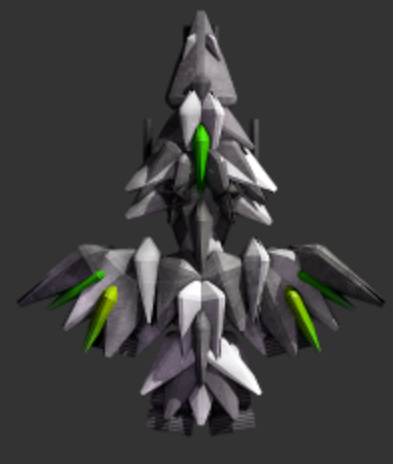
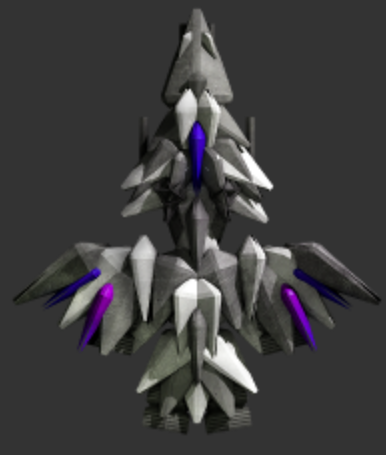
The Republic one seems to have no issues since the eye is adjusted to interpreting slightly blue or yellow lights as "natural", but other cases such as the green-purple combo of the other ones are far more noticeable, especially when ships of different factions meet. To prevent issues with the swizzling system, the lighting used when creating the ship sprites should be neutral (white), or as close as possible.
 AzureNyoki
on 6 Nov 2017
AzureNyoki
on 6 Nov 2017
Related issues
 EndrosG
·
3Comments
EndrosG
·
3Comments
 Safari-Is-Amazing
·
3Comments
Safari-Is-Amazing
·
3Comments
 KeronCyst
·
3Comments
KeronCyst
·
3Comments
 oo13
·
3Comments
Bladewood
·
3Comments
oo13
·
3Comments
Bladewood
·
3Comments
Most helpful comment
I haven't thought about this project since I stopped working on #595, but this thread showed up in my inbox as soon as somebody @'d me, so consider me gotten in touch with.
It's been a long time since I've worked with shaders (the mockups on the PR were just rendered in python), but I can see about getting a PR up to demonstrate the dynamic lighting in-game.