Emscripten: Asyncify doesn't work synchronously when called from Embind function
Asyncify no longer works synchronously when it is called from an Embind function.
Here's an example code:
main.cpp:
#include <stdio.h>
#include <emscripten.h>
#include <emscripten/bind.h>

EM_JS(void, testReadFile, (), {
    Asyncify.handleAsync(async () => {
        FS.createDataFile("/", "foo.txt", "hello world", true, true, true);
        var uint8Array = await FS.readFile("foo.txt");
        var content = new TextDecoder("utf-8").decode(uint8Array);
        console.log(content);
    });
});

void test() {
    testReadFile();
}

EMSCRIPTEN_BINDINGS(my_test) {
    emscripten::function("test", &test);
}

int main()
{
}
index.html:
<!DOCTYPE html>
<html>

<head>
</head>

<body>
  <script>
    var Module
      = {
      onRuntimeInitialized: function () {
        console.log("before");
        Module.test();
        console.log("after");
      }
   };
  </script>
  <script async src="main.js"></script>
</body>

</html>
build, run:
emcc main.cpp -o main.html --bind -s ASYNCIFY -s "ASYNCIFY_IMPORTS=['testReadFile']" -s FORCE_FILESYSTEM=1 -s "EXTRA_EXPORTED_RUNTIME_METHODS=['FS']"
python3 -m http.server 8080
result:
after
hello world
As you can see, it doesn't work synchronously.
But if I call testReadFile() directly from main(), it works synchronously.
Is this a bug? Would there be any workaround to fix this?
Thanks in advance!
 cuinjune
All 23 comments
Do you mean calling testReadFile from JS doesn't work properly?
If so, that is because when a function sleeps, it just returns immediately. You then need to continue it later. Calls in C are all handled for you automatically, but a plain call from JS isn't.
I think you can use ccall for this, it has some asyncify integration. I don't remember the details, but reading the code in preamble.js might help, or looking at the testcases.
 kripken
on 13 Aug 2020
kripken
on 13 Aug 2020
@kripken Thank you so much for your answer!
I tried it with EMSCRIPTEN_KEEPALIVE instead of Embind and now it works fine.
I also needed to remove await before FS.readFile().
Below is the full working code:
main.c:
#include <stdio.h>
#include <emscripten.h>

EM_JS(void, testReadFile, (), {
    Asyncify.handleAsync(async () => {
        FS.createDataFile("/", "foo.txt", "hello world", true, true, true);
        var uint8Array = FS.readFile("foo.txt");
        var content = new TextDecoder("utf-8").decode(uint8Array);
        console.log(content);
    });
});

EMSCRIPTEN_KEEPALIVE
void test() {
    testReadFile();
}

int main()
{
}
index.html:
<!DOCTYPE html>
<html>

<head>
</head>

<body>
  <script>
    var Module
      = {
      onRuntimeInitialized: function () {
        console.log("before");
        Module._test();
        console.log("after");
      }
    };
  </script>
  <script async src="main.js"></script>
</body>

</html>
build:
emcc main.c -o main.html -s ASYNCIFY -s "ASYNCIFY_IMPORTS=['testReadFile']" -s FORCE_FILESYSTEM=1 -s "EXTRA_EXPORTED_RUNTIME_METHODS=['FS']"
result:
hello world
after
@kripken I found out the same code doesn't work if I simply change the main.c to main.cpp.
I need to use C++ so I'm still looking for a solution.
I also tried using ccall but couldn't make it work so far...
cuinjune
on 14 Aug 2020
Maybe the issue is C++ name mangling? If so, wrapping the exported functions in extern "C" { } would work.
 tlively
on 14 Aug 2020
tlively
on 14 Aug 2020
We also hit this issue when working on WebGPU support of OpenCV.js GSoC project.
In that project, the JavaScript code would call into OpenCV functions exposed through embind, e.g. call output = net.foward() to compute the result of a neural network inference.
The forward is implemented in C++ of OpenCV source code. The forward implementation will eventually call WebGPU buffer's mapAsync method to read back the tensor data from GPU to CPU. It is an asynchronous method. So we use Asyncify.handleAsync to make it as a synchronous call for C++ code.
However, according to our test, we found the output = net.forward() will finish before the mapAsync being invoked. That leads to the output is null object.
Any thoughts of the solution?
 huningxin
on 21 Aug 2020
huningxin
on 21 Aug 2020
@huningxin for embind + asyncify see https://emscripten.org/docs/porting/asyncify.html#usage-with-embind (@RReverser added that in #11429)
kripken
on 21 Aug 2020
@huningxin for embind + asyncify see https://emscripten.org/docs/porting/asyncify.html#usage-with-embind (@RReverser added that in #11429)
@kripken Can I use async in emscripten::val? I created my own Object and defined an async function, but it reported an error : use of undeclared identifier'async'.
 NALLEIN
on 22 Aug 2020
NALLEIN
on 22 Aug 2020
@NALLEIN Can you show a code example? It's not very clear what you mean by "async in emscripten::val".
 RReverser
on 23 Aug 2020
RReverser
on 23 Aug 2020
@NALLEIN Can you show a code example? It's not very clear what you mean by "
asyncin emscripten::val".
My code snippet is as follows.:
    emscripten::val readBuffer = {
        readBufferAsync : async function (id){
            const gpuReadBuffer = WebGPU.mgrBuffer.get(id);
            await gpuReadBuffer.mapAsync(GPUMapMode.READ);
            const arrayBuffer = gpuReadBuffer.getMappedRange();
            var mappedData = _malloc(arrayBuffer.byteLength);
            setValue(mappedData, arrayBuffer, 'i8');
            return mappedData;
        }
    }
// another code snippet
    emscripten::val bufferObject = emscripten::val::global("readBuffer");
    mappedData = static_cast<const void*>(bufferObject.call<void*>("readBufferAsync", gpuReadBuffer_.Get()).await());
I created my own object and there is an async function in it. I use it in another code snippet but an error was reported during the compilation process : error: use of undeclared identifier'async'
NALLEIN
on 23 Aug 2020
Before that, I tried to use Asyncify.handleAsync() in EM_JS to process the async function in javascript to make it behave as synchronized, but the problem was the same as the previous one encountered.
The code is as follows:
#ifdef __EMSCRIPTEN__
    EM_JS(const void*, readBufferAsync, (WGPUBuffer id), {
        return Asyncify.handleAsync(async () => {
            const gpuReadBuffer = WebGPU.mgrBuffer.get(id);
            await gpuReadBuffer.mapAsync(GPUMapMode.READ);
            const arrayBuffer = gpuReadBuffer.getMappedRange();
            var mappedData = _malloc(arrayBuffer.byteLength);
            setValue(mappedData, arrayBuffer, 'i8');
            return mappedData;
        });
    });
#endif

// another snippet
#ifdef __EMSCRIPTEN__
void* data = readBufferAsync(gpuReadBuffer_.Get());
#endif
The code doesn't work synchronously.
NALLEIN
on 23 Aug 2020
My code snippet is as follows.:
Well that snippet doesn't work because you seem to be mixing C++ and JavaScript syntax in the same code. Since JavaScript is not valid C++, the compiler complains about async keyword.
Before that, I tried to use Asyncify.handleAsync() in EM_JS to process the async function in javascript to make it behave as synchronized, but the problem was the same as the previous one encountered.
As for this snippet, it should work. Did you pass both -s ASYNCIFY and -s 'ASYNCIFY_IMPORTS=["readBufferAsync"]' to the compiler?
RReverser
on 24 Aug 2020
Before that, I tried to use Asyncify.handleAsync() in EM_JS to process the async function in javascript to make it behave as synchronized, but the problem was the same as the previous one encountered.
As for this snippet, it should work. Did you pass both
-s ASYNCIFYand-s 'ASYNCIFY_IMPORTS=["readBufferAsync"]'to the compiler?
@RReverser Yes, I did pass the -s ASYNCIFY and -s 'ASYNCIFY_IMPORTS=["readBufferAsync"]' to the compiler, but the Asyncify.handleAsync() code snippet did not work in a synchronous manner, and it is not executed until the other parts are finished, as described in this comment: https://github.com/opencv/opencv/pull/18066#issuecomment-677659663.
NALLEIN
on 24 Aug 2020
By referring @cuinjune 's example, I create a standalone sample code to reproduce our WebGPU problem:
main.cpp
#include <stdio.h>
#include <emscripten.h>
#include <emscripten/bind.h>
#include <emscripten/html5.h>
#include <emscripten/html5_webgpu.h>
#include <webgpu/webgpu_cpp.h>

EM_JS(const void*, readBufferAsync, (WGPUBuffer id), {
    return Asyncify.handleAsync(async () => {
        const gpuReadBuffer = WebGPU.mgrBuffer.get(id);
        await gpuReadBuffer.mapAsync(GPUMapMode.READ);
        const arrayBuffer = gpuReadBuffer.getMappedRange();
        console.log("readBufferAsync: mapped size", arrayBuffer.byteLength, "data", new Uint8Array(arrayBuffer));
    });
});

void test() {
    wgpu::Device device = wgpu::Device::Acquire(emscripten_webgpu_get_device());
    wgpu::BufferDescriptor desc = {};
    desc.size = 16;
    desc.usage = wgpu::BufferUsage::CopyDst | wgpu::BufferUsage::MapRead;
    auto gpuReadBuffer = device.CreateBuffer(&desc);
    readBufferAsync(gpuReadBuffer.Get());
}

EMSCRIPTEN_BINDINGS(my_test) {
    emscripten::function("test", &test);
}

int main()
{
}
index.html
<!DOCTYPE html>
<html>

<head>
</head>

<body>
  <script>
    var adapter;
    var device;
    async function mapAsync() {
        const gpuReadBuffer = device.createBuffer(
            {size: 16, usage: GPUBufferUsage.MAP_READ | GPUBufferUsage.COPY_DST});
        await gpuReadBuffer.mapAsync(GPUMapMode.READ);
        const arrayBuffer = gpuReadBuffer.getMappedRange();
        console.log("mapAsync: mapped size", arrayBuffer.byteLength, "data", new Uint8Array(arrayBuffer));
    }
    var Module
      = {
      onRuntimeInitialized: async function () {
        adapter = await navigator.gpu.requestAdapter();
        device = await adapter.requestDevice();
        Module.preinitializedWebGPUDevice = device;
        console.log("before");
        await mapAsync();
        Module.test();
        console.log("after");
      }
   };
  </script>
  <script async src="main.js"></script>
</body>

</html>
build
> emcc main.cpp -o main.html --bind -s ASYNCIFY -s "ASYNCIFY_IMPORTS=['readBufferAsync']" -s USE_WEBGPU=1
result
The console log is
mapAsync: mapped size 16 data Uint8Array(16) [0, 0, 0, 0, 0, 0, 0, 0, 0, 0, 0, 0, 0, 0, 0, 0]
after
readBufferAsync: mapped size 16 data Uint8Array(16) [0, 0, 0, 0, 0, 0, 0, 0, 0, 0, 0, 0, 0, 0, 0, 0]
The readBufferAsync is expected to be called before after. The actual is readBufferAsync is called after after.
@kripken @RReverser , anything we missed?
huningxin
on 24 Aug 2020
I can reproduce this issue by only using emscripten_sleep. My test code is
main.cpp
#include <stdio.h>
#include <emscripten.h>
#include <emscripten/bind.h>
#include <emscripten/html5.h>
#include <emscripten/html5_webgpu.h>
#include <webgpu/webgpu_cpp.h>

const size_t BUFFER_SIZE = 16;

typedef struct {
    wgpu::Buffer buffer;
    const void* mapped;
} GPUReadback;

void mapAsyncAndWait() {
    printf("mapAsyncAndWait\n");
    wgpu::Device device = wgpu::Device::Acquire(emscripten_webgpu_get_device());
    wgpu::BufferDescriptor desc = {};
    desc.size = BUFFER_SIZE;
    desc.usage = wgpu::BufferUsage::CopyDst | wgpu::BufferUsage::MapRead;
    GPUReadback gpuReadback;
    gpuReadback.buffer = device.CreateBuffer(&desc);
    gpuReadback.mapped = nullptr;
    gpuReadback.buffer.MapAsync(wgpu::MapMode::Read, 0, BUFFER_SIZE,
        [](WGPUBufferMapAsyncStatus status, void* userdata) {
            printf("mapAsync callback\n");
            GPUReadback* gpuReadback = static_cast<GPUReadback*>(userdata);
            gpuReadback->mapped = gpuReadback->buffer.GetConstMappedRange(0, BUFFER_SIZE);
        }, &gpuReadback);
    while(gpuReadback.mapped == nullptr)
    {
        printf("emscripten_sleep\n");
        emscripten_sleep(5);
    }
    printf("mapped data %p\n", gpuReadback.mapped);
}

EMSCRIPTEN_BINDINGS(my_test) {
    emscripten::function("mapAsyncAndWait", &mapAsyncAndWait);
}

int main()
{
}
index.html
<!DOCTYPE html>
<html>

<head>
</head>

<body>
  <script>
    var adapter;
    var device;
    var Module
      = {
      onRuntimeInitialized: async function () {
        adapter = await navigator.gpu.requestAdapter();
        device = await adapter.requestDevice();
        Module.preinitializedWebGPUDevice = device;
        console.log("before");
        Module.mapAsyncAndWait();
        console.log("after");
      }
   };
  </script>
  <script async src="main.js"></script>
</body>

</html>
build command
> emcc --bind -s ASYNCIFY -s USE_WEBGPU=1 -o main.html main.cpp
The expected log is
mapAsyncAndWait
emscripten_sleep
emscripten_sleep
mapAsync callback
mapped data 0x502848
after
The actual is
mapAsyncAndWait
emscripten_sleep
after
emscripten_sleep
mapAsync callback
mapped data 0x502848
It looks like the emscripten_sleep resumes the JavaScript code execution at the caller site (console.log("after");).
@kripken @RReverser , any thoughts?
huningxin
on 25 Aug 2020
Well you didn't await Module.mapAsyncAndWait() so it logs after first. And instead of calling the function directly, I think you'll need to use ccall with the async option.
 curiousdannii
on 25 Aug 2020
curiousdannii
on 25 Aug 2020
Well you didn't
await Module.mapAsyncAndWait()so it logsafterfirst.
I tried await Module.mapAsyncAndWait(), the result is the same, the mapAsync callback is logged after after. I guess the reason is mapAsyncAndWait doesn't return a Promise.
And instead of calling the function directly, I think you'll need to use
ccallwith theasyncoption.
The ccall with async option works. Thanks much @curiousdannii ! I am pasting the workable version for reference
index.html
<!DOCTYPE html>
<html>

<head>
</head>

<body>
  <script>
    var adapter;
    var device;
    var Module
      = {
      onRuntimeInitialized: async function () {
        adapter = await navigator.gpu.requestAdapter();
        device = await adapter.requestDevice();
        Module.preinitializedWebGPUDevice = device;
        console.log("before");
        await Module.ccall('mapAsyncAndWait', null, [], [], {async: true});
        console.log("after");
      }
   };
  </script>
  <script async src="main.js"></script>
</body>

</html>
main.cc
#include <stdio.h>
#include <emscripten.h>
#include <emscripten/bind.h>
#include <emscripten/html5.h>
#include <emscripten/html5_webgpu.h>
#include <webgpu/webgpu_cpp.h>

const size_t BUFFER_SIZE = 16;

typedef struct {
    wgpu::Buffer buffer;
    const void* mapped;
} GPUReadback;

extern "C" {

void mapAsyncAndWait() {
    printf("mapAsyncAndWait\n");
    wgpu::Device device = wgpu::Device::Acquire(emscripten_webgpu_get_device());
    wgpu::BufferDescriptor desc = {};
    desc.size = BUFFER_SIZE;
    desc.usage = wgpu::BufferUsage::CopyDst | wgpu::BufferUsage::MapRead;
    GPUReadback gpuReadback;
    gpuReadback.buffer = device.CreateBuffer(&desc);
    gpuReadback.mapped = nullptr;
    gpuReadback.buffer.MapAsync(wgpu::MapMode::Read, 0, BUFFER_SIZE,
        [](WGPUBufferMapAsyncStatus status, void* userdata) {
            printf("mapAsync callback\n");
            GPUReadback* gpuReadback = static_cast<GPUReadback*>(userdata);
            gpuReadback->mapped = gpuReadback->buffer.GetConstMappedRange(0, BUFFER_SIZE);
        }, &gpuReadback);
    while(gpuReadback.mapped == nullptr)
    {
        printf("emscripten_sleep\n");
        emscripten_sleep(5);
    }
    printf("mapped data %p\n", gpuReadback.mapped);
}

}

int main()
{
}
build command
> emcc -s ASYNCIFY -s USE_WEBGPU=1 -s 'EXTRA_EXPORTED_RUNTIME_METHODS=["ccall"]' -s EXPORTED_FUNCTIONS="['_mapAsyncAndWait']" -o main.html main.cc
log
mapAsyncAndWait
emscripten_sleep
emscripten_sleep
mapAsync callback
mapped data 0x502848
after
So I think the Embind lacks the support of async method. Could Embind exported function has the async option? @kripken
huningxin
on 26 Aug 2020
I finally has a workaround for embind exported async method by using Asyncify.asyncFinalizers in a JS wrapper. Actually I refer to the ccall implementation of async.
index.html
diff --git a/index.html b/index.html
index f95903e..4c82162 100644
--- a/index.html
+++ b/index.html
@@ -15,10 +15,16 @@
         device = await adapter.requestDevice();
         Module.preinitializedWebGPUDevice = device;
         console.log("before");
-        Module.mapAsyncAndWait();
+        await mapAsyncAndWaitWrapper();
         console.log("after");
       }
    };
+   function mapAsyncAndWaitWrapper() {
+        Module.mapAsyncAndWait();
+        return new Promise(function(resolve) {
+            Module.Asyncify.asyncFinalizers.push(function() {resolve();});
+        });
+    }
   </script>
   <script async src="main.js"></script>
 </body>
build command
-WASM_CPPFLAGS := --bind -s ASYNCIFY -s USE_WEBGPU=1
+WASM_CPPFLAGS := --bind -s ASYNCIFY -s USE_WEBGPU=1 -s EXTRA_EXPORTED_RUNTIME_METHODS=['Asyncify']
@NALLEIN , please see whether it works for your WebGPU OpenCV.js PR.
@kripken @RReverser , do you think we can add async method support into Embind?
huningxin
on 26 Aug 2020
do you think we can add async method support into Embind?
This sounds like a good idea, yeah. Do you want to try and add it yourself by any chance? (happy to help with PR review)
RReverser
on 26 Aug 2020
Check my issue, with a solution.
https://github.com/emscripten-core/emscripten/issues/10850#issue-594618151
Using valObject::await() operator, same problem, I need some help.
https://github.com/emscripten-core/emscripten/issues/12480#issue-718444546
 Satancito
on 10 Oct 2020
Satancito
on 10 Oct 2020
@Satancito Yes, it's the same issue as @huningxin was showing, and the solution would be the same - someone needs to add support for async functions to Embind.
RReverser
on 10 Oct 2020
I have a solution for this problem. I will share it in this week. 100% Embind solution.
Satancito
on 18 Oct 2020
@RReverser this "EmbindAsync" solves the issue.
EXAMPLE from Asyncify - returning values
Main code
main.cpp
#include <InsaneEmscripten.h>

emscripten::val GetBase64Sha256Normal(const String &text)//returns quickly undefined to JS
{
    USING_EMSCRIPTEN;
    USING_INSANE_EMSCRIPTEN;

    val encoder = val::global()[u8"TextEncoder"].new_();
    val data = encoder.call<val>(u8"encode", val(text));
    Console::Log(u8"ask for digest for "s, text);
    val digestValue = val::global()[u8"crypto"][u8"subtle"].call<val>(u8"digest", val(u8"SHA-256"), data).await();
    Console::Log(u8"got digest of length "s, digestValue[u8"byteLength"]);
    val base64 = val::global().call<val>(u8"btoa", val::global()[u8"String"][u8"fromCharCode"].call<val>(u8"apply", val::null(), val::global()[u8"Uint8Array"].new_(digestValue)));
    return base64;
}

emscripten::val GetBase64Sha256Async(const String &text)//returns a Promise
{
    USING_EMSCRIPTEN;
    USING_INSANE_EMSCRIPTEN;

    EMSCRIPTEN_VAL_FUNCTOR_TYPE(1)
    callback = [](val digestValue) -> val {
        Console::Log(u8"got digest of length "s, digestValue[u8"byteLength"]);
        val base64 = val::global().call<val>(u8"btoa", val::global()[u8"String"][u8"fromCharCode"].call<val>(u8"apply", val::null(), val::global()[u8"Uint8Array"].new_(digestValue)));
        return base64;
    };

    val encoder = val::global()[u8"TextEncoder"].new_();
    val data = encoder.call<val>(u8"encode", val(text));
    Console::Log(u8"ask for digest for "s, text);
    return val::global()[u8"crypto"][u8"subtle"].call<val>(u8"digest", val(u8"SHA-256"), data).call<val>(u8"then", Js::Bind(callback));
}

int main()
{
    USING_EMSCRIPTEN;
    USING_INSANE_EMSCRIPTEN;
    Console::Log("Module instance created."s);
}

EMSCRIPTEN_BINDINGS(exports)
{
    USING_EMSCRIPTEN;
    EMSCRIPTEN_EXPORT_ALL_VAL_FUNCTORS(5);

    function<val>(u8"GetBase64Sha256Normal", &GetBase64Sha256Normal);
    function<val>(u8"GetBase64Sha256Async", &GetBase64Sha256Async);
}
index.html
<!DOCTYPE html>
<html lang="en">

<head>
    <meta charset="UTF-8">
    <meta name="viewport" content="width=device-width, initial-scale=1.0">
    <title>EmbindAsync - Tests</title>
    <script type="text/javascript" src="EmbindAsync.js" defer></script>
</head>

<body>
    <button onclick="onClick(1)">Call GetBase64Sha256Async</button>
    <button onclick="onClick(2)">Call GetBase64Sha256Normal</button>
    <script>
        async function onClick(opt) {
            switch (opt) {
                case 1:
                    console.log("BEFORE 1");
                    var result = await Main.Module.GetBase64Sha256Async("grape");
                    console.log("RESULT: " + result);
                    console.log("AFTER 1");
                    alert(result);
                    break;
                case 2:
                    console.log("BEFORE 2");
                    var result = Main.Module.GetBase64Sha256Normal("grape");
                    console.log("RESULT: " + result);
                    console.log("AFTER 2");
                    alert(result);
                    break;
                default:
                    break;
            }
        }
    </script>

</body>

</html>
Results

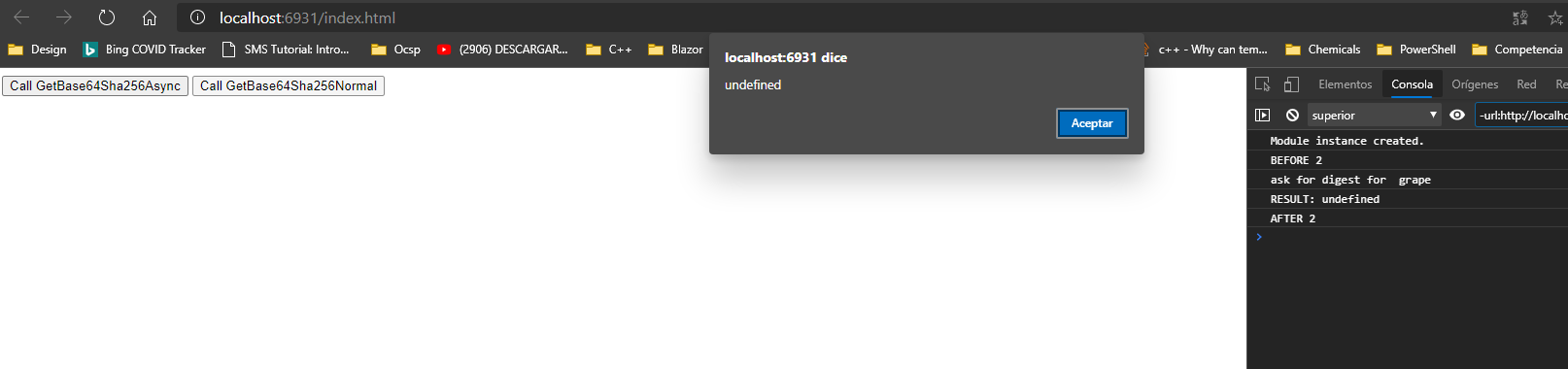
Extras
Compile.ps1
& "$Env:EMSCRIPTEN_DIR/upstream\emscripten/em++.bat" `
main.cpp `
-I ./ `
-o EmbindAsync.js `
-std=c++17 `
--bind `
-s WASM=1 `
-s DISABLE_EXCEPTION_CATCHING=0 `
-s USE_WEBGPU=1 `
-s SINGLE_FILE=1 `
-s ASYNCIFY=1 `
-s VERBOSE=0 `
-O2 `
-s EXPORT_NAME=`'CreateModuleInstance`' `
-s MODULARIZE=1 `
-s EXPORTED_FUNCTIONS=[`'_main`'] `
--extern-post-js "ExternPost.js" `
Run.ps1
emrun --browser "C:\Program Files (x86)\Microsoft\Edge\Application\msedge.exe" index.html
InsaneEmscripten.h
#pragma once
#include <emscripten/bind.h>
#include <InsanePreprocessor.h>
#include <type_traits>
#include <functional>

#define VAL_TYPE() emscripten::val
#define EMSCRIPTEN_EXPORT_FUNCTOR(arity, returnType, name, p3, p4, p5) emscripten::class_<std::function<returnType(INSANE_REPEAT_COMMA_##arity(VAL_TYPE(), 0))>>(STRINGIFY(name##arity)).constructor<>().function("opcall", &std::function<returnType(INSANE_REPEAT_COMMA_##arity(VAL_TYPE(), 0))>::operator());
#define EMSCRIPTEN_EXPORT_ALL_VOID_FUNCTORS(arity) INSANE_REPEAT_ADVANCED(EMSCRIPTEN_EXPORT_FUNCTOR, arity, VOID_TYPE(), VoidFunctor, 0, 0, 0)
#define EMSCRIPTEN_EXPORT_ALL_VAL_FUNCTORS(arity) INSANE_REPEAT_ADVANCED(EMSCRIPTEN_EXPORT_FUNCTOR, arity, VAL_TYPE(), ValFunctor, 0, 0, 0)
#define EMSCRIPTEN_EXPORT_ALL_FUNCTORS(arity) \
    EMSCRIPTEN_EXPORT_ALL_VAL_FUNCTORS(arity) \
    EMSCRIPTEN_EXPORT_ALL_VOID_FUNCTORS(arity)

#define EMSCRIPTEN_FUNCTOR_TYPE(arity, returnType) std::function<returnType(INSANE_REPEAT_COMMA_##arity(VAL_TYPE(), 0))>
#define EMSCRIPTEN_VOID_FUNCTOR_TYPE(arity) EMSCRIPTEN_FUNCTOR_TYPE(arity, VOID_TYPE())
#define EMSCRIPTEN_VAL_FUNCTOR_TYPE(arity) EMSCRIPTEN_FUNCTOR_TYPE(arity, VAL_TYPE())

#define USING_EMSCRIPTEN using namespace emscripten
#define USING_INSANE_EMSCRIPTEN using namespace Insane::Emscripten

typedef std::string String;
using namespace std::string_literals;

namespace Insane::Emscripten
{

    class Console
    {
    private:
        enum class ConsoleMessageType
        {
            LOG,
            INFO,
            WARN,
            ERROR
        };
        template <typename... ParamType,
                  typename = typename std::void_t<std::enable_if_t<std::is_same_v<ParamType, String> ||
                                                                   std::is_same_v<ParamType, emscripten::val> ||
                                                                   std::is_floating_point_v<ParamType> ||
                                                                   std::is_integral_v<ParamType>>...>>
        static inline void Print(ConsoleMessageType type, const ParamType &... args)
        {
            USING_EMSCRIPTEN;
            String method = u8""s;
            switch (type)
            {
            case ConsoleMessageType::INFO:
                method = u8"info"s;
                break;
            case ConsoleMessageType::WARN:
                method = u8"warn"s;
                break;
            case ConsoleMessageType::ERROR:
                method = u8"error"s;
                break;
            default:
                method = u8"log";
                break;
            }
            val::global("console").call<void>(method.c_str(), args...);
        };

    public:
        Console() = default;
        ~Console() = default;
        template <typename... ParamType,
                  typename = typename std::void_t<std::enable_if_t<std::is_same_v<ParamType, String> ||
                                                                   std::is_same_v<ParamType, emscripten::val> ||
                                                                   std::is_floating_point_v<ParamType> ||
                                                                   std::is_integral_v<ParamType>>...>>
        static inline void Log(const ParamType &... args)
        {
            USING_EMSCRIPTEN;
            Print(ConsoleMessageType::LOG, args...);
        };

        template <typename... ParamType,
                  typename = typename std::void_t<std::enable_if_t<std::is_same_v<ParamType, String> ||
                                                                   std::is_same_v<ParamType, emscripten::val> ||
                                                                   std::is_floating_point_v<ParamType> ||
                                                                   std::is_integral_v<ParamType>>...>>
        static inline void Info(const ParamType &... args)
        {
            USING_EMSCRIPTEN;
            Print(ConsoleMessageType::INFO, args...);
        };

        template <typename... ParamType,
                  typename = typename std::void_t<std::enable_if_t<std::is_same_v<ParamType, String> ||
                                                                   std::is_same_v<ParamType, emscripten::val> ||
                                                                   std::is_floating_point_v<ParamType> ||
                                                                   std::is_integral_v<ParamType>>...>>
        static inline void Warn(const ParamType &... args)
        {
            USING_EMSCRIPTEN;
            Print(ConsoleMessageType::WARN, args...);
        };

        template <typename... ParamType,
                  typename = typename std::void_t<std::enable_if_t<std::is_same_v<ParamType, String> ||
                                                                   std::is_same_v<ParamType, emscripten::val> ||
                                                                   std::is_floating_point_v<ParamType> ||
                                                                   std::is_integral_v<ParamType>>...>>
        static inline void Error(const ParamType &... args)
        {
            USING_EMSCRIPTEN;
            Print(ConsoleMessageType::ERROR, args...);
        };
    };

    class Promise
    {
    private:
    public:
        static inline emscripten::val Resolve(const emscripten::val &value)
        {
            USING_EMSCRIPTEN;
            return val::global()[u8"Promise"].call<val>(u8"resolve", value);
        }
        static inline emscripten::val Reject(const emscripten::val &value)
        {
            USING_EMSCRIPTEN;
            return val::global()[u8"Promise"].call<val>(u8"reject", value);
        }
    };

    class Js
    {
    private:
        static inline emscripten::val Bind(const emscripten::val &fx)
        {
            USING_EMSCRIPTEN;
            return fx["opcall"].call<val>("bind", fx);
        }

    public:
        template <typename ReturnType,
                  typename... ParamType,
                  typename = typename std::void_t<std::enable_if_t<std::is_same_v<ReturnType, void> ||
                                                                   std::is_same_v<ReturnType, emscripten::val>>>,
                  typename = typename std::void_t<std::enable_if_t<std::is_same_v<ParamType, emscripten::val>>...>>
        static inline emscripten::val Bind(const std::function<ReturnType(ParamType...)> &fx)
        {
            USING_EMSCRIPTEN;
            return Bind(val(fx));
        }
    };
} // namespace Insane::Emscripten
ExternPost.js
File needed in Compile.ps1
window.CreateModuleInstance({ noInitialRun: false })
    .then(instance => {
        window.Main = { Module: instance };
    });
InsanePreprocessor.h
Too large code. Check the content of this file in EmbindAsync
Satancito
on 19 Oct 2020
@Satancito
is this really solved? This indeed solved with pure embind, but it's not in async/await style, which will quickly leads to callback hell and it is not straightforward enough. ccall can treat the function as async function and return promise without much modification to c function.
maybe we need something like async_function
EMSCRIPTEN_BINDINGS(exports) {
async_function<val>(u8"async_function", async_function);
}
 tim37021
on 2 Jan 2021
tim37021
on 2 Jan 2021
Related issues
 void4
·
3Comments
void4
·
3Comments
 lormuc
·
4Comments
lormuc
·
4Comments
 ShawZG
·
4Comments
ShawZG
·
4Comments
 rpellerin
·
3Comments
rpellerin
·
3Comments
 juj
·
3Comments
juj
·
3Comments