Emscripten: Cannot verify LLVM version
Ubuntu 16.04, emscripten manually built.
When I $ ./emcc -v this is what I get:
CRITICAL:root:Could not verify LLVM version: [Errno 2] No such file or directory
ERROR:root:Emscripten, llvm and clang repo versions do not match, this is dangerous (1.37.0, 1.37.0, ?)
ERROR:root:Make sure to use the same branch in each repo, and to be up-to-date on each. See http://kripken.github.io/emscripten-site/docs/building_from_source/LLVM-Backend.html
INFO:root:(Emscripten: Running sanity checks)
CRITICAL:root:Cannot find /home/sepultura/Downloads/emscripten-fastcomp/build/bin/clang++, check the paths in ~/.emscripten
The paths in emscripten are correct.
A possible source of this problem is that clang++ does not exist in the /build/bin folder.
The folder "/home/sepultura/Downloads/emscripten-fastcomp/tools/clang" does exist though.
Any help?
 DimTheo
All 9 comments
What does your ~/.emscripten look like?
 juj
on 8 Aug 2017
juj
on 8 Aug 2017
For reference, in an emsdk-based installation, the file ~/.emscripten will look like:
C:\code\emsdk\emscripten\incoming>type C:\users\clb\.emscripten
import os
LLVM_ROOT='C:/code/emsdk/clang/fastcomp/build_incoming_vs2015_64/RelWithDebInfo/bin'
NODE_JS='C:/code/emsdk/node/4.1.1_64bit/bin/node.exe'
PYTHON='C:/code/emsdk/python/2.7.5.3_64bit/python.exe'
JAVA='C:/code/emsdk/java/7.45_64bit/bin/java.exe'
EMSCRIPTEN_ROOT='C:/code/emsdk/emscripten/incoming'
EMSCRIPTEN_NATIVE_OPTIMIZER='C:/code/emsdk/emscripten/incoming_vs2015_64bit_optimizer/RelWithDebInfo/optimizer.exe'
BINARYEN_ROOT='C:/code/emsdk/binaryen/master_vs2015_64bit_binaryen'
MINGW_ROOT='C:/code/emsdk/mingw/7.1.0_64bit'
SPIDERMONKEY_ENGINE = ''
V8_ENGINE = ''
TEMP_DIR = 'c:/users/clb/appdata/local/temp'
COMPILER_ENGINE = NODE_JS
JS_ENGINES = [NODE_JS]
import os
EMSCRIPTEN_ROOT = os.path.expanduser(os.getenv('EMSCRIPTEN') or '/home/sepultura/Downloads/emscripten') # directory
LLVM_ROOT = os.path.expanduser('/home/sepultura/Downloads/emscripten-fastcomp/build/bin') # directory
BINARYEN_ROOT = os.path.expanduser(os.getenv('BINARYEN') or '/usr/bin') # directory
#PYTHON = 'python'
NODE_JS = os.path.expanduser(os.getenv('NODE') or '/usr/bin/nodejs') # executable
SPIDERMONKEY_ENGINE = [os.path.expanduser(os.getenv('SPIDERMONKEY') or 'js')] # executable
V8_ENGINE = os.path.expanduser(os.getenv('V8') or 'd8') # executable
JAVA = 'java' # executable
TEMP_DIR = '/tmp'
CRUNCH = os.path.expanduser(os.getenv('CRUNCH') or 'crunch') # executable
COMPILER_ENGINE = NODE_JS
JS_ENGINES = [NODE_JS] # add this if you have spidermonkey installed too, SPIDERMONKEY_ENGINE]
=======================================
A screenshot from the bin folder, clang++ is missing. http://imgur.com/a/UaNtz
DimTheo
on 8 Aug 2017
How did you build fastcomp LLVM/Clang? It looks like the Clang plugin did not get picked up to the build, and LLVM got build without Clang tool in it. Assuming /Home/Downloads/emscripten-fastcomp is the source directory for LLVM trunk, do you have /Home/Downloads/emscripten-fastcomp/tools/clang populated to contain the Clang project?
juj
on 8 Aug 2017
If you are looking for a simple way to bootstrap from github repositories, you can also use emsdk to build everything from source, with
git clone https://github.com/juj/emsdk.git
cd emsdk
./emsdk install --build=Release sdk-incoming-64bit binaryen-master-64bit
./emsdk activate --build=Release sdk-incoming-64bit binaryen-master-64bit
source ./emsdk_env.sh
cd emscripten/incoming
./emcc tests/hello_world.c -o hello_world.html
Then if you like to add your own git remotes for own development,
cd emsdk/emscripten/incoming
git remote add DimTheo https://github.com/DimTheo/emscripten.git
git fetch DimTheo
git checkout -b my_incoming DimTheo/incoming
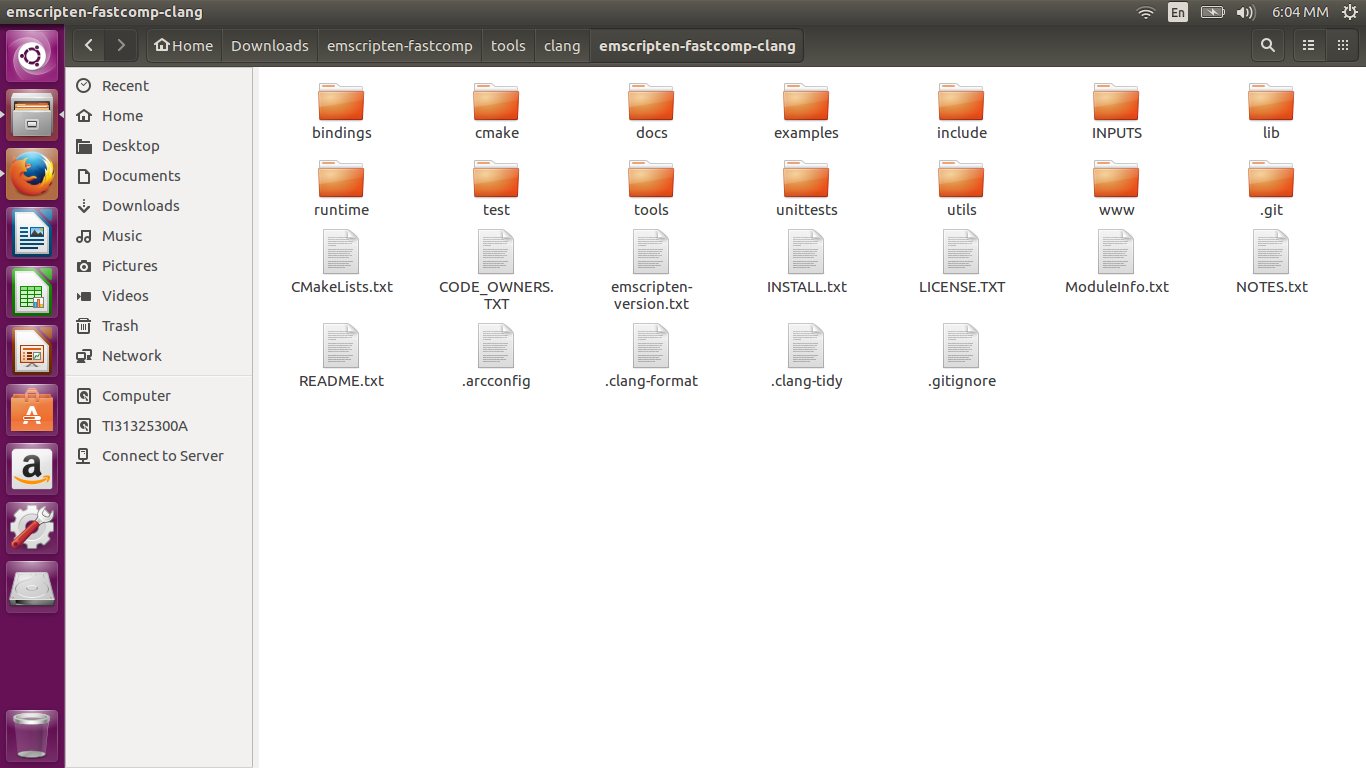
Built fastcomp by following this http://kripken.github.io/emscripten-site/docs/building_from_source/building_fastcomp_manually_from_source.html#building-fastcomp-from-source
DimTheo
on 8 Aug 2017
Oh, the contents of clang should exist one directory up, in emscripten-fastcomp/tools/clang, and without a directory emscripten-fastcomp-clang. Try moving all files in that directory one directory upwards, then kill CMakeCache.txt and recmake and rebuild.
juj
on 8 Aug 2017
Yeah this is what I tried when I posted the screen, I rebuilt and ./emcc -v is all good now.
Thank you for your help.
Maybe the guide here could be made more specific so that users don't have similar future problems.
DimTheo
on 8 Aug 2017
This issue has been automatically marked as stale because there has been no activity in the past 2 years. It will be closed automatically if no further activity occurs in the next 7 days. Feel free to re-open at any time if this issue is still relevant.
![stale[bot] picture](https://avatars.githubusercontent.com/in/1724?v=4&s=40) stale[bot]
on 30 Aug 2019
stale[bot]
on 30 Aug 2019
Related issues
 kripken
·
4Comments
kripken
·
4Comments
 yahsaves
·
4Comments
yahsaves
·
4Comments
 id01
·
3Comments
id01
·
3Comments
 answer1103
·
4Comments
kripken
·
4Comments
answer1103
·
4Comments
kripken
·
4Comments
Most helpful comment
If you are looking for a simple way to bootstrap from github repositories, you can also use
emsdkto build everything from source, withThen if you like to add your own git remotes for own development,