Hello,
Right now i am using home-assistant for controlling ems-esp over mqtt. Playing around with tasmota made me find out about a pretty neat thing, which is mqtt discovery. Basically you put the device on the same mqtt server and all settings get automatically added into home assistant, and it gets added to the "devices" section. This would be pretty neat to have added :D
Here some more info: https://www.home-assistant.io/docs/mqtt/discovery/. Hope you can look into this, and thanks for making this project!!
 Xeyame
All 72 comments
That would be nice to have, I agree. It would mean changing the form of the MQTT topics again though.
 proddy
on 8 Jan 2020
proddy
on 8 Jan 2020
It could be nice for HA, but changing the MQTT topics will break compatibility with other MQTT systems like Domoticz etc.
Also it would mean you have to listen to 100+ additional topics.
As it is now you just have to copy the preconfigured YAML files into the HA config and your (almost) done.
Perhaps the better option for HA would be to make a HA integration for EMS-ESP.
 bbqkees
on 8 Jan 2020
bbqkees
on 8 Jan 2020
Just like with tasmota you could maybe make it an configurable setting
Xeyame
on 8 Jan 2020
Many others project have it as a configurable item 👍
zigbee2mqtt : https://www.zigbee2mqtt.io/integration/home_assistant.html
In your Zigbee2mqtt configuration.yaml set homeassistant: true
espHome : https://esphome.io/components/api.html and https://esphome.io/components/mqtt.html
 moustic999
on 8 Jan 2020
moustic999
on 8 Jan 2020
yes, the correct way would be to have these all configurable. Most of the elements are already there (state, commands, status base). It would work for the thermostat temperatures and the binary switches (heating on/off) but 'm worried how all the boiler data will be transmitted. According to the HA doc each boiler value will need to be sent individually as a sensor, as opposed to one large payload.
Anyway a nice project for someone to experiment with!
proddy
on 8 Jan 2020
Yes I could at one point look into that :p, but personally I only use the thermostat from HA and log the rest into influx/grafana so eh
Xeyame
on 8 Jan 2020
Hi,
I'd rather prefer to have some mqtt free solution for home assistant like I mentioned in issue 87.
Issue 87
I know MQTT is the universal solution but being spoiled by the esphome integration I really miss that for ems-esp.
 TimoFriedri
on 20 Jan 2020
TimoFriedri
on 20 Jan 2020
@TimoFriedri ESPhome wrote their own API using RPC/TCP including the Home Assistance component. That's a lot of engineering work and doable with their hundreds of contributors but sadly EMS-ESP is just me and I simply don't have the time or the need for this feature. It would be easier to just port the EMS-ESP logic to ESPhome.
proddy
on 20 Jan 2020
Ok, I get it. Still, thanks a lot for the nice work you have done.
In that case I would also strongly vote for the optionally MQTT topics for HA auto discovery.
TimoFriedri
on 20 Jan 2020
I added MQTT auto discovery in EMS-ESP version 2.0, only for the Thermostat now. I'm still "on the fence" to what other data from EMS-ESP is actually useful for people to control.
proddy
on 13 May 2020
todo: add Boiler
proddy
on 1 Sep 2020
as requested by @TimoFriedri , include the boiler as sensors in the MQTT Discovery with Home Assistant.
proddy
on 1 Sep 2020
Hi,
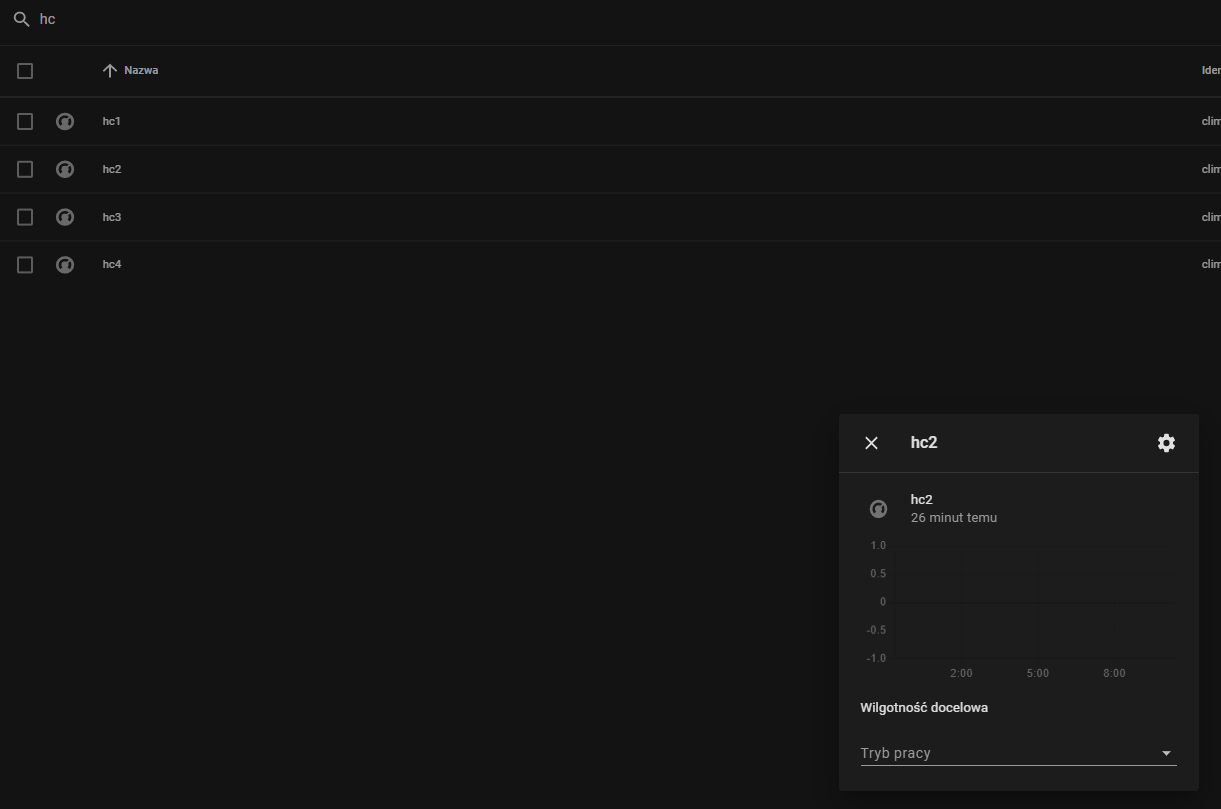
I upgrade to 2.0 version yesterday and I see that system auto discovery 4 climates instances - hc1, hc2, hc3, hc4. But only first have any values (eg. 'set 21,5 degree' and 'current 31,5 degree'). It is possible to discover only usable HC's?
 stravinci
on 2 Sep 2020
stravinci
on 2 Sep 2020
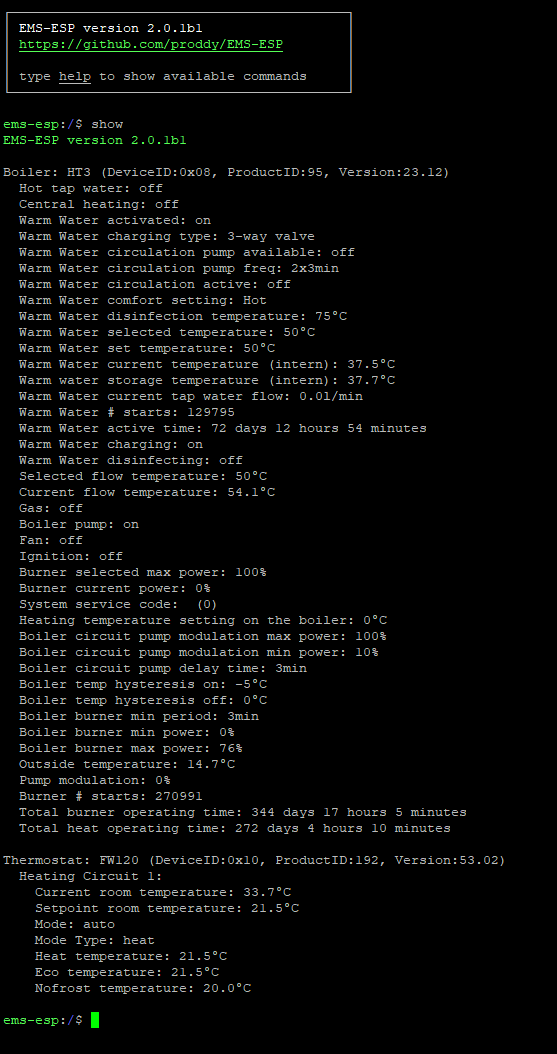
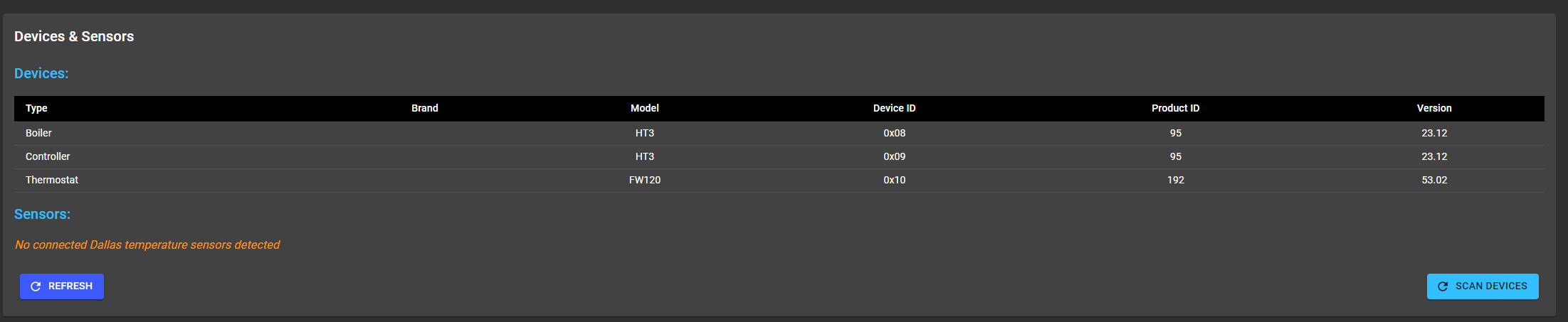
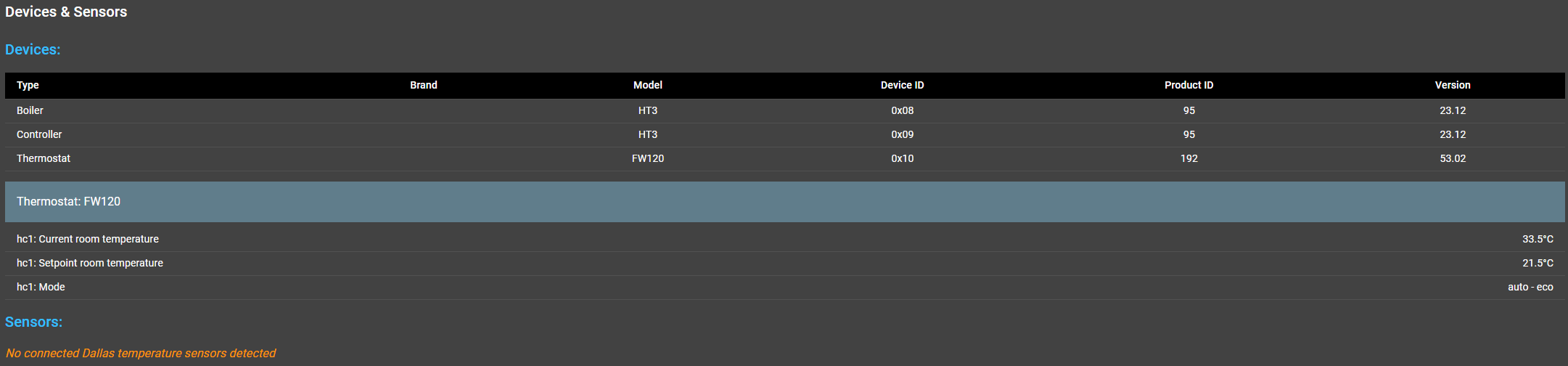
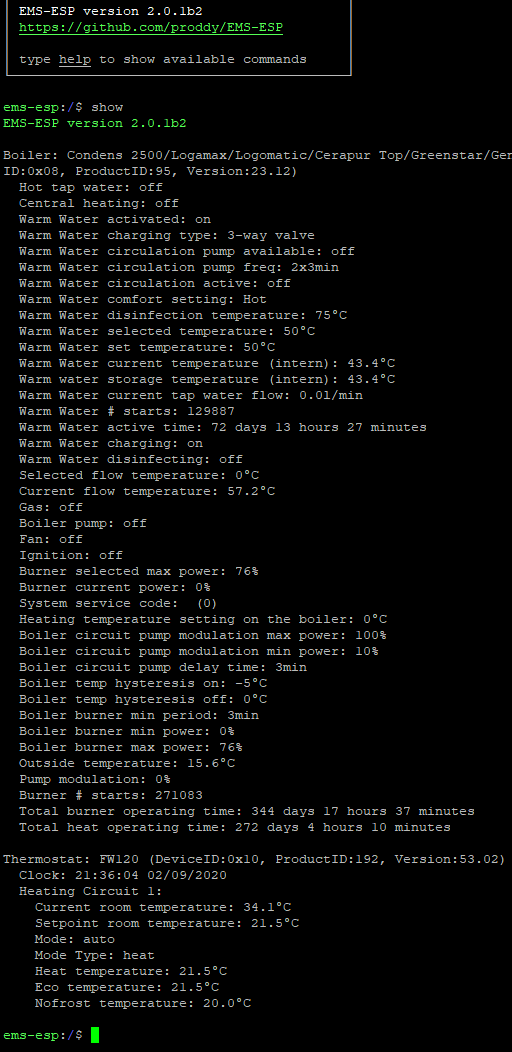
@stravinci are you saying the other heating circuits (hc2,3,4) are also published but with empty values? That was not the intention so looks like a bug. What do you see in the console (show) for the thermostats and also what is shown in the WebU when looking the Devices? Also which Thermostat are you using?
proddy
on 2 Sep 2020
Yes, I see 4 HC's.
Console:
https://alioth.workupload.com/image/n8kUMx7r8Pg
Web:
https://alioth.workupload.com/image/VtCdsY7jE8p
HA:
https://botein.workupload.com/image/Q3bPKFGRxfb
My FW120 is located at boiler so I don't want to set boiler room temperature - boiler know that thermostat is located at his front so it change menu where room temperature does not exist.
stravinci
on 2 Sep 2020
Ok, I'll look into fixing this in 2.0.1 (which is in the dev branch).
(BTW those images didn't upload. just drag&drop into the github issue next time)
proddy
on 2 Sep 2020
Ok, one more time screens.
Console:
Web:
HA:
stravinci
on 2 Sep 2020
I see now, the MQTT discovery config topics are sent, not the payloads. I can fix that.
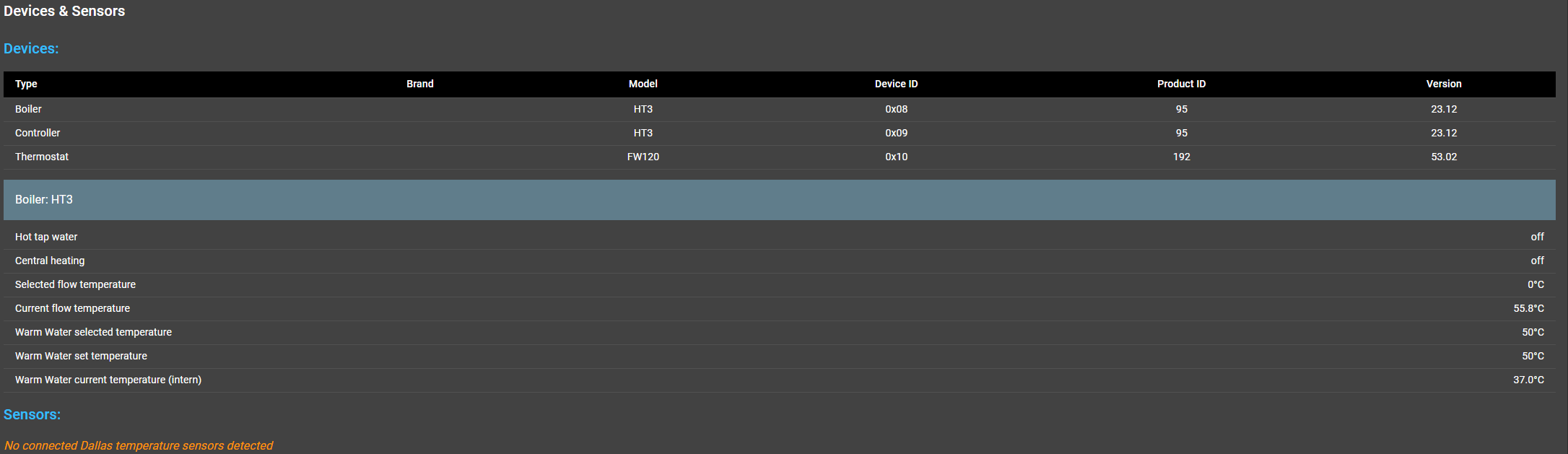
BTW you can also click on the device in the Web UI to show it's details.
proddy
on 2 Sep 2020
Nice UI :)
stravinci
on 2 Sep 2020
@proddy Am I right with the assumption that your TODO means that you planto publish each boiler sensor value as HA discovery entity?
Do you also plan that for all thermostat value?
I know these are some dozen entities in HA, but I think with the new integrations/devices/entities and enable/disable this is no problem to organize on HA side.
TimoFriedri
on 2 Sep 2020
@TimoFriedri yes, I started working on this last night and quickly discovered why I avoided it in the beginning. There are so many values, 56 in fact. Options to consider:
A) Create a MQTT sensor value for each of the Boiler's values. This means sending 56 topics prefixed with 'homeassistant/config'. Not very elegant. It does mean its easy to create a dashboard using the entities card.
B) Create a single topic for HA's Discovery and have all the 56 boiler values as attributes of the sensor. It's nice and tidy, but it will be hard to show all the values on a lovelace dashboard because each value will need to separately added in the form sensor.boiler.attribute.xxx (or use state_attr()).
C) Same as option A but in the Web UI the user defines which of the values they want published. This is lot of programming.
I'm tending to go with B. And use the same with the Thermostat.
proddy
on 2 Sep 2020
Hey, just tested the latest release (was busy for a long time and kinda forgot about it.)
Everything works great, thank you so much! New interface is so much better :)
I do have an interesting issue where i can't access the web gui from my desktop, but it's fine from my phone and laptop (and i think the issue is related to the MTU or tcp clamping settings... somewhere in my network xd)
But anyways, more values shown via autodiscovery would be nice, i'm sorta missing a few now (like outside temperature sensor).
You can make the MQTT integration autodiscover a device (being ems-esp), and then add all sensors to that device, if you don't want a sensor to show up, you can disable it from the device page in HASS. Having it be a full device (and not just an autodiscovered entity) also eases making automation scripts in home assistant, and it's basically option B but you add an device entry to each sensor and register ems-esp to the device registry (if i understand correctly).
Xeyame
on 2 Sep 2020
@Xeyame yes, that's a great suggestion. I didn't know adding a HA 'device' is so powerful (https://developers.home-assistant.io/docs/device_registry_index/). I would need some help here though to get it right, if you're able to. Starting with the manually adding the topics and testing in HA and when we know the mapping I can code it into EMS-ESP.
proddy
on 2 Sep 2020
Right now i'm looking how tasmota registers itself, as i couldn't find much information on how the registering of an actual device happens over mqtt, hope i can get some more info soon.
Xeyame
on 2 Sep 2020
Did you see this:
https://www.home-assistant.io/docs/mqtt/discovery/#sensors-with-multiple-values
stravinci
on 2 Sep 2020
Here is the schema for the device config.
Does the esp8266/esp32 has some kind of serial/uniqure identifier?
TimoFriedri
on 2 Sep 2020
Found this out so far, hope it helps :)
Basically, you don't acutally "register" a device, you just add the device's data to some sensor and it gets stored. The most neat way to this is add an status sensor, ill call it EMS-ESP status. We register it just like a normal sensor, and in this case we can set it to take something like the RSSI measurement. Tasmota also adds an availiability lastwill, kept that in. We send this over MQTT to set the sensor's config. Topic: homeassistant/sensor/ems-esp_status/config:
{
  "name": "EMS-ESP status",
  "availability_topic": "ems-esp/AVTY",
  "payload_available": "Online",
  "payload_not_available": "Offline",
  "json_attributes_topic": "ems-esp/HASS_STATE",
  "state_topic": "ems-esp/HASS_STATE",
  "unit_of_measurement": "%",
  "value_template": "{{value_json['RSSI']}}",
  "icon": "mdi:thermostat",
  "uniq_id": "ems_esp_status",
  "dev": {
    "ids": [
      "esp_mac_address"
    ],
    "name": "EMS-ESP",
    "sw_version": "2.0.0",
    "manufacturer": "EMS-ESP"
  }
}
The ems-esp/HASS_STATE topic gets publishings about the status of the board like any regular sensor (example):
{
  "Version": "2.0",
  "Module": "EMS-ESP",
  "RSSI": "76",
}
The ems-esp/AVTY topic gets availability messages, things like "Online" and "Offline" with retain flags set or maybe like payload_turn_off when the connection to the boiler is lost
Then you want to set up a few sensors (probably one per device, so usually 3; thermostat, controller and boiler), and make it have multiple values like @stravinci said. You also add the device part like this to the sensor's config
"dev": {
    "ids": [
      "esp_mac_address"
    ]
Basically the unique id (in this case the MAC of the esp) makes HASS bind it to the device.
The abbreviations found on https://www.home-assistant.io/docs/mqtt/discovery/ can be used instead too (tasmota does this, may save some network traffic i guess), didn't use them here because it's way more understandable for me this way :)
Xeyame
on 2 Sep 2020
@Xeyame
I think that's basically it.
But would you do 3 devices for thermostat, controller and boiler?
My favorite atm would be that the esp-ems is the device and it has all the entities, like climate.hc1, sensor.sysPress, sensor.wW..., sensor.designtemp, ...
BTW:
"payload_available": "Online",
"payload_not_available": "Offline",
This can be left out, since it is default.
TimoFriedri
on 2 Sep 2020
@TimoFriedri Well, tought that made the most sense, also for when you have multiple thermostats, and also from the HASS website:
https://developers.home-assistant.io/docs/device_registry_index/#what-is-a-device
A device in Home Assistant represents a physical device that has its own control unit. The control unit itself does not have to be smart, but it should be in control of what happens. For example, an Ecobee thermostat with 4 room sensors equals 5 devices in Home Assistant, one for the thermostat including all sensors inside it, and one for each sensor. Each device exists in a specific geographical area, and may have more than one input or output within that area.
So well reading this, i kind of confused sensors and devices i guess. I think they are saying that we should have 3 devices and add sensors with single values? Or maybe have a sensor with multiple values when they are a single "thing"? (Like group current and set temp, the pump percentages, the working/uptimes?) I don't really know what fits best here.
However to be honest i like the look of having a single ems-esp device in the device registry more, and having induvidual sensors for each value is easyer to manage in the dashboard imo
Xeyame
on 2 Sep 2020
@Xeyame
Hmm, for organizational reasons I would also prefer one ems-esp devices with roughly 60 entities.
But thinking about areas. Maybe it might be a better idea to have the actual boiler as an device and the thermostat, since they can be in different areas.
I think the controller is usually in the heating unit (e.g. the BC10 in a GB162) so it might be considered 1 device.
Not sure what would be the most reasonable.
Hmm, and the ems-esp is also a device itself of course with entities like sensor.wifi_signal ....
TimoFriedri
on 2 Sep 2020
@stravinci that last change should fix the issue empty heating circuits poping up in HA
proddy
on 2 Sep 2020
@proddy I'm not sure what changes are made?
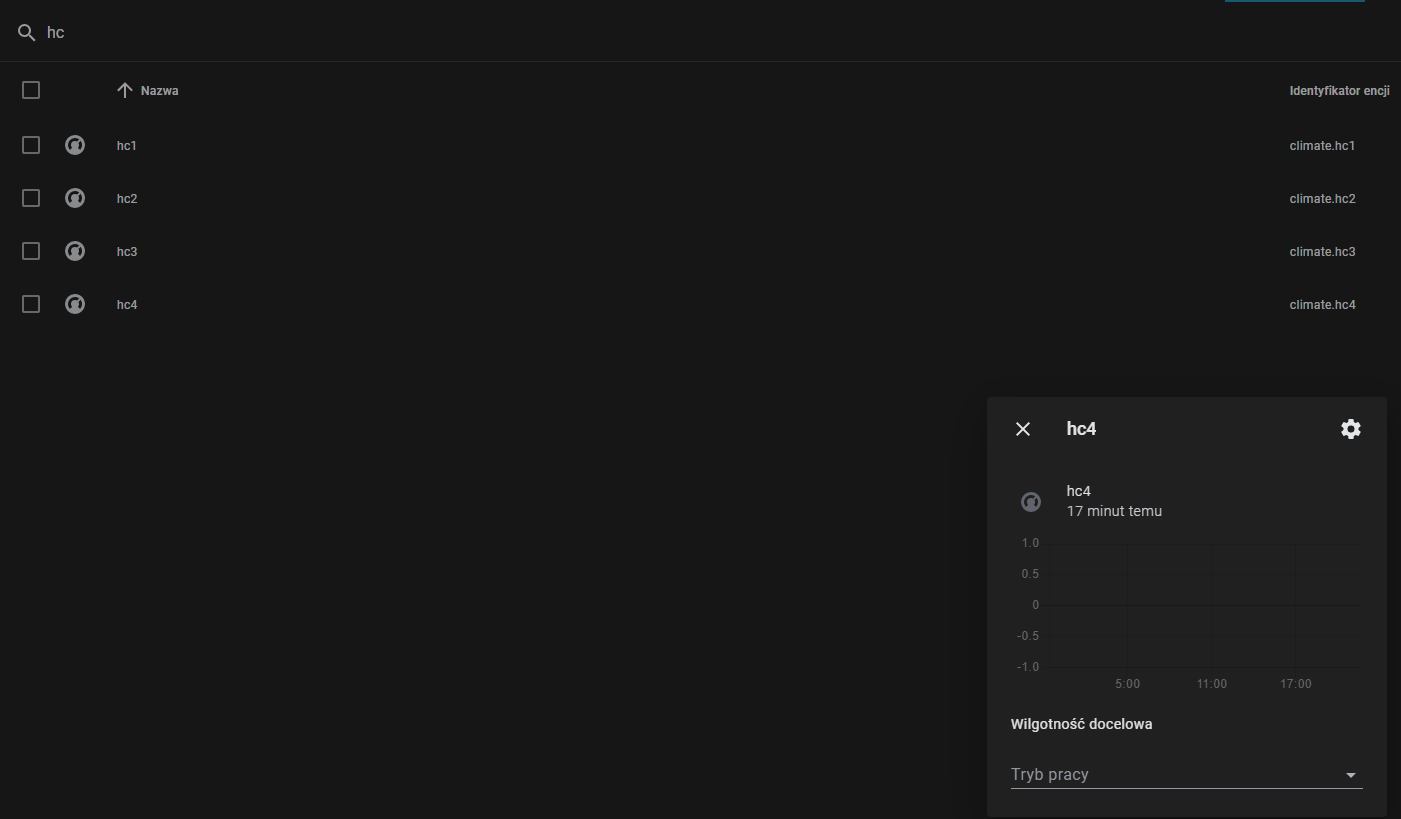
I reboot HA, then I wait for all EMS updates - this screen was create ~17-18 minutes after restart HA.
stravinci
on 2 Sep 2020
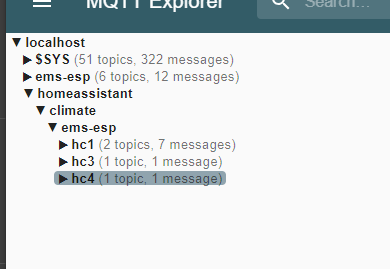
the retain flag is on so the MQTT broker is remembering the last topic. You can use MQTTExplorer to delete them. Remove all the topics homeassistant/climate/ems-esp/hc*/config. I set the retain flag on purpose so if the MQTT server drops out it will stay be able to understand the state data being sent from EMS-ESP.
proddy
on 2 Sep 2020
Ok, I removed all homeassistant->climate->ems-esp topics and reboot EMS-ESP. All HC's come back.

As I understand if I remove only 2,3 and 4 instances then it will work, but as I understand these instances will back after each EMS restart.
stravinci
on 2 Sep 2020
damn. I'll need to write some more test code to figure it out.
proddy
on 2 Sep 2020
I checked, and tested and it really shouldn't be happening. Can you send some logs from watch 170 so I can see what is coming in for hc2 ?
proddy
on 2 Sep 2020
You mean watch on 170?
I execute this command but in few minutes there was no message.
IN MQTT also I get only hc1 messsages, but hc2-4 are created after reboot.
stravinci
on 2 Sep 2020
yes, sorry, typo. Actually its best to watch all traffic from the thermostat so a watch raw 10. There is something that is creating the heatingcircuits but I don't know what it is.
proddy
on 3 Sep 2020
Ok,let me know if you need longer log.
`
┌──────────────────────────────────────────┐
│ EMS-ESP version 2.0.1b2 │
│ https://github.com/proddy/EMS-ESP │
│ │
│ type help to show available commands │
└──────────────────────────────────────────┘
ems-esp:/$ watch raw 10
Watching incoming telegrams, displayed as raw bytes
Filtering only telegrams that match a device ID or telegram type of 0x10
000+10:48:17.954 N 0: [telegram] Rx: 90 08 35 00 11 00 A8
000+10:48:17.984 N 1: [telegram] Rx: 90 08 1A 00 00 F9
000+10:48:18.017 N 2: [telegram] Rx: 90 08 1A 02 00 FD
000+10:48:18.054 N 3: [telegram] Rx: 90 08 23 00 00 00 00 74
000+10:48:18.083 N 4: [telegram] Rx: 90 08 1A 04 03 F2
000+10:48:26.855 N 5: [telegram] Rx: 90 00 06 00 14 09 08 03 2D 14 04 00 71
000+10:48:30.221 N 6: [telegram] Rx: 90 88 02 00 0A F7
000+10:48:30.252 N 7: [telegram] Rx: 88 10 02 00 5F 17 0C 00 00 00 00 00 00 00 D 4
000+10:48:42.312 N 8: [telegram] Rx: 90 88 16 00 02 AF
000+10:48:42.328 N 9: [telegram] Rx: 88 10 16 00 00 00 39
000+10:48:42.491 N 10: [telegram] Rx: 90 00 FF 00 00 6F 03 02 00 D7 01 50 F3 34 00 E0
000+10:49:01.446 N 11: [telegram] Rx: 90 0B FF 00 00 6F 03 02 00 D7 01 50 F3 34 00 A5
000+10:49:01.697 N 12: [telegram] Rx: 90 0B FF 00 00 65 01 00 01 23 3C 41 03 01 00 03 FF 28 FA 01 04 28 2B 2B 01 01 00 25
000+10:49:26.775 N 13: [telegram] Rx: 90 00 06 00 14 09 08 03 2E 14 04 00 69
000+10:49:31.206 N 14: [telegram] Rx: 90 88 02 00 0A F7
000+10:49:31.236 N 15: [telegram] Rx: 88 10 02 00 5F 17 0C 00 00 00 00 00 00 00 D4
000+10:49:43.297 N 16: [telegram] Rx: 90 88 16 00 02 AF
000+10:49:43.317 N 17: [telegram] Rx: 88 10 16 00 00 00 39
000+10:49:43.476 N 18: [telegram] Rx: 90 00 FF 00 00 6F 03 02 00 D7 01 50 F3 34 00 E0
000+10:50:01.340 N 19: [telegram] Rx: 90 0B FF 00 00 6F 03 02 00 D7 01 50 F3 34 00 A5
000+10:50:01.593 N 20: [telegram] Rx: 90 0B FF 00 00 65 01 00 01 23 3C 41 03 01 00 03 FF 28 FA 01 04 28 2B 2B 01 01 00 25
000+10:50:19.964 N 21: [telegram] Rx: 90 08 35 00 11 00 A8
000+10:50:20.018 N 22: [telegram] Rx: 90 08 1A 00 00 F9
000+10:50:20.044 N 23: [telegram] Rx: 90 08 1A 02 00 FD
000+10:50:20.080 N 24: [telegram] Rx: 90 08 23 00 00 00 00 74
000+10:50:20.109 N 25: [telegram] Rx: 90 08 1A 04 03 F2
000+10:50:26.850 N 26: [telegram] Rx: 90 00 06 00 14 09 08 03 2F 14 04 00 61
000+10:50:32.101 N 27: [telegram] Rx: 90 88 02 00 0A F7
000+10:50:32.127 N 28: [telegram] Rx: 88 10 02 00 5F 17 0C 00 00 00 00 00 00 00 D4
000+10:50:44.306 N 29: [telegram] Rx: 90 88 16 00 02 AF
000+10:50:44.327 N 30: [telegram] Rx: 88 10 16 00 00 00 39
000+10:50:44.484 N 31: [telegram] Rx: 90 00 FF 00 00 6F 03 02 00 D7 01 50 F3 34 00 E0
000+10:51:01.449 N 32: [telegram] Rx: 90 0B FF 00 00 6F 03 02 00 D7 01 50 F3 34 00 A5
000+10:51:01.700 N 33: [telegram] Rx: 90 0B FF 00 00 65 01 00 01 23 3C 41 03 01 00 03 FF 28 FA 01 04 28 2B 2B 01 01 00 25
000+10:51:26.778 N 34: [telegram] Rx: 90 00 06 00 14 09 08 03 30 14 04 00 99
000+10:51:33.085 N 35: [telegram] Rx: 90 88 02 00 0A F7
000+10:51:33.111 N 36: [telegram] Rx: 88 10 02 00 5F 17 0C 00 00 00 00 00 00 00 D4
000+10:51:45.323 N 37: [telegram] Rx: 90 88 16 00 02 AF
000+10:51:45.343 N 38: [telegram] Rx: 88 10 16 00 00 00 39
000+10:51:45.535 N 39: [telegram] Rx: 90 00 FF 00 00 6F 03 02 00 D7 01 50 F3 34 00 E0
000+10:52:01.344 N 40: [telegram] Rx: 90 0B FF 00 00 6F 03 02 00 D7 01 50 F3 34 00 A5
000+10:52:01.562 N 41: [telegram] Rx: 90 0B FF 00 00 65 01 00 01 23 3C 41 03 01 00 03 FF 28 FA 01 04 28 2B 2B 01 01 00 25
000+10:52:09.604 N 42: [telegram] Rx: 90 00 BE 00 10 00 00 00 00 B0
000+10:52:09.939 N 43: [telegram] Rx: 90 00 FF 00 00 D3 01 00 00 AA
000+10:52:21.801 N 44: [telegram] Rx: 90 08 35 00 11 00 A8
000+10:52:21.832 N 45: [telegram] Rx: 90 08 1A 00 00 F9
000+10:52:21.857 N 46: [telegram] Rx: 90 08 1A 02 00 FD
000+10:52:21.894 N 47: [telegram] Rx: 90 08 23 00 00 00 00 74
000+10:52:21.922 N 48: [telegram] Rx: 90 08 1A 04 03 F2
000+10:52:26.705 N 49: [telegram] Rx: 90 00 06 00 14 09 08 03 31 14 04 00 91
000+10:52:33.947 N 50: [telegram] Rx: 90 88 02 00 0A F7
000+10:52:33.971 N 51: [telegram] Rx: 88 10 02 00 5F 17 0C 00 00 00 00 00 00 00 D4
000+10:52:46.152 N 52: [telegram] Rx: 90 88 16 00 02 AF
000+10:52:46.170 N 53: [telegram] Rx: 88 10 16 00 00 00 39
000+10:52:46.363 N 54: [telegram] Rx: 90 00 FF 00 00 6F 03 02 00 D7 01 50 F3 34 00 E0
000+10:53:01.330 N 55: [telegram] Rx: 90 0B FF 00 00 6F 03 02 00 D7 01 50 F3 34 00 A5
000+10:53:01.580 N 56: [telegram] Rx: 90 0B FF 00 00 65 01 00 01 23 3C 41 03 01 00 03 FF 28 FA 01 04 28 2B 2B 01 01 00 25
000+10:53:12.019 E 57: [telegram] Rx: 88 00 18 00 32 02 4A 64 00 02 20 65 C0 01 FE 80 00 80 00 FF FF FF 00 00 00 00 00 00 20 01 FF (CRC FF != 03)
000+10:53:26.756 N 58: [telegram] Rx: 90 00 06 00 14 09 08 03 32 13 04 00 95
000+10:53:35.021 N 59: [telegram] Rx: 90 88 02 00 0A F7
000+10:53:35.053 N 60: [telegram] Rx: 88 10 02 00 5F 17 0C 00 00 00 00 00 00 00 D4
000+10:53:47.046 N 61: [telegram] Rx: 90 88 16 00 02 AF
000+10:53:47.061 N 62: [telegram] Rx: 88 10 16 00 00 00 39
000+10:53:47.225 N 63: [telegram] Rx: 90 00 FF 00 00 6F 03 02 00 D7 01 50 F3 34 00 E0
000+10:54:01.446 N 64: [telegram] Rx: 90 0B FF 00 00 6F 03 02 00 D7 01 50 F3 34 00 A5
000+10:54:01.664 N 65: [telegram] Rx: 90 0B FF 00 00 65 01 00 01 23 3C 41 03 01 00 03 FF 28 FA 01 04 28 2B 2B 01 01 00 25 `
stravinci
on 3 Sep 2020
I'm only seeing HC1 (FF 00 00 6F). I guess we need some other users to see if they're experiencing the same thing. My thermostat only has a single heating circuit so its hard to simulate.
proddy
on 3 Sep 2020
Are you sure it's acutually ems-esp adding the values, i've seen home assitant randomly add things that were deleted. I also only have a single heating circuit so can't test aswell (and on v2.0.0 it doesn't happen for me ;P) Might be obvious, but did you try to test with the ems-esp not connected?
Xeyame
on 3 Sep 2020
@Xeyame when I remove HC2-4 using MQTT Exporter they disappear from HA. They come back only after reboot EMS-ESP.
Maybe it is option to collect logs from start EMS-ESP?
stravinci
on 3 Sep 2020
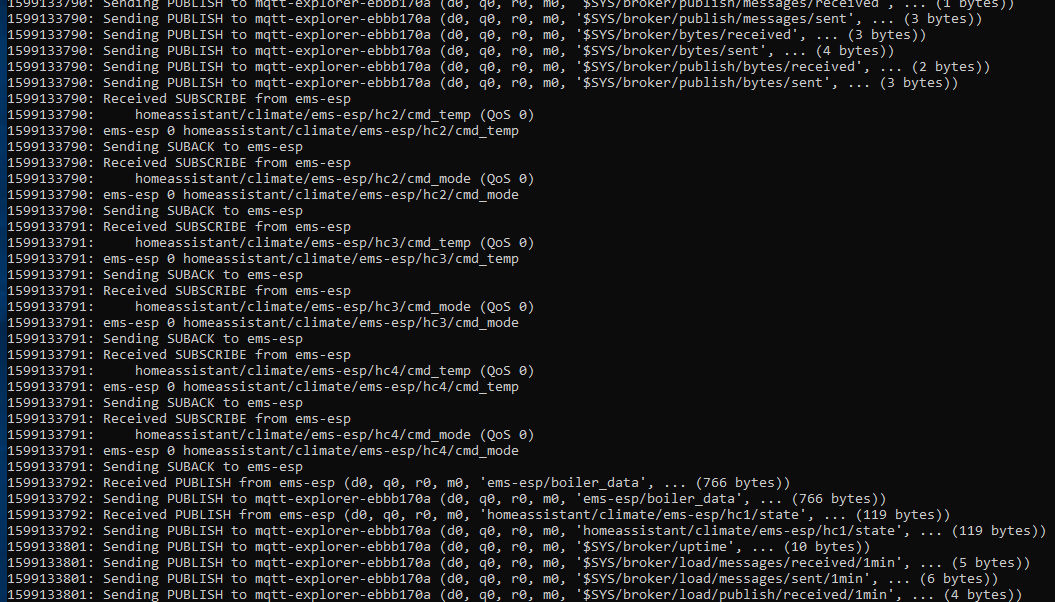
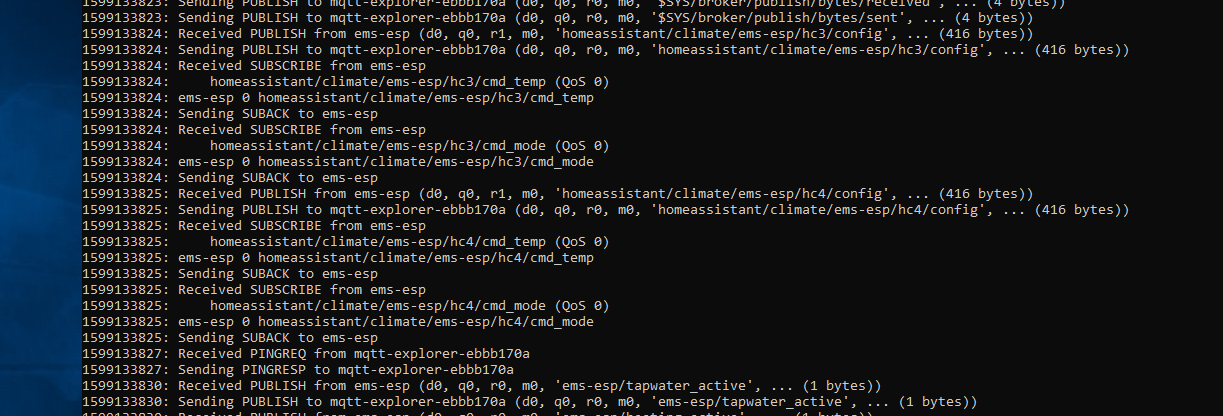
@stravinci what I do in cases like this is download a local copy of mosquitto.exe and run it on my desktop (Win10) from the command line with verbose logging -v, and have EMS-ESP connect to it. Then check the logs what is being published by EMS-ESP. You'll see if EMS-ESP is sending multiple topics for each heating circuit quickly.
proddy
on 3 Sep 2020
@proddy I switched to local MQTT broker, then EMS-ESP autodiscover only 1 HC. But after reboot EMS apear new ones.
stravinci
on 3 Sep 2020
And here are maybe interesting logs.
stravinci
on 3 Sep 2020
thanks, those logs are helpful as I see its also subscribing to ht3 and ht4 when you don't have them active. back to the drawing board then.
proddy
on 3 Sep 2020
@proddy tested new dev build - I see only HC1 in HA :)
stravinci
on 4 Sep 2020
thanks @stravinci . So its working? You know, I'm still not 100% sure why it failed in the first place. I made some minor adjustments but nothing that would effect the behaviour
proddy
on 5 Sep 2020
Found this out so far, hope it helps :)
....
Then you want to set up a few sensors (probably one per device, so usually 3; thermostat, controller and boiler), and make it have multiple values like @stravinci said. You also add the device part like this to the sensor's config"ids": [ "esp_mac_address" ]Basically the unique id (in this case the MAC of the esp) makes HASS bind it to the device.
Thanks @Xeyame . I'm back to looking at MQTT Discovery again with the aim to have EMS-ESP as a single HA device, each having a device with multiple sensors as you suggested. I can bulld the EMS-ESP device and add a few sensors, but the climate doesn't get attached to the HA device. I'm using:
{
"name": "hc1",
"uniq_id": "hc1",
"~": "homeassistant/climate/ems-esp/hc1",
"mode_cmd_t": "~/cmd_mode",
"mode_stat_t": "~/state",
"temp_cmd_t": "~/cmd_temp",
"temp_stat_t": "~/state",
"curr_temp_t": "~/state",
"mode_stat_tpl": "{{value_json.hc1.mode}}",
"temp_stat_tpl": "{{value_json.hc1.seltemp}}",
"curr_temp_tpl": "{{value_json.hc1.currtemp}}",
"min_temp": "5",
"max_temp": "40",
"temp_step": "0.5",
"modes": [
"night",
"day",
"auto"
],
"dev": {
    "ids": [
      "esp_mac_address"
    ]
}
}
I'll have another try later this week.
proddy
on 16 Sep 2020
Think I got the HA Discovery working now. EMS-ESP will add a new HA device and attach all the device data as entities to it. See https://emsesp.github.io/docs/#/Home-Assistant. If there are issues let me know, it seems to work on my system. Remember to remove all previous .yaml files except any custom automations.
in version 2.1.0b1
proddy
on 28 Sep 2020
First of all,
thanks, awesome work.
Now my question: Why don't you expose all values? E.g. "System Pressure", which would be really nice to have for leak alarms.
TimoFriedri
on 28 Sep 2020
Nice work.
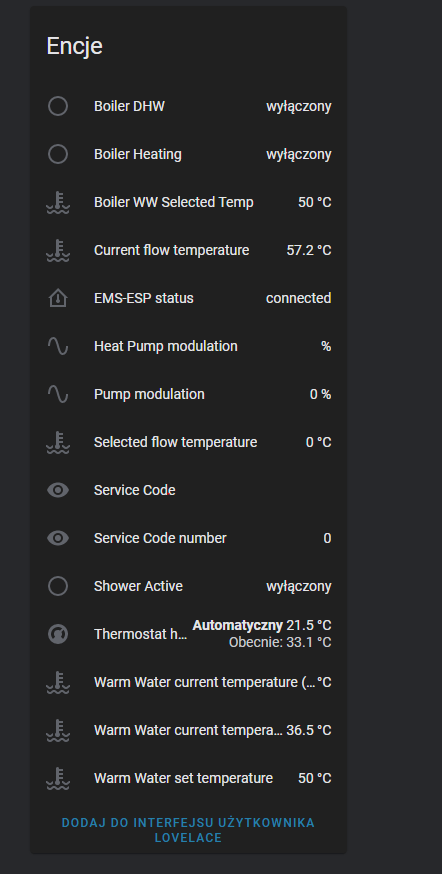
i want to note:
retain - after restart HA, entities has no values
As @TimoFriedri I used more sensors, eg. outdoor temperature sensor
stravinci
on 28 Sep 2020
@TimoFriedri @stravinci thanks for the feedback. I only added a subset of the boiler value to equal the ones in displayed in the WebUI but can easily add the rest (it's just one line). I'll also make sure the topics are retained, thanks
proddy
on 28 Sep 2020
@stravinci I checked and all topics are already retained. When I restart HA the topics are still there. So you may want to check your system to double check.
proddy
on 29 Sep 2020
@TimoFriedri added System Pressure
proddy
on 29 Sep 2020
@proddy sorry for the confusion. I change FW at EMS-ESP, then I saw device and new entities from EMS-ESP in HA, so I remove all sensors from my configuration.yaml file and restart HA, after that all sensors was unavailable. But today I test it once again and all it is ok, so it must be some dependency with old entities (probably names).
stravinci
on 29 Sep 2020
no worries. I had the same thing. I still have old states and entities that I can't seem to get rid off in HA, from previous version of EMS-ESP when I added them manually.
proddy
on 29 Sep 2020
@TimoFriedri made a point that it would be better to have the boiler and thermostat as separate HA Devices as they may be in different areas. Also request is to add all the boiler parameters. I was going to make it flexible where a user can choose via the WebUI but probably easier to blast them all out. I will need to modify the MQTT library to increase the queue size, which will get big.
proddy
on 30 Sep 2020
It seems this is still open for discussion/improvement, so I'd like to give my input
My suggestion would be as follows:
1 device in HA for each physical device in the central heating setup + ems-esp itself.
ATM (beta3) there is ems-esp, ems-esp_thermostat and ems-esp_boiler.
(in case of my setup in the basement)
--> keep ems-esp device (I am ok with single sensor for status and some values as attributes here)
--> keep boiler device and add ALL sensors (as in telnet show cmd)
--> keep thermostat device (RC35)
(--> add controller device (BC10) and add entities to this one, maybe like "service code"-sensor) not sure about this one, in the webui you have "service code" under the boiler, but I think it is rather a property of the controller, and maybe other values. E.g. the "current flow temp" is of course a value of the boiler, but the "Selected flow temperature" is actually a value of the controller.
--> rename devices according to their real physical names. (low importance)
e.g.: EMS-ESP_boiler --> Topline/GB162, EMS-ESP_thermostat --> RC35
This would give a nice mapping of the real world setup to the HA setup.
Don't worry about to many devices or entities. This has become easily manageable in the HA interface. E.g. it is a piece of cake for me to simply disable the "Heat pump circulation"-sensor since I don't have this.
Thanks again for your work (source code and community response).
OK ODD
It took quite long but I now see the ems-esp_thermostat device.
I updated my suggestions as soon as HA had everything updated correctly.
TimoFriedri
on 1 Oct 2020
thanks for the feedback. I do want to get this right so appreciate the comments.
- I'm working on adding the remaining sensors. I'm thinking of a clever way to do this as not to duplicate code as there is a lot of interpretation happing depending on the value to translate into text. E.g.
if (Helpers::hasValue(wWComfort_)) {
        if (wWComfort_ == 0x00) {
            output["wWComfort"] = "Hot";
        } else if (wWComfort_ == 0xD8) {
            output["wWComfort"] = "Eco";
        } else if (wWComfort_ == 0xEC) {
            output["wWComfort"] = "Intelligent";
        }
    }
Having the Controller own values and report them in the console, web and HA is interesting. I had always assumed there were from the boiler since the boiler is sending them out on my combi which obviously has a built in controller unit. I'm also seeing very few telegrams being sent from the Controller. @MichaelDvP do you think we should split the boiler_data and have a controller_data ?
renaming devices is hard since they can be quite long, for example
"Condens 2500/Logamax/Logomatic/Cerapur Top/Greenstar/Generic HT3". This is why I put it in HA's model and manufacturer.
proddy
on 1 Oct 2020
Maybe then generic device names are the way to go.
controller/boiler
I have no insight which devices actually send these values on ems protocol side.
I am just looking at that system from an engineer's perspective and there I see the physical "real" values which are just measured like "Current ... temp" or "system pressure". They clearly belong to the boiler and have physical sensor counterparts.
Then there are "virtual" values which are either controller configuration values like "WW set temp" or controller command values like "Selected flow temperature". I think they are part of the controller. In my case the the BC10 is built into the GB192 and I assume you can't even have a GB192 without any controller built in, so the cut line is a little fuzzy,
It's even fuzzier for values like "Pump Modulation". It is not clear if this is the command value from the controller or the measured status of the pump. Which is strictly speaking a difference. Even though I assume it is the command value in this case.
TimoFriedri
on 1 Oct 2020
@proddy: It's a difficult question. To split between devices boiler (id0x08) and (controller (id0x09) is useless, the controller has very little to say on the bus. Also these are only names for the device-ids, not physical devices. In my case i have as physical devices:
GB125: mainly a big block of iron with some flanges and water.
BE1.3 : oil burner with Fan, oilpump, nozzle, etc.
BC10: mainly some cable clamps and a power supply, i'm not sure if there is much logic on it
MC10: two rotary controls to set WW and heating off/auto or to a fixed temperatur, two buttons for reset and exhaust measurement. That's what is id0x09 (controller) on th bus.
SAFe: the burn control which holds the main parameters, that is mainly the "boiler" id0x08.
and with extra id's:
RC35: Thermostat
MM10: Mixer
If you want to split the long boiler_data you have to build categories, i.e:
- measurements: actual temperatures, pressure, flow, ..
- status values: serviceCode, working hours, pumps started, burner started, but also setpoints that are set by internal timers or automatic, etc.
- parameters: setpoint that can be changed over ems, configurations that influences the operation (modes)
- hardware configurations: that normaly does not change in operation: is a pump attached, 3-way-valve or chargpump, etc.
You can also combine the first two and the last two categories, or split to more categories.
But as Timo wrote the transitions are floating. For some values it's hard to decide the right category.
At least everyone only picks a few relevant values/parameters for his system and have to extract them from the json. It does not matter if these values are in one long json or from some smaller json.
For the ems-esp you have to check buffersize, queue-size and mqtt send frequency, that should be adapted to hold and send out the messages.
 MichaelDvP
on 1 Oct 2020
MichaelDvP
on 1 Oct 2020
Just don't over complicate things.
People will understand a boiler device and a thermostat device and a solar system because that's a box on their wall.
Specifying it into technical stuff like BC10 base controller and 0x09 boiler controller etc will confuse a lot of people.
If the boiler parameters don't fit in one string splitting them up in type of parameters like @MichaelDvP suggests would seem a good idea.
bbqkees
on 1 Oct 2020
@proddy In HA it looks awesome! maybe later I will found some issue (I haven't tested yet it from HA) but first impression is great. GREAT JOB! THANKS!
 lsw271
on 1 Oct 2020
lsw271
on 1 Oct 2020
thanks @lsw271 . It's comments like yours that keep this project going. much appreciated!
proddy
on 1 Oct 2020
quick update on this. I've hit a bit of a road-block when adding the additional sensors to publish to MQTT for HA to pick up. It's related to memory, more specifically the fragmentation (which climbs to 60% and then crashes the ESP8266) so I'm now refactoring some of the MQTT library. It'll take a while longer to get this right I'm afraid.
proddy
on 3 Oct 2020
ok, think most of this is now done. I cleaned up the code a little to sync the console show with the json packages sent to the Web and Home Assistant. I also made sure the C++ variable and member naming matched the MQTT id's we're using to keep things tidy and consistent, so you may find some names change 'e.g. wwrecharge to wwrecharging'. I also had to tweak the asynctcp and mqtt libraries to accept larger payloads and squish some of the memory errors.
closing this as considered done, but will always be tweaking and improving.
proddy
on 7 Oct 2020
Hi,
yesterday I restart my HA instance. After that all entities was offline/unavailable. I'm not sure where is problem (last time I ask you about retain), but after reboot EMS-ESP all entities start working.
Maybe one more question. Do you subscribe MQTT birth messages:
https://www.home-assistant.io/docs/mqtt/birth_will/
stravinci
on 9 Oct 2020
yes, in the status topic. See https://emsesp.github.io/docs/#/MQTT
proddy
on 9 Oct 2020
Yea, but this is EMS-ESP status. As I understand that birth_message send by HA will give you information that you can send intro of your entities like at every boot.
I have about 500 entities and all entities always come back after restart HA, I don't know why here is problem that is I'm asking you. But maybe it is only my setup issue.
stravinci
on 9 Oct 2020
I think its a problem with your setup. My HA gets updated and restarted most nights and EMS-ESP keeps on working. Best if you create a new github issue and we troubleshoot together.
proddy
on 9 Oct 2020
Just tried the latest version, and i have to say its awesome! Everything is neatly there. Thank you so much for the effort!
Xeyame
on 17 Nov 2020
Related issues
 mglatz
·
20Comments
mglatz
·
20Comments
 mediaDS
·
23Comments
proddy
·
17Comments
TimoFriedri
·
6Comments
mediaDS
·
23Comments
proddy
·
17Comments
TimoFriedri
·
6Comments
 SpaceTeddy
·
13Comments
SpaceTeddy
·
13Comments