Hello Proddy,
Is it possible to extend the supported Solar Modules to include the Bosch/Bruderus SM200.
The second device is a Sense II module that is working as a passive display.
Here is the output of my logging.
Also the results iof my mqttlog:
MQTT subscriptions:
Topic:home/ems-esp/restart
Topic:home/ems-esp/start
Topic:home/ems-esp/thermostat_cmd_temp1
Topic:home/ems-esp/thermostat_cmd_mode1
Topic:home/ems-esp/thermostat_cmd_temp2
Topic:home/ems-esp/thermostat_cmd_mode2
Topic:home/ems-esp/thermostat_cmd_temp3
Topic:home/ems-esp/thermostat_cmd_mode3
Topic:home/ems-esp/thermostat_cmd_temp4
Topic:home/ems-esp/thermostat_cmd_mode4
Topic:home/ems-esp/thermostat_cmd
Topic:home/ems-esp/boiler_cmd
Topic:home/ems-esp/boiler_cmd_wwactivated
Topic:home/ems-esp/boiler_cmd_wwonetime
Topic:home/ems-esp/boiler_cmd_wwtemp
Topic:home/ems-esp/generic_cmd
Topic:home/ems-esp/shower_data
 PhillyGilly
All 80 comments
Yes, should be possible. I'll take a look.
 proddy
on 26 Dec 2019
proddy
on 26 Dec 2019
I extended the code to support the SM200 in 1.9.5b6
But what I find worrying for your logs is the message "Error! Unable to read the EMS bus.". Do you always get that?
proddy
on 30 Dec 2019
Hi Proddy. Thanks. I will check later today but I need to eliminate errors
due to the fact that I have two EMS buses and only connected the EMS-ESP to
them in turn. This is because the Sense II, which is acting as a passive
display for the SM200, tries to sieze control of the boiler if it's on the
same bus. Now that I have 1.9.5b installed I can remove the Sense II and
connect the SM200 to the boiler bus and use my PC to monitor it. That could
be interesting as the Sense II displays the 14 days data. I can't use the
Sense II as a controller until I've got the MM200 in and working, so I'll
add that next and see how it works for monitoring temperatures.
On Mon, 30 Dec 2019, 12:47 Proddy, notifications@github.com wrote:
I extended the code to support the SM200 in 1.9.5b6
But what I find worrying for your logs is the message "Error! Unable to
read the EMS bus.". Do you always get that?—
You are receiving this because you modified the open/close state.
Reply to this email directly, view it on GitHub
https://github.com/proddy/EMS-ESP/issues/267?email_source=notifications&email_token=ANNKV75WT4TR4CRCBAQSV2DQ3HUUHA5CNFSM4J7MUOA2YY3PNVWWK3TUL52HS4DFVREXG43VMVBW63LNMVXHJKTDN5WW2ZLOORPWSZGOEH2HR2A#issuecomment-569669864,
or unsubscribe
https://github.com/notifications/unsubscribe-auth/ANNKV7Z5NVI43C6L7HAZ5SDQ3HUUHANCNFSM4J7MUOAQ
.
PhillyGilly
on 30 Dec 2019
Here is the info from 1.9.5b7 with only the Sense II and the MS200 attached to the EMS-ESP.
I tried running with Boiler, MS200 and EMS-ESP but there was an EMS issue.


It seems to take a few minutes to settle down during which there were intermittent problems with reading the EMS bus.
Here is the mqttlog:
mqttlog MQTT publish log: Timestamp:18:20:10 Topic:status Payload:online Timestamp:18:20:10 Topic:start Payload:start Timestamp:18:20:10 Topic:shower_data Payload:{"timer":"0","alert":"0"} Timestamp:18:42:05 Topic:heartbeat Payload:{"version":"1.9.5b7","IP":"192.168.2.101","rssid":62,"load":1,"uptime":1326,"freemem":47,"MQTTdisconnects":0} Timestamp:18:42:05 Topic:sm_data Payload:{"collectortemp":6,"bottomtemp":42.8,"pumpmodulation":0,"pump":"off"} MQTT subscriptions: Topic:home/ems-esp/restart Topic:home/ems-esp/start Topic:home/ems-esp/thermostat_cmd_temp1 Topic:home/ems-esp/thermostat_cmd_mode1 Topic:home/ems-esp/thermostat_cmd_temp2 Topic:home/ems-esp/thermostat_cmd_mode2 Topic:home/ems-esp/thermostat_cmd_temp3 Topic:home/ems-esp/thermostat_cmd_mode3 Topic:home/ems-esp/thermostat_cmd_temp4 Topic:home/ems-esp/thermostat_cmd_mode4 Topic:home/ems-esp/thermostat_cmd Topic:home/ems-esp/boiler_cmd Topic:home/ems-esp/boiler_cmd_wwactivated Topic:home/ems-esp/boiler_cmd_wwonetime Topic:home/ems-esp/boiler_cmd_wwtemp Topic:home/ems-esp/generic_cmd Topic:home/ems-esp/shower_data
Here is the telnet info:
log30122019.txt
PhillyGilly
on 30 Dec 2019
I ran 1.9.5b7 overnight and found that I had lost connection between the EMS-ESP and web interface this morning. I rebooted the EMS-ESP and connection was re-established. Initially things looked fine and I confirmed this via a telnet session and left it running with log v.
After running for about 90 minutes, I checked the HA interface and I have "flat lining" where data isn't arriving

Here are the last few entries from the log.
(10:37:25) Solar Module -> All, type 0x026A, telegram: B0 00 FF 00 02 6A 03 03 03 03 03 03 03 03 03 03 03 03 (CRC=95) #data=12
(10:37:30) Solar Module -> All, type 0x07, telegram: B0 00 07 00 00 01 00 00 00 01 00 00 00 00 00 00 00 00 00 (CRC=7E) #data=15
(10:37:53) Solar Module -> All, type 0x0266, telegram: B0 00 FF 00 02 66 0D 6F 00 03 08 (CRC=D4) #data=5
Error! Unable to read the EMS bus.
(10:38:23) Solar Module -> All, type 0x0262, telegram: B0 00 FF 00 02 62 00 DC 00 F8 80 00 80 00 80 00 80 00 80 00 80 00 80 00 80 00 80 00 80 00 (CRC=A8) #data=24 (10:38:23) Solar Module -> All, type 0x0262, telegram: B0 00 FF 18 02 62 80 00 (CRC=B8) #data=2 (10:38:24) Solar Module -> All, type 0x0263, telegram: B0 00 FF 00 02 63 80 00 80 00 00 00 80 00 80 00 80 00 00 80 00 (CRC=5A) #data=15
(10:38:24) Solar Module -> All, type 0x0264, telegram: B0 00 FF 00 02 64 64 00 00 04 00 00 FF 00 00 00 00 03 64 00 00 00 00 00 (CRC=3C) #data=18
(10:38:24) Solar Module -> All, type 0x0266, telegram: B0 00 FF 00 02 66 0D 6F 00 03 08 (CRC=D4) #data=5
(10:38:25) Solar Module -> All, type 0x0268, telegram: B0 00 FF 00 02 68 0C 00 (CRC=08) #data=2 (10:38:25) Solar Module -> All, type 0x0269, telegram: B0 00 FF 00 02 69 00 (CRC=0A) #data=1 (10:38:25) Solar Module -> All, type 0x026A, telegram: B0 00 FF 00 02 6A 03 03 03 03 03 03 03 03 03 03 03 03 (CRC=95) #data=12
(10:38:25) Thermostat -> All, type 0x06, telegram: 90 00 06 00 13 0C 0A 1F 25 2D 01 00 10 FF 00 (CRC=7A) #data=11
(10:38:30) Solar Module -> All, type 0x07, telegram: B0 00 07 00 00 01 00 00 00 01 00 00 00 00 00 00 00 00 00 (CRC=7E) #data=15
(10:38:43) Thermostat -> Solar Module, type 0x1802, telegram: 90 B0 FF 00 18 02 91 (CRC=32) #data=1
(10:38:43) Solar Module -> Thermostat, type 0x0291, telegram: B0 10 FF 00 02 91 00 02 FB F4 00 00 00 00 00 00 00 00 00 00 00 00 00 00 00 00 00 00 00 00 (CRC=4A) #data=24 (10:38:43) Thermostat -> Solar Module, type 0x1802, telegram: 90 B0 FF 18 18 02 91 (CRC=F2) #data=1
(10:38:43) Solar Module -> Thermostat, type 0x0291, telegram: B0 10 FF 18 02 91 00 00 00 00 00 00 00 00 00 00 00 00 00 00 00 00 00 00 00 00 00 00 00 00 (CRC=2D) #data=24 (10:38:43) Thermostat -> Solar Module, type 0x1802, telegram: 90 B0 FF 30 18 02 91 (CRC=AB) #data=1
(10:38:43) Solar Module -> Thermostat, type 0x0291, telegram: B0 10 FF 30 02 91 00 00 00 00 00 00 00 00 00 00 00 00 00 00 00 00 00 00 00 00 00 00 00 00 (CRC=5F) #data=24 (10:38:43) Thermostat -> Solar Module, type 0x0402, telegram: 90 B0 FF 48 04 02 91 (CRC=30) #data=1
(10:38:43) Solar Module -> Thermostat, telegram: B0 10 FF 48 02 91 (CRC=DD)
(10:38:48) Thermostat -> All, type 0xBF, telegram: 90 00 BF 00 10 CF 00 00 00 00 00 00 00 00 00 00 00 00 00 00 00 00 00 00 00 00 00 00 (CRC=8D) #data=24
(10:38:53) Solar Module -> All, type 0x0266, telegram: B0 00 FF 00 02 66 0D 6F 00 03 08 (CRC=D4) #data=5
Starting scheduled MQTT publish...
Error! Unable to read the EMS bus.
(10:39:24) Solar Module -> All, type 0x0262, telegram: B0 00 FF 00 02 62 00 DA 00 F8 80 00 80 00 80 00 80 00 80 00 80 00 80 00 80 00 80 00 80 00 (CRC=58) #data=24 (10:39:24) Solar Module -> All, type 0x0262, telegram: B0 00 FF 18 02 62 80 00 (CRC=B8) #data=2 (10:39:24) Solar Module -> All, type 0x0263, telegram: B0 00 FF 00 02 63 80 00 80 00 00 00 80 00 80 00 80 00 00 80 00 (CRC=5A) #data=15
(10:39:24) Solar Module -> All, type 0x0264, telegram: B0 00 FF 00 02 64 64 00 00 04 00 00 FF 00 00 00 00 03 64 00 00 00 00 00 (CRC=3C) #data=18
(10:39:25) Solar Module -> All, type 0x0266, telegram: B0 00 FF 00 02 66 0D 6F 00 03 08 (CRC=D4) #data=5
(10:39:25) Solar Module -> All, type 0x0268, telegram: B0 00 FF 00 02 68 0C 00 (CRC=08) #data=2 (10:39:25) Solar Module -> All, type 0x0269, telegram: B0 00 FF 00 02 69 00 (CRC=0A) #data=1 (10:39:25) Solar Module -> All, type 0x026A, telegram: B0 00 FF 00 02 6A 03 03 03 03 03 03 03 03 03 03 03 03 (CRC=95) #data=12
(10:39:26) Thermostat -> All, type 0x06, telegram: 90 00 06 00 13 0C 0A 1F 26 2E 01 00 10 FF 00 (CRC=DA) #data=11
(10:39:30) Solar Module -> All, type 0x07, telegram: B0 00 07 00 00 01 00 00 00 01 00 00 00 00 00 00 00 00 00 (CRC=7E) #data=15
(10:39:54) Solar Module -> All, type 0x0266, telegram: B0 00 FF 00 02 66 0D 6F 00 03 08 (CRC=D4) #data=5
(10:40:01) Solar Module -> All, type 0xBF, telegram: B0 00 BF 00 30 A4 00 00 00 00 00 00 00 00 00 00 00 00 00 00 00 00 00 00 00 00 00 00 (CRC=01) #data=24
Fetching data from EMS devices
Requesting type SM100Monitor(0x262) from dest 0x30
(10:40:14) Sending read of type 0x262 to 0x30, telegram: 8B B0 FF 00 20 02 62 (CRC=B7) (10:40:14) Solar Module -> Me, type 0x0262, telegram: B0 0B FF 00 02 62 00 DA 00 F8 80 00 80 00 80 00 80 00 80 00 80 00 80 00 80 00 80 00 80 00 80 (CRC=CE) #data=25 (10:40:14) Solar Module -> All, type 0x07, telegram: B0 00 07 00 08 01 00 00 00 01 00 00 00 00 00 00 00 00 00 (CRC=CE) #data=15
(10:40:15) Solar Module -> All, type 0x07, telegram: B0 00 07 00 00 01 00 00 00 01 00 00 00 00 00 00 00 00 00 (CRC=7E) #data=15
(10:40:24) Solar Module -> All, type 0x0262, telegram: B0 00 FF 00 02 62 00 DA 00 F8 80 00 80 00 80 00 80 00 80 00 80 00 80 00 80 00 80 00 80 00 (CRC=58) #data=24 (10:40:24) Solar Module -> All, type 0x0262, telegram: B0 00 FF 18 02 62 80 00 (CRC=B8) #data=2 (10:40:24) Solar Module -> All, type 0x0263, telegram: B0 00 FF 00 02 63 80 00 80 00 00 00 80 00 80 00 80 00 00 80 00 (CRC=5A) #data=15
(10:40:24) Solar Module -> All, type 0x0264, telegram: B0 00 FF 00 02 64 64 00 00 04 00 00 FF 00 00 00 00 03 64 00 00 00 00 00 (CRC=3C) #data=18
(10:40:25) Solar Module -> All, type 0x0266, telegram: B0 00 FF 00 02 66 0D 6F 00 03 08 (CRC=D4) #data=5
(10:40:25) Solar Module -> All, type 0x0268, telegram: B0 00 FF 00 02 68 0C 00 (CRC=08) #data=2 (10:40:25) Solar Module -> All, type 0x0269, telegram: B0 00 FF 00 02 69 00 (CRC=0A) #data=1 (10:40:26) Solar Module -> All, type 0x026A, telegram: B0 00 FF 00 02 6A 03 03 03 03 03 03 03 03 03 03 03 03 (CRC=95) #data=12
(10:40:27) Thermostat -> All, type 0x06, telegram: 90 00 06 00 13 0C 0A 1F 27 2F 01 00 10 FF 00 (CRC=BA) #data=11
PhillyGilly
on 31 Dec 2019
I wouldn't bother with the web interface - it's problematic and I'm busy rewriting the whole thing anyway.
If you think you've lost a connection, the first thing is to start the Telnet and look for errors like 'TCP disconnect'. Then type 'system' and check the uptime and look down for the "# disconnects". It could be that the MQTT was flooding again and not sending packages out. I haven't personally tested with a SM (don't have one) but could expect a lot of information is being sent to the broker. Use something like MQTT Explorer to see. Then also check settings like MQTT QOS and increase the publish_time to 5 or 10 seconds.
I will continue to run stress tests here.
proddy
on 31 Dec 2019
Here is the content of my system.
Not sure I like the fatal errors!!
ESP8266 System stats: [APP] EMS-ESP version: 1.9.5b7
[APP] MyESP version: 1.2.22
[APP] Build timestamp: 2019-12-30 14:54:37
[APP] Uptime: 0 days 3 hours 38 minutes 51 seconds
[APP] System Load: 1%
[WIFI] WiFi Hostname: ems-esp
[WIFI] WiFi IP: 192.168.2.101
[WIFI] WiFi signal strength: 66%
[WIFI] WiFi MAC: 4C:11:AE:10:8F:E6
[MQTT] is connected (heartbeat enabled)
[NTP] Local Time is 16:40:49 GMT (1577810449)
[SYSTEM] System is Stable
[SYSTEM] Board: PLATFORMIO_D1_MINI
[SYSTEM] CPU frequency: 80 MHz
[SYSTEM] SDK version: 2.2.2-dev(38a443e)
[SYSTEM] CPU chip ID: 0x108FE6
[SYSTEM] Core version: 2_6_3
[SYSTEM] Boot version: 6
[SYSTEM] Boot mode: 1
[SYSTEM] Last reset reason: Hardware Watchdog
[SYSTEM] Last reset info: Fatal exception:4 flag:1 (WDT) epc1:0x40000f68 epc2:0x00000000 epc3:0x00000000 excvaddr:0x00000000 depc:0x00000000
[SYSTEM] Restart count: 0
[SYSTEM] # TCP disconnects: 0
[SYSTEM] rtcmem status: blocks:2 addr:0x60001280
[SYSTEM] rtcmem 00: 1163087990
[SYSTEM] rtcmem 01: 65536
[FLASH] Flash chip ID: 0x1640EF
[FLASH] Flash speed: 40000000 Hz
[FLASH] Flash mode: DIO
[FLASH] Flash size (CHIP): 4194304
[FLASH] Flash size (SDK): 4194304
[FLASH] Flash Reserved: 4096
[MEM] Firmware size: 616640
[MEM] Max OTA size: 2523136
[MEM] OTA Reserved: 16384
[MEM] Free Heap: 23992 bytes initially | 10408 bytes used (43%) | 13584 bytes free (56%) Error! Unable to read the EMS bus.
PhillyGilly
on 31 Dec 2019
looks fine. the fatal exception is normal after a reset (cold-start) of the ESP. no need to panic there.
proddy
on 1 Jan 2020
I forgot about this one, implementing SM200. I'll take a look this week.
proddy
on 6 Jan 2020
I will try to reconfigure and run the trace tonight. It would be neat if you could produce JSONs with sections for each Solar Circuit as sc1, sc2 in the same way that multiple heating circuits are hc1, hc2 etc but I don't know what that means for the current SM100 implementations.
FWIW I'm still on 1.9.5b7 (as I still can't find any newer bin files on the dev branch) and living with the web interface EMS bus error as it doesn't seen to impact telnet logging or HA.
PhillyGilly
on 6 Jan 2020
wow, didn't notice my automatic TravisCI builds were breaking. Last one was
6 days ago!
On Mon, Jan 6, 2020 at 1:48 PM PhillyGilly notifications@github.com wrote:
I will try to reconfigure and run the trace tonight. It would be neat if
you could produce JSONs with sections for each Solar Circuit as sc1, sc2 in
the same way that multiple heating circuits are hc1, hc2 etc but I don't
know what that means for the current SM100 implementations.FWIW I'm still on 1.9.5b7 (as I still can't find any newer bin files on
the dev branch) and living with the web interface EMS bus error as it
doesn't seen to impact telnet logging or HA.—
You are receiving this because you commented.
Reply to this email directly, view it on GitHub
https://github.com/proddy/EMS-ESP/issues/267?email_source=notifications&email_token=AAJMO6B7AUDVNHUK54DMEO3Q4MSB5A5CNFSM4J7MUOA2YY3PNVWWK3TUL52HS4DFVREXG43VMVBW63LNMVXHJKTDN5WW2ZLOORPWSZGOEIFLDBI#issuecomment-571126149,
or unsubscribe
https://github.com/notifications/unsubscribe-auth/AAJMO6FM7HKP5ZVON5DABXLQ4MSB5ANCNFSM4J7MUOAQ
.
proddy
on 6 Jan 2020
Here is the trace log:
[TELNET] Connected to EMS-ESP version 1.9.5b7. Type ? for commands.
System Logging set to None
devices
These device IDs are on the EMS Bus: 0x10 0x30
and 2 were recognized by EMS-ESP as:
unknown? (DeviceID:0x10 ProductID:207 Version:17.01)
SM200 Solar Module (DeviceID:0x30 ProductID:164 Version:25.04)
You have a device is that is not yet known by EMS-ESP.
Please report this as a GitHub issue so we can expand the EMS device library.
info EMS-ESP system stats:
System logging set to None
LED: on, Listen mode: off
Boiler: disabled, Thermostat: disabled, Solar Module: enabled, Mixing Module: disabled
Shower Timer: disabled, Shower Alert: disabled
EMS Bus stats:
No connection can be made to the EMS bus
Boiler stats:
Boiler:
Warm Water activated: ?
Warm Water circulation pump available: ?
Warm Water selected temperature: ? C
Warm Water desinfection temperature: ? C
Warm Water current temperature: ? C
Warm Water current tap water flow: ? l/min
Warm Water # starts: ? times
Warm Water 3-way valve: on
Selected flow temperature: ? C
Current flow temperature: ? C
Return temperature: ? C
Gas: ?
Boiler pump: ?
Fan: ?
Ignition: ?
Circulation pump: ?
Burner selected max power: ? %
Burner current power: ? %
Flame current: ? uA
System pressure: ? bar
System service code: ??
Heating temperature setting on the boiler: ? C
Boiler circuit pump modulation max power: ? %
Boiler circuit pump modulation min power: ? %
Boiler temperature: ? C
Exhaust temperature: ? C
Pump modulation: ? %
Burner # starts: ? times
Solar Module stats:
Solar module: SM200 Solar Module (DeviceID:0x30 ProductID:164 Version:25.04)
Collector temperature: 9.2 C
Bottom temperature: 18.1 C
Pump modulation: 0 %
Pump active: off
Energy last hour: 0.0 Wh
Energy today: 0 Wh
Energy total: 1624.6 kWh
log v
System Logging set to Verbose
Error! Unable to read the EMS bus.
(16:15:20) Solar Module -> All, type 0x0266, telegram: B0 00 FF 00 02 66 0F 7B 00 4B 09 (CRC=C5) #data=5
Error! Unable to read the EMS bus.
(16:15:48) Solar Module -> All, type 0x07, telegram: B0 00 07 00 00 01 00 00 00 01 00 00 00 00 00 00 00 00 00 (CRC=7E) #data=15
(16:15:48) Thermostat -> All, type 0x06, telegram: 90 00 06 00 14 01 10 06 0F 07 00 00 10 FF 00 (CRC=24) #data=11
(16:15:50) Solar Module -> All, type 0x0262, telegram: B0 00 FF 00 02 62 00 5C 00 B5 80 00 80 00 80 00 80 00 80 00 80 00 00 6D 80 00 80 00 80 00 (CRC=4E) #data=24
(16:15:51) Solar Module -> All, type 0x0262, telegram: B0 00 FF 18 02 62 80 00 (CRC=B8) #data=2
(16:15:51) Solar Module -> All, type 0x0263, telegram: B0 00 FF 00 02 63 80 00 80 00 00 00 80 00 80 00 80 00 00 80 00 (CRC=5A) #data=15
(16:15:51) Solar Module -> All, type 0x0264, telegram: B0 00 FF 00 02 64 64 00 00 00 00 00 FF 00 00 00 00 00 64 00 00 00 00 00 (CRC=A4) #data=18
(16:15:51) Solar Module -> All, type 0x0266, telegram: B0 00 FF 00 02 66 0F 7B 00 4B 09 (CRC=C5) #data=5
(16:15:52) Solar Module -> All, type 0x0268, telegram: B0 00 FF 00 02 68 0C 00 (CRC=08) #data=2
(16:15:52) Solar Module -> All, type 0x0269, telegram: B0 00 FF 00 02 69 00 (CRC=0A) #data=1
(16:15:52) Solar Module -> All, type 0x026A, telegram: B0 00 FF 00 02 6A 03 03 03 03 03 03 03 03 03 03 03 03 (CRC=95) #data=12
Error! Unable to read the EMS bus.
(16:16:20) Solar Module -> All, type 0x0266, telegram: B0 00 FF 00 02 66 0F 7B 00 4B 09 (CRC=C5) #data=5
(16:16:31) Solar Module -> All, type 0xBF, telegram: B0 00 BF 00 30 A4 00 00 00 00 00 00 00 00 00 00 00 00 00 00 00 00 00 00 00 00 00 00 (CRC=01) #data=24
(16:16:36) Thermostat -> All, type 0xBF, telegram: 90 00 BF 00 10 CF 00 00 00 00 00 00 00 00 00 00 00 00 00 00 00 00 00 00 00 00 00 00 (CRC=8D) #data=24
Fetching data from EMS devices
Requesting type SM100Monitor(0x262) from dest 0x30
Starting scheduled MQTT publish...
Publishing SM data via MQTT
(16:16:48) Solar Module -> All, type 0x07, telegram: B0 00 07 00 00 01 00 00 00 01 00 00 00 00 00 00 00 00 00 (CRC=7E) #data=15
(16:16:48) Thermostat -> All, type 0x06, telegram: 90 00 06 00 14 01 10 06 10 07 00 00 10 FF 00 (CRC=AB) #data=11
(16:16:49) Sending read of type 0x262 to 0x30, telegram: 8B B0 FF 00 20 02 62 (CRC=B7)
(16:16:49) Solar Module -> Me, type 0x0262, telegram: B0 0B FF 00 02 62 00 5C 00 B5 80 00 80 00 80 00 80 00 80 00 80 00 00 6D 80 00 80 00 80 00 80 (CRC=E2) #data=25
(16:16:49) Solar Module -> All, type 0x07, telegram: B0 00 07 00 08 01 00 00 00 01 00 00 00 00 00 00 00 00 00 (CRC=CE) #data=15
(16:16:50) Solar Module -> All, type 0x07, telegram: B0 00 07 00 00 01 00 00 00 01 00 00 00 00 00 00 00 00 00 (CRC=7E) #data=15
(16:16:51) Solar Module -> All, type 0x0262, telegram: B0 00 FF 00 02 62 00 5C 00 B5 80 00 80 00 80 00 80 00 80 00 80 00 00 6D 80 00 80 00 80 00 (CRC=4E) #data=24
(16:16:51) Solar Module -> All, type 0x0262, telegram: B0 00 FF 18 02 62 80 00 (CRC=B8) #data=2
(16:16:51) Solar Module -> All, type 0x0263, telegram: B0 00 FF 00 02 63 80 00 80 00 00 00 80 00 80 00 80 00 00 80 00 (CRC=5A) #data=15
(16:16:51) Solar Module -> All, type 0x0264, telegram: B0 00 FF 00 02 64 64 00 00 00 00 00 FF 00 00 00 00 00 64 00 00 00 00 00 (CRC=A4) #data=18
(16:16:52) Solar Module -> All, type 0x0266, telegram: B0 00 FF 00 02 66 0F 7B 00 4B 09 (CRC=C5) #data=5
(16:16:52) Solar Module -> All, type 0x0268, telegram: B0 00 FF 00 02 68 0C 00 (CRC=08) #data=2
(16:16:52) Solar Module -> All, type 0x0269, telegram: B0 00 FF 00 02 69 00 (CRC=0A) #data=1
(16:16:52) Solar Module -> All, type 0x026A, telegram: B0 00 FF 00 02 6A 03 03 03 03 03 03 03 03 03 03 03 03 (CRC=95) #data=12
Error! Unable to read the EMS bus.
(16:17:21) Solar Module -> All, type 0x0266, telegram: B0 00 FF 00 02 66 0F 7B 00 4B 09 (CRC=C5) #data=5
Error! Unable to read the EMS bus.
(16:17:48) Solar Module -> All, type 0x07, telegram: B0 00 07 00 00 01 00 00 00 01 00 00 00 00 00 00 00 00 00 (CRC=7E) #data=15
(16:17:49) Thermostat -> All, type 0x06, telegram: 90 00 06 00 14 01 10 06 11 08 00 00 10 FF 00 (CRC=12) #data=11
(16:17:51) Solar Module -> All, type 0x0262, telegram: B0 00 FF 00 02 62 00 5C 00 B5 80 00 80 00 80 00 80 00 80 00 80 00 00 6D 80 00 80 00 80 00 (CRC=4E) #data=24
(16:17:51) Solar Module -> All, type 0x0262, telegram: B0 00 FF 18 02 62 80 00 (CRC=B8) #data=2
(16:17:51) Solar Module -> All, type 0x0263, telegram: B0 00 FF 00 02 63 80 00 80 00 00 00 80 00 80 00 80 00 00 80 00 (CRC=5A) #data=15
(16:17:51) Solar Module -> All, type 0x0264, telegram: B0 00 FF 00 02 64 64 00 00 00 00 00 FF 00 00 00 00 00 64 00 00 00 00 00 (CRC=A4) #data=18
(16:17:52) Solar Module -> All, type 0x0266, telegram: B0 00 FF 00 02 66 0F 7B 00 4B 09 (CRC=C5) #data=5
(16:17:52) Solar Module -> All, type 0x0268, telegram: B0 00 FF 00 02 68 0C 00 (CRC=08) #data=2
(16:17:52) Solar Module -> All, type 0x0269, telegram: B0 00 FF 00 02 69 00 (CRC=0A) #data=1
(16:17:53) Solar Module -> All, type 0x026A, telegram: B0 00 FF 00 02 6A 03 03 03 03 03 03 03 03 03 03 03 03 (CRC=95) #data=12
Error! Unable to read the EMS bus.
(16:18:21) Solar Module -> All, type 0x0266, telegram: B0 00 FF 00 02 66 0F 7B 00 4B 09 (CRC=C5) #data=5
There is new data in the 0x0262 telegram at positions 16+17 which is the bottom temperature on the second circuit confirmed by putting the T2 and T5 probes alternately in ice/hot water. But I can't see anything obvious relating the three way valve position or status.
This Excell contains the results of my test and suggested addition to the Wiki.
Trace2 06012020.xlsx
PhillyGilly
on 6 Jan 2020
a few observations
- you don't have a boiler so I should probably suppress showing the Boiler Stats in
info, right? - I see the warning "No connection can be made to the EMS bus" and "Error! Unable to read the EMS bus." yet you are receiving data so that is something else I need to fix
- did you see you had multiple circuits on the SM200? Can you identify them in the incoming telegrams?
proddy
on 7 Jan 2020
Hi @proddy
_You don't have a boiler so I should probably suppress showing the Boiler Stats in info, right?_
I do have a boiler (WB Greenstar see #226 but it isn't on the EMS bus yet. However suppressing unnecessary info would be better but this is a low priority as most users have a boiler.)
_I see the warning "No connection can be made to the EMS bus" and "Error! Unable to read the EMS bus." yet you are receiving data so that is something else I need to fix_
Agreed.
_did you see you had multiple circuits on the SM200? Can you identify them in the incoming telegrams?_
Yes (and no). The SM200 does not have multiple circuits like I suggested. However all the "missing" data is contained in the 0x0262 temperature telegram or in the 0x026A status telegram.

I can't definitively test my findings in January but I've described my process here:
PhillyGilly
on 7 Jan 2020
Bin file for 1.9.5b16 found and uploaded.
New devices added (note: it is a CS200 )

Thanks :-)
PhillyGilly
on 8 Jan 2020
What should we consider adding to the project
a) Including the 6 other TSs (TS3-TS8) using 0x26A to see which are active, and having their data included in a single MQTT payload ?
b) or as above but just the the additional cylinder as in your setup
and how much of a priority is this. There's a lot on the to-do list and I'm thinking of moving them to a backlog
proddy
on 8 Jan 2020
Hi @proddy
Bearing in mind everything that is going on I would be grateful if you could just add TS5 and VS2 into the existing SM100 set up as below.
This would work for 100% of known SM200 users and also inconvenience 0% of current SM100 users.

I agree that using separate or nested payloads would be a tidier way of proceeding, but wouldn't we need a fully configured installation to test and map the physical connections to telegram data? As there aren't any users with this configuration (AFAIK) I suggest you put this development into the backlog.
Thanks.
PhillyGilly
on 8 Jan 2020
Hello @proddy. In issue #299 @MichaelDvP has kindly created a test version for the MM200 problem. This made me think that I could help get the missing SM200 into a future release by making a version that brings back TS5 and VS2. I have looked at how the SM100 code works in ems.cpp and it seems fairly straight forward to add in those two points. So, if I were to do this which file version should I use (i.e. last stable 1.9.4 of latest version 1.95b17) ?
PhillyGilly
on 18 Jan 2020
@PhillyGilly sure, give it a shot. Add the two variables to ems.h, make sure you init them in ems_init(), add the handler to EMS_Types[] and create the new functions. I can help you out if you get stuck. Actually looking at ems.cpp is monstrously long. It's in need of a refactor to separate classes and files which I'll do after the new web UI is functional.
Also thinking about it, I could create a new branch for the SM200/MM200 work so we can all work collaboratively without PRs. Let me know if that's easier for y'all.
proddy
on 18 Jan 2020
The SM200 telegrams look to be documented now in Norbert's hometop (https://github.com/norberts1/hometop_HT3/blob/master/HT3/docu/HT3-Bus_Telegramme.pdf) which may give some insights in where the rest of the data is hiding. I'm busy refactoring the code to make it much easier to extend. The solar module will be a separate class library for example so I would before adding code to 1.9,x
proddy
on 2 Feb 2020
This message crossed with the one above. I haven't looked at Norbert's pdf yet but I had started copying SM100 code and updating it for SM200 in line with the Wiki https://emsesp.github.io/docs/#/SM100.
The various declarations and functions are here:
SM200 code.txt
This covers the basic SM200 functionality that I need now., but Norbert's info may open the option to have SM200 code that covers all the possible configurations although it couldn't be tested.
I'm not going to get a chance to compile it for a bit but if anybody can yet give me a bin file, I will be able to test it.
PhillyGilly
on 2 Feb 2020
I have had a quick look at Norbert's documentation of x0262, x0264, and x028E telegrams. Everything appears to be the same in these. In x026A he identifies Solar Pump on/off although his values are 0/1 for on/off where we have 3/4 and he does not identify VS2 at all. As I have seen this change at byte 4, I am happy with the changes proposed above
PhillyGilly
on 2 Feb 2020
ok, let's stick to the original design. I'll incorporate them into the new code. Just did heatpumps. Solar is next
proddy
on 2 Feb 2020
I agree. Is there any sensible way fir me to feedback my thoughts on x0262 to Norbert?
PhillyGilly
on 2 Feb 2020
I agree. Is there any sensible way fir me to feedback my thoughts on x0262 to Norbert?
just create an issue on his github and refer to the document.
proddy
on 2 Feb 2020
I forgot about this one. What are the next steps?
proddy
on 24 Feb 2020
Regarding Norbert: I created an issue on his Github and have had a small dialogue with him. In summary he is on the case for the 0x0262 Temperature but I can contribute further on the statuses in 0x026A. I don't need anything else from you on this one.
Regarding the SM200 module: I followed your suggestions above and "wrote" the lines of code for the ems.h and ems.cpp as below (and in txt file due to format) and posted them above at the beginning of the Feb. As you can see I have simply added a few lines to your code, and although there may be more elegant solutions than multiple nested elseif, I don't think there's a good enough reason to rewrite the working SM100 code. I was hoping that you would be able to add this into into a new release as its a small change. I will test the firmware if somebody can compile it for me.
for ems.h
at line~40
// Device Flags
define EMS_DEVICE_FLAG_NONE 0 // no flags set
define EMS_DEVICE_FLAG_SM10 10 // solar module1
define EMS_DEVICE_FLAG_SM100 11 // solar module2
define EMS_DEVICE_FLAG_SM200 12 // solar module3
at line~350
// Solar Module - SM10/SM100/SM200/ISM1
typedef struct {
uint8_t device_id; // the device ID of the Solar Module
uint8_t device_flags; // Solar Module flags
const char * device_desc_p;
uint8_t product_id;
char version[10];
int16_t collectorTemp; // collector temp (TS1)
int16_t bottomTemp; // bottom temp (TS2)
int16_t bottomTemp2; // bottom temp cylinder 2 (TS5)
uint8_t pumpModulation; // modulation solar pump
uint8_t pump; // pump active
uint8_t valveStatus; // valve status (VS2)
int16_t setpoint_maxBottomTemp; // setpoint for maximum collector temp
uint16_t EnergyLastHour;
uint16_t EnergyToday;
uint16_t EnergyTotal;
uint32_t pumpWorkMin; // Total solar pump operating time
} _EMS_SolarModule;
for ems.cpp
at line~180
// Solar Module values
EMS_SolarModule.collectorTemp = EMS_VALUE_SHORT_NOTSET; // collector temp from SM10/SM100/SM200
EMS_SolarModule.bottomTemp = EMS_VALUE_SHORT_NOTSET; // bottom temp from SM10/SM100/SM200
EMS_SolarModule.bottomTemp2 = EMS_VALUE_SHORT_NOTSET; // bottom temp 2 from SM200
EMS_SolarModule.pumpModulation = EMS_VALUE_INT_NOTSET; // modulation solar pump SM10/SM100/SM200
EMS_SolarModule.pump = EMS_VALUE_BOOL_NOTSET; // pump active
EMS_SolarModule.valveStatus = EMS_VALUE_BOOL_NOTSET; // valve status from SM200
EMS_SolarModule.EnergyLastHour = EMS_VALUE_USHORT_NOTSET;
EMS_SolarModule.EnergyToday = EMS_VALUE_USHORT_NOTSET;
EMS_SolarModule.EnergyTotal = EMS_VALUE_USHORT_NOTSET;
EMS_SolarModule.device_id = EMS_ID_NONE;
EMS_SolarModule.product_id = EMS_ID_NONE;
EMS_SolarModule.pumpWorkMin = EMS_VALUE_LONG_NOTSET;
EMS_SolarModule.setpoint_maxBottomTemp = EMS_VALUE_SHORT_NOTSET;
at line~1470
/*
- SM200Monitor - type 0x0262 EMS+
- B0 0B FF 00 02 62 00 44 02 7A 80 00 80 00 80 00 80 00 80 00 80 00 00 7C 80 00 80 00 80 00 80
- bytes 0+1 = TS1 Temperature sensor for collector
- bytes 2+3 = TS2 Temperature sensor bottom cylinder 1
- bytes 16+17 = TS5 Temperature sensor bottom cylinder 2
*/
void _process_SM200Monitor(_EMS_RxTelegram * EMS_RxTelegram) {
_setValue(EMS_RxTelegram, &EMS_SolarModule.collectorTemp, 0); // is *10
_setValue(EMS_RxTelegram, &EMS_SolarModule.bottomTemp, 2); // is *10
_setValue(EMS_RxTelegram, &EMS_SolarModule.bottomTemp2, 16); // is *10
}
/*
- SM200Status - type 0x0264 EMS+ for pump modulation
- e.g. 30 00 FF 09 02 64 64 = 100%
- 30 00 FF 09 02 64 1E = 30%
*/
void _process_SM200Status(_EMS_RxTelegram * EMS_RxTelegram) {
_setValue(EMS_RxTelegram, &EMS_SolarModule.pumpModulation, 9); // check for complete telegram
/*
- SM200Status2 - type 0x026A EMS+
- B0 00 FF 00 02 6A 03 03 03 03 01 03 03 03 03 03 01 03
- byte 4 = VS2 3-way valve for cylinder 2 : test=01, on=04 and off=03
- byte 10 = PS1 Solar circuit pump for collector array 1: test=01, on=04 and off=03
*/
void _process_SM200Status2(_EMS_RxTelegram * EMS_RxTelegram) {
_setValue(EMS_RxTelegram, &EMS_SolarModule.valveStatus, 4, 2); // 03=off 04=on
_setValue(EMS_RxTelegram, &EMS_SolarModule.pump, 10, 2); // 03=off 04=on
}
/*
- SM200Energy - type 0x028E EMS+ for energy readings
- e.g. 30 00 FF 00 02 8E 00 00 00 00 00 00 06 C5 00 00 76 35
*/
void _process_SM200Energy(_EMS_RxTelegram * EMS_RxTelegram) {
_setValue(EMS_RxTelegram, &EMS_SolarModule.EnergyLastHour, 2); // last hour / 10 in Wh
_setValue(EMS_RxTelegram, &EMS_SolarModule.EnergyToday, 6); // todays in Wh
_setValue(EMS_RxTelegram, &EMS_SolarModule.EnergyTotal, 10); // total / 10 in kWh
}
at line~1950
void ems_getSolarModuleValues() {
if (ems_getSolarModuleEnabled()) {
if (EMS_SolarModule.device_flags == EMS_DEVICE_FLAG_SM10) {
ems_doReadCommand(EMS_TYPE_SM10Monitor, EMS_ID_SM); // fetch all from SM10Monitor
} else if (EMS_SolarModule.device_flags == EMS_DEVICE_FLAG_SM100) {
ems_doReadCommand(EMS_TYPE_SM100Monitor, EMS_ID_SM); // fetch all from SM100Monitor
} else if (EMS_SolarModule.device_flags == EMS_DEVICE_FLAG_SM200) {
ems_doReadCommand(EMS_TYPE_SM200Monitor, EMS_ID_SM); // fetch all from SM200Monitor
}
}
at line~2785
// Solar Module devices
{EMS_DEVICE_UPDATE_FLAG_SOLAR, EMS_TYPE_SM10Monitor, "SM10Monitor", _process_SM10Monitor},
{EMS_DEVICE_UPDATE_FLAG_SOLAR, EMS_TYPE_SM100Monitor, "SM100Monitor", _process_SM100Monitor},
{EMS_DEVICE_UPDATE_FLAG_SOLAR, EMS_TYPE_SM100Status, "SM100Status", _process_SM100Status},
{EMS_DEVICE_UPDATE_FLAG_SOLAR, EMS_TYPE_SM100Status2, "SM100Status2", _process_SM100Status2},
{EMS_DEVICE_UPDATE_FLAG_SOLAR, EMS_TYPE_SM100Energy, "SM100Energy", _process_SM100Energy},
{EMS_DEVICE_UPDATE_FLAG_SOLAR, EMS_TYPE_SM200Monitor, "SM200Monitor", _process_SM100Monitor},
{EMS_DEVICE_UPDATE_FLAG_SOLAR, EMS_TYPE_SM200Status, "SM200Status", _process_SM100Status},
{EMS_DEVICE_UPDATE_FLAG_SOLAR, EMS_TYPE_SM200Status2, "SM200Status2", _process_SM100Status2},
{EMS_DEVICE_UPDATE_FLAG_SOLAR, EMS_TYPE_SM200Energy, "SM200Energy", _process_SM100Energy},
{EMS_DEVICE_UPDATE_FLAG_SOLAR, EMS_TYPE_ISM1StatusMessage, "ISM1StatusMessage", _process_ISM1StatusMessage},
{EMS_DEVICE_UPDATE_FLAG_SOLAR, EMS_TYPE_ISM1Set, "ISM1Set", _process_ISM1Set},a
PhillyGilly
on 25 Feb 2020
sorry, must have missed that. I'll add the code tonight.
proddy
on 25 Feb 2020
I'm not getting bottomtemp2 still in 1.9.5b43

Also I hadn't previously noticed but the system status page dropped the mqtt info box between 1.9.5b37 and 1.9.5b38 hence the MQTT explorer


PhillyGilly
on 26 Feb 2020
you code hasn't gone in yet, hence no bottomtemp2. Also MQTT log has been removed entirely from telnet console and web. It was too much memory overhead and not really aligned with the goals of EMS-ESP
proddy
on 26 Feb 2020
btw this is all documented in the changelog.md file
proddy
on 26 Feb 2020
Sorry. I jumped the gun. I didn't look at the code/change log before
commenting
Agree there's no need for mqttlog when external app can be used.
Also mqttlog still appears as option after telnet ? command.
Cheers.
On Wed, 26 Feb 2020, 07:55 Proddy, notifications@github.com wrote:
you code hasn't gone in yet, hence no bottomtemp2. Also MQTT log has been
removed entirely from telnet console and web. It was too much memory
overhead and not really aligned with the goals of EMS-ESP—
You are receiving this because you were mentioned.
Reply to this email directly, view it on GitHub
https://github.com/proddy/EMS-ESP/issues/267?email_source=notifications&email_token=ANNKV75W7LVX3O2BQZ2TIOTREYN63A5CNFSM4J7MUOA2YY3PNVWWK3TUL52HS4DFVREXG43VMVBW63LNMVXHJKTDN5WW2ZLOORPWSZGOEM7FVEA#issuecomment-591288976,
or unsubscribe
https://github.com/notifications/unsubscribe-auth/ANNKV7Y3RQ33RAKGDTPM4CTREYN63ANCNFSM4J7MUOAQ
.
PhillyGilly
on 26 Feb 2020
mqttlog shows the publish queue. It has a limit of 50 messages and is sent sequentially every 750ms. A better name for this would probably be mqttqueue I agree.
proddy
on 26 Feb 2020
@PhillyGilly I merged in your changes and tried to simplify it a bit. It's in 1.9.5b44. Can you check? Note only telnet will show the boiler temp2, not the web UI.
proddy
on 26 Feb 2020
Hello @proddy . Thank you. Yes the SM100/SM200 code was a bit repetitive.
I've got all the data in telenet info but not MQTT explorer.
(However can you note that the IP in my Explorer is the HA Raspberry Pi and my Telnet IP is the ESP. Is that OK?)

PhillyGilly
on 26 Feb 2020
didn't do the MQTT. If the data looks ok I'll do that next
proddy
on 26 Feb 2020
Yes it looks right. Cylinder 1 has been heating today. Cylinder 2 is colder at the bottom because that is where it fills.

PhillyGilly
on 26 Feb 2020
ok. Added to 1.9.5b45 just now
proddy
on 26 Feb 2020
@Proddy. BottomTemperature2 and ValveStatus both there! Thank you very much.

The valve status is right in EMS-ESP. My plumbing & wiring is wrong! To be fixed next week.
PhillyGilly
on 26 Feb 2020
great. BTW that HA dashboard is sweet. If at some point you want to share the config let me know and I'll add it to the wiki
proddy
on 26 Feb 2020
Sure. Here it is. I've included code for the Lovelace tab, sensor.yaml and binary_sensor.yaml
HomeAssistantSM200.txt
I can do a screenshot too, once my system is fixed and the sun is shining.
(BTW I wouldn't have found out that the valve is plumbed and wired incorrectly if I hadn't been able to extract the data and be confident that it was right and the physical world was wrong).
PhillyGilly
on 27 Feb 2020
Correction to above:
04 sensor.hw_solar_valve_status
- platform: mqtt
state_topic: 'home/ems-esp/sm_data'
name: 'Solar Valve Status'
icon: 'mdi:valve'
value_template: "{% if value_json.valvestatus == 'on' %} Cyl#2 active {% else %} Cyl#1 active {% endif %}"
PhillyGilly
on 3 Mar 2020
ok, I'll adjust the files on the wiki too
proddy
on 3 Mar 2020
The installation team came and reorientated the three way valve in my
system today, so I should have a good screenshot in a week and be able to
run the digital tests for @Norbert too.
When I have posted the picture I will close the Issue.
On Tue, 3 Mar 2020, 15:27 Proddy, notifications@github.com wrote:
ok, I'll adjust the files on the wiki too
—
You are receiving this because you were mentioned.
Reply to this email directly, view it on GitHub
https://github.com/proddy/EMS-ESP/issues/267?email_source=notifications&email_token=ANNKV75VG6EAMFXNNN6OBHLRFUOVRA5CNFSM4J7MUOA2YY3PNVWWK3TUL52HS4DFVREXG43VMVBW63LNMVXHJKTDN5WW2ZLOORPWSZGOENT5WXY#issuecomment-594008927,
or unsubscribe
https://github.com/notifications/unsubscribe-auth/ANNKV74EHPSISWU7EJ3AMPDRFUOVRANCNFSM4J7MUOAQ
.
PhillyGilly
on 3 Mar 2020
Hello Proddy,
Is it possible to extend the supported Solar Modules to include the Bosch/Bruderus SM200.
stupid question: isn't the Buderus solar module SM200 with EMSplus, whereas for Bosch/Junkers it's the MS200 solar module and EMS2?
 joanwa
on 27 Jun 2020
joanwa
on 27 Jun 2020
There is only one device which is badged variously as SM200 and MM200. So which ever you've got should work already. Obviously @proddy has only written code that can be tested against available configurations. So if you have a really "interesting" installation it might need a bit of tweaking. Referring to the installation manual (see last few pages)
MS200 full installation manual.pdf
(or the device set up) do you know what configuration you have?
PhillyGilly
on 27 Jun 2020
correct, the Buderus SM100/SM200 and Junkers MS100/MS200 are all EMS plus and use the same range of telegram types (0x262, 0x264, 0x26A, 0x28E). I haven't tested it though but in theory....
proddy
on 27 Jun 2020
edit, wrong language before...
ok, thanks a lot! The MS200 manual you linked states in table/chapter 2.8 that the MS200 does have an EMS2/EMSplus bus. Does that mean EMSplus/EMS2 are the same thing?
One of my EMS1 devices went belly up and I'm now replacing them all with EMS2 devices. I had FW200, ISM2 & IPM 1 and replace them with CW400, MS200 & MM100. The CW400 and MM100 I already have. The solar module I still have to get, was just confused with the whole EMSplus vs. EMS2 and MS200 vs. SM200 thing.
EMS-ESP already was of great help in finding out which device broke down, whereas the MB LAN 2 was completely useless.
joanwa
on 27 Jun 2020
I haven't heard of EMS2plus. I think its all the same, i.e. EMS 2.0 = EMS+ = EMS Plus. It's just telegrams of bytes after all. There is however a difference between some telegrams that Buderus devices and HT3 (Junkers/Bosch/Worcester) use, so a lot of EMS-ESP was built by trial and error with input from the good folks on the forum (like PhillyGilly!). If you run into strange telegrams then let us know and we'll figure them out. Those MB LAN modules are seriously overpriced.
proddy
on 27 Jun 2020
yeah, sorry just EMSplus, not EMS2plus, corrected above. I'll definitely post here what issues I run into with my configuration. Would also gladly assist in getting the CW400 fully supported. I'll keep you posted!
joanwa
on 27 Jun 2020
I think we are all pretty much mehrsprachig here as we are dealing with deutsche Technik anything works. I remain interested in the physical plumbing of your system as you will be the only the second known MS200 installation. Depending on what cylinders (kessel), pumps and valves we may be able to see new data in status telegram. The guru for telegram content is Norbert and I wanted to discuss some results with him regarding this 0x26A telegram (see my post 25th February above). As you are going to have to configure your MS200 usw you will need to know and it would be good to be able to test/confirm the software.
PhillyGilly
on 28 Jun 2020
There is however a difference between some telegrams that Buderus devices and HT3 (Junkers/Bosch/Worcester) use
That makes me wonder if my planned combination of Bosch branded CW400 and MM100 will talk to Buderus branded SM200?
Apart from that, off-topic here, is there still some need for testing on an FW200, IPM1 & ISM2 combination?
joanwa
on 28 Jun 2020
That makes me wonder if my planned combination of Bosch branded CW400 and MM100 will talk to Buderus branded SM200?
I have Junkers MM200 and Bosch MS200 coexisting with my Bosch Sense II controller.
All of the information relating to the Junkers solar module device shows it is identical -
pu_ems_plus_2016-03_6720818016_01.pdf
my opinion is that Bosch don't make many of these devices, they simply rebadge other suppliers' products.
If you think about it the devices don't actually talk to one another, they just pub/sub on the bus. As solar modules are going to have a pretty much defined set of data needs, there really isn't any good reason why they should be different.
(FWIW my MM200 and MS200 also come in identical plastic enclosures, so I have changed the covers and they are all labelled "Bosch" now!).
PhillyGilly
on 28 Jun 2020
I now have the Junkers MS200 which is recognized as
Solar Module: SM200 (DeviceID:0x30, ProductID:164, Version:25.05)
 This Solar Module will respond to telegram type IDs: 0x362 0x363 0x366 0x364 0x36A 0x38E
but have further telegram types coming from 0x30:
000+15:39:53.012 D 64: [emsesp] No telegram type handler found for ID 0x368 (src 0x30, dest 0x00)
000+15:39:53.474 D 65: [emsesp] No telegram type handler found for ID 0x369 (src 0x30, dest 0x00)
000+15:39:54.131 D 67: [emsesp] No telegram type handler found for ID 0x3A9 (src 0x30, dest 0x00)
000+15:39:54.321 D 68: [emsesp] No telegram type handler found for ID 0x3AA (src 0x30, dest 0x00)
missing reported values are pump status and pump modulation of a second circuit from heat exchanger to buffer reservoir and also the temperature sensor of the second circuits return. How can I help decoding them?
joanwa
on 20 Jul 2020
How can I help decoding them?
watch raw 30 from the telnet console. Leave it for a few minutes and cut & paste the Rx telegrams into this post. Then we can see if we dig out the information. With any luck it may be in the same positions as the MS100.
I checked Norbert's doc and 0x369 contains:
Solarertrag letzte Stunde (Total Last Hour Gain)
Solarertrag aktueller Tag (Daily Solar Gain)
Solarertrag Summe (Total Solar Gain)
I can add it if you think its useful?
proddy
on 20 Jul 2020
0x369 already would be helpful. I already have the solar gain posted with the existing SM200 config, but that yields 0. I think that has sth to do with my 'external' heat exchanger and how it measures/derives the gain there.
attached around 100 lines of Rx telegrams:
ems-esp:/$ watch raw 30
Watching incoming telegrams, displayed as raw bytes
Filtering only telegrams that match a device ID or telegram type of 0x30
000+01:25:33.549 N 47: [telegram] Rx: B0 08 35 02 00 73
000+01:25:33.635 N 48: [telegram] Rx: B0 00 FF 00 02 62 02 5D 02 10 80 00 80 00 80 00 80 00 80 00 80 00 80 00 80 00 02 62 80 00 C6
000+01:25:33.818 N 49: [telegram] Rx: B0 00 FF 18 02 62 80 00 B8
000+01:25:34.332 N 50: [telegram] Rx: B0 00 FF 00 02 63 80 00 80 00 00 00 80 00 80 00 80 00 00 80 00 5A
000+01:25:34.551 N 51: [telegram] Rx: B0 00 FF 00 02 64 64 00 00 04 00 00 FF 00 64 5E 00 00 64 00 00 00 00 00 0F
000+01:25:35.058 N 52: [telegram] Rx: B0 00 FF 00 02 66 0D 2D 00 12 08 D4
000+01:25:35.242 N 53: [telegram] Rx: B0 00 FF 00 02 68 0C 00 08
000+01:25:35.735 N 54: [telegram] Rx: B0 00 FF 00 02 69 00 0A
000+01:25:35.941 N 55: [telegram] Rx: B0 00 FF 00 02 6A 03 03 03 03 03 04 03 03 03 03 04 03 42
000+01:25:36.485 N 56: [telegram] Rx: B0 00 FF 00 02 A9 80 00 26
000+01:25:36.676 N 57: [telegram] Rx: B0 00 FF 00 02 AA 00 00 03 64 00 45
000+01:25:51.195 N 58: [telegram] Rx: B0 00 FF 09 02 64 5C 04
000+01:26:03.954 N 59: [telegram] Rx: B0 0B FF 00 02 62 02 5D 02 10 80 00 80 00 80 00 80 00 80 00 80 00 80 00 80 00 02 62 80 00 80 EB
000+01:26:04.337 N 60: [telegram] Rx: B0 0B FF 00 02 63 80 00 80 00 00 00 80 00 80 00 80 00 00 80 00 8A
000+01:26:04.483 N 61: [telegram] Rx: B0 00 FF 00 02 66 0D 2D 00 12 08 D4
000+01:26:04.907 N 62: [telegram] Rx: B0 0B FF 00 02 66 0D 2D 00 12 08 0B
000+01:26:05.328 N 63: [telegram] Rx: B0 0B FF 00 02 8E 00 00 00 00 00 00 00 00 00 00 00 00 2A
000+01:26:19.093 N 64: [telegram] Rx: B0 00 FF 09 02 64 5A 02
000+01:26:34.604 N 65: [telegram] Rx: B0 00 FF 00 02 62 02 5C 02 11 80 00 80 00 80 00 80 00 80 00 80 00 80 00 80 00 02 62 80 00 E4
000+01:26:34.788 N 66: [telegram] Rx: B0 00 FF 18 02 62 80 00 B8
000+01:26:35.270 N 67: [telegram] Rx: B0 00 FF 00 02 63 80 00 80 00 00 00 80 00 80 00 80 00 00 80 00 5A
000+01:26:35.490 N 68: [telegram] Rx: B0 00 FF 00 02 64 64 00 00 04 00 00 FF 00 64 5A 00 00 64 00 00 00 00 00 6B
000+01:26:35.965 N 69: [telegram] Rx: B0 00 FF 00 02 66 0D 2D 00 12 08 D4
000+01:26:36.149 N 70: [telegram] Rx: B0 00 FF 00 02 68 0C 00 08
000+01:26:36.642 N 71: [telegram] Rx: B0 00 FF 00 02 69 00 0A
000+01:26:36.847 N 72: [telegram] Rx: B0 00 FF 00 02 6A 03 03 03 03 03 04 03 03 03 03 04 03 42
000+01:26:37.517 N 73: [telegram] Rx: B0 00 FF 00 02 A9 80 00 26
000+01:26:37.707 N 74: [telegram] Rx: B0 00 FF 00 02 AA 00 00 03 64 00 45
000+01:26:38.247 N 75: [telegram] Rx: B0 00 BF 00 30 A4 00 00 00 00 00 00 00 00 00 00 00 00 00 00 00 00 00 00 00 00 00 00 01
000+01:26:49.611 N 76: [telegram] Rx: B0 00 FF 00 02 62 02 5B 67
000+01:26:50.388 N 77: [telegram] Rx: B0 00 FF 09 02 64 58 00
000+01:27:03.707 N 78: [telegram] Rx: B0 0B FF 00 02 62 02 5B 02 11 80 00 80 00 80 00 80 00 80 00 80 00 80 00 80 00 02 61 80 00 80 E9
000+01:27:04.096 N 79: [telegram] Rx: B0 0B FF 00 02 63 80 00 80 00 00 00 80 00 80 00 80 00 00 80 00 8A
000+01:27:04.411 N 80: [telegram] Rx: B0 0B FF 00 02 66 0D 2D 00 12 08 0B
000+01:27:04.738 N 81: [telegram] Rx: B0 0B FF 00 02 8E 00 00 00 00 00 00 00 00 00 00 00 00 2A
000+01:27:05.483 N 82: [telegram] Rx: B0 00 FF 00 02 66 0D 2D 00 12 08 D4
000+01:27:21.185 N 83: [telegram] Rx: B0 00 FF 09 02 64 56 0E
000+01:27:35.300 N 84: [telegram] Rx: B0 08 35 02 00 73
000+01:27:35.386 N 85: [telegram] Rx: B0 00 FF 00 02 62 02 58 02 12 80 00 80 00 80 00 80 00 80 00 80 00 80 00 80 00 02 60 80 00 A5
000+01:27:35.570 N 86: [telegram] Rx: B0 00 FF 18 02 62 80 00 B8
000+01:27:36.084 N 87: [telegram] Rx: B0 00 FF 00 02 63 80 00 80 00 00 00 80 00 80 00 80 00 00 80 00 5A
000+01:27:36.303 N 88: [telegram] Rx: B0 00 FF 00 02 64 64 00 00 04 00 00 FF 00 64 56 00 00 64 00 00 00 00 00 C7
000+01:27:36.810 N 89: [telegram] Rx: B0 00 FF 00 02 66 0D 2D 00 12 08 D4
000+01:27:36.994 N 90: [telegram] Rx: B0 00 FF 00 02 68 0C 00 08
000+01:27:37.674 N 91: [telegram] Rx: B0 00 FF 00 02 69 00 0A
000+01:27:37.880 N 92: [telegram] Rx: B0 00 FF 00 02 6A 03 03 03 03 03 04 03 03 03 03 04 03 42
000+01:27:38.393 N 93: [telegram] Rx: B0 00 FF 00 02 A9 80 00 26
000+01:27:38.584 N 94: [telegram] Rx: B0 00 FF 00 02 AA 00 00 03 64 00 45
000+01:27:49.705 N 95: [telegram] Rx: B0 00 FF 09 02 64 54 0C
000+01:28:03.716 N 96: [telegram] Rx: B0 0B FF 00 02 62 02 55 02 12 80 00 80 00 80 00 80 00 80 00 80 00 80 00 80 00 02 5D 80 00 80 90
000+01:28:04.094 N 97: [telegram] Rx: B0 0B FF 00 02 63 80 00 80 00 00 00 80 00 80 00 80 00 00 80 00 8A
000+01:28:04.420 N 98: [telegram] Rx: B0 0B FF 00 02 66 0D 2D 00 12 08 0B
000+01:28:04.773 N 99: [telegram] Rx: B0 0B FF 00 02 8E 00 00 00 00 00 00 00 00 00 00 00 00 2A
000+01:28:06.515 N 100: [telegram] Rx: B0 00 FF 00 02 66 0D 2D 00 12 08 D4
000+01:28:20.814 N 101: [telegram] Rx: B0 00 FF 09 02 64 52 0A
000+01:28:21.626 N 102: [telegram] Rx: B0 00 FF 14 02 62 02 5A 3F
000+01:28:33.253 N 103: [telegram] Rx: B0 00 FF 00 02 62 02 51 6D
000+01:28:36.861 N 104: [telegram] Rx: B0 00 FF 00 02 62 02 51 02 12 80 00 80 00 80 00 80 00 80 00 80 00 80 00 80 00 02 57 80 00 08
000+01:28:37.044 N 105: [telegram] Rx: B0 00 FF 18 02 62 80 00 B8
000+01:28:37.552 N 106: [telegram] Rx: B0 00 FF 00 02 63 80 00 80 00 00 00 80 00 80 00 80 00 00 80 00 5A
000+01:28:37.771 N 107: [telegram] Rx: B0 00 FF 00 02 64 64 00 00 04 00 00 FF 00 64 52 00 00 64 00 00 00 00 00 A3
000+01:28:38.278 N 108: [telegram] Rx: B0 00 FF 00 02 66 0D 2D 00 12 08 D4
000+01:28:38.461 N 109: [telegram] Rx: B0 00 FF 00 02 68 0C 00 08
000+01:28:38.924 N 110: [telegram] Rx: B0 00 FF 00 02 69 00 0A
000+01:28:39.129 N 111: [telegram] Rx: B0 00 FF 00 02 6A 03 03 03 03 03 04 03 03 03 03 04 03 42
000+01:28:39.580 N 112: [telegram] Rx: B0 00 FF 00 02 A9 80 00 26
000+01:28:39.771 N 113: [telegram] Rx: B0 00 FF 00 02 AA 00 00 03 64 00 45
000+01:28:49.210 N 114: [telegram] Rx: B0 00 FF 09 02 64 50 08
000+01:29:03.314 N 115: [telegram] Rx: B0 0B FF 00 02 62 02 4E 02 12 80 00 80 00 80 00 80 00 80 00 80 00 80 00 80 00 02 51 80 00 80 CF
000+01:29:03.691 N 116: [telegram] Rx: B0 0B FF 00 02 63 80 00 80 00 00 00 80 00 80 00 80 00 00 80 00 8A
000+01:29:04.018 N 117: [telegram] Rx: B0 0B FF 00 02 66 0D 2D 00 12 08 0B
000+01:29:04.371 N 118: [telegram] Rx: B0 0B FF 00 02 8E 00 00 00 00 00 00 00 00 00 00 00 00 2A
000+01:29:06.449 N 119: [telegram] Rx: B0 00 FF 14 02 62 02 50 35
000+01:29:07.329 N 120: [telegram] Rx: B0 00 FF 00 02 66 0D 2D 00 12 08 D4
000+01:29:20.723 N 121: [telegram] Rx: B0 00 FF 09 02 64 4E 16
000+01:29:37.488 N 122: [telegram] Rx: B0 08 35 02 00 73
000+01:29:37.574 N 123: [telegram] Rx: B0 00 FF 00 02 62 02 4B 02 12 80 00 80 00 80 00 80 00 80 00 80 00 80 00 80 00 02 4A 80 00 30
000+01:29:37.758 N 124: [telegram] Rx: B0 00 FF 18 02 62 80 00 B8
000+01:29:38.272 N 125: [telegram] Rx: B0 00 FF 00 02 63 80 00 80 00 00 00 80 00 80 00 80 00 00 80 00 5A
000+01:29:38.491 N 126: [telegram] Rx: B0 00 FF 00 02 64 64 00 00 04 00 00 FF 00 64 4E 00 00 64 00 00 00 00 00 86
000+01:29:39.091 N 127: [telegram] Rx: B0 00 FF 00 02 66 0D 2D 00 12 08 D4
000+01:29:39.275 N 128: [telegram] Rx: B0 00 FF 00 02 68 0C 00 08
000+01:29:40.922 N 129: [telegram] Rx: B0 00 FF 00 02 69 00 0A
000+01:29:41.127 N 130: [telegram] Rx: B0 00 FF 00 02 6A 03 03 03 03 03 04 03 03 03 03 04 03 42
000+01:29:42.108 N 131: [telegram] Rx: B0 00 FF 00 02 A9 80 00 26
000+01:29:42.299 N 132: [telegram] Rx: B0 00 FF 00 02 AA 00 00 03 64 00 45
000+01:29:50.709 N 133: [telegram] Rx: B0 00 FF 09 02 64 4C 14
000+01:30:03.218 N 134: [telegram] Rx: B0 0B FF 00 02 62 02 4A 02 13 80 00 80 00 80 00 80 00 80 00 80 00 80 00 80 00 02 47 80 00 80 32
000+01:30:03.570 N 135: [telegram] Rx: B0 0B FF 00 02 63 80 00 80 00 00 00 80 00 80 00 80 00 00 80 00 8A
000+01:30:03.953 N 136: [telegram] Rx: B0 0B FF 00 02 66 0D 2D 00 12 08 0B
000+01:30:04.380 N 137: [telegram] Rx: B0 0B FF 00 02 8E 00 00 00 00 00 00 00 00 00 00 00 00 2A
000+01:30:05.205 N 138: [telegram] Rx: B0 00 FF 14 02 62 02 46 23
000+01:30:08.516 N 139: [telegram] Rx: B0 00 FF 00 02 66 0D 2D 00 12 08 D4
000+01:30:21.792 N 140: [telegram] Rx: B0 00 FF 09 02 64 4A 12
000+01:30:38.513 N 141: [telegram] Rx: B0 00 FF 00 02 62 02 4A 02 13 80 00 80 00 80 00 80 00 80 00 80 00 80 00 80 00 02 46 80 00 22
000+01:30:38.697 N 142: [telegram] Rx: B0 00 FF 18 02 62 80 00 B8
000+01:30:39.241 N 143: [telegram] Rx: B0 00 FF 00 02 63 80 00 80 00 00 00 80 00 80 00 80 00 00 80 00 5A
000+01:30:39.461 N 144: [telegram] Rx: B0 00 FF 00 02 64 64 00 00 04 00 00 FF 00 64 4A 00 00 64 00 00 00 00 00 E2
000+01:30:41.183 N 145: [telegram] Rx: B0 00 FF 00 02 66 0D 2D 00 12 08 D4
000+01:30:41.366 N 146: [telegram] Rx: B0 00 FF 00 02 68 0C 00 08
000+01:30:42.452 N 147: [telegram] Rx: B0 00 FF 00 02 69 00 0A
000+01:30:42.658 N 148: [telegram] Rx: B0 00 FF 00 02 6A 03 03 03 03 03 04 03 03 03 03 04 03 42
000+01:30:43.202 N 149: [telegram] Rx: B0 00 FF 00 02 A9 80 00 26
000+01:30:43.392 N 150: [telegram] Rx: B0 00 FF 00 02 AA 00 00 03 64 00 45
quick scan for 0x368, 0x3A9, 0x3AA
0x368 = B0 00 FF 00 02 68 0C 00 08 (that number 12 could mean something?)
0x3A9 = B0 00 FF 00 02 A9 80 00 26 (single value of either 38 or 19 degrees for something?
0x3AA = B0 00 FF 00 02 AA 00 00 03 64 00 45 (0x64 is most likely 100%, the 0x45 is 69 or 34.5 degrees?)
proddy
on 20 Jul 2020
ok, thanks. I need to watch another batch and write down what the offline heat exchange temperature gauge says (this is where the sensor also sits) with pump of second circuit on, and another watch batch when pump is off.
joanwa
on 21 Jul 2020
That makes me wonder if my planned combination of Bosch branded CW400 and MM100 will talk to Buderus branded SM200?
I have Junkers MM200 and Bosch MS200 coexisting with my Bosch Sense II controller.
All of the information relating to the Junkers solar module device shows it is identical -
pu_ems_plus_2016-03_6720818016_01.pdf
my opinion is that Bosch don't make many of these devices, they simply rebadge other suppliers' products.
If you think about it the devices don't actually talk to one another, they just pub/sub on the bus. As solar modules are going to have a pretty much defined set of data needs, there really isn't any good reason why they should be different.
(FWIW my MM200 and MS200 also come in identical plastic enclosures, so I have changed the covers and they are all labelled "Bosch" now!).
So turns out Buderus SM200 is different from Bosch/Junkers MS200. Tried and tested myself and Norbert provided some more details on the gitter channel https://gitter.im/EMS-ESP/community#:
that moduls: SMx00 (Buderus'/Bosch-Brand) and MSx00 (Junkers/Bosch-Brand) are not identical and will not work on the same boiler. Only Buderus-moduls will work on Buderus-boiler and Junkers-moduls will work on Junkers-boilers.
The reason is at least the different 'POLLING' sequences created by the boiler.
Buderus is using: Bit7 (MSB) is set for the polling like: 8B ... (for the service-key) and
Junkers is using: Bit7 (MSB) is UNset for the polling like: 0B ...
Apart from that the telegrams itself and there payload are identical or at least compare able.
Buderus-Details see also: https://emswiki.thefischer.net/doku.php?id=wiki:ems:ems-telegramme
So you can't run that SM200 on your Junkers CW400 and boiler-System. This will not work
joanwa
on 27 Jul 2020
That's correct. EMS-ESP works out which protocol (HT vs Buderus) is used based on the first telegram it receives. It's is quite easy to change this to detect both. This will enable writing/Tx to any EMS device independent from the brand (junkers vs bosch).
In any case EMS-ESP should be able to read and decode from a Junkers MM200 and Bosch MS200 - does this not work?
proddy
on 27 Jul 2020
That's correct. EMS-ESP works out which protocol (HT vs Buderus) is used based on the first telegram it receives. It's is quite easy to change this to detect both. This will enable writing/Tx to any EMS device independent from the brand (junkers vs bosch).
In any case EMS-ESP should be able to read and decode from https://github.com/proddy/EMS-ESP/issues/267 - does this not work?
Yes, it does work.
The EMS-ESP is taking to both the MM200 and the MS200 and both are recognised by my controller (RC300/RC310/Moduline 3000/Bosch CW400/W-B Sense II (DeviceID: 0x10, ProductID: 158, Version: 33.03).
My MM200 module is badged as Junkers but internally it says Bosch and EMS2
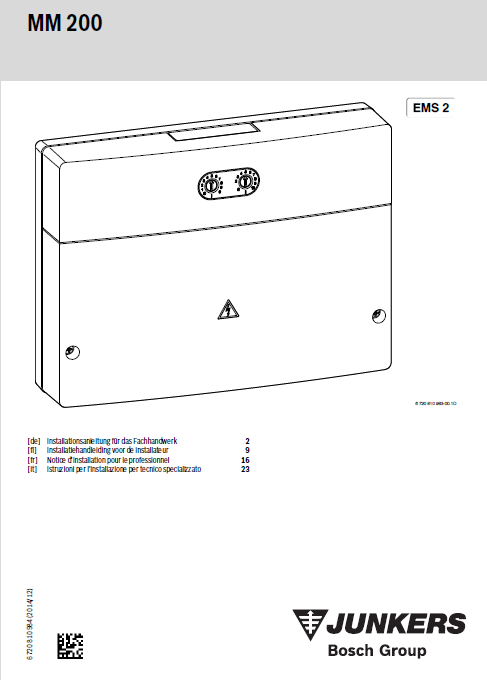
Obviously I haven't seen or tested a Junkers MS200 module and I have to bow to @norberts superior knowledge in that, and I shouldn't have said the modules were the same and I apologise to @joanwa if I misled her. I'm still unclear if my Junkers MM200 module would work with other Junkers kit, but as it works for me, I guess I'm OK.
PhillyGilly
on 27 Jul 2020
Obviously I haven't seen or tested a Junkers MS200 module and I have to bow to @norberts superior knowledge in that, and I shouldn't have said the modules were the same and I apologise to @joanwa if I misled her. I'm still unclear if my Junkers MM200 module would work with other Junkers kit, but as it works for me, I guess I'm OK.
thats again confusing ;) so Bosch MS200 = Junkers MS200 != Buderus SM200. The Buderus is different
joanwa
on 27 Jul 2020
Obviously I haven't seen or tested a Junkers MS200 module and I have to bow to @norberts superior knowledge in that, and I shouldn't have said the modules were the same and I apologise to @joanwa if I misled her. I'm still unclear if my Junkers MM200 module would work with other Junkers kit, but as it works for me, I guess I'm OK.
thats again confusing ;) so Bosch MS200 = Junkers MS200 != Buderus SM200. The Buderus is different
No. There are MM (Mixing Modules) and SM (Solar Modules). AFAIK Junkers MM200 == Bosch MM200 and Bruderus SM200 == Bosch MS200. . I don't know about the Junkers SM200.
Here is my web interface showing modules.

You might be interested in some of the other kit and errors :-)
PhillyGilly
on 27 Jul 2020
@PhillyGilly I was only referring to the solar modules, not the mixing modules (as per the thread). Junkers does not have an SM200, only Buderus does.
I can definitely say per my own testing that Bosch MS200 == Junkers MS200 but != Buderus SM200.
According to Norberts comment, a Buderus SM200 will not talk to an otherwise Bosch/Junkers controlled HT3 system. Bosch/Junkers modules are interchangeable, but Buderus is different, that should hold for the solar as well as mixing modules.
It's really a bit confusing I have to admit since Bosch owns both, Buderus and Junkers. But the Bosch branded modules themselves are compatible with the Junkers stuff. I guess thats also the reason they have the same name MS200 for Bosch and Junkers, but SM200 for Buderus. For the MM200 naming, well... ;)
joanwa
on 27 Jul 2020
@joanwa It's weird and very unteutonic (if that's a word!) not what you'd expect from a German business. The Bruderus SM200 is physically identical to the Bosch MS200 and has the same functions according to the published information but different communications? Bruderus don't have a MM200 module but their MM100 module ..... :-)
pu_ems_plus_2016-03_6720818016_01.pdf
PhillyGilly
on 28 Jul 2020
@joanwa @PhillyGilly
yes, it's very confusing. Starting with 2017 they have changed that brand-name from 'Junkers' to 'Bosch'.
But the hardware/software didn't changed for that newer modul-line (EMS2).
I had problems to find the right matching modul CW400 in 2017 working on my Heatronic-bus.
Some of them I found where labled with the old name 'Junkers' and that newer onces with 'Bosch'.
So I decided to compare that 10digit factory-number and that once where equal.
I'm using now that CW400 with 'Bosch'-Brand on that Junkers-Heatronic3 Bus.
At least that build-year of the moduls and the 10digit factory-number are importend for using them on the heater-system.
 norberts1
on 28 Jul 2020
norberts1
on 28 Jul 2020
quick scan for 0x368, 0x3A9, 0x3AA
0x368 = B0 00 FF 00 02 68 0C 00 08 (that number 12 could mean something?)
0x3A9 = B0 00 FF 00 02 A9 80 00 26 (single value of either 38 or 19 degrees for something?
0x3AA = B0 00 FF 00 02 AA 00 00 03 64 00 45 (0x64 is most likely 100%, the 0x45 is 69 or 34.5 degrees?)
@proddy here's another log of 0x30 telegrams:
# 0x368
000+00:06:33.341 N 53: [telegram] Rx: B0 00 FF 00 02 68 0C 00 08
# 0x3A9
000+00:06:35.145 N 56: [telegram] Rx: B0 00 FF 00 02 A9 80 00 26
# 0x3AA
000+00:06:35.335 N 57: [telegram] Rx: B0 00 FF 00 02 AA 00 00 03 64 00 45
# 0x369
000+00:06:34.520 N 54: [telegram] Rx: B0 00 FF 00 02 69 00 0A
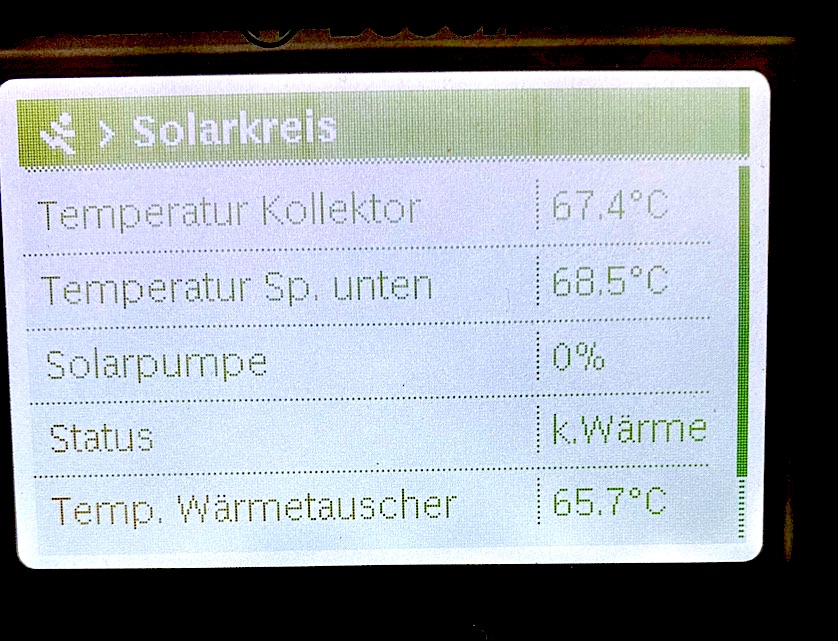
and while having recorded this, these are the values shown in the CW400, where the missing/wanted one is Temp. Wärmetauscher = 65.7 (see picture). I can't really find this value in the telegrams above.
edit, from the thermostat 0x10 I have those two without handler:
000+00:43:05.083 D 73: [emsesp] No telegram type handler found for ID 0xA2 (src 0x10)
000+00:47:05.796 N 433: [telegram] Rx: 90 00 A2 00 00 00 00 00 00 E6

000+00:43:47.003 D 115: [emsesp] No telegram type handler found for ID 0x267 (src 0x10)
000+00:46:47.654 N 424: [telegram] Rx: 90 00 FF 00 01 67 00 00 BD
with now value Temp. Wärmetauscher = 55.4
joanwa
on 28 Jul 2020
Some things to note
- when outputting the telegrams in raw format (
watch raw) the last byte is the CRC. And if you exclude the header which could be 5 or 6 bytes the telegram's actually data is quite short. For example,Rx 90 00 FF 00 01 67 00 00 BDjust has two values 0 and 0. AndRx: B0 00 FF 00 02 A9 80 00 26has one value 0x8000 which means un-defined or not-set. - It's very likely the warmetauscher temperature is stored as a two-byte short. So 65.7 degrees will be two consecutive bytes
02followed by91. - if you know the pattern, set
watch rawand try and mark in real-time when the data comes in. Or use the syslog feature to dump all the telegrams to an external rlog daemon. If you have a MacOSX, Linux or a Pi3 then there will be running already running you can use. The data must be there somewhere!
proddy
on 28 Jul 2020
cool, thanks that helps. dump to external config I've only seen in the webui, not configurable via telnet. the webui remains basically unreachable for quite some time. not sure if due to my weak wifi signal or other issues. will get it sorted somehow and report back here.
joanwa
on 28 Jul 2020
okay. There is a problem with memory on the ESP8266. If telnet and the web are running it will probably get very slow or crash. Best to stick to one for now. I purposely removed most of the telnet/console commands to ease up on the memory and have people use the Web for config.
proddy
on 28 Jul 2020
Here is my web interface showing modules.
You might be interested in some of the other kit and errors :-)
@PhillyGilly yuck! lots of nasty errors in that. Hopefully you'll find version 2.0 a lot better. Would you like to give it a shot?
proddy
on 29 Jul 2020
Here is my web interface showing modules.
You might be interested in some of the other kit and errors :-)@PhillyGilly yuck! lots of nasty errors in that. Hopefully you'll find version 2.0 a lot better. Would you like to give it a shot?
Hi @proddy. The "errors" aren't as bad as it looks. I'm keen to try v2 following your post yesterday, but it will have to wait until the week-end. I'll give you feed-back. Thanks.
PhillyGilly
on 29 Jul 2020
@proddy could I make a proposal for renaming a solar value? We have
Solar Module: MS200 (DeviceID:0x30, ProductID:164, Version:25.05)
  Collector: off
where Collector: off (0/nein) means, according to @norberts1 docu page 28, solar system status is NOT shut down. Meaning it's actually on. Only when Collector: on (1/ja 5 Grad Hysterese) it is shut down.
This is consistent with my system. First solar pump status says running and heats the tank, than tank heated status goes on, and after that Collector goes into on status, which means it just got shut down.
Norberts docu name is Abschaltung 1. Kollektorfeld bei Stagnation.
So instead of Collector could we just name it Collector shutdown?
joanwa
on 31 Jul 2020
So instead of Collector could we just name it Collector shutdown?
sure, easy.
proddy
on 31 Jul 2020
I'm fairly easy about this, but by way of background we had an earlier discussion on naming in another thread when @MichaelDvP was working on the MM200 code. What we agreed there was Deutsche Abkurtzungen and English full names with reference to the installation manual. This is how Bosch seem to work but @norberts1 (obviously) uses German/German. The original work and naming on the SM100 module preceded that so I don’t know if it follows the same convention. I think the relevant documents are posted somewhere above in this thread if @joanwa wants to cross-check.
PhillyGilly
on 31 Jul 2020
good point. On my to-do is #426 (multi-language support) and first thing there is to isolate all the strings into one single language file. Then we can all have a hack at it.
proddy
on 31 Jul 2020
I logged a whole day trying to find that heat exchanger temp in 0x368, 0x3A9, 0x3AA & 0x369 but they are just static.
Seems like they are already encoded within 0x362:
B0 0B FF 00 02 62 00 77 01 D4 80 00 80 00 80 00 80 00 80 00 80 00 80 00 80 00 00 F9 80 00 80 9E
Norberts docu https://github.com/norberts1/hometop_HT3/blob/master/HT3/docu/HT_EMS_Bus_messages.pdf
has my wanted value actually already documented:
page 38 ID 866 (0262)
Byte 26, 27: Solar Option D: External Temp Heat exchanger ID 866_20_0
and also 0x364 page 39 ID 868 (0264)
B0 00 FF 00 02 64 64 00 00 00 00 00 FF 00 00 00 00 00 64 00 00 00 00 00 A4
Byte 14: OptionD: ReqHx Pump power ID 868_8_0
joanwa
on 4 Aug 2020
right, 0x362 and 0x364 are already supported so I can extend to extract the information. You just need the 'external temp heat exchanger' and 'pump power'? Is the pump power different from the already captured pump modulation? I don't have time to work this out from the doc so if you could tell me exactly what the fields should be named and also provide some test data I can implement it.
proddy
on 4 Aug 2020
Already wired both in. Shall I send an PR? one is the solar circuit pump, the other is the pump from the heat exchanger to the cylinder tank.
Solar Module: MS200 (DeviceID:0x30, ProductID:164, Version:25.05)
  Collector temperature (TS1): 50.4°C
  Bottom temperature (TS2): 56.3°C
  Heat exchanger temperature (TS6): 50.0°C
  Solar pump modulation (PS1): 0%
  Valve (VS2) status: off
  Solar Pump (PS1) active: off
  Tank Heated: off
  Collector shutdown: off
  Energy last hour: 6920.0Wh
  Energy today: 9680Wh
  Energy total: 182.1kWh
a PR would be good, or just the diffs over. What ever is easier. Thanks!
proddy
on 4 Aug 2020
Related issues
 mtvw
·
13Comments
mtvw
·
13Comments
 mglatz
·
11Comments
mglatz
·
11Comments
 glitter-ball
·
3Comments
glitter-ball
·
3Comments
 Chuckame
·
11Comments
Chuckame
·
10Comments
Chuckame
·
11Comments
Chuckame
·
10Comments