Ems-esp: Lots of empty MQTT objects and termination of MQTT connection
Related to Version 1.9.1 (with working tx_mode 3 to Junkers (thanks)
There are bunch of empty objects (see grafic) delivered by MQTT (to an iobroker client) and the connection is terminated after a while (some minutes). With the previous release (1.8.014b) the MQTT connection was stable. As far as I can see, there is not much configuration required related to that.

 FrankRenp
All 46 comments
yes, i agree its sloppy but by design. When I added support for multiple heating circuits (up to 4) I found to independently control these in Home Assistant the easiest way is to have separate topics, for receiving the values and sending commands. This is mentioned in the ChangeLog too.
So what you're seeing are all the subscriptions.
A couple of options come to mind
1) have a setting for # heating circuit (HC) and then send out the MQTT subscribes for each of them with the HC number postfixed to end of the topic name
2) make it dynamic. As soon as thermostat data for each HC comes in, check if we have an MQTT subscribe and if not issue the subscribe.
3) go back to single subscriptions and append the HC in the payload. This is more work for HA and Domoticz as they will need to extract the HC using templates. I think its possible.
What do you suggest?
 proddy
on 8 Oct 2019
proddy
on 8 Oct 2019
From my point of view, it is a good idea, only to transmit data, which contain information, in particular if having a generic system which has lots of options. That would lead to one of the options 2 or 3. Even option 1 would have empty subscriptions, if not all data are available on the bus.
I had no problem before to extract the values from the boiler_data string within iobroker with a javascript.
My current major problem is not the amount of subscriptions, but the disconnection after some minutes - with some retries before. I need to debug to find the cause in the ems or in the server. But it seems, that there is a message flodding...
2019-10-06 08:28:14.742 - info: mqtt.0 (8835) Client [ems-esp] connected with secret 1570343294740_1795
2019-10-06 08:28:14.863 - warn: mqtt.0 (8835) Client [ems-esp] Cannot resend message: TypeError: "string" must be a string, Buffer, or ArrayBuffer
2019-10-06 08:28:15.008 - info: mqtt.0 (8835) Client [ems-esp] subscribes on topic "ems-esp/restart"
2019-10-06 08:28:15.013 - info: mqtt.0 (8835) Client [ems-esp] subscribes on topic "ems-esp/start"
2019-10-06 08:28:15.014 - info: mqtt.0 (8835) Client [ems-esp] subscribes on topic "ems-esp/thermostat_cmd_temp"
2019-10-06 08:28:15.016 - info: mqtt.0 (8835) Client [ems-esp] subscribes on topic "ems-esp/thermostat_cmd_mode"
2019-10-06 08:28:15.028 - info: mqtt.0 (8835) Client [ems-esp] subscribes on topic "ems-esp/thermostat_daytemp"
2019-10-06 08:28:15.029 - info: mqtt.0 (8835) Client [ems-esp] subscribes on topic "ems-esp/thermostat_nighttemp"
2019-10-06 08:28:15.032 - info: mqtt.0 (8835) Client [ems-esp] subscribes on topic "ems-esp/thermostat_holidayttemp"
2019-10-06 08:28:15.035 - info: mqtt.0 (8835) Client [ems-esp] subscribes on topic "ems-esp/thermostat_cmd_temp1"
2019-10-06 08:28:15.038 - info: mqtt.0 (8835) Client [ems-esp] subscribes on topic "ems-esp/thermostat_cmd_mode1"
2019-10-06 08:28:15.040 - info: mqtt.0 (8835) Client [ems-esp] subscribes on topic "ems-esp/thermostat_daytemp1"
2019-10-06 08:28:15.041 - info: mqtt.0 (8835) Client [ems-esp] subscribes on topic "ems-esp/thermostat_nighttemp1"
2019-10-06 08:28:15.043 - info: mqtt.0 (8835) Client [ems-esp] subscribes on topic "ems-esp/thermostat_holidayttemp1"
2019-10-06 08:28:15.044 - info: mqtt.0 (8835) Client [ems-esp] subscribes on topic "ems-esp/thermostat_cmd_temp2"
2019-10-06 08:28:15.046 - info: mqtt.0 (8835) Client [ems-esp] subscribes on topic "ems-esp/thermostat_cmd_mode2"
2019-10-06 08:28:15.047 - info: mqtt.0 (8835) Client [ems-esp] subscribes on topic "ems-esp/thermostat_daytemp2"
2019-10-06 08:28:15.049 - info: mqtt.0 (8835) Client [ems-esp] subscribes on topic "ems-esp/thermostat_nighttemp2"
2019-10-06 08:28:15.050 - info: mqtt.0 (8835) Client [ems-esp] subscribes on topic "ems-esp/thermostat_holidayttemp2"
2019-10-06 08:28:15.052 - info: mqtt.0 (8835) Client [ems-esp] subscribes on topic "ems-esp/thermostat_cmd_temp3"
2019-10-06 08:28:15.053 - info: mqtt.0 (8835) Client [ems-esp] subscribes on topic "ems-esp/thermostat_cmd_mode3"
2019-10-06 08:28:15.055 - info: mqtt.0 (8835) Client [ems-esp] subscribes on topic "ems-esp/thermostat_daytemp3"
2019-10-06 08:28:15.056 - info: mqtt.0 (8835) Client [ems-esp] subscribes on topic "ems-esp/thermostat_nighttemp3"
2019-10-06 08:28:15.058 - info: mqtt.0 (8835) Client [ems-esp] subscribes on topic "ems-esp/thermostat_holidayttemp3"
2019-10-06 08:28:15.059 - info: mqtt.0 (8835) Client [ems-esp] subscribes on topic "ems-esp/thermostat_cmd_temp4"
2019-10-06 08:28:15.061 - info: mqtt.0 (8835) Client [ems-esp] subscribes on topic "ems-esp/thermostat_cmd_mode4"
2019-10-06 08:28:15.063 - info: mqtt.0 (8835) Client [ems-esp] subscribes on topic "ems-esp/thermostat_daytemp4"
2019-10-06 08:28:15.064 - info: mqtt.0 (8835) Client [ems-esp] subscribes on topic "ems-esp/thermostat_nighttemp4"
2019-10-06 08:28:15.065 - info: mqtt.0 (8835) Client [ems-esp] subscribes on topic "ems-esp/thermostat_holidayttemp4"
2019-10-06 08:28:15.067 - info: mqtt.0 (8835) Client [ems-esp] subscribes on topic "ems-esp/boiler_cmd_wwactivated"
2019-10-06 08:28:15.068 - info: mqtt.0 (8835) Client [ems-esp] subscribes on topic "ems-esp/boiler_cmd_wwtemp"
2019-10-06 08:28:15.070 - info: mqtt.0 (8835) Client [ems-esp] subscribes on topic "ems-esp/boiler_cmd_comfort"
2019-10-06 08:28:15.071 - info: mqtt.0 (8835) Client [ems-esp] subscribes on topic "ems-esp/boiler_cmd_flowtemp"
2019-10-06 08:28:15.073 - info: mqtt.0 (8835) Client [ems-esp] subscribes on topic "ems-esp/shower_timer"
2019-10-06 08:28:15.074 - info: mqtt.0 (8835) Client [ems-esp] subscribes on topic "ems-esp/shower_alert"
2019-10-06 08:28:15.075 - info: mqtt.0 (8835) Client [ems-esp] subscribes on topic "ems-esp/shower_coldshot"
2019-10-06 08:28:37.788 - warn: mqtt.0 (8835) Client [ems-esp] Message 28589 deleted after 11 retries
2019-10-06 08:28:37.800 - warn: mqtt.0 (8835) Client [ems-esp] Message 28588 deleted after 11 retries
-------- lots of lines
2019-10-06 08:29:01.817 - warn: mqtt.0 (8835) Client [ems-esp] Message 28416 deleted after 11 retries
2019-10-06 08:30:57.014 - info: mqtt.0 (8835) Client [ems-esp] connection closed: disconnected
FrankRenp
on 8 Oct 2019
interesting, I'll turn logging on in my Mosquitto broker and see if the same is happening
proddy
on 8 Oct 2019
I checked my environment and don't see any retries or disconnects. When you find out what is causing it let me know.
proddy
on 9 Oct 2019
After having installed moquito for windows, I found out, that disconnects do not occur than.
It seems, that it was the iobroker option (send also states, ack=true) which caused the disconnects. Now it's ok.
FrankRenp
on 9 Oct 2019
as for the MQTT I'm going to refactor that whole piece and bundle all the thermostat stats and commands into 2 separate MQTT topics. It'll be a major breaking change but with all the new boiler & thermostat commands the TCP stack on the ESP is running out of memory. I'll use this GitHub issue as a reference.
proddy
on 9 Oct 2019
I made the refactor in 1.9.2b6. See if it works and if so please close the issue.
proddy
on 12 Oct 2019
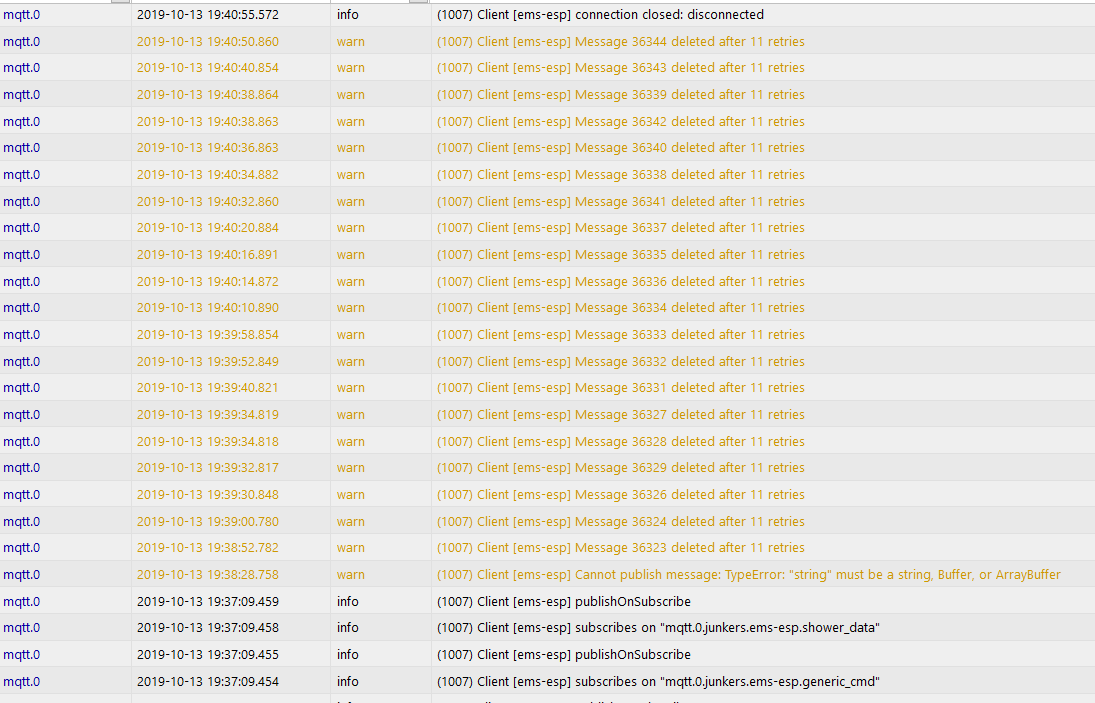
I cannot see any change - the connection is terminated after some errors. There are still a lot of subscriptions. I do not understand enough from the mqtt protocol to construe the mqtt message from Iobroker - however, the other clients I have, do not terminate.
Is there any command to reconnect to the mqtt broker after a disconnect?
[APP] EMS-ESP version: 1.9.2b6
[APP] MyESP version: 1.2.10
[APP] Build timestamp: 2019-10-13 19:24:31
[APP] Uptime: 0 days 0 hours 11 minutes 22 seconds
[APP] System Load: 3%
[WIFI] WiFi Hostname: ems-esp
[WIFI] WiFi IP: *
[WIFI] WiFi signal strength: 100%
[WIFI] WiFi MAC: *
[MQTT] is disconnected
FrankRenp
on 13 Oct 2019
From the log looks like a message is trying to be sent ("cannot publish message: TypeError") and then the broker kills the connection after so many retries. It'll be good if you can enable more verbose logging to see which message this is?
Another thing I'll add is a parameter to change the QOS. It's set to 1 as default which is forcing your iobroker to send back a PUB acknowledgement.
I'll also continue to watch my Mosquitto broker to see if I can see similar behavior.
proddy
on 13 Oct 2019
I added mqtt_qos and mqtt_keepalive as options. See if mqtt_qos 0 is any better
proddy
on 13 Oct 2019
First it was not - but after restarting the mqtt-broker, the problem was gone. I will observe and close, if it stays stable.
FrankRenp
on 14 Oct 2019
"Unmotivated" restart after 2 hours run:
[SYSTEM] Last reset reason: Exception
[SYSTEM] Last reset info: Fatal exception:0 flag:2 (EXCEPTION) epc1:0x4021c974 epc2:0x00000000 epc3:0x00000000 excvaddr:0x00000000 depc:0x00000000
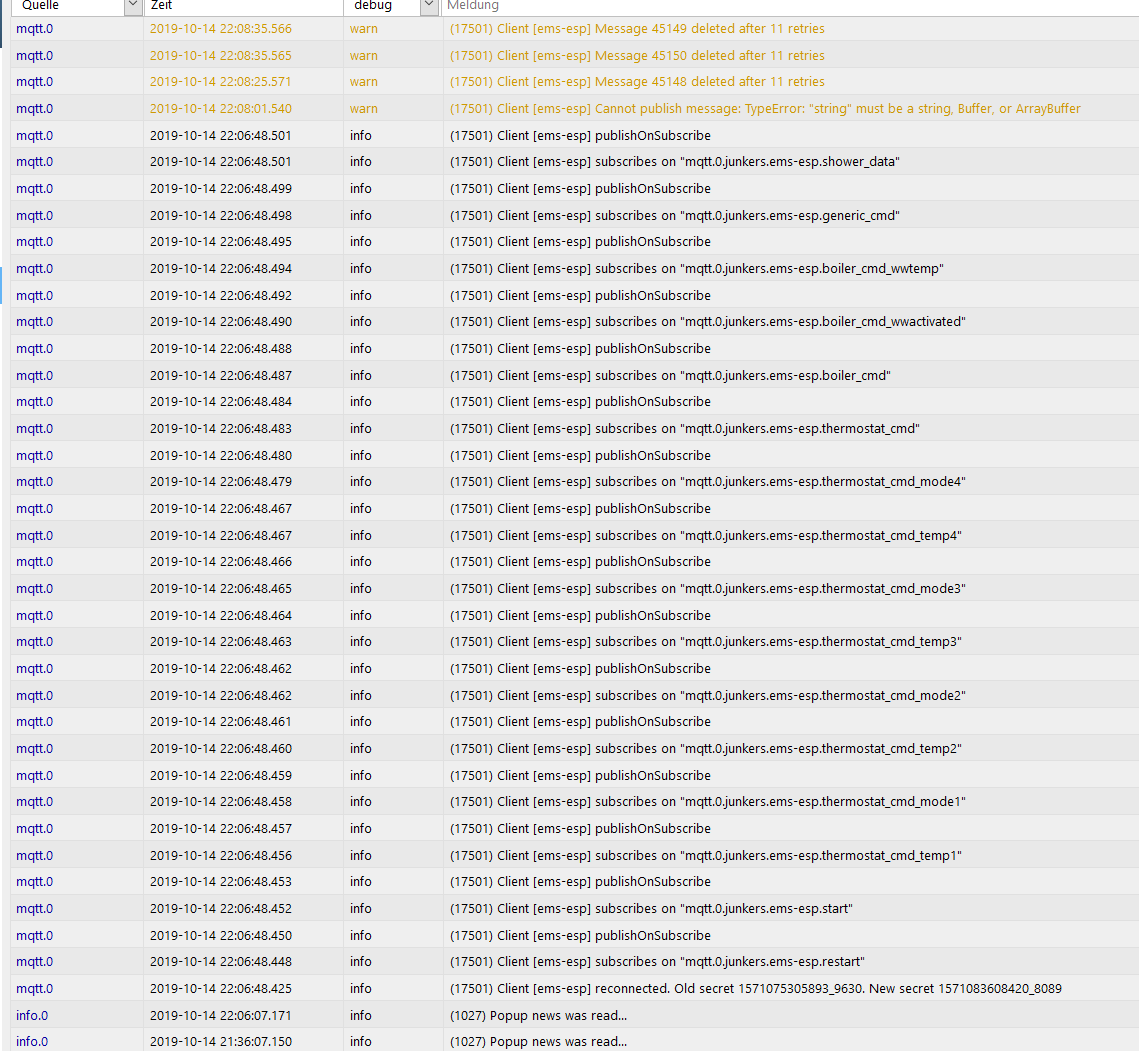
After the restart, the warnings occured again. After restarting the mqtt broker, no warnings.
Seems to be "session-related" - if there are such things in mqtt. It seems, that after a reconnect of the mqtt client in the ems, the problems occur. With broker restart, they are gone.
FrankRenp
on 14 Oct 2019
this is strange. I'd like to try and reproduce it. Can I just install iobroker and only use their MQTT broker?
proddy
on 14 Oct 2019
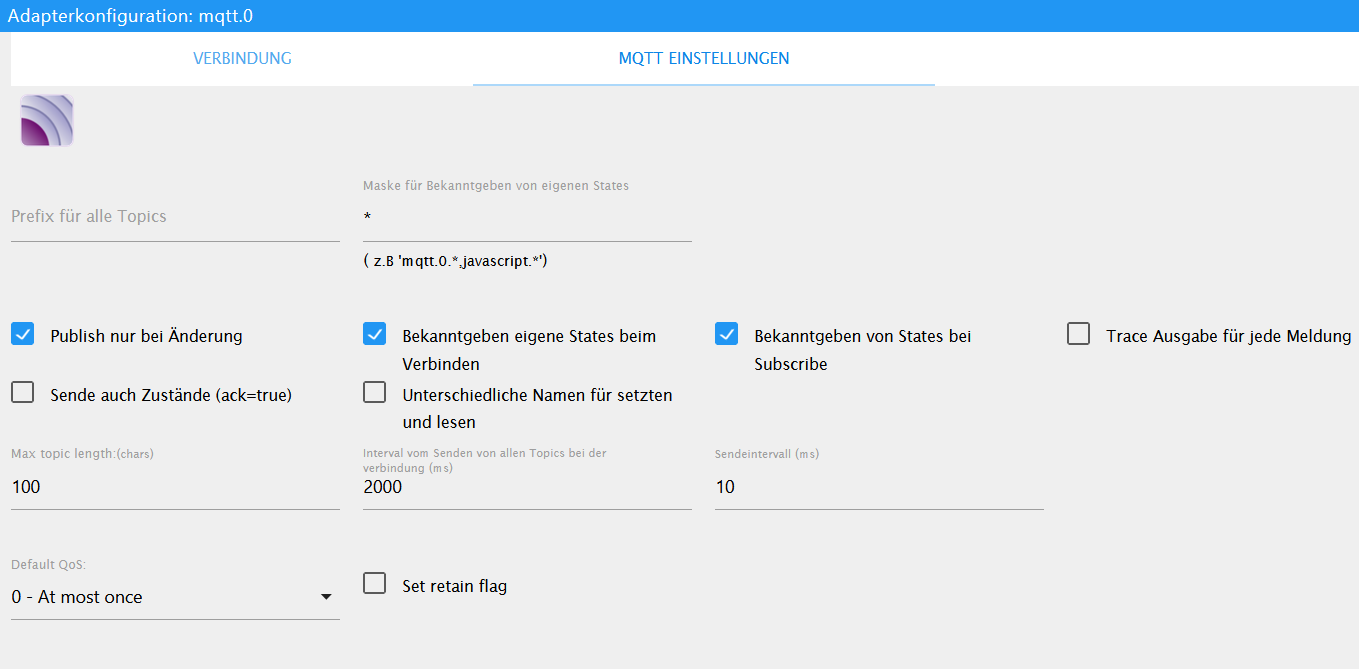
Think so - here it is running on a raspberry, but there are Version for Windows and Linux. You'll need the iobroker itself (https://www.iobroker.net/#en/download) and the Mqtt Broker/Client adapter at least. There are not so many Mqtt-Options:
FrankRenp
on 15 Oct 2019
actually its easier if you test with mosquitto yourself to rule to see if its an issue with EMS-ESP or the iobroker. You can run it next to iobroker on a different port, like 1887. It's only a few commands to install and get it running. For example with Linux/Ubuntu on the rpi:
  sudo apt-get mosquitto
  sudo mosquitto -p 1887 -v
and make sure you set mqtt_port to 1887
you'll see a lot of logging, but hopefully no disconnects.
proddy
on 15 Oct 2019
Currently its running since the last two days without any problems with ioBroker. Connection is still there. Seems to be a start connection issue together with ioBroker. I cannot not reproduce with mosquitto by know.
Can I close this issue and reopen, if I get new information?
FrankRenp
on 16 Oct 2019
yes please close it. Out of interest are you still running with QOS set to 0 ?
proddy
on 16 Oct 2019
Yes, I do. ->Closed
FrankRenp
on 16 Oct 2019
Sorry, reopening, since still mqtt disconnects with version 1.9.2b6.
I did run a check as proposed with mosquittos on windows. After some hours run, there is a disconnect - see logs belows. If this is the case, there is no reaction anymore with the esp - no ping, no browser answer, no telnet....
After one of the resets there was no reset info, after the other one it was this one, I think because I pressed the reset button...(as before)
[SYSTEM] Last reset reason: External System
[SYSTEM] Last reset info: Fatal exception:0 flag:6 (EXT_SYS_RST) epc1:0x00000000 epc2:0x00000000 epc3:0x00000000 excvaddr:0x00000000 depc:0x00000000
[SYSTEM] Restart count: 0
[SYSTEM] rtcmem status: blocks:2 addr:0x60001280
[SYSTEM] rtcmem 00: 1163087990
[SYSTEM] rtcmem 01: 0
Mosquitto Logs:
1571495982: Received PUBLISH from ems-esp (d0, q0, r0, m0, 'junkers/ems-esp/boiler_data', ... (475 bytes))
1571496072: Client ems-esp has exceeded timeout, disconnecting.
....
1571551879: New connection from 192.168.0.31 on port 1883.
1571551879: New client connected from 192.168.0.31 as ems-esp (p2, c0, k60, u'ems').
1571551879: Will message specified (7 bytes) (r1, q1).
...
1571577139: Received PUBLISH from ems-esp (d0, q0, r0, m0, 'junkers/ems-esp/heating_active', ... (1 bytes))
1571577142: Received PINGREQ from mqtt-client-test
1571577142: Sending PINGRESP to mqtt-client-test
1571577174: Received PINGREQ from ems-esp
1571577174: Sending PINGRESP to ems-esp
1571577195: Socket error on client ems-esp, disconnecting.
1571577202: Received PINGREQ from mqtt-client-test
FrankRenp
on 20 Oct 2019
Ok, I'll run some performance tests and monitor any disconnects. If the telnet is also not responding then I suspect its the WiFi going into sleep mode.
proddy
on 20 Oct 2019
@FrankRenp see #217 as this is very similar to what you're seeing. I suspect the WiFi but need to run some more tests to confirm. I also need to check what changes have been made in the latest Arduino ESP8266 core libraries.
proddy
on 21 Oct 2019
OK, i uploaded the curent version - it's running, I will report.
(The remote firmware update feature is really good, I do not need to climb-up the attic each time :-) That makes testing much more easy.)
FrankRenp
on 21 Oct 2019
Today, 10:45 (9420) Client [ems-esp] connection closed: timeout
but still a Wifi-Connection/Telnet:
System output
[APP] EMS-ESP version: 1.9.3b3
[APP] MyESP version: 1.2.12
[APP] Build timestamp: 2019-10-21 20:41:05
[APP] Uptime: 0 days 20 hours 32 minutes 19 seconds
[APP] System Load: 4%
[...]
[MQTT] is disconnected
[NTP] Time in UTC is 15:17:00
[SYSTEM] System is Stable
[SYSTEM] Board: PLATFORMIO_D1_MINI
[SYSTEM] CPU frequency: 80 MHz
[SYSTEM] SDK version: 2.2.1(cfd48f3)
[SYSTEM] CPU chip ID: 0x3A1469
[SYSTEM] Core version: 2_5_2
[SYSTEM] Boot version: 6
[SYSTEM] Boot mode: 1
[SYSTEM] Last reset reason: Restart from terminal
[SYSTEM] Restart count: 0
[SYSTEM] # TCP disconnects: 0
[SYSTEM] rtcmem status: blocks:2 addr:0x60001280
[SYSTEM] rtcmem 00: 1163087990
[SYSTEM] rtcmem 01: 65536
[FLASH] Flash chip ID: 0x164020
[FLASH] Flash speed: 40000000 Hz
[FLASH] Flash mode: DIO
[FLASH] Flash size (CHIP): 4194304
[FLASH] Flash size (SDK): 4194304
[FLASH] Flash Reserved: 4096
[MEM] Firmware size: 628752
[MEM] Max OTA size: 2510848
[MEM] OTA Reserved: 16384
[MEM] Free Heap: 26888 bytes initially | 14800 bytes used (55%) | 12088 bytes free (44%)
FrankRenp
on 22 Oct 2019
That's strange. It says [MQTT] is disconnected but I see # TCP disconnects: 0. In the code when I detect the MQTT has lost connection to the broker it should increment the count. Odd.
proddy
on 22 Oct 2019
my test system has been running for 3 days now with no wifi or mqtt dropouts. I'm doing the random checks with Telnet and Web but other than that I just left it alone. If I can't reproduce here, I can't fix.
proddy
on 26 Oct 2019
Ok, I just installed the 1.9.3b5 and setup another rasperry only with mosquitto running. Wifi 100%
I'll let it run and report back, if I can reproduce something strange. Currently the log locks pretty normal, doesn't it?
1572103039: Received PINGREQ from ems-esp
1572103039: Sending PINGRESP to ems-esp
1572103071: Received PUBLISH from ems-esp (d0, q0, r0, m0, 'junkers/ems-esp/boiler_data', ... (474 bytes))
1572103071: Received PUBLISH from ems-esp (d0, q0, r0, m0, 'junkers/ems-esp/tapwater_active', ... (1 bytes))
1572103071: Received PUBLISH from ems-esp (d0, q0, r0, m0, 'junkers/ems-esp/heating_active', ... (1 bytes))
1572103071: Received PUBLISH from ems-esp (d0, q0, r0, m0, 'junkers/ems-esp/thermostat_data', ... (52 bytes))
1572103073: Received PUBLISH from ems-esp (d0, q0, r0, m0, 'junkers/ems-esp/boiler_data', ... (474 bytes))
1572103073: Received PUBLISH from ems-esp (d0, q0, r0, m0, 'junkers/ems-esp/tapwater_active', ... (1 bytes))
1572103073: Received PUBLISH from ems-esp (d0, q0, r0, m0, 'junkers/ems-esp/heating_active', ... (1 bytes))
1572103073: Received PUBLISH from ems-esp (d0, q0, r0, m0, 'junkers/ems-esp/tapwater_active', ... (1 bytes))
1572103073: Received PUBLISH from ems-esp (d0, q0, r0, m0, 'junkers/ems-esp/heating_active', ... (1 bytes))
1572103074: Received PUBLISH from ems-esp (d0, q0, r0, m0, 'junkers/ems-esp/heartbeat', ... (108 bytes))
1572103082: Received PINGREQ from ems-esp
1572103082: Sending PINGRESP to ems-esp
1572103124: Received PINGREQ from ems-esp
1572103124: Sending PINGRESP to ems-esp
1572103134: Received PUBLISH from ems-esp (d0, q0, r0, m0, 'junkers/ems-esp/boiler_data', ... (474 bytes))
1572103134: Received PUBLISH from ems-esp (d0, q0, r0, m0, 'junkers/ems-esp/tapwater_active', ... (1 bytes))
1572103134: Received PUBLISH from ems-esp (d0, q0, r0, m0, 'junkers/ems-esp/heating_active', ... (1 bytes))
1572103134: Received PUBLISH from ems-esp (d0, q0, r0, m0, 'junkers/ems-esp/tapwater_active', ... (1 bytes))
1572103134: Received PUBLISH from ems-esp (d0, q0, r0, m0, 'junkers/ems-esp/heating_active', ... (1 bytes))
1572103139: Received PUBLISH from ems-esp (d0, q0, r0, m0, 'junkers/ems-esp/tapwater_active', ... (1 bytes))
1572103139: Received PUBLISH from ems-esp (d0, q0, r0, m0, 'junkers/ems-esp/heating_active', ... (1 bytes))
1572103166: Received PINGREQ from ems-esp
1572103166: Sending PINGRESP to ems-esp
1572103191: Received PUBLISH from ems-esp (d0, q0, r0, m0, 'junkers/ems-esp/boiler_data', ... (473 bytes))
1572103191: Received PUBLISH from ems-esp (d0, q0, r0, m0, 'junkers/ems-esp/tapwater_active', ... (1 bytes))
1572103191: Received PUBLISH from ems-esp (d0, q0, r0, m0, 'junkers/ems-esp/heating_active', ... (1 bytes))
1572103191: Received PUBLISH from ems-esp (d0, q0, r0, m0, 'junkers/ems-esp/thermostat_data', ... (52 bytes))
1572103194: Received PUBLISH from ems-esp (d0, q0, r0, m0, 'junkers/ems-esp/heartbeat', ... (108 bytes))
FrankRenp
on 26 Oct 2019
yes, looks normal so far
proddy
on 26 Oct 2019
I can reprodruce, sorry..
Again a socket error on ems-esp client (log see below). (broker mosquitto v.1.4.10 on raspbian stretch). It may be related to a restart of a windows 10 client, but I cannot say for sure. There are some clients and rasperries running here.
There was first no reaction (Telnet, Web), but after some minutes, it seems there was an automatic reboot.
[SYSTEM] Last reset reason: Exception
[SYSTEM] Last reset info: Fatal exception:29 flag:2 (EXCEPTION) epc1:0x40000e5a epc2:0x00000000 epc3:0x00000000 excvaddr:0x00000004 depc:0x00000000
[SYSTEM] Restart count: 0
[SYSTEM] # TCP disconnects: 0
1572167644: Received PUBLISH from ems-esp (d0, q0, r0, m0, 'junkers/ems-esp/heating_active', ... (1 bytes))
1572167652: Received PINGREQ from ems-esp
1572167652: Sending PINGRESP to ems-esp
1572167688: Received PINGREQ from ems-esp
1572167688: Sending PINGRESP to ems-esp
1572167778: Client ems-esp has exceeded timeout, disconnecting.
1572167778: Socket error on client ems-esp, disconnecting.
1572167859: Saving in-memory database to /var/lib/mosquitto/mosquitto.db.
FrankRenp
on 27 Oct 2019
ok this is actually good. We need to work out if the Mosquitto disconnect is because of the EMS-ESP crashing and rebooting which is a totally different problem (and more severe) or something else. When you look at system pay attention to the uptime. Did it restart?
Or is the MQTT failing but the EMS-ESP is still working (but no wifi telnet/web response).
In these situations do you have either Telnet or WiFi constantly on?
proddy
on 27 Oct 2019
It seems, that the problem is to find out, if the emp-esp is still working. I'm not aware of an interface to find out. Perhaps we could use a flashing LED as indicator?
After I had access again (presumably after the restart), I could only identify _one_ restart - but mqtt interruption was at least earlier. The disconnect was 1572167778/9:16 GMT (10:16) and the reboot in the event log was 10:41. In between, I tried Telnet/Web without response.
The disconnect itself occured without an open telnet or web session. My wifi is constantly on.
FrankRenp
on 27 Oct 2019
try not to use the web, at least that will eliminate one of the reasons. If either the Wifi and MQTT drop it will try and reconnect. This is counted but the catch 22 here is that you can't see it as Telnet and MQTT traffic are both stopped. You have a good idea. Perhaps when the count hits say 20 I can put the system into 'unstable' mode and this will cause the LED to flash very fast, like you see at startup.
proddy
on 27 Oct 2019
Disconnecting after two days running - telnet still working. Can I trigger to reconnect mqtt or do I need to reboot? Mqttlog does not provide anything suspicions (see below). Will check with new version next week only.
Remark: "Device in AP mode" seems to be wrong, doesn't it? Im still connected via my Wifi...
system:
[APP] EMS-ESP version: 1.9.3b5
[APP] MyESP version: 1.2.12
[APP] Build timestamp: 2019-10-26 17:06:36
[APP] Uptime: 2 days 5 hours 33 minutes 23 seconds
[APP] System Load: 24%
[WIFI] Device is in AP mode with SSID ems-esp
[WIFI] WiFi MAC: 3C:71:BF:3A:14:69
[MQTT] is disconnected
[NTP] Time in UTC is 17:28:05
[SYSTEM] System is Stable
[SYSTEM] Board: PLATFORMIO_D1_MINI
[SYSTEM] CPU frequency: 80 MHz
[SYSTEM] SDK version: 2.2.1(cfd48f3)
[SYSTEM] CPU chip ID: 0x3A1469
[SYSTEM] Core version: 2_5_2
[SYSTEM] Boot version: 6
[SYSTEM] Boot mode: 1
[SYSTEM] Last reset reason: Exception
[SYSTEM] Last reset info: Fatal exception:0 flag:2 (EXCEPTION) epc1:0x206f7425 epc2:0x00000000 epc3:0x00000000 excvaddr:0x00000000 depc:0x00000000
[SYSTEM] Restart count: 0
[SYSTEM] # TCP disconnects: 0
[SYSTEM] rtcmem status: blocks:2 addr:0x60001280
[SYSTEM] rtcmem 00: 1163087990
[SYSTEM] rtcmem 01: 65536
[FLASH] Flash chip ID: 0x164020
[FLASH] Flash speed: 40000000 Hz
[FLASH] Flash mode: DIO
[FLASH] Flash size (CHIP): 4194304
[FLASH] Flash size (SDK): 4194304
[FLASH] Flash Reserved: 4096
[MEM] Firmware size: 691008
[MEM] Max OTA size: 2449408
[MEM] OTA Reserved: 16384
[MEM] Free Heap: 25544 bytes initially | 15232 bytes used (59%) | 10312 bytes free (40%)
mqttlog
MQTT publish log:
Topic:status Payload:online
Topic:start Payload:start
Topic:heartbeat Payload:{"version":"1.9.3b5","IP":"192.168.0.31","rssid":32,"load":24,"uptime":87744,"freemem":52,"MQTTdisconnects":0}
Topic:shower_data Payload:{"timer":"0","alert":"0"}
Topic:boiler_data Payload:{"wWComfort":"Hot","wWSelTemp":15,"wWDesiredTemp":75,"selFlowTemp":0,"selBurnPow":100,"curBurnPow":0,"pumpMod":0,"wWCircPump":0,"outdoorTemp":11.4,"curFlowTemp":28.2,"wWActivated":"on","burnGas":"off","flameCurr":-0.1,"heatPmp":"off","fanWork":"off","ignWork":"off","wWCirc":"off","heating_temp":51,"pump_mod_max":100,"pump_mod_min":10,"wWHeat":"off","UBAuptime":3705317,"burnStarts":133418,"burnWorkMin":1034926,"heatWorkMin":1034926,"ServiceCode":"","ServiceCodeNumber":0}
Topic:tapwater_active Payload:0
Topic:heating_active Payload:0
Topic:thermostat_data Payload:{"hc1":{"seltemp":18,"currtemp":21.3,"mode":"off"}}
MQTT subscriptions:
Topic:junkers/ems-esp/restart
Topic:junkers/ems-esp/start
Topic:junkers/ems-esp/temp1
Topic:junkers/ems-esp/mode1
Topic:junkers/ems-esp/temp2
Topic:junkers/ems-esp/mode2
Topic:junkers/ems-esp/temp3
Topic:junkers/ems-esp/mode3
Topic:junkers/ems-esp/temp4
Topic:junkers/ems-esp/mode4
Topic:junkers/ems-esp/thermostat_cmd
Topic:junkers/ems-esp/boiler_cmd
Topic:junkers/ems-esp/boiler_cmd_wwactivated
Topic:junkers/ems-esp/boiler_cmd_wwtemp
Topic:junkers/ems-esp/generic_cmd
Topic:junkers/ems-esp/shower_data
FrankRenp
on 29 Oct 2019
to trigger a reconnect to MQTT just use set mqtt_enabled off and then on again
proddy
on 29 Oct 2019
I'm faced with a similar issue. After a few hours the EMS-ESP disconnects to my MQTT broker, (mosquitto) but i can login to the webinterface and via telnet:
[TELNET] exiting telnet session
[MQTT] Error publishing to EMS/ems-esp/boiler_data with payload {"wWComfort":"Hot","wWSelTemp":57,"wWDesiredTemp":70,"selFlowTemp":70,"selBurnPow":21,"curBurnPow":0,"pumpMod":9,"wWCircPump":0,"wWCurTmp":26.1,"wWCurFlow":0,"curFlowTemp":60.7,"wWActivated":"on","wWOnetime":"off","burnGas":"off","flameCurr":-0.1,"heatPmp":"on","fanWork":"on","ignWork":"off","wWCirc":"off","heating_temp":70,"pump_mod_max":100,"pump_mod_min":10,"wWHeat":"off","wWStarts":39679,"wWWorkM":29936,"UBAuptime":3968249,"burnStarts":244833,"burnWorkMin":208677,"heatWorkMin":178740,"ServiceCode":"","ServiceCodeNumber":0} [error 0]
[MQTT] Error publishing to EMS/ems-esp/boiler_data with payload {"wWComfort":"Hot","wWSelTemp":57,"wWDesiredTemp":70,"selFlowTemp":70,"selBurnPow":21,"curBurnPow":0,"pumpMod":9,"wWCircPump":0,"wWCurTmp":26.1,"wWCurFlow":0,"curFlowTemp":62,"wWActivated":"on","wWOnetime":"off","burnGas":"off","flameCurr":-0.1,"heatPmp":"on","fanWork":"on","ignWork":"off","wWCirc":"off","heating_temp":70,"pump_mod_max":100,"pump_mod_min":10,"wWHeat":"off","wWStarts":39679,"wWWorkM":29936,"UBAuptime":3968260,"burnStarts":244836,"burnWorkMin":208679,"heatWorkMin":178743,"ServiceCode":"","ServiceCodeNumber":0} [error 0]
[MQTT] Error publishing to EMS/ems-esp/boiler_data with payload {"wWComfort":"Hot","wWSelTemp":57,"wWDesiredTemp":70,"selFlowTemp":70,"selBurnPow":21,"curBurnPow":0,"pumpMod":9,"wWCircPump":0,"wWCurTmp":27,"wWCurFlow":0,"curFlowTemp":60.2,"wWActivated":"on","wWOnetime":"off","burnGas":"off","flameCurr":-0.1,"heatPmp":"on","fanWork":"on","ignWork":"off","wWCirc":"off","heating_temp":70,"pump_mod_max":100,"pump_mod_min":10,"wWHeat":"off","wWStarts":39679,"wWWorkM":29936,"UBAuptime":3968307,"burnStarts":244848,"burnWorkMin":208690,"heatWorkMin":178754,"ServiceCode":"","ServiceCodeNumber":0} [error 0]
[MQTT] TCP Disconnected
[MQTT] Connecting to MQTT using user DevUser...
[MQTT] MQTT connected established
?
[TELNET] Connected to EMS-ESP version 1.* EMS-ESP version 1.9.4b2s.
- Hostname: ems-esp (192.168.X.Y)
- WiFi SSID: MY_WLAN (signal 92%)
- MQTT disconnected
*
...
Afterwards I activated log verbose via telnet and clicked on some link on the webinterface, after a few minutes the webinterface freezes and the devices reboots. After reboot the mqtt was reconnected to the broker.
Last messages via Telnet:
Starting scheduled query from EMS devices
Requesting type RCTime(0x06) from dest 0x10
Requesting type UBAMonitorFast(0x18) from dest 0x08
Requesting type UBAMonitorSlow(0x19) from dest 0x08
Requesting type UBAParameterWW(0x33) from dest 0x08
Requesting type UBAParametersMessage(0x16) from dest 0x08
Requesting type UBATotalUptimeMessage(0x14) from dest 0x08
(13:50:01.272) Sending read of type 0x06 to 0x10, telegram: 8B 90 06 00 20 (CRC=A4)
(13:50:01.322) Thermostat -> me, type 0x06, telegram: 90 0B 06 00 13 0A 14 1E 2E 10 03 00 (CRC=D9) #data=8
<--- RCTime(0x06)
(13:50:01.334) Sending read of type 0x18 to 0x08, telegram: 8B 88 18 00 20 (CRC=1C)
(13:50:01.398) Boiler -> me, type 0x18, telegram: 88 0B 18 00 46 02 6B 15 00 01 23 24 C0 01 13 80 00 80 00 FF FF FF 00 00 00 00 00 00 00 (CRC=A2) #data=25
<--- UBAMonitorFast(0x18)
(13:50:01.449) Boiler -> all, type 0x07, telegram: 88 00 07 00 0B 01 00 00 00 00 00 00 00 00 00 00 00 00 00 (CRC=5D) #data=15
<--- UBADevices(0x07)
(13:50:01.679) Boiler -> all, type 0x18, telegram: 88 00 18 00 46 02 6C 15 00 01 23 24 C0 01 13 80 00 80 00 FF FF FF 00 00 00 00 00 00 00 (CRC=3E) #data=25
<--- UBAMonitorFast(0x18)
(13:50:02.021) Sending read of type 0x19 to 0x08, telegram: 8B 88 19 00 20 (CRC=18)
(13:50:02.087) Boiler -> me, type 0x19, telegram: 88 0B 19 00 80 00 80 00 01 10 FF FF 01 09 03 BC 88 03 2F 46 00 00 00 02 BA 55 03 21 89 80 00 (CRC=90) #data=27
<--- UBAMonitorSlow(0x19)
(13:50:02.270) Sending read of type 0x33 to 0x08, telegram: 8B 88 33 00 20 (CRC=B0)
(13:50:02.320) Boiler -> me, type 0x33, telegram: 88 0B 33 00 08 FF 39 00 00 00 00 02 46 00 FF FF (CRC=8E) #data=12
<--- UBAParameterWW(0x33)
(13:50:02.426) Sending read of type 0x16 to 0x08, telegram: 8B 88 16 00 20 (CRC=24)
(13:50:02.481) Boiler -> me, type 0x16, telegram: 88 0B 16 00 FF 46 15 00 00 FB 03 01 03 64 0A 00 (CRC=86) #data=12
<--- UBAParametersMessage(0x16)
(13:50:02.582) Sending read of type 0x14 to 0x08, telegram: 8B 88 14 00 20 (CRC=2C)
(13:50:02.621) Boiler -> me, type 0x14, telegram: 88 0B 14 00 3C 8D 90 (CRC=7A) #data=3
<--- UBATotalUptimeMessage(0x14)
(13:50:03.103) Boiler -> all, type 0x07, telegram: 88 00 07 00 03 01 00 00 00 00 00 00 00 00 00 00 00 00 00 (CRC=ED) #data=15
<--- UBADevices(0x07)
(13:50:04.956) Boiler -> all, type 0x18, telegram: 88 00 18 00 46 02 6E 15 00 01 23 24 C0 01 13 80 00 80 00 FF FF FF 00 00 00 00 00 00 00 (CRC=99) #data=25
<--- UBAMonitorFast(0x18)
(13:50:05.178) Boiler -> 0x13, type 0x05, telegram: 88 13 05 22 00 (CRC=80) #data=1
(13:50:05.483) Boiler -> all, type 0x34, telegram: 88 00 34 00 39 01 12 80 00 A1 00 00 01 00 00 74 F0 00 9A FF 00 (CRC=4C) #data=17
<--- UBAMonitorWWMessage(0x34)
(13:50:14.914) Boiler -> 0x13, type 0x05, telegram: 88 13 05 22 00 (CRC=80) #data=1
(13:50:15.216) Boiler -> all, type 0x07, telegram: 88 00 07 00 03 01 00 00 00 00 00 00 00 00 00 00 00 00 00 (CRC=ED) #data=15
<--- UBADevices(0x07)
(13:50:15.441) Boiler -> all, type 0x18, telegram: 88 00 18 00 46 02 68 15 00 01 23 24 C0 01 13 80 00 80 00 FF FF FF 00 00 00 00 00 00 00 (CRC=69) #data=25
<--- UBAMonitorFast(0x18)
(13:50:15.681) Boiler -> all, type 0x34, telegram: 88 00 34 00 39 01 13 80 00 A1 00 00 01 00 00 74 F0 00 9A FF 00 (CRC=5A) #data=17
<--- UBAMonitorWWMessage(0x34)
(13:50:15.942) Boiler -> all, type 0x19, telegram: 88 00 19 00 80 00 80 00 01 0E FF FF 01 09 03 BC 88 03 2F 46 00 00 00 02 BA 55 03 21 89 80 00 (CRC=EF) #data=27
<--- UBAMonitorSlow(0x19)
(13:50:19.029) Boiler -> all, type 0x18, telegram: 88 00 18 00 46 02 61 15 00 01 23 24 C0 01 13 80 00 80 00 FF FF FF 00 00 00 00 00 00 00 (CRC=18) #data=25
<--- UBAMonitorFast(0x18)
l
Verbindung zu Host verloren.
My device is: EMS Bus Wi-Fi Gateway hardware version V1.3 with a generic Wemos D1 Mini V2 type ESP8266.
Are there any logs or some other data, which i can provide to analyse the root cause of the issue?
 oorotor
on 30 Oct 2019
oorotor
on 30 Oct 2019
I think I have enough to try and reproduce. Did you compile the firmware yourself or are you using the .bin files from the GitHub repo?
proddy
on 30 Oct 2019
Dear @FrankRenp
in the post two days before i noticed that you have the same effect that the wifi went to AP mode while its already connected to yor wifi (i suppose). I had the same issue several times ago.
My interpretation: The ESP switched partly to AP mode. Therefore outgoing connections will be established using the default IP address (you can see the AP mode wifi network around the device). This leads to nowhere... Incomming connections are somehow valid...
Strange
[WIFI] Device is in AP mode with SSID ems-esp
 S-Przybylski
on 31 Oct 2019
S-Przybylski
on 31 Oct 2019
I think I have enough to try and reproduce. Did you compile the firmware yourself or are you using the .bin files from the GitHub repo?
I used a self compiled version, today i have flashed your latest build from yesterday (1.9.4b4), i will give an update, if the issues happens again.
oorotor
on 1 Nov 2019
@oorotor there's a bug in one of the libraries I used (ArduinoJson) which will cause the ESP to reboot constantly so be carefully if manually building.
proddy
on 1 Nov 2019
I will also check, if I'm back home. However, I'm still curious why I can connect via my wifi network and get the information, that it is in AP mode (I considered that mutually exclusive...)
FrankRenp
on 2 Nov 2019
I created a small test program using the core wifi/mqtt libraries to help troubleshoot this which is independent of all the EMS code. And I've reproduced the MQTT disconnects so that's good (or bad?). I can also use this to test WiFi/AP issues. I'll upload to my GitHub.
proddy
on 2 Nov 2019
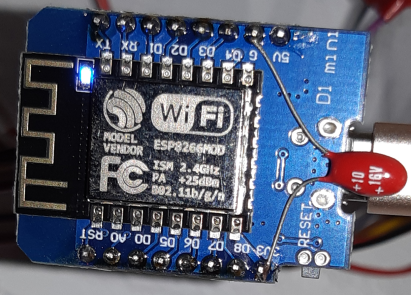
@FrankRenp just a thought, if you look at the top cap of your ESP, does it say "DO-IT"? On my test rig I can reproduce the MQTT disconnects using an old Wemos D1 mini with the DO-IT chips. But when I switch to nodemcuv2 I don't get any.
proddy
on 4 Nov 2019
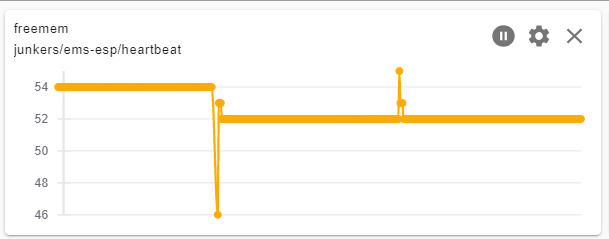
For top cap see figure below. Currently its running for 2 days, with some tcp disconnects, but no mqtt nor freemem problems (see other figures below). (Your firmware compile used.)
[APP] EMS-ESP version: 1.9.4b5
[APP] MyESP version: 1.2.14
[APP] Build timestamp: 2019-11-02 12:31:49
[APP] Uptime: 2 days 0 hours 16 minutes 21 seconds
[APP] System Load: 1%
[WIFI] WiFi Hostname: ems-esp
...
[WIFI] WiFi signal strength: 100%
...
[MQTT] is connected (heartbeat enabled)
[NTP] Local Time is 19:34:25 CET (1572896065)
[SYSTEM] System is Stable
[SYSTEM] Board: PLATFORMIO_D1_MINI
[SYSTEM] CPU frequency: 80 MHz
[SYSTEM] SDK version: 2.2.1(cfd48f3)
[SYSTEM] CPU chip ID: 0x3A1469
[SYSTEM] Core version: 2_5_2
[SYSTEM] Boot version: 6
[SYSTEM] Boot mode: 1
[SYSTEM] Last reset reason: Restart from terminal
[SYSTEM] Restart count: 0
[SYSTEM] # TCP disconnects: 13
[SYSTEM] rtcmem status: blocks:2 addr:0x60001280
[SYSTEM] rtcmem 00: 1163087990
[SYSTEM] rtcmem 01: 218169344
[FLASH] Flash chip ID: 0x164020
[FLASH] Flash speed: 40000000 Hz
[FLASH] Flash mode: DIO
[FLASH] Flash size (CHIP): 4194304
[FLASH] Flash size (SDK): 4194304
[FLASH] Flash Reserved: 4096
[MEM] Firmware size: 633616
[MEM] Max OTA size: 2506752
[MEM] OTA Reserved: 16384
[MEM] Free Heap: 24912 bytes initially | 12184 bytes used (48%) | 12728 bytes free (51%)
FrankRenp
on 4 Nov 2019
turned out that my test application was crashing because I used an DO-IT Wemos. It's been running fine for 2 days now with no drops. I downloaded mosquitto and run it on my Windows10 with mosquitto.exe -v and the test app in a Serial mode to monitor the traffic between the two.
If you're interested the code is https://github.com/proddy/MyESP
proddy
on 5 Nov 2019
Crash today, 8.11., 13:52 after 6 days running
I'm trying to install your test-application, generally I'm no software specialist.
FrankRenp
on 8 Nov 2019
I would take the latest dev. I made a change that hopefully helps stability
On Fri, 8 Nov 2019 at 16:57, FrankRenp notifications@github.com wrote:
Crash today, 8.11., 13:52 after 6 days running
I'm trying to install your test-application, generally I'm no software
specialist.—
You are receiving this because you commented.
Reply to this email directly, view it on GitHub
https://github.com/proddy/EMS-ESP/issues/204?email_source=notifications&email_token=AAJMO6DB4F42CKHWSFAV5Q3QSWEAPA5CNFSM4I6J2PT2YY3PNVWWK3TUL52HS4DFVREXG43VMVBW63LNMVXHJKTDN5WW2ZLOORPWSZGOEDSREOA#issuecomment-551883320,
or unsubscribe
https://github.com/notifications/unsubscribe-auth/AAJMO6DEDCCGXALETLUS67LQSWEAPANCNFSM4I6J2PTQ
.
proddy
on 8 Nov 2019
Haven't been able to reproduce in 1.9.4. Please re-open if you still see it.
proddy
on 13 Nov 2019
Related issues
 mglatz
·
11Comments
mglatz
·
11Comments
 Chuckame
·
11Comments
Chuckame
·
10Comments
Chuckame
·
11Comments
Chuckame
·
10Comments
 NFis
·
6Comments
NFis
·
6Comments
 Oderik
·
26Comments
Oderik
·
26Comments
Most helpful comment
Haven't been able to reproduce in 1.9.4. Please re-open if you still see it.