Ems-esp: How can I trigger the thermostat set message on Heatronics 3?
I want to add support for writing to the thermostat Junkers FW100 (e.g. change the room setpoint temperature), but I cannot find the telegram type that is used to write to the thermostat.
When I change the temperature on the thermostat device and monitor the ems bus, I don't see any write message. I only see the next broadcasted status message with the new temperature. I suppose that is normal because the thermostat does not send a write telegram to itself.
Any idea how I can find this?
 Vuego123
All 90 comments
That's correct, you won't see any telegrams when manually changing the temperature on the thermostat. The best way is to look at the hometop project, specifically this file https://github.com/norberts1/hometop_HT3/blob/master/HT3/sw/lib/ht_discode.py to figure out the telegram format.
 proddy
on 26 Jun 2019
proddy
on 26 Jun 2019
I don't see are any write examples in that project. I think they only read?
Vuego123
on 28 Jun 2019
it does support writing too. It's mentioned on https://github.com/norberts1/hometop_HT3. The code is quite complex and hard to read and not very modular. I gave up trying to understand it!
proddy
on 29 Jun 2019
Same here, I've spent 2 hours looking at the code, but the most crucial things I want to know remain a mystery so far... But I'm not giving up yet. ;-)
Another strategy, I have a second thermostat that is not used. Can I connect 2 thermostats (Junkers FW100 and Junkers FW200) on 1 EMS bus? Will it it work and will thermostat 1 write to thermostat 2 when I update the room temp setpoint on thermostat 1?
Vuego123
on 29 Jun 2019
I'm not sure the EMS can provide enough power (amps) to both thermostats but you could try. It'll be interesting to see if they have different unique identifiers. We should be able to work it out from the HT3 code - I just need the time!
proddy
on 2 Jul 2019
in hometop project, write to the bus is done in https://github.com/norberts1/hometop_HT3/blob/master/HT3/sw/lib/ht_yanetcom.py
I will check this code to see what we can reuse. especially messages .
that's not so easy as it convert everything to decimal.
 moustic999
on 4 Jul 2019
moustic999
on 4 Jul 2019
@moustic999 indeed, yesterday I discovered that file as well and also an overview here in html: https://github.com/norberts1/hometop_HT3/blob/master/HT3/sw/etc/html/HT3-Bus_Telegramme.html
For my FW100 thermostat the message id should be 357
I think I understand how they send messages to change the temperaure, but it's not working for my FW100 (yet). I would expect that the following message:
B8 10 FF 10 00 65 24
sets the temp for the "sparen" mode to 18°c
- B8 source
- 10 destination
- FF for ems+
- 10 offset (or it this 12 because the offset counted different for ems+ messages?)
- 00 ems+ message type
- 65 ems+ message type
- 24 is temp counted in parts of 0,5°c
but no luck yet.
Vuego123
on 4 Jul 2019
Sorry, I made a mistake
you are right
op code is FF xx 00 65
let me continue checking against the value to be send
I would propose to first try to switch the mode as it is simpler than setting temp , which is mode dependant
moustic999
on 4 Jul 2019
Can you describe your installation ?
do you have any others controller ? CRxxx or something else ?
I see very strange behavior in the code.
regarding destination 0x10 and 0x18
do you have the 2 ?
moustic999
on 4 Jul 2019
My setup:
- Solar module: Junkers ism1
- Heater: Junkers zsb 22-3 (heatronic 3)
- Thermostat: Junkers FW100
So no CRxxx device.
The code makes a difference between heatronic 3bus system ( thermostat has id 0x10) and EMS bus system ( thermostat has id 0x18).
Vuego123
on 4 Jul 2019
Hello,
I have a Junker FW120 Thermostat and I was looking to write on it like you.
Thanks of all provided information, I was able to change the mode using the following command : send 8B 10 FF 0E 00 65 02 (economic mode) 🎆
I am now trying to change the temperature.
 Neonox31
on 5 Oct 2019
Neonox31
on 5 Oct 2019
Good new, I was able to change tempearture levels using following commands :
# Change economic temperature to 10°C
send 8B 10 FF 10 00 65 14

# Change frost protection temperature to 10°C
send 8B 10 FF 0F 00 65 14

# Change comfort temperature to 10°C
send 8B 10 FF 11 00 65 14
Now I have to take a look at the code for implementing it.
Neonox31
on 5 Oct 2019
@Neonox31 I can help with the implementation if needed
proddy
on 6 Oct 2019
I tested the examples and they all work for my Junkers FW100 as well. @proddy I can try to implement and test this. Ok to send you a pull request when I'm ready?
Vuego123
on 6 Oct 2019
@proddy Thanks for your proposal 👍
@Vuego123 Let me know if you open a PR because I plan to do one too.
Neonox31
on 6 Oct 2019
I don't know why but sometimes the new setted temperature is not considered by the thermostat.
I have to investiguate on this, if someone has any clue...
Neonox31
on 6 Oct 2019
there was a similar report with the RC35 when setting the set point temp in day mode, it wouldn't show up. Is this similar to what you're seeing?
proddy
on 6 Oct 2019
@Neonox31 I'm working on a first version, but there are more things I need to adapt than anticipated. It might take some time.
@proddy : is it possible that the "_ems_sendTelegram()" has never been used for EMS+ telegrams? I see a test that will never work:
// complete the rest of the header depending on EMS or EMS:
if (EMS_TxTelegram.type > 0xFF) { ...
But EMS+ markers are 0xFF, 0xF7 or 0xF9. None of them are bigger than 0xFF.
Secondly, the "ems_parseTelegram()" uses a completer check to decide if it is EMS+ or not:
// determing if its normal ems or ems plus, check for marker
if (telegram[2] >= 0xF0) {
// its EMS plus / EMS 2.0
EMS_RxTelegram.emsplus = true;
EMS_RxTelegram.emsplus_type = telegram[2]; // 0xFF, 0xF7 or 0xF9
So unless sending EMS+ messages has been reported as working, I will fix that part as well by aligning the logic with "ems_parseTelegram()".
Vuego123
on 6 Oct 2019
@Neonox31 : Intermediate progress: https://github.com/Vuego123/EMS-ESP/tree/Write-to-FW100-/-FW120
Contains support for changing the thermostat mode and improved logic for sending EMS+ messages. Not tested yet at this moment.
When it is tested I will do a pull request.
Vuego123
on 7 Oct 2019
Ok thanks for the link.
Here is mine also WIP : https://gitlab.com/neonox31/boiler/merge_requests/4/diffs
Neonox31
on 7 Oct 2019
@Vuego123 @Neonox31 I could also create a special branch in EMS-ESP and add you both as collaborators?
proddy
on 7 Oct 2019
there was a similar report with the RC35 when setting the set point temp in day mode, it wouldn't show up. Is this similar to what you're seeing?
@proddy I forgot to answer your question, it is not similar because the temperature never change on both physical thermostant and telnet as if the telegram has never sent.
Neonox31
on 7 Oct 2019
It could be a good idea to create a dedicated branch :+1: , but before I would like to solve the problem with the temperature.
Neonox31
on 7 Oct 2019
It's still a mystery !
(01:43:32.614) Sending raw: 8D 10 FF 0F 00 65 28 (CRC=BF) #data=100
(01:43:32.631) 0x0D -> Thermostat, type 0x0065, telegram: 8D 10 FF 0F 00 65 28 (CRC=BF) #data=1
(01:43:32.911) Thermostat -> Boiler, type 0x16, telegram: 90 88 16 00 02 (CRC=AF) #data=1
(01:43:32.933) Boiler -> Thermostat, type 0x16, telegram: 88 10 16 00 FF 46 (CRC=98) #data=2
(01:43:33.065) Thermostat -> all, type 0x006F, telegram: 90 00 FF 00 00 6F 01 01 00 BE 00 EE F3 34 00 (CRC=43) #data=9
Publishing boiler data via MQTT
Publishing hot water and heating states via MQTT
Publishing thermostat data via MQTT
send 8D 10 FF 0F 00 65 28

(01:43:41.851) Sending raw: 8D 10 FF 0F 00 65 28 (CRC=BF) #data=48
(01:43:41.868) 0x0D -> Thermostat, type 0x0065, telegram: 8D 10 FF 0F 00 65 28 (CRC=BF) #data=1
(01:43:42.297) Thermostat -> all, type 0x0065, telegram: 90 00 FF 00 00 65 01 00 04 19 30 41 07 01 00 03 FF 2A 06 01 01 28 28 28 03 01 00 (CRC=25) #data=21
(01:43:42.610) Thermostat -> all, type 0x006F, telegram: 90 00 FF 00 00 6F 01 01 00 C8 00 EE F3 34 00 (CRC=1D) #data=9
Publishing hot water and heating states via MQTT
Publishing thermostat data via MQTT
The first telegram sent fails and the second passes with exactly the same command. I think the thermostat doesn't manage well rx telegrams and forgets some.
The most curious is that using change mode command works every time... It fails sometimes too
I have no real solution, maybe I have to send multiple times the telegram until I got a response but it is ugly 🤢
Neonox31
on 8 Oct 2019
@proddy Is it normal that #data value changed between sent telegrams ?
Neonox31
on 8 Oct 2019
the #data should show the number of data bytes in the data package sent. So that needs fixing too. For example send 8D 10 FF 0F 00 65 28 should show #data=1 as there is one byte 0x28 sent ?
proddy
on 8 Oct 2019
Ok so this a bug, but I don't think it is related.
Neonox31
on 8 Oct 2019
ok fixed that small issue - its just a formatting bug, nothing major.
proddy
on 8 Oct 2019
@Neonox31 why do you start your last example with 8D instead of B8 ?
Vuego123
on 9 Oct 2019
@proddy thanks for the fix.
@Vuego123 Because 8D is the modem here : https://github.com/norberts1/hometop_HT3/blob/master/HT3/sw/etc/html/HT3-Bus_Telegramme.html
The problem is the same with 8D or 8B, did you have the same behavior with your FW100 ?
Neonox31
on 9 Oct 2019
I'd like to share some findings for my setup:
thermostsat - Bosch cw100
boiler - bosch condense 2500 (uses HT3 protocol)
I have set thermostat mode to manual and captured set messages with different temps.
It seems it has very basic format:
Set 16C
(00:09:21.787) Thermostat -> all, type 0x01B9, telegram: 98 00 FF 0A 01 B9 20 (CRC=35) #data=1
<--- RCPLUSSetMessage(0x1B9)Set 20C
(00:08:22.765) Thermostat -> all, type 0x01B9, telegram: 98 00 FF 0A 01 B9 28 (CRC=3D) #data=1
<--- RCPLUSSetMessage(0x1B9)
Set 22C
(00:07:34.706) Thermostat -> all, type 0x01B9, telegram: 98 00 FF 0A 01 B9 2C (CRC=39) #data=1
<--- RCPLUSSetMessage(0x1B9)
Set 23C
(00:09:50.654) Thermostat -> all, type 0x01B9, telegram: 98 00 FF 0A 01 B9 2E (CRC=3B) #data=1
<--- RCPLUSSetMessage(0x1B9)
The last byte is the desired temperature with 0.5C resolution coded with DEC2HEX(temp_in_C*2).
However trying to replicate RCPLUSSetMessage with "send 98 00 FF 0A 01 B9 32" seems does not have an effect. I do not see "Sending raw message ..." in logs for some reason.
 m1588
on 29 Oct 2019
m1588
on 29 Oct 2019
@m1588 do any 'send' messages work?
proddy
on 29 Oct 2019
@proddy "send 8B 98 06 00 20" works fine
m1588
on 29 Oct 2019
The code checks when sending that the destination is not 0x00 which is why send 98 00 FF 0A 01 B9 32 didn't work. I'll change the check to override that for raw sending.
proddy
on 29 Oct 2019
@proddy , the send is working now, however, the boiler is not starting, unfortunately
m1588
on 30 Oct 2019
send 98 00 FF 0A 01 B9 32 is not a command to the boiler. It's a broadcast message from the Thermostat to everyone on the EMS bus showing a certain status. The destination is 0x00.
proddy
on 30 Oct 2019
but how we can starting boiler ? I try with send 98 08 FF 0A 01 B9 32 and send 98 88 FF 0A 01 B9 32 with no result.
In the log of thermostat, not appears any message to boiler (0x08 || 0x88) ?
 mellbo
on 3 Nov 2019
mellbo
on 3 Nov 2019
@mellbo please create a new issue for your question. This issue is about writing to a FW100 thermostat using the heatronics protocol, and don't want it polluted with non relative comments.
proddy
on 3 Nov 2019
the 01B9 message must be targetted to the thermostat, not the boiler, then the thermostat will broadcasted it to everybody, in case of multiple device would need this info.
so for example : send 8D 10 FF 0A 01 B9 32
moustic999
on 4 Nov 2019
@Vuego123 @moustic999 how you two guys doing on implementing Write operations for Junkers? I'd like to add this to complete HT3 support. Let me help you.
proddy
on 13 Nov 2019
Is there any news or progress about FW1x0?
I have Junkers Cerapur boiler with Junkers FW120 thermostat and if there is anything I could do to contribute on supporting read/write mode - I would gladly help.
 UBAMaster: Bosch Condens 2500/Buderus Logamax GB062/Junkers Cerapur Top/Worcester Greenstar i/Generic HT3 (DeviceID:0x08 ProductID:95 Version:23.12)
 Controller: Bosch Condens 2500/Buderus Logamax GB062/Junkers Cerapur Top/Worcester Greenstar i/Generic HT3 (DeviceID:0x09 ProductID:95 Version:23.12)
 Thermostat: Junkers FW120 (DeviceID:0x10 ProductID:192 Version:53.03)
EDIT: I have ability to connect Junkers / Bosch MB LAN-2 module in to the BUS if that would help to analyze / sniff packets.
 algirdasc
on 3 Jan 2020
algirdasc
on 3 Jan 2020
@Neonox31 made a start with the implementation and his code (on GitLab) looks solid. What we could do is create a new dev branch to test this out but Logan would need to merge his changes into it. Let me know. I don't think it'll be a lot of work to finish and test this.
proddy
on 3 Jan 2020
Hello,
Unfortunately I haven't been able to move forward because we got a new baby since october.
My implementation works but only sometimes and I don't understand why, the thermostat seems to not take account all writes...
If anyone has clue, I can find some time to solve the problem.
Neonox31
on 3 Jan 2020
congrats @Neonox31 on the new family addition!
@algirdasc I've merged @Neonox31's code from a few months back into the latest dev build. I have no idea if it works but give it a shot.
proddy
on 3 Jan 2020
Thanks for the update. @proddy, i've uploaded latest commit, but still with no luck. For example:
Setting thermostat mode to off for heating circuit 1
(14:24:16) Sending write of type 0x65 to 0x10, telegram: 8B 10 65 0E 00 (CRC=69)
but thermostat is still in manual mode:
Thermostat stats:
  Thermostat: Junkers FW120 (DeviceID:0x10 ProductID:192 Version:53.03)
  Thermostat time is 15:12:17 03/01/2020
  Heating Circuit 1
   Current room temperature: 35.2 C
   Setpoint room temperature: 25.0 C
   Mode is set to manual
   Day Mode is set to day
Is there anything I could do to help finding the problem? Maybe connecting MB LAN module to BUS and sniffing telegrams would help?
algirdasc
on 3 Jan 2020
@proddy thanks !
I've juste rebased my branch with the dev one and a lot of changes have been made since ! Awesome work !
I'll try to continue my dev this week-end.
Neonox31
on 3 Jan 2020
@algirdasc start with changing the temperature using direct send commands, like the examples @Neonox31 mentioned in his earlier post:
# Change economic temperature to 10°C
send 8B 10 FF 10 00 65 14

# Change frost protection temperature to 10°C
send 8B 10 FF 0F 00 65 14

# Change comfort temperature to 10°C
send 8B 10 FF 11 00 65 14
and keep logging in verbose (log v) so we can see what is sent and what the EMS bus returns. When we have the telegrams sorted I can tidy up the code.
proddy
on 3 Jan 2020
Here are the telegrams:
log v

System Logging set to Verbose
(15:58:11) Thermostat -> All, type 0x06, telegram: 90 00 06 00 14 01 10 03 2D 01 05 00 (CRC=3E) #data=8
send 8B 10 FF 10 00 65 14

(15:58:12) Sending raw: 8B 10 FF 10 00 65 14
(15:58:14) UBAMaster -> All, type 0x18, telegram: 88 00 18 00 28 01 52 48 00 01 03 20 C0 80 00 80 00 80 00 FF FF FF 00 00 00 00 00 00 00 (CRC=C2) #data=25
(15:58:14) UBAMaster -> All, type 0x34, telegram: 88 00 34 00 37 02 33 02 33 A1 00 04 03 00 00 94 72 00 0C F8 00 (CRC=35) #data=17
(15:58:17) Thermostat -> UBAMaster, type 0x16, telegram: 90 88 16 00 02 (CRC=AF) #data=1
(15:58:17) UBAMaster -> Thermostat, type 0x16, telegram: 88 10 16 00 FF 31 (CRC=EF) #data=2
(15:58:17) Thermostat -> All, type 0x006F, telegram: 90 00 FF 00 00 6F 03 01 00 FA 01 6B F3 34 00 (CRC=65) #data=9


send 8B 10 FF 0F 00 65 14

(15:58:24) Sending raw: 8B 10 FF 0F 00 65 14
(15:58:24) UBAMaster -> All, type 0x18, telegram: 88 00 18 00 28 01 4F 48 00 01 03 20 C0 80 00 80 00 80 00 FF FF FF 00 00 00 00 00 00 00 (CRC=A1) #data=25
(15:58:25) UBAMaster -> All, type 0x34, telegram: 88 00 34 00 37 02 33 02 33 A1 00 04 03 00 00 94 72 00 0C F8 00 (CRC=35) #data=17
send 8B 10 FF 11 00 65 14

(15:58:30) Sending raw: 8B 10 FF 11 00 65 14
(15:58:30) Thermostat -> All, type 0x0065, telegram: 90 00 FF 11 00 65 32 (CRC=68) #data=1
(15:58:34) UBAMaster -> All, type 0x18, telegram: 88 00 18 00 28 01 4C 48 00 01 03 20 C0 80 00 80 00 80 00 FF FF FF 00 00 00 00 00 00 00 (CRC=D9) #data=25
(15:58:34) UBAMaster -> All, type 0x34, telegram: 88 00 34 00 37 02 33 02 33 A1 00 04 03 00 00 94 72 00 0C F8 00 (CRC=35) #data=17

log n
System Logging set to None
and did any of those commands work? i.e. did it set the thermostat temps?
proddy
on 3 Jan 2020
It worked one time when changed thermostat mode dial from manual to auto, but it looks like blind luck, because I cannot reproduce the same result anymore. Also I've noticed differences when changing temps:
thermostat temp 1 10
Setting new thermostat temperature to 10.0 for heating circuit 1 type 0 (0=auto,1=night,2=day,3=holiday)
(19:26:03) Sending write of type 0x65 to 0x10, telegram: **8B 10 65 00 14** (CRC=61)
The telegram is different than the one you've provided. Is that correct?
algirdasc
on 3 Jan 2020
I just tried with 1.9.5b10 version and send 8B 10 FF 0F 00 65 14 command seems to considered by the thermostat but not every time 🙁
@algirdasc FYI the temperature is not dynamically resfreshed on the thermostat LCD screen, you have to change the mode and come back to the no frost mode again to see the modified temperature.
Neonox31
on 3 Jan 2020
@Neonox31 ok, so how should I know if temperature changed? I was using info telnet command to check actual values, but those does not change also. Could you clarify what exact actions step by step should I perform to properly test this?
algirdasc
on 3 Jan 2020
@algirdasc on my side i just use the following commands with the thermostat in no frost mode :
> info

...
Thermostat stats:
  Thermostat: Junkers FW120 (DeviceID:0x10 ProductID:192 Version:53.02)
  Thermostat time is 21:16:03 03/01/2020
  Heating Circuit 1
   Current room temperature: 20.6 C
   Setpoint room temperature: 10.0 C
   Mode is set to manual

> send 8B 10 FF 0F 00 65 0A (Set the temperature to 5 degrees)

> info

...
Thermostat stats:
  Thermostat: Junkers FW120 (DeviceID:0x10 ProductID:192 Version:53.02)
  Thermostat time is 21:16:03 03/01/2020
  Heating Circuit 1
   Current room temperature: 20.7 C
   Setpoint room temperature: 5.0 C
   Mode is set to manual
@Neonox31 I can confirm that this commands change room temperature to 5 degrees when thermostat is in no frost mode. I have tried to set other temperatures and it worked. Sometimes not from first time btw. What about other modes? And is it possible to change thermostat modes from telnet/HA?
@proddy, I have noticed that day or night modes have Day mode set. Is it possible to have MQTT Topic with what day mode is set?
Thermostat stats:
Thermostat: Junkers FW120 (DeviceID:0x10 ProductID:192 Version:53.03)
Thermostat time is 09:57:01 04/01/2020
Heating Circuit 1
Current room temperature: 35.8 C
Setpoint room temperature: 25.0 C
Mode is set to manual
Day Mode is set to day
 VooZ2
on 4 Jan 2020
VooZ2
on 4 Jan 2020
@VooZ2 Sure you can switch current mode over telnet using the following commands :
No frost : send 8B 10 FF 0E 00 65 01
Economy : send 8B 10 FF 0E 00 65 02
Comfort : send 8B 10 FF 0E 00 65 03
Auto: send 8B 10 FF 0E 00 65 04
The thermostat should show a new NC icon (NETCOM mode) indicates it is controlled remotely :
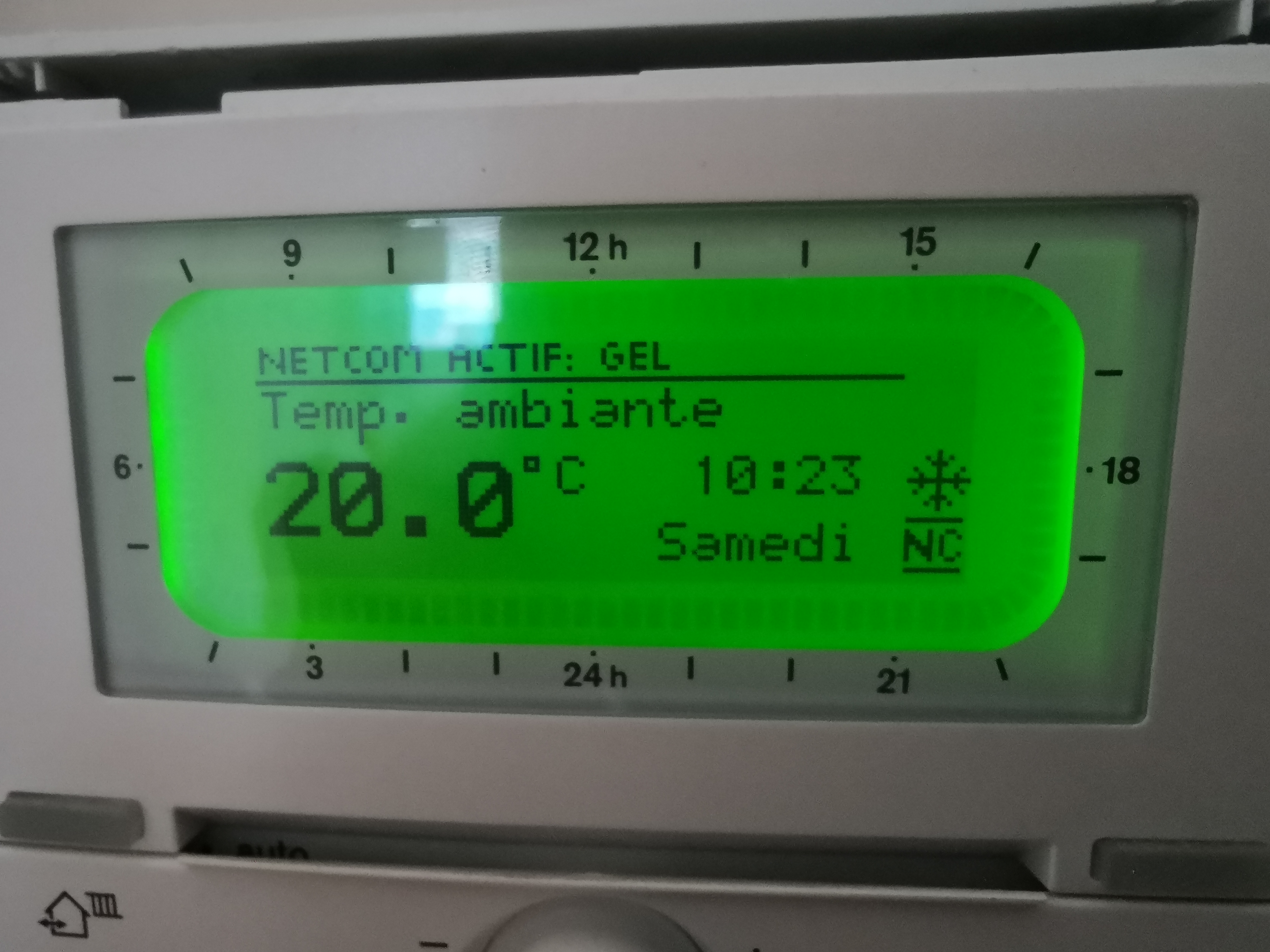
And yes there are problems with defined modes in code, the no frost mode is missing.
Once I can be able to write every time, I will fix it.
Neonox31
on 4 Jan 2020
The mode implementation for Junkers thermostats is based off the Buderus RC35 code. If someone can explain what the modes are and how they work I can implement it correctly. Like is there a day and night mode seperate from the no-frost, economy, comfort, auto?
proddy
on 4 Jan 2020
@VooZ2 extending the MQTT is easy. But first I need someone to figure out for me how the Junkers works with modes. I see day, night, eco, comfort, auto, nofrost etc and not sure how to implement them.
proddy
on 4 Jan 2020
@proddy
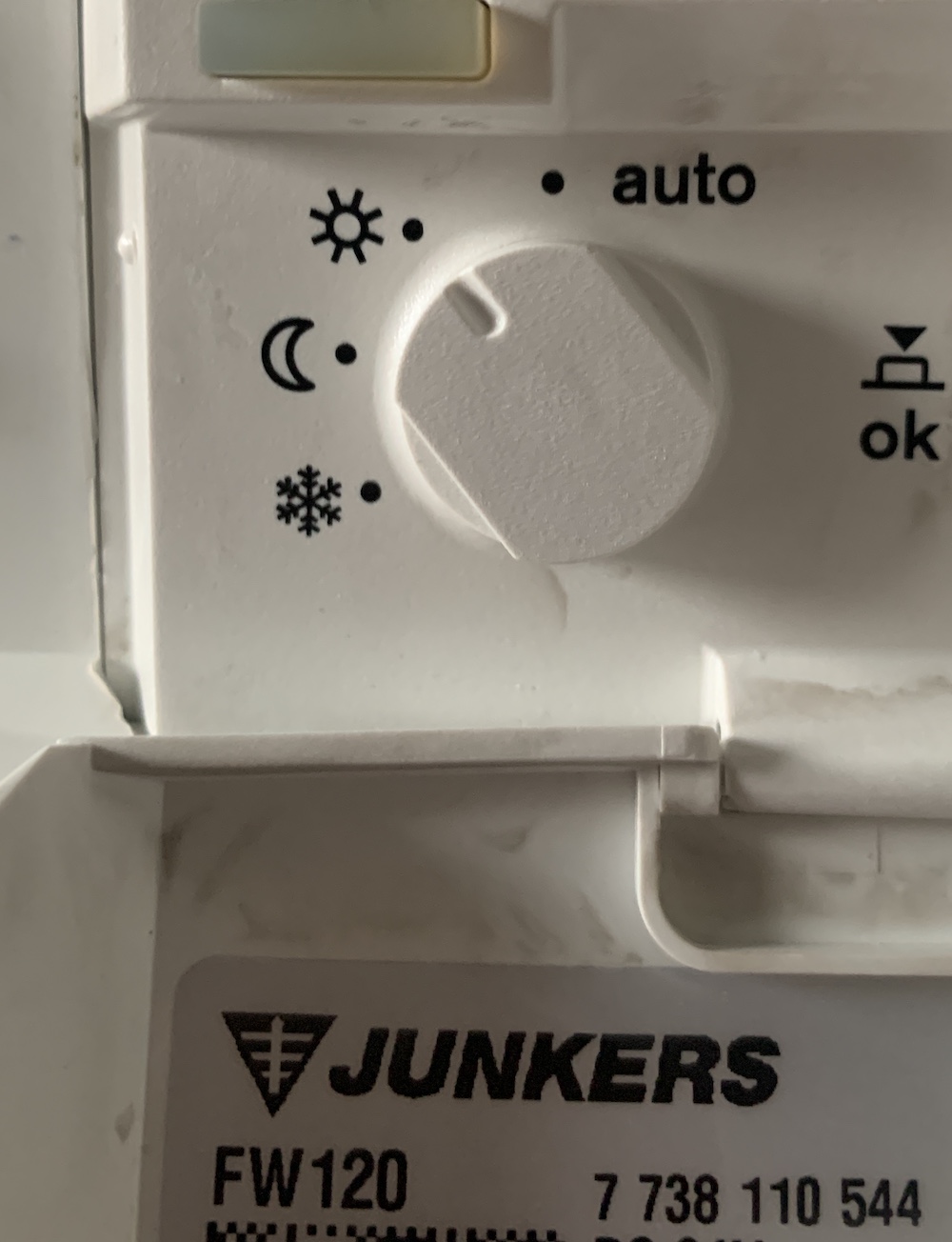
The junkers FW100 has a physical button to choose between 4 "modes" :
- snowflake icon
- sun icon
- moon icon
- "auto"
The junkers FW100 has 3 different "temperature levels" with the following labels:
- heating (in my case 21,5°)
- saving (in my case 20°)
- eco (in my case 19°)
Mode snowflake means that temperature level eco is set forever (or until the mode is changed)
Mode sun means that temperature level heating is set forever (or until the mode is changed)
Mode moon means that temperature level saving is set forever (or until the mode is changed)
In mode Auto, the thermostat switches automatically between temperature level heating, saving and eco depending on how you configure the timer on the FW100.
Vuego123
on 4 Jan 2020
Here are available temperatures levels :
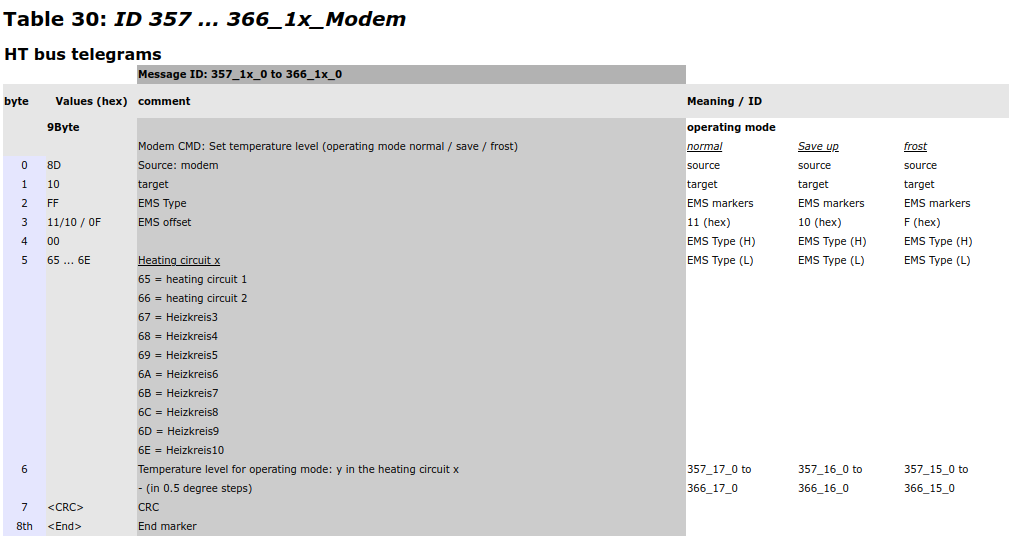
And available modes :
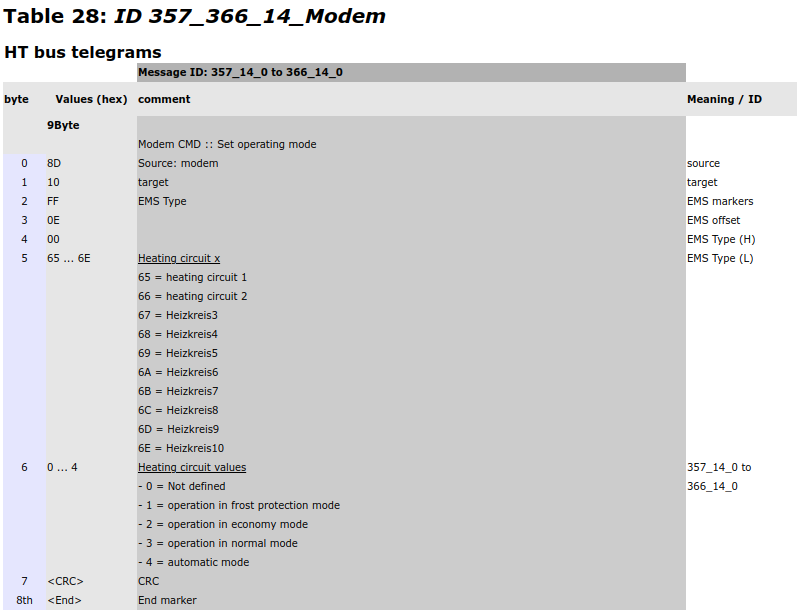
Neonox31
on 4 Jan 2020
@proddy here is modes on FW120 and what I see via telnet info:
- auto
Mode is set to auto
Day Mode is set to day
Mode is set to auto
Day Mode is set to night


md5-5c28b6c1e49efab376ee8041d39e03b4


Mode is set to manual
Day Mode is set to day


md5-b9b29dccb3dd09b30588459dda92de28


Mode is set to manual
Day Mode is set to night
- no frost
Mode is set to manual
like @Neonox31 said when you start control via internet it goes to Netcom mode (thermostat show a NC icon). It indicates that thermostat controlled remotely. Same icon I saw when I have used shitty MB LAN 2.
What I want to achieve for now:
- Have some stats in HA (it's already done and working);
- Have ability to change modes from HA.
VooZ2
on 4 Jan 2020
@VooZ2 Sure you can switch current mode over telnet using the following commands :
No frost :send 8B 10 FF 0E 00 65 01
Economy :send 8B 10 FF 0E 00 65 02
Comfort :send 8B 10 FF 0E 00 65 03
Auto:send 8B 10 FF 0E 00 65 03
The thermostat should show a newNCicon (NETCOM mode) indicates it is controlled remotely
I can confirm that it works. Sometimes it stuck and need to repeat few times code.
PS: auto 04 in the end and not 03
VooZ2
on 4 Jan 2020
I can confirm that it works. Sometimes it stuck and need to repeat few times code.
That's the main problem 🙁
PS: auto
04in the end and not03
Thanks 👍 Edited !
Neonox31
on 4 Jan 2020
@Neonox31 do you get Flame current and System pressure information from Boiler stats? Or this information available on Junkers?
VooZ2
on 4 Jan 2020
@VooZ2 Nope.
Neonox31
on 4 Jan 2020
Hi, today I get bbqkees HW. It detect my Junkers Smart Cerapur (HT3) and FW120, but setting thermostat doesn't work. That is why I update to version 1.9.5b49. At this version I don't get "not supported" message but setting temperature from HA still doesn't work. I tried command listed above and its work ok, eg. send 8B 10 FF 0E 00 65 03 to set day mode and send 8B 10 FF 11 00 65 2C to set 22Celcius in day mode.
How can i help you to debug/implement it?
 stravinci
on 5 Mar 2020
stravinci
on 5 Mar 2020
@stravinci, try the following
- get the latest build from dev. I made some changes to the Junkers code last night
- go to telnet, turn on
log v - test if the console command
thermotstat temp 22works. In the log you should see something like 'sending write 8B 10 FF 11 00 65 2C`. Hopefully! - go to HA, adjust the temp and watch what you see in the EMS-ESP's telnet console. Do you see the same messages and send telegram?
proddy
on 5 Mar 2020
@proddy
- yes I have newest version from yesterday (1.9.5b49)
- Attached log below - I see there is 8B 10 FF 00 00 65 2C instead of 8B 10 FF 11 00 65 2C
- Using HA i see the same result as manual command
thermostat temp 22
Setting new thermostat temperature to 22.0 for heating circuit 1
(00:15:18.913) Sending write of type 0x65 to 0x10, telegram: 8B 10 FF 00 00 65 2C
ok, thats a bug. I think I know where. I'll fix it tomorrow
proddy
on 5 Mar 2020
fixed in b50
proddy
on 6 Mar 2020
@proddy confirmed, fixed in b50
stravinci
on 6 Mar 2020
@proddy confirmed, fixed in b50
Can you also change mode in HA or telnet? It's still doesn't work for me.
VooZ2
on 7 Mar 2020
@VooZ2 which thermostat do you have? I'll look into it.
proddy
on 7 Mar 2020
FW120. We have talked about modes in this topic before.
VooZ2
on 7 Mar 2020
@proddy yes, @WooZ2 has right - thermostat from HA doesn't work.
stravinci
on 7 Mar 2020
Ok. I’ll take a look
proddy
on 8 Mar 2020
@VooZ2 I cleaned up the thermostat mode logic a little in 1.9.5b52. Could you see if it still works?
thermostat mode <mode> [hc] where mode is manual,auto,heat,day,night,eco,comfort,holiday,nofrost
proddy
on 8 Mar 2020
@VooZ2 I cleaned up the thermostat mode logic a little in 1.9.5b52. Could you see if it still works?
thermostat mode <mode> [hc]where mode is manual,auto,heat,day,night,eco,comfort,holiday,nofrost
It works. But I need to figure out why sometimes it needs to repeat command or use different mode. For example sometimes I need mode heat, sometimes day. Both modes turn same mode on thermostat. Same with night/eco mode. Also will test id I can change temp in manual modes. But we are on right way :)
VooZ2
on 8 Mar 2020
oh, for Junkers I only implemented nofrost, eco, comfort and auto based on the earlier postings (values 01 to 04). The other ones like manual, day, night, heat etc are just mapped to auto in most cases.
proddy
on 8 Mar 2020
this has improved in v2. needs thorough testing though. If errors are found we'll reopen.
proddy
on 7 Jun 2020
Hello @proddy,
Juste tested with the 2.0.1 version and it works like a charm !
You make an awesome job on this new version, thanks :+1:
Neonox31
on 24 Oct 2020
thanks, wait until you see v2.1 !
proddy
on 24 Oct 2020
On v2.1.0b11, mode temperatures seems to be broken on FW120 :
Thermostat: FW120 (DeviceID:0x10, ProductID:192, Version:53.02)
  Time: 14:48:08 24/10/2020
  Heating circuit 1:
    Setpoint room temperature: 21.0 °C
    Current room temperature: 21.2 °C
    Heat temperature: 0.5 °C
    Eco temperature: 3.5 °C
    Nofrost temperature: 32.5 °C
    Mode: auto
    Mode type: heat
@Neonox31 did it work in 2.0.1? What should the mode be?
proddy
on 24 Oct 2020
@proddy Yes it works on 2.0.1
I think the mistake was here : https://github.com/proddy/EMS-ESP/blob/dev/src/devices/thermostat.cpp#L143
process_JunkersSet and process_JunkersSet2 functions are swapped, I'm currently fixing it localy to see if it works well.
Do you want a P.R ?
Neonox31
on 24 Oct 2020
a PR is fine, whatever you prefer. It'll be nice to have another person contribute ;-) Or just send me what needs to be swapped. thanks!
proddy
on 24 Oct 2020
It works, here the P.R : https://github.com/proddy/EMS-ESP/pull/577
Neonox31
on 24 Oct 2020
I can't set the temperature too, but sent telegram seems to be OK :

I have a JunkersSet response with 2A, but I have no idea what it means.
Neonox31
on 25 Oct 2020
Do not take into account my last message, values are limited according mode.
On the FW120 here are the intervals :
0°C <= no-frost temp <= 18.5°C
5°C <= eco temp <= 21°C
18.5°C <= heat temp <= 30°C
That's why I couldn't set the heat temperature at 18 degrees.
Neonox31
on 25 Oct 2020
great. shall we close this one?
proddy
on 25 Oct 2020
@proddy sure 👍
Neonox31
on 25 Oct 2020
Related issues
 Oderik
·
10Comments
Oderik
·
10Comments
 TimoFriedri
·
6Comments
TimoFriedri
·
6Comments
 mediaDS
·
23Comments
Oderik
·
26Comments
mediaDS
·
23Comments
Oderik
·
26Comments
 stevedcc
·
12Comments
stevedcc
·
12Comments