Emotion: Everything hot pink after 'Global Styles'!
Description:
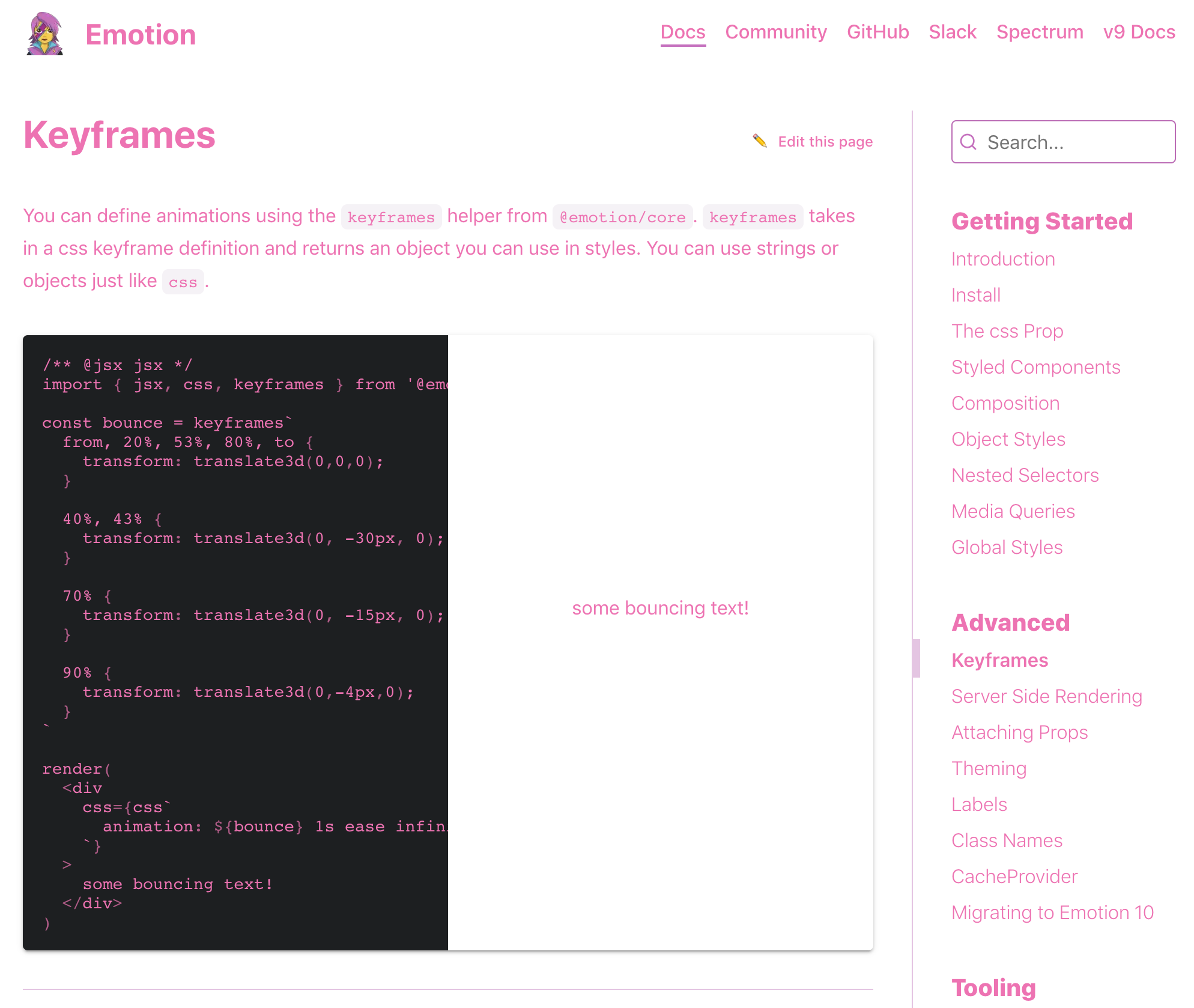
It is cool that when in the article 'Global Styles' virtually everything including the header and the navigation bar turns into hot pink.
However, even more curiously and awkwardly, that effect applies also to every article after 'Global Styles'.
Documentation links:
All the articles after 'Global Styles' https://emotion.sh/docs/globals, i.e.
https://emotion.sh/docs/keyframes, https://emotion.sh/docs/ssr, https://emotion.sh/docs/with-props, ....
For example, the article 'Keyframes' https://emotion.sh/docs/keyframes looks like this.
 shiatsumat
All 8 comments
If this is not already being worked on I could take a stab at it 👋
 AntonNiklasson
on 22 Sep 2019
AntonNiklasson
on 22 Sep 2019
@AntonNiklasson you are more than welcome to take a stab at this. If you need any help you can ping me on our Slack. Most likely we should purge all global styles on navigation.
 Andarist
on 22 Sep 2019
Andarist
on 22 Sep 2019
I'm not able to reproduce this. Not on the live site, and not in my local development environment. 🤷♂
AntonNiklasson
on 26 Sep 2019
That sounds strange. I experienced this 'hot pink' phenomenon on Google Chrome (version 77.0.3865.90), Safari (version 13.0.1) and Firefox (version 69.0.1) on MacBook Mojave (version 10.14.6).
shiatsumat
on 27 Sep 2019
Alright, this is weird. I was actually able to reproduce it now. Loading the site straight into https://emotion.sh/docs/globals makes the hot pink stick around when navigating between pages. If I reload the page on something like https://emotion.sh/docs/introduction, navigate to "Global Styles" and then to some other page, the global styles are purged.
I'll look into it a bit further.
AntonNiklasson
on 27 Sep 2019
Ah, I have also experienced that.
shiatsumat
on 27 Sep 2019
I've run into this pretty randomly as well.
Maybe not as "flashy", but could we just extract the .some-class styles from the example into <Global /> and target just that selector to help stop the bleeding onto other pages?
 zslabs
on 5 Oct 2019
zslabs
on 5 Oct 2019
Maybe not as "flashy", but could we just extract the .some-class styles from the example into
and target just that selector to help stop the bleeding onto other pages?
This sounds good to me.
 mitchellhamilton
on 5 Oct 2019
mitchellhamilton
on 5 Oct 2019
Related issues
 meebix
·
3Comments
meebix
·
3Comments
 bitttttten
·
3Comments
bitttttten
·
3Comments
 kentcdodds
·
3Comments
kentcdodds
·
3Comments
 sami616
·
3Comments
sami616
·
3Comments
 rockmandash
·
3Comments
rockmandash
·
3Comments