Emotion: v10 keyframe docs needs clarification on what you can and can't do
emotionversion: 10.0.1reactversion: 16.6.3
Relevant code.
const rotate = keyframes`
    to { transform: rotate(360deg); }
`;

const idleRotation = `${
   rotate
  } 0.86s cubic-bezier(0.4, 0.15, 0.6, 0.85) infinite`;

const AnimatedSvg = styled.svg`
  ${() => css`
    animation: ${idleRotation};
  `}
`;
What you did:
This is a rather simplified example, in my full example, I'm combining/picking from multiple animations dynamically depending on the props passed in. This used to work in Emotion 9, but in Emotion 10 it doesn't. animation: ${keyframesArray.join(',')};
Is there some trick in Emotion 10 that can help me?
I did try work around this by doing the following but that ended up inserting label:var-name into the css and breaking it.
const idleRotation = css`${
   rotate
  } 0.86s cubic-bezier(0.4, 0.15, 0.6, 0.85) infinite`;
What happened:
https://codesandbox.io/s/v3nx68owp5
Problem description:
Keyframes appear to not interpolate correctly except when directly being inserted into css or styled string blocks.
Suggested solution:
Not sure what the solution is for this, it could just be an extra section in the docs outlining how to dynamically use keyframes.
 SimeonC
All 14 comments
Yeah, they have to be interpolated directly. Some docs could definitely help, we can also provide a warning for this.
 mitchellhamilton
on 3 Dec 2018
mitchellhamilton
on 3 Dec 2018
Thanks for confirming that, I managed to still make my code "kind of" dry but it's not great. I'll edit the title as I guess this isn't really an "issue" but intended.
For reference I did this;
export const svgStyles = (props) => {
  const circumference = getStrokeCircumference(props.size);

  const baseCss = css`
    fill: none;
    stroke: ${getStrokeColor(props)};
    stroke-dasharray: ${circumference}px;
    stroke-dashoffset: ${circumference * 0.8}px;
    stroke-linecap: round;
    stroke-width: ${getStrokeWidth(props.size)}px;
    transform-origin: center;
  `;

  if (props.phase === 'ENTER') {
    return css`
      animation: ${keyframeNames.rotate} 0.86s
          cubic-bezier(0.4, 0.15, 0.6, 0.85) infinite,
        ${getEnterStrokeKeyframe(props.size)} 0.8s ease-in-out,
        ${keyframes.enterOpacity} 0.2s ease-in-out;
      ${baseCss};
    `;
  }
  return css`
    animation: ${keyframeNames.rotate} 0.86s cubic-bezier(0.4, 0.15, 0.6, 0.85)
      infinite;
    ${baseCss};
  `;
};

const Svg = styled.svg`
  ${svgStyles};
`;
Just wondering if there is a planned fix for it? I am doing a flashing animation on the text color of a button, where color is a prop. It seems to be impossible to solve this scenario? Can always find a workaround, but yeah, unexpected behaviour
 christianalfoni
on 14 Feb 2019
christianalfoni
on 14 Feb 2019
@christianalfoni could you provide a codesandbox showcasing what do you want to achieve? keyframes should be very much usable, the only problem described here is that they can't be interpolated directly into plain string, but rather into css template calls.
 Andarist
on 14 Feb 2019
Andarist
on 14 Feb 2019
Oh, sorry, though this is the issue I am having:
https://codesandbox.io/s/43q0ky8o69
Maybe this is due to same issue, but I can not figure out how to express a dynamic keyframe
christianalfoni
on 14 Feb 2019
And also, this works:
/** @jsx jsx */
import { jsx, css, keyframes } from '@emotion/core'

const bounce = keyframes`
  from, 20%, 53%, 80%, to {
    transform: translate3d(0,0,0);
  }

  40%, 43% {
    transform: translate3d(0, -30px, 0);
  }

  70% {
    transform: translate3d(0, -15px, 0);
  }

  90% {
    transform: translate3d(0,-4px,0);
  }
`

render(
  <div
    css={css({
      animation: `${bounce} 1s ease infinite`
    })}
  >
    some bouncing text!
  </div>
)
Which is kinda weird related to the string interpolation? IS that because of the babel plugin maybe? The produced code looks different, so it works?
Cause this:
animation: `${bounce} 1s ease infinite`
Would normally evaluate to:
animation: "[Object object] 1s ease infinite"
The keyframes object has custom toString method and its output gets later "fixed" by object serializer here - https://github.com/emotion-js/emotion/blob/25beeccca3d2e00db8bef101db332d5a9dfb23ec/packages/serialize/src/index.js#L31
I'm not sure why this is done only for object styles though 🤔cc @mitchellhamilton
As to your "dynamic keyframes" - I'm not sure where do you find problems, could you elaborate on that? Your first element has no animation because functions as values (in style object) are never even evaluated. I've prepared a simple demo with what I believe are "dynamic keyframes" - https://codesandbox.io/s/7j36596k41
Andarist
on 14 Feb 2019
Oh? Are they not evaluated? The explains it... oh wait, I see where I am going wrong now. I am refactoring from styled.div (with styled components) to css prop. To get going I just changed out styled-components with emotion and everything worked out of the box, except our animations. Which I tried to reproduce poorly in the codesandbox.
I see what was missing now was using css on the returned value, which is not needed in styled-components.... and I confused it all with CSS property. Sorry about that.
Updated Sandbox shows old code and what we had to change to, to get it running: https://codesandbox.io/s/43q0ky8o69
christianalfoni
on 14 Feb 2019
Sorry for not responding sooner. This has been sort-of fixed lately by https://github.com/emotion-js/emotion/pull/1553 (we provide a dev warning for this which suggests the solution). When interpolating keyframes into plain strings you have to wrap it in css call, like this:
css`animation: ${keyframes({ /* ... */ })}`
Replacing the stringified in plain strings would be too costly as we would have to scan ALL styles with an additional regexp.
Andarist
on 27 Oct 2019
Personally, I'm still completely confused about keyframes. I've been trying to implement a single one for hours across multiple days.
I've tried using them in every way I can conceive of, but every outcome is one of the following:
_EMO_ 10s: ;false: ;
or
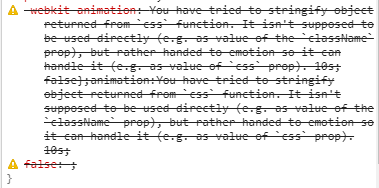
or
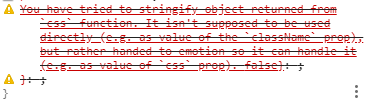
How can someone do the following?
- Define a keyframe animation as a partial
- Reference that partial inside of `styled.div```
I tried with and without css, writing it as keyframes`` and keyframes(), ditching the partial altogether and adding the keyframes inline, but the result is always no keyframes, just different failures, no matter what I try.
Also @Andarist I know you mentioned a dev warning in #1553, but the only warning I get in all of these scenarios is the one in the actual style output, nothing in my console. I assume this isn't the intended behavior?
Edit: Actually the console dev warning shows up now that I decided to stop trying to resolve this and commented out the line in my code like:
const MyComponent = styled.div`
  ${({ visible }) => `

    // ... some style rules

    ${visible &&
      `
       animation-iteration-count: 1;
       opacity: 1 !important;
       // animation: ${fadeOut} 10s;
     `}
   `
 }
 `
 Slapbox
on 12 Nov 2019
Slapbox
on 12 Nov 2019
This should work:
``js
const MyComponent = styled.div
${({ visible }) => `
// ... some style rules

${visible &&
  css`
   animation-iteration-count: 1;
   opacity: 1 !important;
   // animation: ${fadeOut} 10s;
 `}
`
}
```
It's important to always wrap your string styles with css for various reasons:
- prettier formatting
- babel plugin optimization
- this issue with
keyframes
Andarist
on 12 Nov 2019
Thanks for your reply @Andarist!
That the specific code I posted was the only code that generated the expected developer warning - specifically commenting the line out. I tried a bunch of combinations, too many to make sense to list out.
Using the code you posted as a reference I tried the following code, but I get the same results. Have I got something wrong here? I had the same results when interpolating in a keyframed animation I defined in a variable.
export const MyComponent = styled.div`
  ${({ theme, visible }) => `

    //  ... some style rules

    ${visible &&
      css`
        animation-iteration-count: 1;
        opacity: 1 !important;
        animation: ${keyframes`
          0% {
            opacity: 1;
          }

          100% {
            opacity: 0;
          }
        `} 10s;
      `}}
  `}
`;
The output CSS when not visible === false is: false: ;
When visible === true,
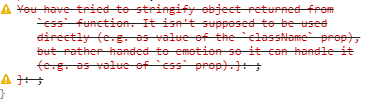
Note this doesn't result in a warning message in the console as expected, only in the rule itself. All emotion packages are on the latest 10.0.x as of yesterday.
Also is there a doc on usage of the @emotion/css? I didn't realize I should be wrapping nested conditionals in css and had only been using it for generating partials like:
const blueBg = () => cssbackground: blue;``
(Can't figure out properly formatting backticks in markdown for the life of me)
Slapbox
on 12 Nov 2019
Could you share a repro case? Hard to be sure without looking at the actual code.
Andarist
on 13 Nov 2019
@Andarist I discovered while making the repro that I wasn't wrapping one level of template strings with css```. I see my mistake in thinking now. There were a cases where it didn't click that I neededcss`.
Slapbox
on 13 Nov 2019
Related issues
 pimmey
·
3Comments
pimmey
·
3Comments
 hamlim
·
3Comments
hamlim
·
3Comments
 desmap
·
3Comments
desmap
·
3Comments
 smlmrkhlms
·
3Comments
smlmrkhlms
·
3Comments
 tkh44
·
3Comments
tkh44
·
3Comments