Emotion: Styles are output multiple times during SSR
emotionversion: 10.0.0reactversion: 16.6.3
Relevant code.
import styled from '@emotion/styled';

const Header = styled.h1`
  color: green;
  font-size: 48px;
  line-height: 48px;
`;

function App() {
  return (
    <section>
      <Header>HI</Header>
      <Header>How</Header>
      <Header>Are</Header>
      <Header>You?</Header>
    </section>
  );
}
What you did:
Rely on automatic SSR
What happened:
The styles are output before every instance of <Header>. Rules are repeated 4 times.
Reproduction:
Render the same styled component multiple terms during SSR
Problem description:
I expect the styles to only be output once.
Suggested solution:
Ensure that styles are unique when output.
 staylor
All 14 comments
This will only happen when there isn’t a common ancestor that uses emotion. If there is a parent component that uses emotion it will work fine and the styles won’t be duplicated.
This is a trade off we make, in most cases it will work okay. We haven’t figured out a way to fix this yet, though it might be possible to fix in the future. Cases like this are obviously not great but for most people it will work fine.
 mitchellhamilton
on 30 Nov 2018
mitchellhamilton
on 30 Nov 2018
Is it possible to at least warn about it in dev mode?
 Andarist
on 1 Dec 2018
Andarist
on 1 Dec 2018
can you link to the rationale doc for switching to this new API?
staylor
on 1 Dec 2018
@mitchellhamilton - how about a simple de-dupe step of some kind? e.g. updating a WeakSet with a class name and if it already exists, avoid rendering a duplicate <style> tag?
In my particular use-case, the same tag is being output 30 times:
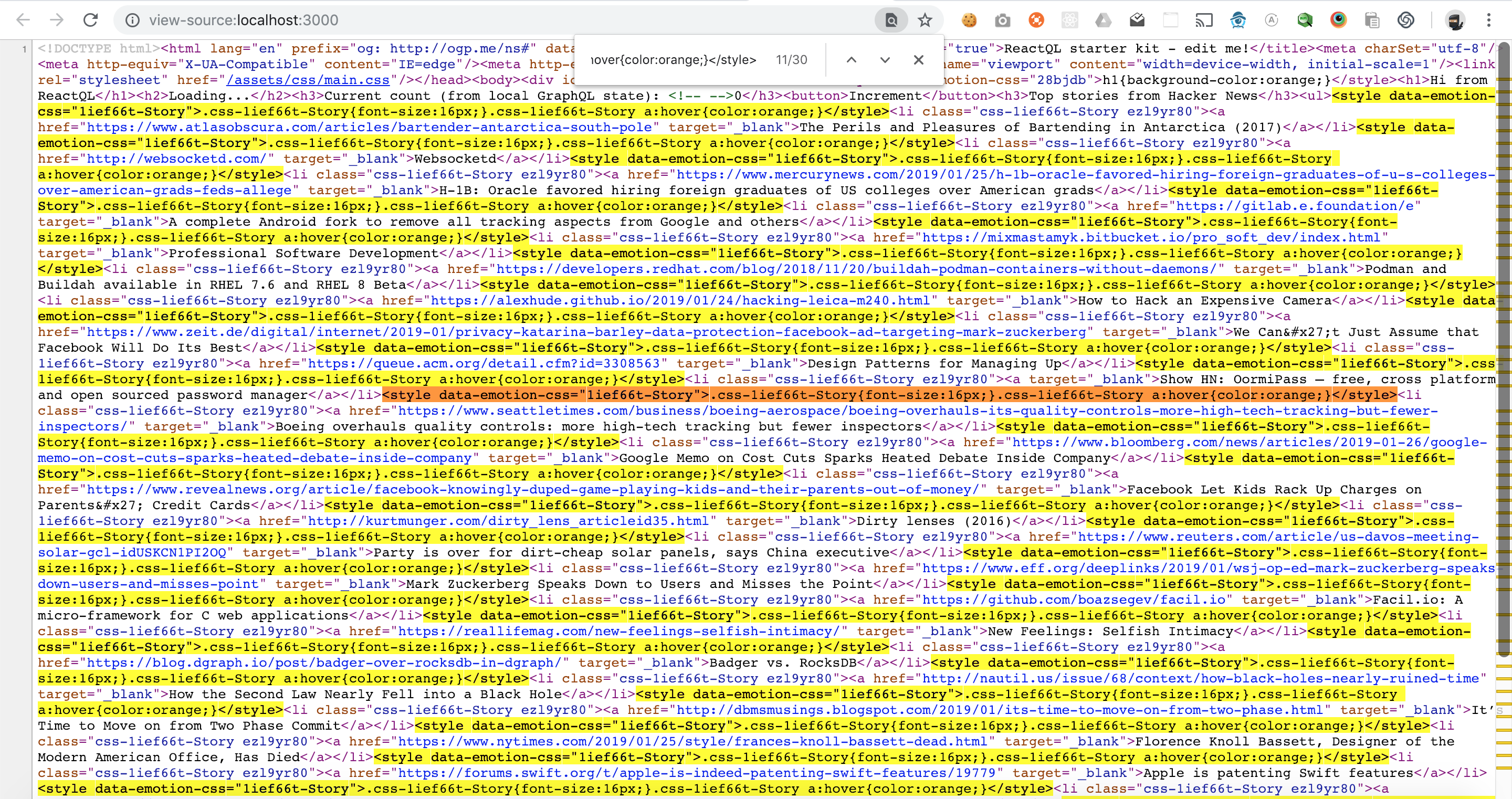
Every <style> tag is identical.
 leebenson
on 26 Jan 2019
leebenson
on 26 Jan 2019
This also happens with <Global>, no matter if there are parent components I get the same exact Global style rendered many times. My use case involves the rendering of several @font-faces depending on each component's data.
 luishdz1010
on 6 Mar 2019
luishdz1010
on 6 Mar 2019
Anyone find a workaround for this? @mitchellhamilton not sure what you meant by..
This will only happen when there isn’t a common ancestor that uses emotion. If there is a parent component that uses emotion it will work fine and the styles won’t be duplicated.
Could you give an example of a common ancestor that uses emotion? I have some code that basically looks like this that runs into this error...
import { css, jsx } from "@emotion/core";
import OtherComponent from `./OtherComponent';
import test from './some-function';

const myCss = test();
// above returns something like..
// {
//  fontSize: '14px'
// }

export default function MyComponent() {
   return <OtherComponent css={myCss} />
}
and then in another component..
import MyComponent from './MyComponent';

function App() {
  return (
    <MyComponent />
    <MyComponent />
    <MyComponent />
  );
}
In the above example an identical style tag is rendered for every instance of MyComponent. But if I change MyComponent to..
import { css, jsx } from "@emotion/core";
import OtherComponent from `./OtherComponent';
import test from './some-function';

const myCss = {
  fontSize: '14px'
};

export default function MyComponent() {
   return <OtherComponent css={myCss} />
}
There is no repetition of style tags.
 jsanchez034
on 11 Mar 2019
jsanchez034
on 11 Mar 2019
Here's an example -> https://github.com/leebenson/reactql/blob/master/src/components/example/hackernews.tsx#L21
I created a wrapped <ul>. Even though there's no styling attached, it's an Emotion-created component, which prevents the child <li> tags from experiencing the error.
Basically - as long as at least _one_ parent is controlled by Emotion whenever there are multiple siblings that share the same class, this error won't show up -- at least in the use-cases I've encountered.
I still think there should be some sort of de-dupe happening in the lib, although I'm not sure if there have been any efforts to fix this yet. For now, just create a styled.* tag somewhere in your HTML hierarchy that's above wherever you're using identical sibling tags.
leebenson
on 11 Mar 2019
The issue can also be "fixed" by wrapping your application within a CacheProvider component. Without it, the first emotion-based component has to create wrap its subtree within one - but obviously each sibling has to do it on its own (in such case) and this causes this duplication.
This is not a problem per se - just a tradeoff for things working "out of the box". Still, this can be easily "fixed" (as described here and above) if you care about this.
Andarist
on 4 Nov 2019
The issue can also be "fixed" by wrapping your application within a CacheProvider component. Without it, the first emotion-based component has to create wrap its subtree within one - but obviously each sibling has to do it on its own (in such case) and this causes this duplication.
This is not a problem per se - just a tradeoff for things working "out of the box". Still, this can be easily "fixed" (as described here and above) if you care about this.
How would this be done more specifically?
 axeen
on 28 Jan 2020
axeen
on 28 Jan 2020
The issue can also be "fixed" by wrapping your application within a CacheProvider component. Without it, the first emotion-based component has to create wrap its subtree within one - but obviously each sibling has to do it on its own (in such case) and this causes this duplication.
This is not a problem per se - just a tradeoff for things working "out of the box". Still, this can be easily "fixed" (as described here and above) if you care about this.How would this be done more specifically?
The easiest way is to wrap your whole app in custom CacheProvider (https://emotion.sh/docs/cache-provider). For me, it fixed the problem.
But the downside is you must set up ssr manually (https://emotion.sh/docs/ssr)
 andgra
on 1 Jun 2020
andgra
on 1 Jun 2020
It should be also possible to just wrap your top-level component with a single extra div with a css prop used on it because when SSRed it will act as a CacheProvider automatically.
Andarist
on 4 Jun 2020
It's worth noting the next.js emotion example does this too.
For anyone curious, in pages/_app.js, import CacheProvider and cache, then wrap your whole app with CacheProvider, and set cache as a value prop:
import React, { Component } from 'react'
import { CacheProvider, Global } from '@emotion/core'
import { cache } from 'emotion'

const MyApp = ({ Component, pageProps }) => {
  return (
    <CacheProvider value={cache}>
      <Component {...pageProps} />
    </CacheProvider>
  )
}

export default MyApp
OR, the other suggestion of adding a div in the top level component with the css prop also worked, and didnt mean adding emotion as a dep, much neater!
import React, { Component } from 'react'
import { css } from '@emotion/core'

const MyApp = ({ Component, pageProps }) => {
  return (
    <div css={css` margin: 0;`}>
      <Component {...pageProps} />
    </div>
  )
}

export default MyApp
Both solved my issue.
Would be good if the SSR docs could be updated with this information. Currently it the SSR Next.js docs, after saying the _doc.js file needs changes, has this callout:
This only applies if you’re using vanilla Emotion or a version of Emotion prior to v10. For v10 and above, SSR just works in Next.js.
Which for me, with the huge amount of duplicate style tags making the pages much larger, wasn't a case of it just working out of the box.
Thanks @Andarist 👍
 AshConnolly
on 18 Jun 2020
AshConnolly
on 18 Jun 2020
Documentation PRs are always welcome 😉
Andarist
on 18 Jun 2020
I am still encountering this issue using next.js with custom koa server, I tried both babel and custom CacheProvider both doesn't work in SSR. Has anyone managed to solve it?
cc @mitchellhamilton
 shobhitsharma
on 26 Apr 2021
shobhitsharma
on 26 Apr 2021
Related issues
 meebix
·
3Comments
meebix
·
3Comments
 eddeee888
·
3Comments
eddeee888
·
3Comments
 bitttttten
·
3Comments
bitttttten
·
3Comments
 johnbrett
·
3Comments
johnbrett
·
3Comments
 pimmey
·
3Comments
pimmey
·
3Comments
Most helpful comment
@mitchellhamilton - how about a simple de-dupe step of some kind? e.g. updating a WeakSet with a class name and if it already exists, avoid rendering a duplicate
<style>tag?In my particular use-case, the same tag is being output 30 times:
Every
<style>tag is identical.