Emotion: TypeScript example is broken in documentation
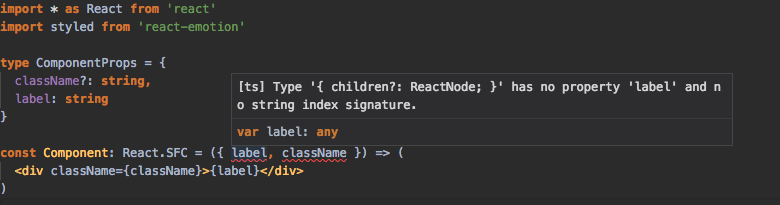
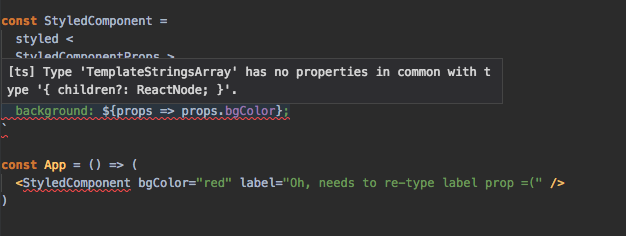
When trying to run this typescript example from documentation, I get many typescript errors
https://emotion.sh/docs/typescript#passing-props-when-styling-a-react-component
emotionversion: 9.1.3reactversion: 16.4.0typescriptversion: 2.8.3
What you did:
Tried to run this example
What happened:
Got many typescript errors


TypeScript
 smashercosmo
All 2 comments
Ok, figured out the correct way
import * as React from 'react'
import styled from 'react-emotion'

type ComponentProps = {
  className?: string,
  label: string
}

type StyledComponentProps = {
  bgColor: string
}

const Component: React.SFC<ComponentProps> = ({ label, className }) => (
  <div className={className}>{label}</div>
)

const StyledComponent = styled<ComponentProps, StyledComponentProps>(Component)`
  color: red;
  background: ${props => props.bgColor};
`

const App = () => (
  <StyledComponent bgColor="red" label="Oh, needs to re-type label prop =(" />
)
👍3
Close this issue in favor of #679.
 Ailrun
on 8 Jun 2018
Ailrun
on 8 Jun 2018
Was this page helpful?
0 / 5 - 0 ratings
Related issues
 eddeee888
·
3Comments
eddeee888
·
3Comments
 artooras
·
3Comments
artooras
·
3Comments
 MrFungusEli
·
3Comments
MrFungusEli
·
3Comments
 bitttttten
·
3Comments
bitttttten
·
3Comments
 AlexanderProd
·
3Comments
AlexanderProd
·
3Comments
Most helpful comment
Ok, figured out the correct way