Embla-carousel: Blank space
Hello! Thank you for the awesome library.
Can you try to help me and tell me why am I getting tons of blank space before and after the slides?

import React, { useCallback, useEffect, cloneElement } from 'react'
import styled from 'styled-components'
import { useEmblaCarousel } from 'embla-carousel/react'
import { CarouselHeader } from './CarouselHeader'

const Carousel = () => {
  const [EmblaCarouselReact, embla] = useEmblaCarousel()

  const onSelect = useCallback(() => {
    if (!embla) return
  }, [embla])

  useEffect(() => {
    if (!embla) return
    embla.on('select', onSelect)
    onSelect()
  }, [embla, onSelect])
  return (
    <>
      <CarouselHeader>Gear up</CarouselHeader>
      <CarouselContentContainer>
        <CarouselContentWrapper>
          <Container>
            <EmblaCarouselReact>
              <Wrapper>
                <SlideContainer>
                  <Image src="https://static.nike.com/a/images/f_auto/q_auto:eco/t_PDP_864_v1/e35da960-df24-45f5-9343-3639e48c3095/tempo-high-cut-running-shorts-F8N65D.jpg" />
                </SlideContainer>
                <SlideContainer>
                  <Image src="https://static.nike.com/a/images/f_auto/q_auto:eco/t_PDP_864_v1/e35da960-df24-45f5-9343-3639e48c3095/tempo-high-cut-running-shorts-F8N65D.jpg" />
                </SlideContainer>
                <SlideContainer>
                  <Image src="https://static.nike.com/a/images/f_auto/q_auto:eco/t_PDP_864_v1/e35da960-df24-45f5-9343-3639e48c3095/tempo-high-cut-running-shorts-F8N65D.jpg" />
                </SlideContainer>
                <SlideContainer>
                  <Image src="https://static.nike.com/a/images/f_auto/q_auto:eco/t_PDP_864_v1/e35da960-df24-45f5-9343-3639e48c3095/tempo-high-cut-running-shorts-F8N65D.jpg" />
                </SlideContainer>
                <SlideContainer>
                  <Image src="https://static.nike.com/a/images/f_auto/q_auto:eco/t_PDP_864_v1/e35da960-df24-45f5-9343-3639e48c3095/tempo-high-cut-running-shorts-F8N65D.jpg" />
                </SlideContainer>
                <SlideContainer>
                  <Image src="https://static.nike.com/a/images/f_auto/q_auto:eco/t_PDP_864_v1/e35da960-df24-45f5-9343-3639e48c3095/tempo-high-cut-running-shorts-F8N65D.jpg" />
                </SlideContainer>
              </Wrapper>
            </EmblaCarouselReact>
          </Container>
        </CarouselContentWrapper>
      </CarouselContentContainer>
    </>
  )
}

const CarouselContentContainer = styled.figure`
  @media screen and (min-width: 1920px) {
    margin-left: auto;
    margin-right: auto;
  }
  display: block;
`

const CarouselContentWrapper = styled.div`
  @media screen and (min-width: 1920px) {
    margin: 0 auto;
    max-width: 1792px;
  }
`

const Container = styled.div`
  overflow: hidden;
  position: relative;
`

const Wrapper = styled.div`
  margin-left: -1rem;
  display: flex;
`

const SlideContainer = styled.div`
  flex: 0 0 auto;
  height: 100%;
  position: relative;
  width: 300px;
  padding-left: 1rem;

  @media only screen and (min-width: 640px) {
    margin-right: 16px;
    width: 330px;
  }

  @media only screen and (min-width: 1024px) {
    width: calc((100vw - 144px) / 3);
    max-width: 586px;
  }

  @media (min-width: 1920px) {
    width: 33%;
  }
`

const Image = styled.img`
  max-width: 100%;
  cursor: pointer;
`

export { Carousel }
 todortotev
All 13 comments
Hello Todor @todortotev,
Thank you. By default the carousel option is align: "center". If you want to remove trailing and leading white space, add containScroll: "trimSnaps" to the carousel options like so:
const [EmblaCarouselReact, embla] = useEmblaCarousel({
  containScroll: "trimSnaps"
})
Let me know if it helps!
Kindly,
David
 davidcetinkaya
on 18 Aug 2020
davidcetinkaya
on 18 Aug 2020
Hello Todor @todortotev,
Thank you. By default the carousel option is
align: "center". If you want to remove trailing and leading white space, addcontainScroll: "trimSnaps"to the carousel options like so:const [EmblaCarouselReact, embla] = useEmblaCarousel({ containScroll: "trimSnaps" })Let me know if it helps!
Kindly,
David
Works! Thank you very much, appreciate it! Maybe a slack/discord channel would help "boost" the community. Your work is huge and I believe you should receive more acknowledgment!
todortotev
on 18 Aug 2020
Hi Todor @todortotev,
I’m glad it helped. And those are very encouraging words. Thank you!
I’m horrible at marketing a product, even if it’s open source and I’ve worked really hard on Embla Carousel. If I were to open up a channel, I wouldn’t know the first thing about how to drive traffic to it 🙈.
Kindly
David
davidcetinkaya
on 18 Aug 2020
@davidcetinkaya Sorry for bothering you, but now I have another issue which came from the "trimSnaps" option.
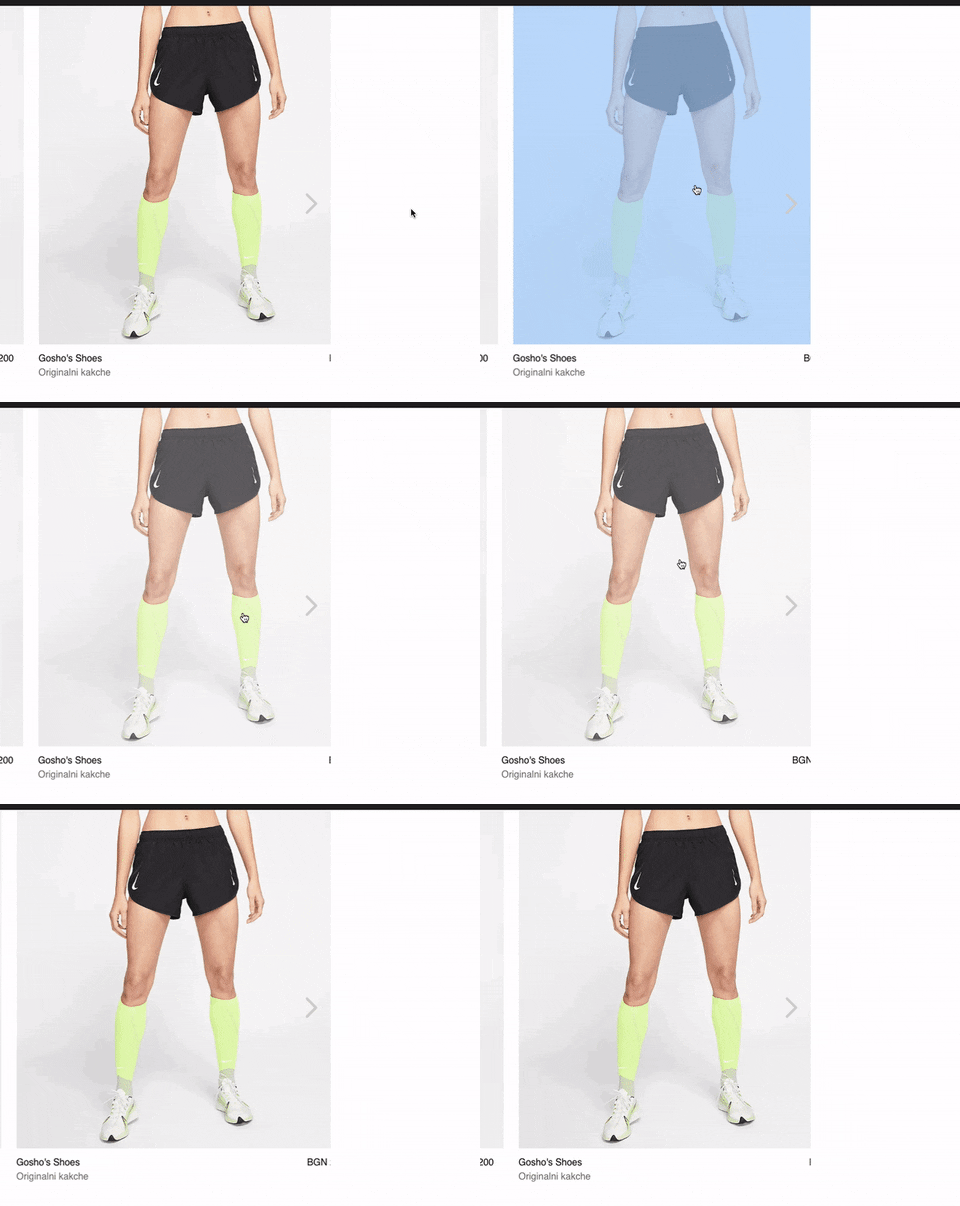
Any suggestions?
todortotev
on 18 Aug 2020
@todortotev sorry for missing this when you posted your code before. You need to add spacing between the slides with padding instead of margin. Seems like you've copied the padding-left: 1rem; on the slides and margin-left: -1rem; on the wrapper from one of the CodeSandbox examples. So to add spacing between the slides, remove the margin-right you've added and adjust those values instead.
So I'm thinking something along this way:
// Subtract the same amount as spacing between slides with negative margin-left
const Wrapper = styled.div`
  margin-left: -16px;
  display: flex;
`
// Change padding-left to apply desired spacing between slides
const SlideContainer = styled.div`
  flex: 0 0 auto;
  height: 100%;
  position: relative;
  width: 300px;
  padding-left: 16px;

  @media only screen and (min-width: 640px) {
    width: 330px;
  }

  @media only screen and (min-width: 1024px) {
    width: calc((100vw - 144px) / 3);
    max-width: 586px;
  }

  @media (min-width: 1920px) {
    width: 33%;
  }
`
Let me know how it goes.
Kindly
David
davidcetinkaya
on 18 Aug 2020
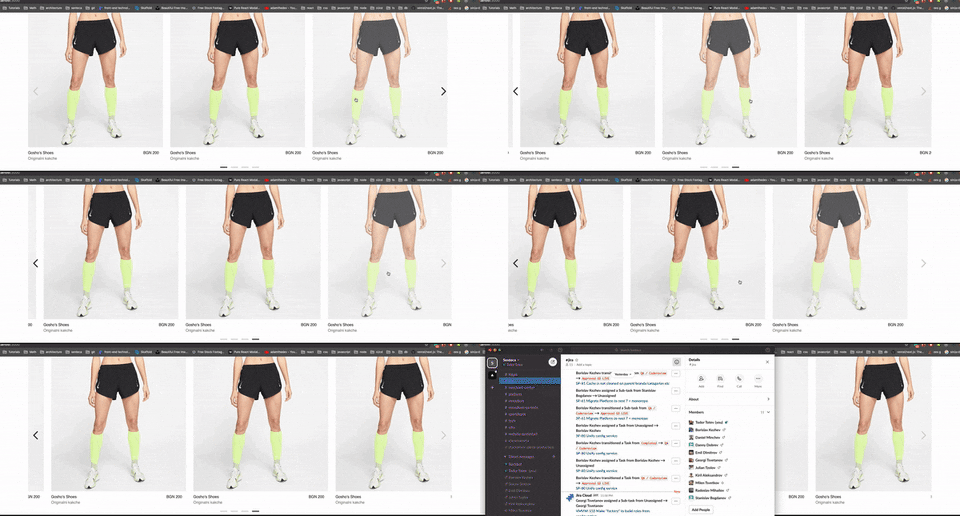
@davidcetinkaya Yay, it worked! The main issue though is that the "item" of the carousel gets kinda cropped :/
todortotev
on 19 Aug 2020
@todortotev seems like something funky is going on. It’s much easier if you create a CodeSandbox so I can see what’s causing this. Because this should really not be an issue at all. Item should not be cropped 🙂.
Would you mind creating a CodeSandbox? Or maybe the issue is present on the CodeSandbox you shared initially in this issue? I’ll take a look when I have access to my computer and let you know.
davidcetinkaya
on 19 Aug 2020
@davidcetinkaya I have just updated the codesandbox. Apologies for not doing that earlier!
Thank you from the bottom of my heart for all the help and guidance!
todortotev
on 19 Aug 2020
@todortotev thanks! I’ll take a look at it in an hour or two and let you know when I have something.
Thank you for your patience!
davidcetinkaya
on 19 Aug 2020
Hello again Todor @todortotev,
I found the issue. The margin-right was still there as spacing between slides:
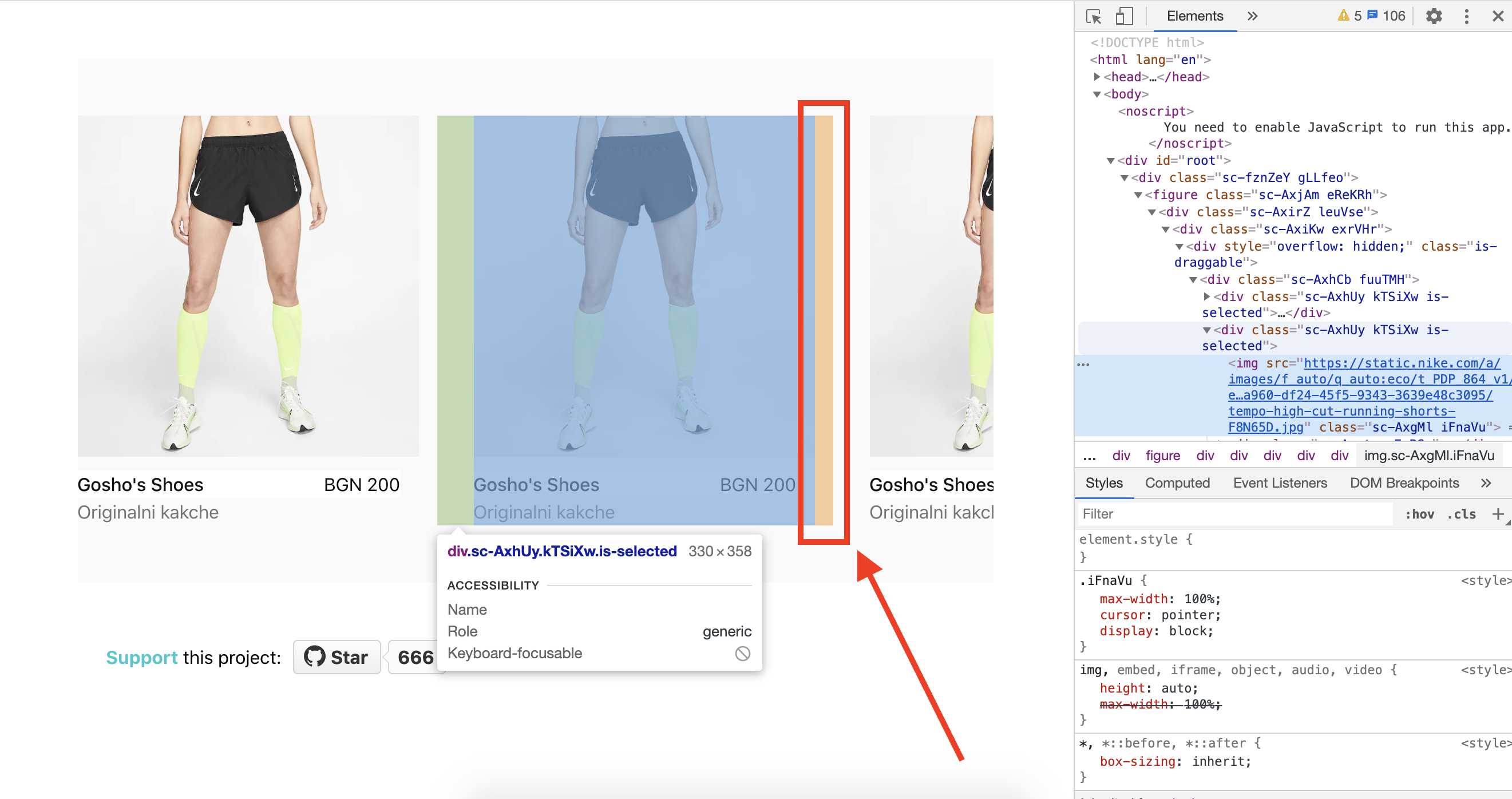
As mentioned earlier, use only padding for spacing between slides. This is because Embla Carousel doesn't read the margin on the slides when reading the slide widths. Please take a look at the modified CodeSandbox here. I've added comments to the styled-components declarations that I hope makes sense.
An unrelated thing
I saw that your sandbox is forked from an old example when embla-carousel-react was a separate package. Some time ago, I decided to create a mono-repo so the react package moved into the core package as described here. I've updated the modified CodeSandbox to use the latest version of the core package for you.
Let me know if you have further questions. I'd be happy to help 🙂.
Best
David
davidcetinkaya
on 19 Aug 2020
@davidcetinkaya Cant thank you enough for the patience and assistance!
I sent you a mail but I think it could be more proper to discuss here.
I'm an official contributor to Next.js so I'll just drop some advice that I think will help you gain the popularity Embla deserves and I have learned from my experience contributing to their library so far.
I think since you are using slack you can make a free slack server and link it at the repository, tons of people will come there to ask various questions and by the looks you are a person who gives feedback, this will definitely boost the community.
Also, a ''secret' channel can be used to communicate with people who actively contribute.
At Reddit, there is "Showoff Saturday" at /r/webdev which can help us get some more people. Having a similar thread to the one you made at /r/frontend could be made at /r/reactjs and /r/webdev.
Another thing I have learned from my experience with next is that "examples" are gold.
People come to the repo and look for code sandboxed (for UI libraries) or ready to deploy(for other kinds of libraries) examples.
If you can consider, making a "examples" folder, which can have different use cases in separate folders - i.e. with left and right arrow, with dots, with keyboard control, and if you can accompany them with code sandboxed links it would help you a ton I believe. I see that currently there are about a dozen of examples, but maybe it could be helpful to have them in a "examples" folder too with the code ready to download/clone?
I could help to create a script, for example create-embla-carousel with dots would create an example? (Not sure how much of benefit is that though, just brainstorming loud)
I would love to contribute and help you in any way I can if you need - let me know how I could be of service.
Kindly,
Todor.
todortotev
on 19 Aug 2020
I'm glad to be able to help! Don't hesitate to ask more questions if you need more assistance 👍.
Massive thanks for taking the time to share your thoughts and ideas @todortotev!
I will do my best following your guidelines and I'm hoping that this will increase the traction to Embla Carousel. I really like Next.js by the way 🙂.
davidcetinkaya
on 20 Aug 2020
Hi again Todor (@todortotev),
For what it’s worth, Embla Carousel now supports margin and any other means that will render spacing between your slides. You’re not forced to use the padding approach anymore. And it will automatically detect your spacings!
This feature was released with version 4.2.0. Read more about it here if you’re interested.
Kindly,
David
davidcetinkaya
on 24 Mar 2021
Related issues
 nikrowell
·
6Comments
nikrowell
·
6Comments
 davemullenjnr
·
5Comments
davemullenjnr
·
5Comments
 jamesdbruner
·
3Comments
jamesdbruner
·
3Comments
 Hahlh
·
3Comments
Hahlh
·
3Comments
 krikienoid
·
6Comments
krikienoid
·
6Comments
Most helpful comment
I'm glad to be able to help! Don't hesitate to ask more questions if you need more assistance 👍.
Massive thanks for taking the time to share your thoughts and ideas @todortotev!
I will do my best following your guidelines and I'm hoping that this will increase the traction to Embla Carousel. I really like Next.js by the way 🙂.