Embla-carousel: Question: where is CSS?
Hi,
Sorry, I am puzzled, but where is CSS code located in your project? E.g., I see that, for example, <style id="/src/css/radio.css:-css" type="text/css">.radio {... is generated by your script, but I could not locate that in the source code. To be honest, I really like your project, but your code has almost 0 comments, the overall structure is quite confusing, therefore I am not able to do anything with your code (help with adding new features, etc). Thanks.
 Andrew-web-coder
All 18 comments
Hello Andrew (@Andrew-web-coder),
Thank you for your question. I'm not sure I understand it though, so I need some clarification before I can help you.
Where is CSS code located in your project?
What piece of code are you referring to? One of the CodeSandboxes? Would you mind providing a link? Have you had a look at the quickstart example on how to get started?
If you need help with achieving something I'd be happy to help. But in order to do that I need you to describe what you want to achieve.
Thanks in advance!
Best,
David
 davidcetinkaya
on 9 Jan 2020
davidcetinkaya
on 9 Jan 2020
Hello @Andrew-web-coder,
I'm closing this issue. Feel free to reopen it if you want me to help you out with anything regarding Embla.
Kindly,
David
davidcetinkaya
on 10 Jan 2020
Sorry, I am confused, your guide does not cover styling of dots and navigation arrows, does that mean we have to include all related CSS classes manually?
Andrew-web-coder
on 17 Jan 2020
Also, your QuickStart quide does not mention .embla__viewport element at all, but it exists and needs styling, too.
Andrew-web-coder
on 17 Jan 2020
Hello again @Andrew-web-coder,
The quickstart example only covers how to get started quickly with Embla. It's not a full demonstration by any means.
Have you had a look at the Basic Setup CodeSandbox where I demonstrate one way to setup dots with Embla Carousel?
You’ll find the link to the sandbox in the CodeSandbox section. Have a look at the screenshot below:
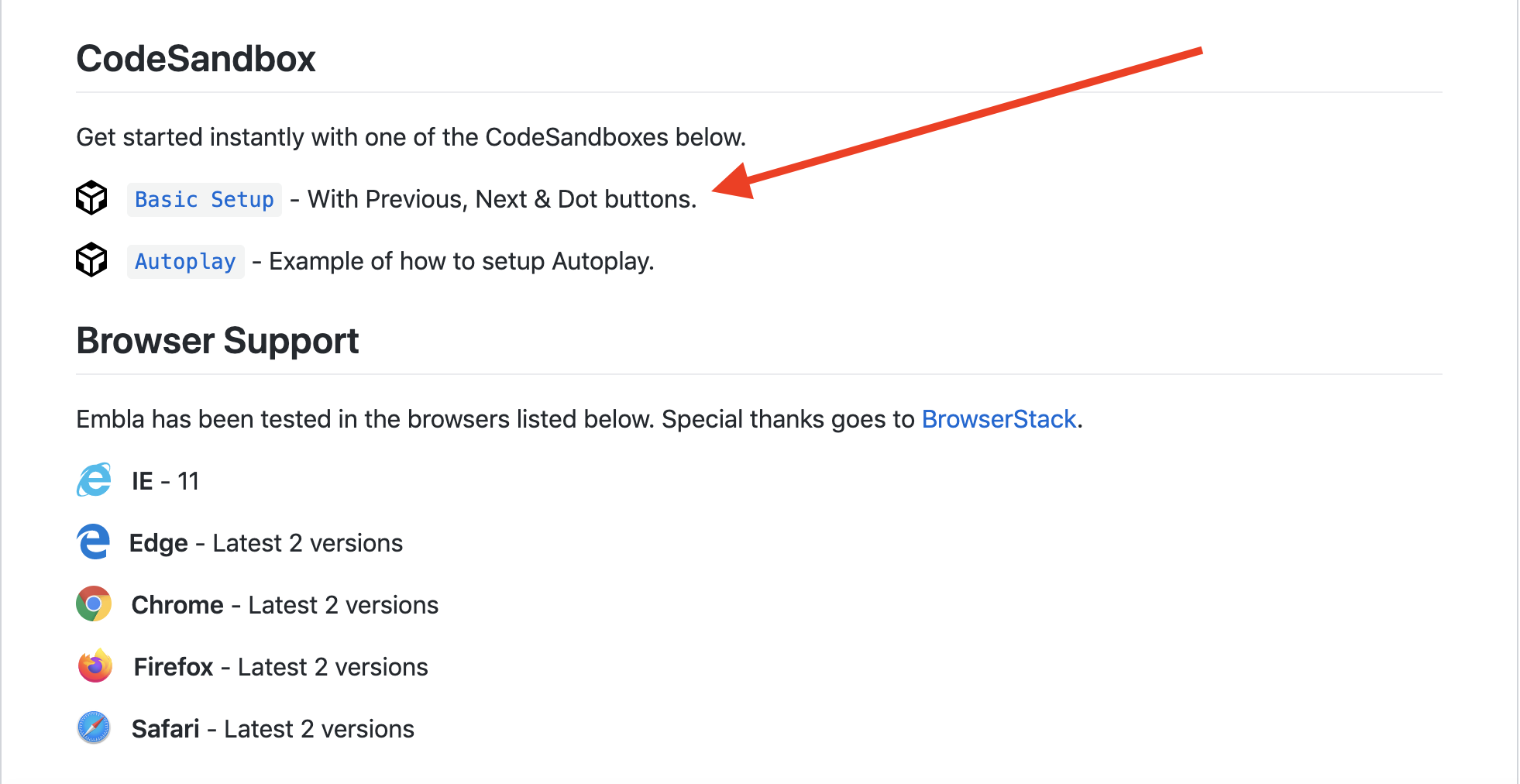
Let me know if it helps!
David
davidcetinkaya
on 17 Jan 2020
Yes, I saw those examples, does that mean we have to grab CSS files from these demos directly? I kind of expected that these files will be in the source code.
Andrew-web-coder
on 17 Jan 2020
Could you maybe add little note in the docs that user has to take care about CSS by himself, because you do not provide these files out of the box? That would clear the confusion. But, if you would include sample CSS files in the source, that would be awesome.
Andrew-web-coder
on 17 Jan 2020
Hello @Andrew-web-coder,
Thank you for your additional thoughts 👍.
The purpose of Embla Carousel is to provide:
Extensible low level carousels for the web.
With emphasis on low level, it's purpose is to provide bare bone carousels and give you the tools to extend them with your own desired functionality. This is opposed to most other carousel plugins that include dots and a whole bunch of other stuff in their code that you may or may not use, resulting in large bundle sizes. This is why the Embla library has a small bundle size.
And this is also why it doesn't make sense to include pre-defined CSS files for Embla. It's simply up to the user to build and style their own desired dot navigation, prev/next buttons etc. With that said, I've provided a CodeSandbox example as mentioned just to get you started.
Does that mean we have to grab CSS files from these demos directly?
If you want your dots to look the same way as they do in the CodeSandbox demo, the answer is yes. But feel free to write your own CSS and style them however you want. This is the main benefit of a library not providing everything out of the box: You don't have to overwrite a lot of default stuff, you can just build your own solution.
Could you maybe add little note in the docs that user has to take care about CSS by himself?
Do you have any suggestions on how to better communicate this in the docs?
Best,
David
davidcetinkaya
on 17 Jan 2020
Oh, OK, it is clear now. You could almost copy/paste your comment about "low level" and paste in the docs, because right now the docs does not really give a clue what "low level carousel" means.
Andrew-web-coder
on 17 Jan 2020
Hello again @Andrew-web-coder,
Thanks for your feedback! Just a thought, would you like to draft an introduction text to Embla Carousel in order to convey the purpose of the Embla Carousel library better?
I'd very much appreciate the contribution.
Best,
David
davidcetinkaya
on 28 Jan 2020
I really really like that there is no css, thank you so much for that!
 eballeste
on 28 Jan 2020
eballeste
on 28 Jan 2020
Hi Enrique (@eballeste),
Thanks for the feedback, I’m glad you appreciate it. What are your thoughts about the introduction text? Do you have any ideas about how we can improve it to describe Embla Carousel better?
davidcetinkaya
on 28 Jan 2020
I have to admit I didn't initially understand what the description meant by "low level".
"Physics enabled" also sounds a little off to me, not sure what you mean by this.
I would maybe change it to:
Build awesome, bare bone carousels for the web. Embla Carousel is extendable, dependancy-free, and 100% open source.
Not sure about the wording but maybe something like that?
eballeste
on 28 Jan 2020
Hello again Enrique (@eballeste)
Thank you for your feedback 👍. Both you and Andrew (@Andrew-web-coder) think the description is unclear so I think it makes sense to consider rephrasing it.
How about this then:
Extensible bare bones carousels for the web. Build awesome carousels by extending them your own CSS and JavaScript. It's dependency free and 100% open source.
?
Kindly,
David
davidcetinkaya
on 30 Jan 2020
yes, perfect. there's a typo though:
Build awesome carousels by extending them _with_ your own CSS and JavaScript.
eballeste
on 30 Jan 2020
I would replace It's in the third sentence with Embla Carousel. It's is kind of vague and a little confusing because some people might think you're talking about the items mentioned in the previous sentence. Better to be bold and clear than vague.
Extensible bare bone carousels for the web. Build awesome carousels by extending them with your own CSS and JavaScript. Embla Carousel is dependency free and 100% open source.
eballeste
on 30 Jan 2020
Thanks a lot Enrique (@eballeste), this helps a lot 🙂. I’ll update the introduction text as soon as possible.
Cheers!
David
davidcetinkaya
on 30 Jan 2020
Hello Andrew and Enrique (@Andrew-web-coder, @eballeste),
I've updated the Embla Carousel description text in order to communicate its purpose better. Thank you both for providing valuable feedback and improving Embla ⭐️.
Best,
David
davidcetinkaya
on 31 Jan 2020
Related issues
 iamkevingreen
·
4Comments
iamkevingreen
·
4Comments
 davemullenjnr
·
5Comments
davemullenjnr
·
5Comments
 EctordAniel
·
3Comments
EctordAniel
·
3Comments
 ej-mitchell
·
5Comments
ej-mitchell
·
5Comments
 Hahlh
·
3Comments
Hahlh
·
3Comments
Most helpful comment
I really really like that there is no css, thank you so much for that!