Embla-carousel: Add methods about previous and next slides in the API?
Hello again, I was checking the example on CodeSandbox.
I wanted to customize the example to hide the "Previous" button when the first slide is shown and if the "loop" mode is off.
I have seen I can grab the current index position with selectedIndex() and the total number of slides using groupedIndexes() but it's not very obvious and the concept of "grouped slides" is a bit confusing.
Maybe embla object could expose some convenient methods or properties like isFirstSlide(), isLastSlide(), hasPreviousSlide() and hasNextSlide() to make the task more convenient?
Or maybe there is a better approach, I may be missing something.
Thank you for your attention!
 michaelrambeau
All 13 comments
Hi Michael @michaelrambeau,
Thank you for opening this issue!
I've added an example implementation of what you're asking for in this CodeSandbox. You'll find the code in the prevAndNextButtons.js file.
Below is a short explanation of the code:
const togglePrevAndNextBtns = (prevBtn, nextBtn, embla) => {
  const index = {
    min: 0, // <-- First index will always be zero
    max: embla.groupedIndexes().length - 1 // <-- Last index will always be this
  };
  return () => {
    const selected = embla.selectedIndex(); // <-- Grab selected index
    const previous = embla.previousIndex(); // <-- Grab previous index
    // If previous index IS first enable previous button
    if (previous === index.min) prevBtn.removeAttribute('disabled');
    // If selected index IS first disable previous button
    if (selected === index.min) prevBtn.setAttribute('disabled', 'disabled');
    // If previous index IS last enable next button
    if (previous === index.max) nextBtn.removeAttribute('disabled');
    // If selected index IS last disable next button
    if (selected === index.max) nextBtn.setAttribute('disabled', 'disabled');
  };
};

const disablePrevAndNextBtns = togglePrevAndNextBtns(prevBtn, nextBtn, embla);
// Attach he function above to embla select (when slide target changes)
// Attach the function above to embla init (when the carousel has mounted)
embla.on('select', disablePrevAndNextBtns);
embla.on('init', disablePrevAndNextBtns);
Do you think this makes sense? Or do you think there are more intuitive approaches to this like your suggestion with isFirstSlide(), isLastSlide(), hasPreviousSlide() and hasNextSlide()?
I look forward to your feedback 🙂!
 davidcetinkaya
on 9 Jun 2019
davidcetinkaya
on 9 Jun 2019
@davidcetinkaya Thank you David for your quick answer.
It makes sense even if I'd prefer a little more "expressive" API, but it's more a personal taste, let's wait until a second person requests it.
I'm closing the issue since the example you did on CodeSandbox solves the problem.
Congratulations for your 100 first stars on GitHub! ⭐️
michaelrambeau
on 10 Jun 2019
Thanks for the feedback Michael @michaelrambeau. Feel free to open a new issue at any point if you think there's room for any improvement :slightly_smiling_face:.
And thank you for the congrats ⭐️, I'm very happy that people appreciate Embla Carousel. And with your help it gets better 👍.
davidcetinkaya
on 10 Jun 2019
Hi Michael @michaelrambeau,
I hope you're doing great :slightly_smiling_face:. I've been thinking about what you said about a more of an expressive API and I think this idea is really good. So I've decided to reopen this issue and will ping you as soon as I've implemented this. Thank you so much for this amazing input 👍!
PS. Feel free to check out the new implementation of the { dragFree: true } feature. It's a smooth scrolling experience without snapping to slide positions, similar to the css-property -webkit-overflow-scrolling: touch; but with the benefit of dot and prev/next navigation :blush:.
Just look for { dragFree: true } on the demo page, it's the first carousel from the top.
Thank you for your time!
davidcetinkaya
on 14 Jun 2019
Hi Michael @michaelrambeau,
I've added the requested API methods now. Please see release v0.9.0. The only difference from your suggestion is that I decided to go with index instead of slide, so isFirstSlide() became isFirstIndex().
The reason for this is that the groupSlides option allows for multiple slides within a single index. So if you have groupSlides set to 2, each time I press the next button the carousel will slide past 2 slides instead of 1.
Thank you for reporting this ✨!
Please confirm that this is the improvement you were looking for 👍.
davidcetinkaya
on 16 Jun 2019
Hello David @davidcetinkaya thank you for the latest improvements!
I checked the dragFree option, it works well, maybe you could add a few lines of explanation in the demo about that behavior.
About the slides and the indexes, I still don't understand the concept of multiple slides on the same index, is there an example somewhere of that use-case, what real-world problem is it solving?
It may be something obvious for you but I can't visualize... thank you in advance!
michaelrambeau
on 17 Jun 2019
Hi Michael @michaelrambeau,
Thank you for your feedback 😃. It really helps me improve stuff. I will do my best to explain the groupSlides feature and please be honest and say if my explanation is unclear in some way 🔥.
The groupSlides feature makes sense when you want to show multiple slides in the carousel viewport at once. This will probably happen more often on bigger screen sizes like tablets or desktops.
For example, if you have a logo slider or maybe images of thumbnail sizes. In this case it can be quite annoying for the user interacting with the carousel that on every next button click it only takes you one slide forward at the time, even though you've already seen slide 1 & 2. Take a look at the screenshots below, assuming the groupSlides option is set to 2:

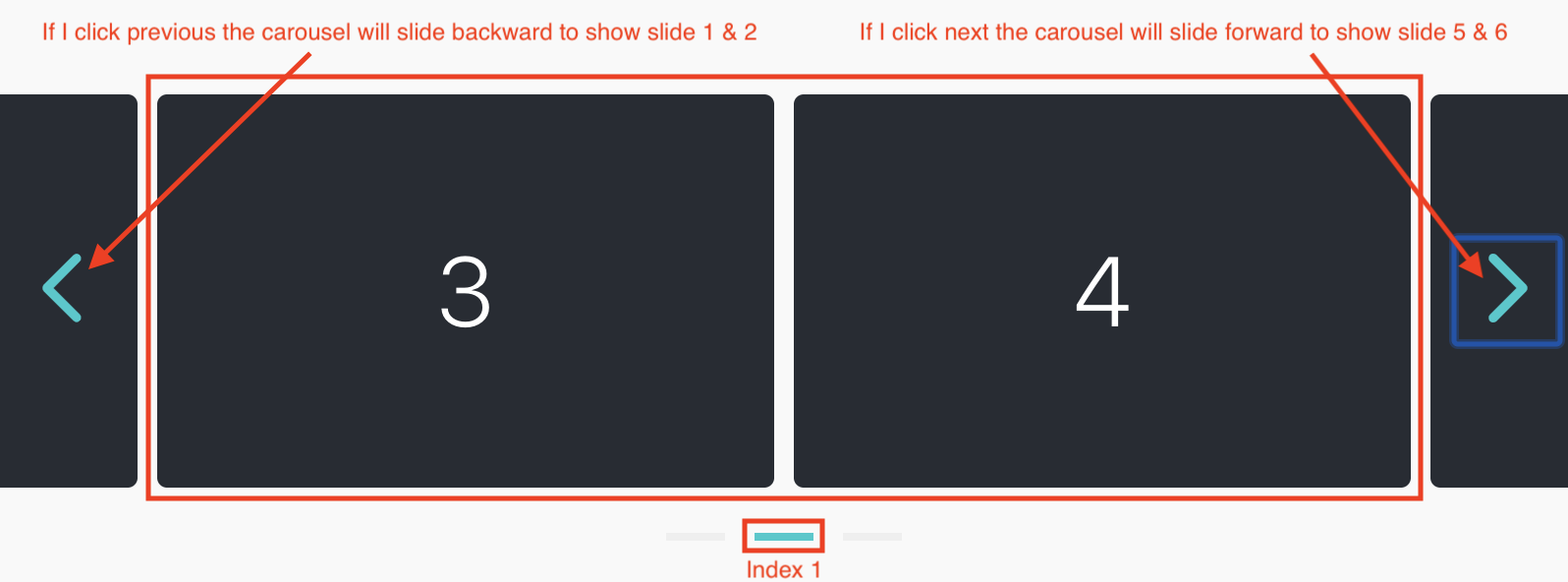
In the screenshot above ☝️, each next or previous button click will take the user 2 slides forward or 2 slides backward. In this case it makes sense to set groupSlides to 2 for bigger screens and on smaller screens set it to default, meaning scrolling 1 slide per next or previous click.
I've setup a CodeSandbox here where you can try this.
- Does this make sense 🙂?
- Do you still think the methods should be named with the word
Sliderather thanIndex?
davidcetinkaya
on 17 Jun 2019
Hello David @davidcetinkaya
The demo makes perfectly sense, now I understand, thank you.
So it's about defining "multiple slides per view".
I don't know if "view" is the best word, because it's very generic, but it's the one used by _Swiper_ library, they have this option:
slidesPerView: Number of slides per view (slides visible at the same time on slider's container).
So maybe instead of isFirstIndex you could be more explicit and call it isFirstView and so on...
An other idea would be to have a separate "View" object that would provide isFirst and isLast properties.
The carousel is made of views and each view can have one of several slides.
embla.getCurrentView() => returns the current view
embla.getCurrentView().isFirst => true or false
These are just ideas, I know it's hard to come out with the best design/architecture, that is both simple and flexible... so please ignore this idea if it doesn't go in the right direction 😄
michaelrambeau
on 17 Jun 2019
Yeah, need to think of a better name for it. This naming thing can be so hard sometimes :sweat_smile: .
Thanks a ton for the ideas Michael @michaelrambeau, you're always helpful :muscle:!
davidcetinkaya
on 18 Jun 2019
Hi Michael @michaelrambeau,
How about this, we change the name of the methods/options (left) to the proposed (right) 🙂:
- groupSlides -->
slidesToScroll - isFirstIndex -->
isStartScroll_(Not needed? I can just check canScrollNext?)_ - isLastIndex -->
isEndScroll_(Not needed? I can just check canScrollPrevious?)_ - hasPreviousIndex -->
canScrollPrevious - hasNextIndex -->
canScrollNext
I look forward to your feedback ☺️ 👍🏻!
davidcetinkaya
on 19 Jun 2019
Hello David @davidcetinkaya
Yes, if possible, I think it's better if the high-level API does not mention the word index because of the possible confusion between views and slides inside the views, so canScrollPrevious() and canScrollNext() sound good to me.
We may need isStartScroll if the user wants to make something about the first slide displayed on the screen because canScrollPrevious will always return true when the loop mode is true, right?
I noticed we have already goTo(), next() and previous() methods, maybe scrollTo, scrollPrevious and scrollNext would be more consistent?
Well I don't want to make you break everything since you have already published the version 1 (or you can add "aliases" if you decide to rename some methods and don't want to break existing stuff until the next major release)
michaelrambeau
on 20 Jun 2019
Thank you Michael @michaelrambeau 😃!
I'm glad you think the scroll naming is more clear. Good point about the consistency with the word scroll. I will take that into account when renaming the methods 👍 .
Side note: I just released a working React version of Embla if you're interested. Try it on CodeSandbox or check it out on Github.
Thank you for all your help Michael, really! As soon as I've added a contributors section you're first up 😃 🎉!
davidcetinkaya
on 20 Jun 2019
@davidcetinkaya Thank you David, I will definitively check the React version, being a heavy user and a big fan of React!
I'm closing this issue but I guess we will talk very soon about the React version.
Keep up the great work!
michaelrambeau
on 20 Jun 2019
Related issues
 cliffordfajardo
·
5Comments
cliffordfajardo
·
5Comments
 jamesdbruner
·
3Comments
jamesdbruner
·
3Comments
 patrickhuang94
·
3Comments
patrickhuang94
·
3Comments
 nikrowell
·
7Comments
nikrowell
·
7Comments
 Hahlh
·
3Comments
Hahlh
·
3Comments
Most helpful comment
@davidcetinkaya Thank you David, I will definitively check the React version, being a heavy user and a big fan of React!
I'm closing this issue but I guess we will talk very soon about the React version.
Keep up the great work!