Ember.js: CSS Files are Being Fetched Twice in Production Mode
I generated a new project using 2.13.3 ember CLI in order to debug an issue we are seeing with our production application where all of our CSS files are being fetched twice when running in production mode:
ember s --environment production
Here is a screenshot of the network tab in Chrome that shows this behavior:
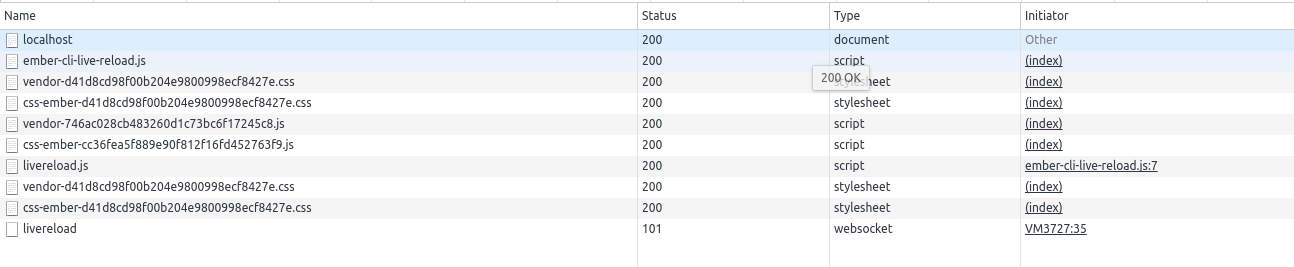
I don't see this behavior on non-Ember applications we maintain and am curious what is causing this behavior. We also see this on a deployed application where livereload is not running, so it doesn't appear to be related to that.
Any help on this issue to diagnose the source of the duplicate CSS rendering would be helpful. Thanks.
 brandonwtrility
All 14 comments
We also see this on a deployed application where livereload is not running
can you share your built index.html ?
 stefanpenner
on 28 Jun 2017
stefanpenner
on 28 Jun 2017
@stefanpenner Here is the HTML:
<!DOCTYPE html>
<html>
  <head>
    <meta charset="utf-8">
    <meta http-equiv="X-UA-Compatible" content="IE=edge">
    <title>CssEmber</title>
    <meta name="description" content="">
    <meta name="viewport" content="width=device-width, initial-scale=1">


<meta name="css-ember/config/environment" content="%7B%22modulePrefix%22%3A%22css-ember%22%2C%22environment%22%3A%22production%22%2C%22rootURL%22%3A%22/%22%2C%22locationType%22%3A%22auto%22%2C%22EmberENV%22%3A%7B%22FEATURES%22%3A%7B%7D%2C%22EXTEND_PROTOTYPES%22%3A%7B%22Date%22%3Afalse%7D%7D%2C%22APP%22%3A%7B%22name%22%3A%22css-ember%22%2C%22version%22%3A%220.0.0+e7241c22%22%7D%2C%22exportApplicationGlobal%22%3Afalse%7D" />

    <link rel="stylesheet" href="/assets/vendor-d41d8cd98f00b204e9800998ecf8427e.css" integrity="sha256-47DEQpj8HBSa+/TImW+5JCeuQeRkm5NMpJWZG3hSuFU= sha512-z4PhNX7vuL3xVChQ1m2AB9Yg5AULVxXcg/SpIdNs6c5H0NE8XYXysP+DGNKHfuwvY7kxvUdBeoGlODJ6+SfaPg==" >
    <link rel="stylesheet" href="/assets/css-ember-d41d8cd98f00b204e9800998ecf8427e.css" integrity="sha256-47DEQpj8HBSa+/TImW+5JCeuQeRkm5NMpJWZG3hSuFU= sha512-z4PhNX7vuL3xVChQ1m2AB9Yg5AULVxXcg/SpIdNs6c5H0NE8XYXysP+DGNKHfuwvY7kxvUdBeoGlODJ6+SfaPg==" >


  </head>
  <body>


    <script src="/assets/vendor-746ac028cb483260d1c73bc6f17245c8.js" integrity="sha256-IVy1gfO4EKrYctJ0LtfKmdG4UkUTa2nnPnLufpCqkck= sha512-48eBkB3ZFACXPGmaxXYfSvuyH3ogqJl+i90vpCRRHEhGf7O0fVudEHECBUun7Qq9WROzzYPlUCzhhOerOQfAYw==" ></script>
    <script src="/assets/css-ember-cc36fea5f889e90f812f16fd452763f9.js" integrity="sha256-4QiSt47m/qARYTxkvuxdX3tCQ9JsvSQjAJxw56ZZ/wo= sha512-VAkDuy1f5nEznz1AWqL8ZXjlRbJA7CrzlaYIHXhYtEmJ0VUopCkUviYn8x0HKOMz/DUY5VC0RRVgPy4BeCNngQ==" ></script>


  </body>
</html>
@stefanpenner This default index.html has not been edited at all. Here was the steps to reproduce the issue:
ember new myapp
cd myapp
ember s --environment production --live-reload=false
Network panel for a new project:

brandonwtrility
on 28 Jun 2017
Interesting, i am also seeing this in Chrome, but not in Firefox.....
Which browser you using?
stefanpenner
on 28 Jun 2017
@stefanpenner I am using Google Chrome Version 58.0.3029.110 (64-bit)
brandonwtrility
on 28 Jun 2017
@stefanpenner I just saw this SO post about double CSS loading in Chrome: https://stackoverflow.com/questions/42650050/css-from-cdn-with-integrity-loads-twice
The CSS links generated by the ember app have the integrity attribute.
I also tested in Firefox and noticed the double loading is not a problem there for us as well.
brandonwtrility
on 28 Jun 2017
Ya I suspect a chrome bug re: integrity checks..
stefanpenner
on 28 Jun 2017
We may need to disable this as a default for now..
stefanpenner
on 28 Jun 2017
@stefanpenner Is there a way to disable the integrity attribute via a build param? We can disable it until Chrome releases a fix for this.
brandonwtrility
on 28 Jun 2017
@brandonwtrility two ways:
- remove
ember-cli-srifrompackage.json(but then you loose all integrity)
or
- add
integrity=""to thelinktag (this avoids the double load problem)
stefanpenner
on 28 Jun 2017
@stefanpenner I removed the ember-cli-sri package and did checked again and the problem is resolved. That seems to be a good temporary solution for now. Thanks for the suggestion.
brandonwtrility
on 28 Jun 2017
@brandonwtrility my recommendation has been updated to be:
add integrity="" to the link tag (this avoids the double load problem)
Also, I think we may want to change this in ember-cli blueprint by default: https://github.com/ember-cli/ember-cli/pull/7160
stefanpenner
on 28 Jun 2017
@stefanpenner Excellent, I will take your suggestion so when we have a cleaner CLI upgrade path. Thanks again for your help!
brandonwtrility
on 28 Jun 2017
@brandonwtrility thanks for reporting, I was totally unaware of this issue
stefanpenner
on 28 Jun 2017
Related issues
 MichalBryxi
·
3Comments
MichalBryxi
·
3Comments
 rafaelbnp
·
3Comments
rafaelbnp
·
3Comments
 SaladFork
·
4Comments
SaladFork
·
4Comments
 hilem
·
4Comments
hilem
·
4Comments
 amk221
·
3Comments
amk221
·
3Comments
Most helpful comment
@brandonwtrility two ways:
ember-cli-srifrompackage.json(but then you loose all integrity)or
integrity=""to thelinktag (this avoids the double load problem)