Ember-inspector: Tab does not display in Firefox Developer Edition
I'm using FF 61.0b2 on a Macbook Pro running 10.12.6 (Sierra)
Since today's update clicking on the Ember tab in the inspector doesn't do anything.
Tried disabling all the other plugins but it made no difference.
 fjfish
All 11 comments
Tab showing in dev tools but not working (not switching to the tab) for me in FFDev (61.0b2 (64-bit) OSX High Sierra. Works in regular FF (59.0.2 (64-bit) OSX. Working in Chrome Canary (dev edition) (Version 68.0.3419.0) Also working in Chrome Reg edition (Version 66.0.3359.139)
 archebyte
on 4 May 2018
archebyte
on 4 May 2018
I don't know anything about why it wouldn't work in FF only in the dev edition. Sounds like they changed something. Any errors or helpful information to debug?
 rwwagner90
on 5 May 2018
rwwagner90
on 5 May 2018
I wish I knew where to look. I checked OSX Console and don't see FFDev throwing any errors. DevTools console also not throwing errors. I do see this (attached) which says that the plug in is not seeing this page as an ember app, though it's a fresh install with these specs.
Ember CLI: 3.1.4 (package.json: 3.1.3) <-- another puzzling thing is discrepancies of install vs. package.json versions as in below:
DEBUG: -------------------------------
DEBUG: Ember : 3.1.1 (package.json: 3.1.0)
DEBUG: Ember Data : 3.1.1 (package.json: 3.1.0)
DEBUG: jQuery : 3.3.1
DEBUG: -------------------------------
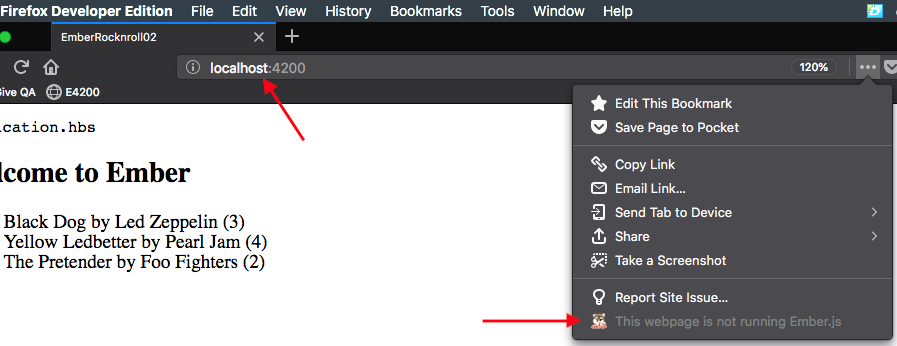
Let me know if you need help with testing or more info.
J
archebyte
on 5 May 2018
@plebeian-org / @rwwagner90 that's interesting. I am seeing the helper, but still not seeing the tab. I have done uninstall/reinstall. If I have time later I will install the version before last from source and see if that works.
fjfish
on 6 May 2018
@fjfish any luck?
I am also experiencing this.
 ahopkins
on 7 May 2018
ahopkins
on 7 May 2018
I am having the same issue on my Mac. It works in Firefox 59.0.3 but does not work in Firefox Developer Edition 61.0b2. It stopped working when I updated Firefox Developer Edition from 60 to 61.
 hectorsq
on 7 May 2018
hectorsq
on 7 May 2018
I'm using Firefox Developer Edition 61.0b2 (64-bit) on Ubuntu 18.04. I can see the Ember Inspector tab. When I click on it I get the following error message in the Browser Console:
Error: Unknown event: ["devtools.main", "enter", "webext-devtools-panel-ember-inspector_emberjs_com-204658-0"] telemetry.js:636:5
 mrloop
on 9 May 2018
mrloop
on 9 May 2018
@mrloop are you able to provide a stack trace for that error?
I'm out this week, but I can get FF developer edition next week and take a look. I'm curious if maybe FF itself is messed up, since it works in normal FF, it sounds like they may have introduced a bug or potentially changed an API.
rwwagner90
on 9 May 2018
Still busted in 61.0b3.
 nummi
on 9 May 2018
nummi
on 9 May 2018
Cool. Happy to help test or whatever. No rush over here, plenty of other choices. LOVE LOVE LOVE the new improvements. What an astounding improvement of the inspector! Kudos to those working on it. Love the overlays, tidy new sidebar info, and more. Super helpful!
archebyte
on 9 May 2018
Just merged the PR from @pbishop16 which should fix the issue 🎉
rwwagner90
on 11 May 2018
Related issues
 ansmonjol
·
3Comments
ansmonjol
·
3Comments
 EWhite613
·
7Comments
EWhite613
·
7Comments
 gokatz
·
6Comments
gokatz
·
6Comments
 davidchalifoux
·
3Comments
davidchalifoux
·
3Comments
 izackhub
·
6Comments
izackhub
·
6Comments