Ember-inspector: Ember inspector does not play nice with chrome dev tools dark theme
Since Chrome version 29 the option for using a dark theme in developer tools has been added.
When having it enabled and opening ember inspector the following issues appear:
- Theme is not respected (this is not that bad but just mentioning it)
- The attributes panel colouring makes it really hard to read.
- In render performance when no metrics have been acquired the text saying that is hard to read.

 gkaran
All 9 comments
Now that chrome 50 is launched I feel this issue will affect more people
 Frozenfire92
on 22 Apr 2016
Frozenfire92
on 22 Apr 2016
I wonder what the best way to address this is. I want to help, but I'm popping in without a ton of knowledge of developing chrome extensions.
So, the first question is: why?
- My guess is that Ember Inspector is creating a lot of custom elements that prevent it from picking up Dark Theme's CSS styles.
- It is also possible that the Inspector's styles overwrite default chrome colors. Since these are smart guys, I'm guessing this is not the case.
Since in the former case, it would actually require a ton of work to make the DOM structure more standardized, the best short term approach might be to have a separate "Dark" version of this Ember inspector.
A good first step in that direction might be to create a styles/colors.scss that would set up current colors as variables, with an eye towards making the existing color palate as consistent as possible (if it isn't already).
Thoughts?
Perhaps I should open a separate issue to see if such a pull request would be welcome.
 Rio517
on 3 Jun 2016
Rio517
on 3 Jun 2016
Ember-extension does not receive any styles from chrome, the existing light theme was had tuned to look as it does. I suspect the missing piece of info here is that the chrome inspector allows frames to run foreign code which is where the ember extension runs. Resulting in no style leak or inheritance.
What this means, is a dark theme will need to be made specifically for this extension(good idea, but some extra work) and we will need some what of detecting which theme is active.
 stefanpenner
on 3 Jun 2016
stefanpenner
on 3 Jun 2016
Curious if there's any update to this. I love using the dark theme, it's easier on my eyes, it's always a bit of an "aah!" when I switch to the Ember Inspector tab.
 tonedef
on 4 Jan 2017
tonedef
on 4 Jan 2017
@tonedef are you able to work on the dark theme and figuring out a detection mechanism?
 locks
on 4 Jan 2017
locks
on 4 Jan 2017
@stefanpenner Are you saying it would be worth it to create a dark theme specifically for the Ember Inspector as well as a mechanism for toggling between the dark and light themes for the Ember Inspector? Something like a 'Settings' tab or something?
 ryanponce
on 10 Feb 2017
ryanponce
on 10 Feb 2017
This seems to no longer be an issue. The dark theme is still not applied to inspector, but it shows up completely light, without those hard to read elements shown in the original screenshot.
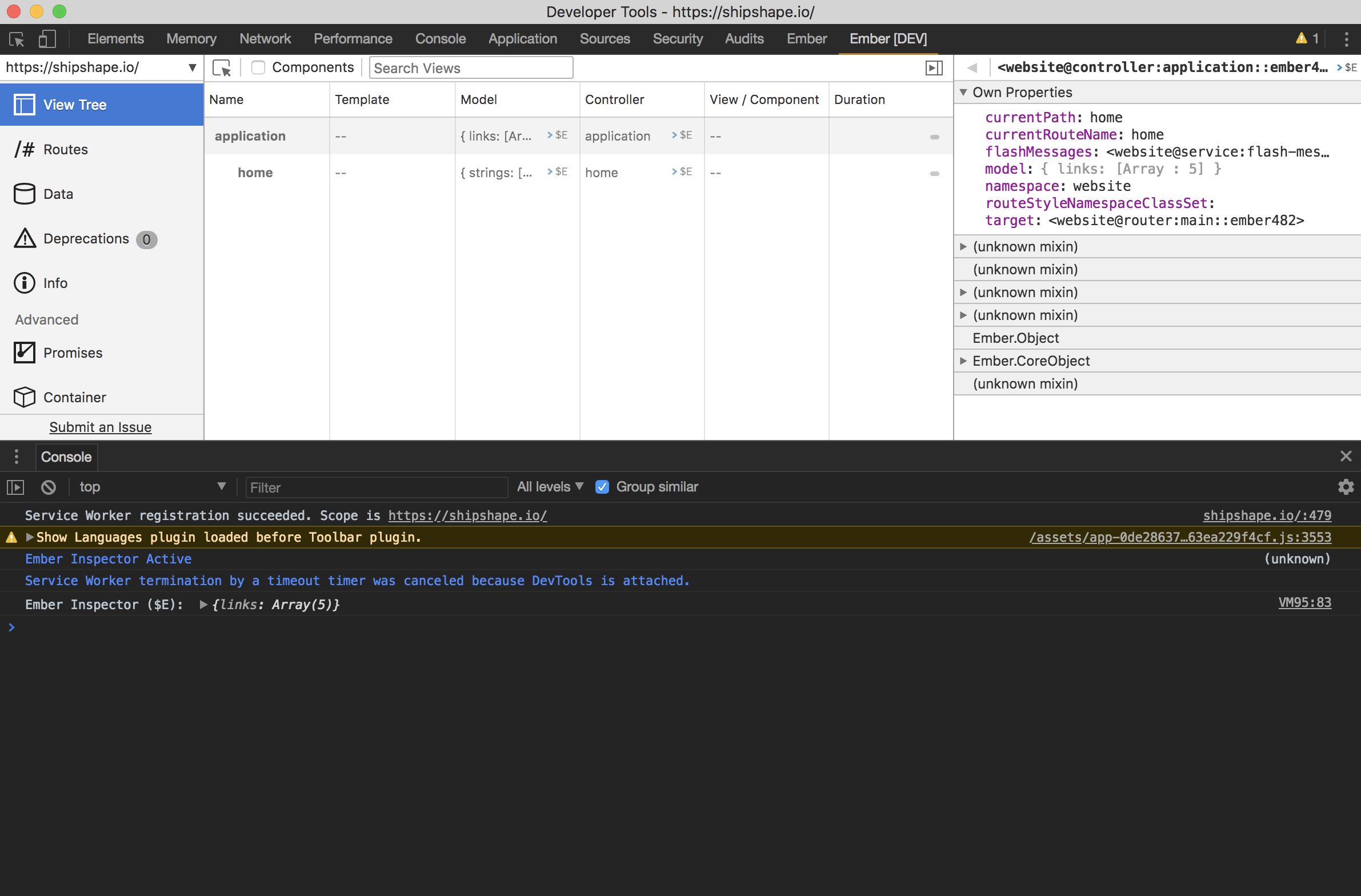
@locks @teddyzeenny what are your thoughts? I think it is fine to keep inspector always the same theme, personally, unless someone has an easy way to implement it.
 rwwagner90
on 7 Mar 2018
rwwagner90
on 7 Mar 2018
@rwwagner90 Agreed. I guess, if anything, this issue could be changed to something like "create dark theme"
 jedateach
on 5 Apr 2018
jedateach
on 5 Apr 2018
Closing this in favor of https://github.com/emberjs/ember-inspector/issues/771
rwwagner90
on 5 Apr 2018
Related issues
 josemarluedke
·
4Comments
josemarluedke
·
4Comments
 gokatz
·
6Comments
gokatz
·
6Comments
 davidchalifoux
·
3Comments
davidchalifoux
·
3Comments
 brian-c
·
3Comments
brian-c
·
3Comments
 chancancode
·
3Comments
chancancode
·
3Comments
Most helpful comment
Ember-extension does not receive any styles from chrome, the existing light theme was had tuned to look as it does. I suspect the missing piece of info here is that the chrome inspector allows frames to run foreign code which is where the ember extension runs. Resulting in no style leak or inheritance.
What this means, is a dark theme will need to be made specifically for this extension(good idea, but some extra work) and we will need some what of detecting which theme is active.