Elvish: How do I configure tab completion to behave like bash and not like cmd/pwsh?
Tab completion (by default) in Bash, ZSH, and similar shells will only add characters to the command I'm typing if there is a single option. Given a directory, /foo, containing two files, bar and baz:
- If I type
/foo/b[Tab]in bash, not much will happen - If I type
/foo/ba[Tab]in bash, it will autocomplete to/foo/bar - If I type
/foo/b[Tab][Tab]in bash, I may get a list of options
In shells like cmd, pwsh, and elvish, typing /foo/b[Tab] will autocomplete the first possibility, and subsequent [Tab]s will cycle through the options.
I am happy to have a list of options shown immediately, but I really don't like the autocomplete-on-first-tab behavior. How do I configure elvish to not do that? I've been looking around, but I basically can't find any information on how to configure how tab completion behaves.
 firelizzard18
All 11 comments
What version of elvish are you using (elvish -buildinfo)? I don't see the behavior you describe so I can't help but wonder if you're using an old version. Also, to rule out something in your Elvish config does the behavior change if you run elvish -norc?
 krader1961
on 27 May 2021
krader1961
on 27 May 2021
I'm using the version of elvish built into u-root. I'll try it with this repo and see if it behaves the same, and record video if it does.
firelizzard18
on 28 May 2021
Using u-root's default shell, https://github.com/u-root/u-root/tree/master/cmds/core/elvish:
~/# elvish -buildinfo
version: unknown
builder: unknown
~/# elvish -norc
flag provided but not defined: -norc
Usage: elvish [flags] [script]
I took screen grabs via QEMU before and after [Tab]. If QEMU (or KDE/plasma) supports screen capture, I don't know how to do it.

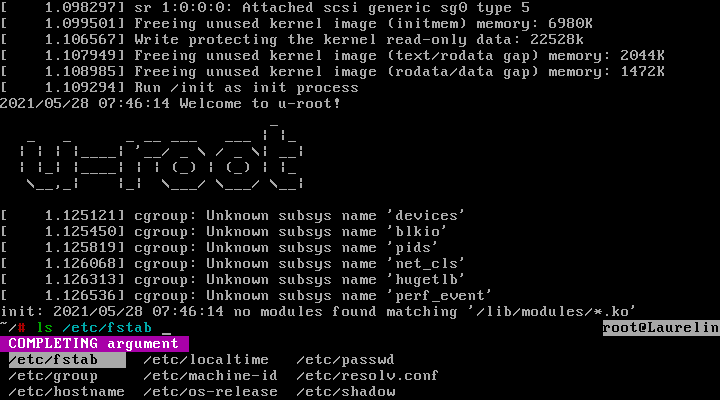
The only thing I did between these two images is press [Tab] once. As you can see, /etc/ was autocompleted to /etc/fstab.
firelizzard18
on 28 May 2021
Note that support for the -norc flag was added three years ago:
commit 67568e2b8c3ffe4a66b37693c951837378ebefe1
Author: Ian Woloschin <[email protected]>
Date:   Wed Jun 27 05:56:11 2018 -0400

    Add support for -norc flag (#707)

    * Add support for -norc flag

    * Style fixes

    * Clean up shell.New declaration
You are using an incredibly old version of elvish. It's impossible to provide support, even answering questions, for such an ancient version of the program. There have been over 2000 commits to the source since then. Try a current binary from https://elv.sh/get/.
krader1961
on 28 May 2021
Oh hey, I added support for -norc :)
Looking at u-root, did they just wholesale copy Elvish into their repo?
https://github.com/u-root/u-root/tree/master/cmds/core/elvish
Doesn't look like much activity in over 2 years, while there has been a ton over here. I don't actually have any idea how u-root works but it seems like you'd need to make a PR there to wholesale copy current Elvish (or maybe the last release) over? That doesn't really seem very sustainable though.
 iwoloschin
on 28 May 2021
iwoloschin
on 28 May 2021
Doesn't look like much activity in over 2 years,
If you look at the elvish history more closely the changes 2 years ago only involved a reorg of the u-root code. The elvish source was merged on 2018-09-21: see https://github.com/u-root/u-root/pull/953. But the elvish source is at least three months older than that date since it doesn't support -norc.
Also, @firelizzard18, the u-root roadmap says that the project wants support for the printf and time commands. Which are both implemented by the current version of elvish. The u-root project really needs a mechanism to track the Elvish project.
krader1961
on 28 May 2021
Unsurprisingly, @xiaq has already opened a u-root issue about the fact it is using an ancient version of Elvish. I noticed it because I was going to open a similar issue but first did a search to see if this had already been reported.
Probably the biggest challenge is reconciling this u-root change to the Elvish source with the Elvish project: https://github.com/u-root/u-root/commit/a4c8954ddd8579fbfaa40b217c01ea1b6ea5d08c#diff-60fbc218051a48d4cf10972452c4eaa54e467262121a2d4751f31b34eff7c021. It is amazing they went to the trouble of creating that change. But it isn't scalable as the Elvish internal API evolves -- such as the recent introduction of the new number system. The only practical resolution, AFAICT, is for the u-root project to accept that the elvish binary may be larger than necessary due to limitations of the Go tool chain, but that the size will decrease as the Go tool chain is improved. Too, the Elvish project is aware of this issue and actively working to decrease the size of the binary. See, for example, issue #375.
@firelizzard18: Is there anything else we can help with or should this be closed?
krader1961
on 30 May 2021
@krader1961 I just cloned and built elvish from this repository. The tab completion behavior is the same. So my question stands, how do I configure elvish so that it does not modify the command prompt when I it [Tab] once?
Before
$ ./go/bin/elvish
~> ls /etc/f_
After one [Tab]
$ ./go/bin/elvish
~> ls /etc/filesystems
 COMPLETING argument  _
/etc/filesystems  /etc/fonts/  /etc/fstab
@firelizzard18: The important detail is that the completion in your example includes directories (/etc/fonts/) and non-directories. That triggers the behavior you are seeing. AFAIK, that is not configurable. Note that if your /tmp/ directory does not contain any file beginning with the letter "b" then doing this
> touch /tmp/bar /tmp/baz
> ls /tmp/b[Tab]
will result in ls /tmp/ba on the command line and completion mode not being enabled. That is, the behavior you want. I have no idea whether the current difference in path completion behavior is good or bad. I have been using Elvish as my daily shell for three years, and have been programming since 1977. I find the Elvish argument completion behavior to be unobjectionable. So I am ambivalent whether the implementation should be complicated by configuration options to provide the behavior you prefer. Flexibility is good but adding every feature someone wants leads to monstrosities like the zsh shell.
I defer to people like @zzamboni and @iwoloschin, who have been using Elvish longer than me, and are probably younger than me, to comment on whether changing the behavior, or making it configurable, is a good idea.
krader1961
on 31 May 2021
Flexibility is good but adding every feature someone wants leads to monstrosities like the
zshshell.
I use zsh as my daily shell :rofl:
I would prefer to have the option of making completion-when-directories-are-present behave the same as completion-with-only-files. But given that [Esc] after [Tab] in modern (not out of date) elvish will remove the completion suggestion, I'll be fine without that option.
That being said, I would appreciate clearer documentation on what can and can't be configured. Maybe add a page under https://elv.sh/ref/, such as "Customization"? Even if the content is primarily, "Elvish is not that configurable," explicitly notating that in an easy to find location would have helped me.
firelizzard18
on 1 Jun 2021
@firelizzard18 @krader1961 in my experience, completion is a very personal preference, so no out-of-the-box settings will satisfy everyone. I also had a bit of an adaptation curve to the way Elvish does completion, and there is still one case that I would like to see behave differently, but otherwise, once you get the hang of it, it can become quite efficient.
@firelizzard18 the way Tab completion works in Elvish is described in general terms here: https://elv.sh/learn/tour.html#tab-completion. The way it behaves is independent of what is being completed - i.e. it doesn't matter if the completion list includes files, directories, command-line options or anything else.
The main difference with bash-like completion is that whenever there are multiple options, Elvish completes to the first one, and shows you the list of options. The advantage of this is that you can continue typing, and Elvish will filter the list by matching what you type against all the existing options, so if I want to find a PDF file that I remember starts with "a", I can type ls a<Tab>.pdf and I will get a list that only contains those options. That's a lot harder to do in bash-style completion.
The drawback is that it makes it harder to do "progressive completion" in which you type a<Tab> and then type the next few characters, <Tab> again, and so on until you complete the file you want. I don't think this behavior is configurable at the moment.
The one behavior that still bugs me is #474 - e.g. if I type cd ~/Dow<Tab> on my Mac, I get an option menu of one option, this is because Elvish expands ~/Dow to /Users/myuser/Dow and then shows the list of available options. If I type ls /Users/myuser/Dow<Tab> then the completion happens inline without showing options, as it should be.
 zzamboni
on 1 Jun 2021
zzamboni
on 1 Jun 2021
Related issues
 tw4452852
·
5Comments
krader1961
·
6Comments
tw4452852
·
5Comments
krader1961
·
6Comments
 bpinto
·
5Comments
bpinto
·
5Comments
 notramo
·
8Comments
krader1961
·
4Comments
notramo
·
8Comments
krader1961
·
4Comments