Elvish: extra newline (not present in other shells)
related: #804
Cursor should be after < symbol
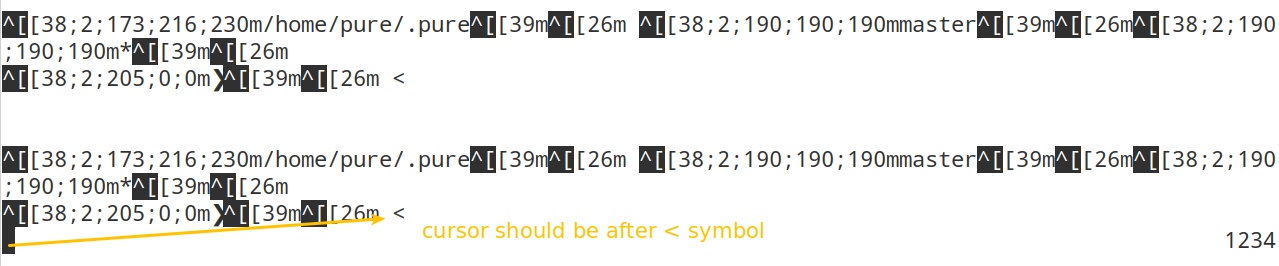
And it doesn't seems to be related to the right prompt, to be sure I override it with (to no avail):
edit:rprompt = { printf "1234"}
It is present independently to the redirection >/dev/tty in edit:prompt definition:
edit:prompt = { python3 $E:PURE_EXECUTABLE_PATH/pure/prompt.py >/dev/tty }

 edouard-lopez
All 17 comments
elvish doesn't strip trailing newline like the other shells do. you can specify end parameter to print function to remove it in your prompt.
 SolitudeSF
on 18 Mar 2019
SolitudeSF
on 18 Mar 2019
hm, that fixes the newline, but for some reason cursor is placed on the start of the line, and not after prompt.
SolitudeSF
on 18 Mar 2019
My prompt string doesn't finish by a newline but a space:
def layout():
return "\n{current_working_path} {git_active_branch}{git_is_dirty}\n{virtual_env}{prompt_symbol} "
print(layout().format(**data))
print function adds a newline
SolitudeSF
on 18 Mar 2019
That's correct I don't go to a newline.
However, the cursor appear at the beginning of the line on top of the prompt symbol ❯ and right prompt is not on the same line anymore
print(layout().format(**data), end='')

edouard-lopez
on 18 Mar 2019
right prompt is actually on the line, its just its being drawn over. if you input something it will rerender. but thats is some weird behavior. might need @xiaq for input on the issue.
SolitudeSF
on 18 Mar 2019
Elvish does not expect prompts to be written to /dev/tty. Elvish always saves the output of the prompt, stripping out control characters (which is why you saw #804). The only way of writing a colored prompt is via using the edit:styled builtin as documented in
https://elv.sh/ref/edit.html#prompts. Except that in fact that doc is outdated - you are encouraged to use the newer styled builtin instead of edit:styled, which has a slightly different syntax
The reason Elvish does this is that it needs to know the width of the prompt in order to control the layout. When there are escape sequences in the prompt, the width cannot be calculated without parsing those escape sequences; so now Elvish does the easier thing of skipping control characters. It wouldn't be too hard to parse those sequences though, and I am open to that.
Before Elvish is able to parse the escape sequences, consider restructuring the Python script so that it is capable of outputting line-separated JSON instead of escape sequences, and use a small chunk of Elvish code to convert them into styled texts. For instance, the script may output something like:
{"text": "abc", "style": "green"}
{"text": "xyz", "style": "blue"}
and the prompt function being
```
edit:prompt = {
python /path/to/script.py | from-json | each [obj]{ styled $obj[text] $obj[style] }
}
 xiaq
on 20 Mar 2019
xiaq
on 20 Mar 2019
Thanks @xiaq
I like the idea to structure data as JSON however I'm wondering if the output you expect a valid JSON or not (you just print 2 lines)?
Don't you have a $E:COLUMNS like other shells?
In the fish implementation of pure prompt we use the following regexp \e\[[^m]*m to get a raw version of a prompt, _i.e._ remove escape sequences, then measure its length.
set --local raw_prompt (string replace --all --regex '\e\[[^m]*m' $empty $prompt)
string length $raw_prompt
Maybe you can use something similar to parse the line.
edouard-lopez
on 21 Mar 2019
I did refractor my code to be able to print a JSON object to stdout.
However, my colors are colorful object that goes well beyond the 16 base colors.
So, I'm a bit perplexed here as original approach works nicely with 3 other shells (bash, zsh, fish) and redirecting elvish output to /dev/tty does print colors the only problem being the cursor is on a new line.
I could redesign my colors object so I get a colorful object and fallback colors to use with Elvish but I find that a convoluted. For instance, going from
{
'text': raw(),
'style': colors.info
}
To:
{
'text': raw(),
'style': colors.info,
'fallback': 'cyan'
}
Then use fallback based on the shell name.
What do you think? cc @timofurrer
edouard-lopez
on 29 Mar 2019
I don't really know elvish, so I can't help much here I guess.
As far as colorful goes you can specify a RGB colorful string and let colorful translate it to those 16 base colors by explicitly specifying the color mode.
 timofurrer
on 29 Mar 2019
timofurrer
on 29 Mar 2019
@edouard-lopez edit:styled can also take full ANSI style specifications, which I guess you can produce from colorful (I'm not a Python nor a colorful expert, so this is just a quick test I put together):
> python -c 'import colorful; print(repr(colorful.italic_coral_on_beige.style[0]))'
'\x1b[3m\x1b[38;5;210m\x1b[48;5;230m'
> echo (edit:styled "hi there" "\x1b[3m\x1b[38;5;210m\x1b[48;5;230")
hi there    << correctly styled
 zzamboni
on 29 Mar 2019
zzamboni
on 29 Mar 2019
I got it working, but have some trouble with my elvish configuration:
Output
❯ python3 $PURE_EXECUTABLE_PATH/pure/prompt.py --last-command-status $status --json
{'text': '/data/projects/purish', 'style': '\x1b[38;2;66;113;174m'}
{'text': '', 'style': '\x1b[38;2;150;152;150m'}
{'text': '', 'style': '\x1b[38;2;150;152;150m'}
{'text': '', 'style': '\x1b[38;2;150;152;150m'}
{'text': '❯', 'style': '\x1b[38;2;137;89;168m'}
prompt.elv
edit:prompt = {
    python3 $E:PURE_EXECUTABLE_PATH/pure/prompt.py --json | from-json | each [obj]{ styled $obj[text] $obj[style] }
}
edit:rprompt = { printf "" }
rc.elv
❯ cat $E:HOME/.elvish/rc.elv --plain
E:PURE_EXECUTABLE_PATH = $E:HOME/.pure/
# use pure
Error
/data/projects/purish> edit:prompt = {
    python3 $E:PURE_EXECUTABLE_PATH/pure/prompt.py --json | from-json | each [obj]{ styled $obj[text] $obj[style] }
}
prompt function error: invalid character '\'' looking for beginning of object key string
prompt function error: invalid character '\'' looking for beginning of object key string
json strings are enclosed in double quotes, as far as i know
SolitudeSF
on 29 Mar 2019
@SolitudeSF indeed, now got
❯ elvish
/data/projects/purish>
/data/projects/purish> edit:prompt = {
python3 $E:PURE_EXECUTABLE_PATH/pure/prompt.py --json | from-json | each [obj]{ styled $obj[text] $obj[style] }
}
prompt function error: exec: "styled": executable file not found in $PATH
elvish --version
0.11+ds1-3
you elvish version is outdated. latest stable is 0.12
SolitudeSF
on 30 Mar 2019
styled was introduced after 0.11 I think, before it was edit:style (similar but not quite the same syntax).
On 30 Mar 2019, 10:58 +0100, Solitude notifications@github.com, wrote:
you elvish version is outdated. latest stable is 0.12
—
You are receiving this because you commented.
Reply to this email directly, view it on GitHub, or mute the thread.
zzamboni
on 30 Mar 2019
Actually, the previous iteration was edit:styled, and the current one is styled.
I think there are two remaining issues here:
The
styledbuiltin does not support 256-color. This is already tracked in #687. There has been some good discussions but implementation is still lacking.Elvish editor does not support prompts that output ANSI color codes. This is now #814.
Please add your thoughts in those two issues if you wish to. In the meanwhile I am closing this one.
xiaq
on 6 Apr 2019
Related issues
 zethra
·
3Comments
zethra
·
3Comments
 krader1961
·
8Comments
krader1961
·
8Comments
 nogoegst
·
6Comments
zzamboni
·
3Comments
krader1961
·
6Comments
nogoegst
·
6Comments
zzamboni
·
3Comments
krader1961
·
6Comments
Most helpful comment
@edouard-lopez
edit:styledcan also take full ANSI style specifications, which I guess you can produce fromcolorful(I'm not a Python nor a colorful expert, so this is just a quick test I put together):