Elmish.wpf: Adding and closing tab-items dynamically
Hi,
I'm trying to add and close tab-items in a tab control dynamically.
The error message I get is:
TabsProblem Error: 0 : Unable to process the message: CloseTab: System.IndexOutOfRangeException: Index was outside the bounds of the array.
...
I think it doesn't make much sense to post my code here. But the main idea is to remove the currently selected tab-item from the list of all tab-items when the "X" button is pressed.
This is how it looks like:

I have checked all the examples, but now I'm stuck. I would be grateful for any advice.
I have created a small test repo TabsProblem
Thx,
Sven
 KingKnecht
All 29 comments
I have no idea what causes this.
The exception occurs here:
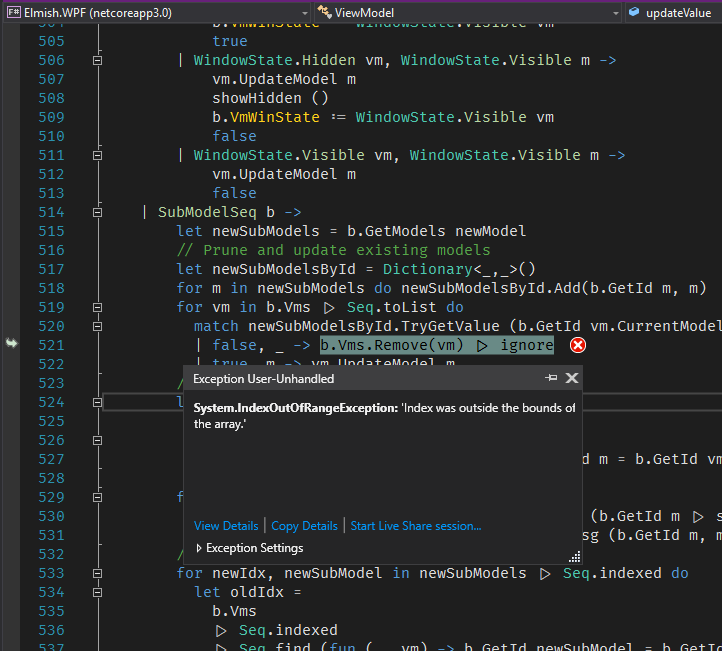
As far as I know, ObservableCollection.Remove should never throw (docs).
Could you try .NET Framework and see if there's a difference? Might be a bug in .NET Core 3.0.
 cmeeren
on 11 Oct 2019
cmeeren
on 11 Oct 2019
Ok, now it gets weird. Framework 4.7.1, same behavior in my App, but no exceptions in the output window.

KingKnecht
on 12 Oct 2019
@cmeeren, just looking at the screenshot, isn't that the classical mistake? b.Vms is traversed, and while traversing, one element is removed. Even if the source doesn't directly reveal a problem, perhaps optimizations of that loop are involved. Also, this is not the GUI thread. In any case, I would finish the traversal first, and then delete. Perhaps it solves the problem.
 BentTranberg
on 12 Oct 2019
BentTranberg
on 12 Oct 2019
Ok, now it gets weird. Framework 4.7.1, same behavior in my App, but no exceptions in the output window.
For good measure, clean absolutely everything manually (including the .vs folder along with all bin and obj folders) and then try.
b.Vms is traversed
No, b.Vms |> Seq.toList is traversed, to avoid exactly that problem.
I guess however that it could, at least in some cases, be more efficient to add the items to be removed to a new sequence and them remove all of them. /cc @bender2k14
this is not the GUI thread
Yes it is, because the update loop runs on the UI thread through Elmish's syncDispatch. AFAIK if this were not done on the UI thread, it would cause other exceptions noting that fact.
cmeeren
on 12 Oct 2019
@cmeeren I have created a new project with .net framework from scratch and then copied the source code and XAML over. There should be no artifacts from net core. If that is what you are concerned about.
KingKnecht
on 12 Oct 2019
Thanks. Puzzling behaviour. I don't even know how to begin debugging it; it seems like an internal error in ObservableCollection since Remove shouldn't throw (just return false if no elements matched).
Anyone is welcome to have a look at this.
cmeeren
on 12 Oct 2019
I googled in the hope of finding something that looked relevant. I found this: https://stackoverflow.com/questions/16178724/clearing-a-listview-index-was-outside-the-bounds-of-the-array
Quote from the favored answer: _Finally got it. I had a SelectionChanged event that was firing when I cleared the listview, and the event couldn't handle an index of "-1" (no selection)._
I see TabControl.OnSelectionChanged in the stack trace.
I'm thinking, removing a tab, and to remove it we have to select it, and then we remove it, and what's selected then? Nothing, perhaps, so we get that -1 problem.
I'm not familiar with the code, and will work slowly from here on, so I kindly ask you guys to consider this.
BentTranberg
on 12 Oct 2019
Yes, I definitely think I'm on the right track. I apparently solved the problem with the following changes. (Pardon me for reformatting the source. I didn't intend to return my changes in any manner.)
open System
open Elmish
open Elmish.WPF
open MyMainWinodw
let makeNameGenerator prefix =
let mutable intId = 0
fun () ->
intId <- (+) intId 1
prefix <| intId
let createTabId = makeNameGenerator (sprintf "-%03i")
type Tab =
{
Name: string
}
type Model =
{
Tabs: Tab list
SelectedTab: Tab option
}
let init =
{
Tabs = []
SelectedTab = None
}, Cmd.none
type Msg =
| AddTab
| CloseTab
| CloseTab2 of Tab
| SetSelectedTab of Tab option
let update msg m =
match msg with
| AddTab ->
{ m with Tabs = m.Tabs |> List.append [ { Name = "Tab" + createTabId () } ] }, Cmd.none
| CloseTab ->
match m.SelectedTab with
| Some t ->
{ m with SelectedTab = None }, Cmd.ofMsg (CloseTab2 t)
| None ->
m, Cmd.none
| CloseTab2 tabToDelete ->
{ m with Tabs = m.Tabs |> List.filter ((<>) tabToDelete) }, Cmd.none
| SetSelectedTab t ->
{ m with SelectedTab = t }, Cmd.none
let bindings () : Binding<Model, Msg> list =
[
"Tabs" |> Binding.subModelSeq((fun m -> m.Tabs), (fun s -> s), fun () ->
[
"Name" |> Binding.oneWay(fun (_, e) -> e.Name)
"CloseTab" |> Binding.cmd CloseTab
])
"AddTab" |> Binding.cmd AddTab
"SelectedTab" |> Binding.subModelSelectedItem("Tabs", (fun m -> m.SelectedTab), (fun t -> SetSelectedTab t))
]
[<EntryPoint; STAThread>]
let main argv =
Program.mkProgramWpf (fun () -> init) update bindings
|> Program.withConsoleTrace
|> Program.runWindowWithConfig
{ ElmConfig.Default with LogConsole = true; Measure = true }
(MainWindow())
I tried to set SelectedTab to None in the CloseTab case, but that still threw the exception - not at all unexpectedly. So I set SelectedTab = None first, and then kick the rest of the job to another case - CloseTab2. So I had to change to mkProgramWpf to be able to do that.
BentTranberg
on 12 Oct 2019
@BentTranberg I thought, you had to change the Elmish.Wpf source code to make it run. Now I understand that you changed mkSimpleWpf to mkProgramWpf to have this additional Cmd available. Currently I'm trying to understand what it does. I found this https://nozzlegear.com/blog/elmish-mksimple-vs-elmish-mkprogram. I will give it a try after work. Thanks a lot for your effort!
KingKnecht
on 14 Oct 2019
Changes needed to close the tab clicked, and not the selected tab.
Modify the message
| CloseTab of Name: string
Modify handling of the message
| CloseTab name ->
match name with
| null | "" -> m, Cmd.none
| name ->
match m.Tabs |> List.tryFind (fun tab -> tab.Name = name) with
| Some tabToDelete ->
{ m with SelectedTab = None }, Cmd.ofMsg (CloseTab2 tabToDelete)
| None ->
m, Cmd.none
Modify the binding
"CloseTab" |> Binding.cmdParam (fun o ->
match o with
| :? string as name -> CloseTab name
| _ -> CloseTab "")
In the XAML, the button should be like this.
<Button Command="{Binding CloseTab}" CommandParameter="{Binding Name}">X</Button>
@bender2k14 and @cmeeren, I would appreciate if you can do a slight code review.
The way messages CloseTab and CloseTab2 work together to avoid that original exception, is this the way to solve that kind of problem, or is there a more elegant way that perhaps can do away with an extra message?
In the binding, I'm sending CloseTab "" as a kind of "no operation". Is there some other more elegant way to express "no operation" in that particular case?
I've bound CommandParameter to Name, and didn't even consider whether I could bind to "Tab" instead, so I didn't have to search Tabs for Name.
BentTranberg
on 14 Oct 2019
Ok, I wouldn't have gotten much sleep tonight without trying, so I bound to "Tab" instead of name.
"Tab" |> Binding.oneWay (fun (_, e) -> e)
and
| CloseTab of Tab option
and
| CloseTab tabToClose ->
match tabToClose with
| Some tabToClose -> { m with SelectedTab = None }, Cmd.ofMsg (CloseTab2 tabToClose)
| None -> m, Cmd.none
and
<Label Content="{Binding Tab.Name}"/>
<Button Command="{Binding CloseTab}" CommandParameter="{Binding Tab}">X</Button>
and it works.
BentTranberg
on 14 Oct 2019
Excellent work @BentTranberg!
To make the code easier to review, do you mind putting it in a branch with a working example?
 TysonMN
on 15 Oct 2019
TysonMN
on 15 Oct 2019
I'm uloading it in a zip file. Clean source, no binaries.
@KingKnecht, are you planning to make these changes in your demo? I don't use Git daily, so I'd fumble around quite a bit cloning and stuff. Also, thank you for initiating this issue. It's been very useful for me too.
BentTranberg
on 15 Oct 2019
Yes, it will go to my demo. Maybe we should create another Elmish.Wpf example from it? Could be helpful for other newbies. I don't use Git daily neither, but I would try to prepare a pull request, if desired.
KingKnecht
on 15 Oct 2019
Any suggestions how to name the sample? SubModelSeq2, MkProgramWpf, DynamicTabs, ...?
KingKnecht
on 15 Oct 2019
As long as it's just for repro, it doesn't matter.
Note that I'm not comfortable adding it as a sample to this repo unless I know it demonstrates the optimal solution to the problem (and from the description it sounds like there either is a better way, or Elmish.WPF should be extended with a new API).
I haven't had a chance to look carefully at this error yet.
cmeeren
on 15 Oct 2019
The samples in this repo are specifically aimed at demonstrating features in Elmish.WPF - for example, how to use various kinds of methods for bindings. The solution we ended up with for this issue, is an example particularly aimed at demonstrating a specific use case for one of the many components in WPF with Elmish.WPF, which is a rather different aim, not that closely tied to Elmish.WPF itself. For that reason I think those kinds of demos should be kept separate from this repo, and also not least because they could potentially grow wastly in numbers and content, and deal not just with standard WPF components, but also with other libraries, even commercial ones.
BentTranberg
on 15 Oct 2019
@BentTranberg There is still an issue, sorry. If multiple tabs are created and then tabs are closed from left to right (latest to oldest) the content of the tab disappears ("Fill me!").
I have played around with the SetSelectedTab hoping to see my content again. I tried this:
let closeAndSelect tabToClose m =
let m' = { m with Tabs = m.Tabs |> List.filter ((<>) tabToClose) }
let cmd = match m'.Tabs with
|[] -> Cmd.none
|x::xs -> Cmd.ofMsg(SetSelectedTab (Some x))
m', cmd
and then the closeTab2 looks like this:
| CloseTab2 tabToClose -> closeAndSelect tabToClose m
But this doesn't make a difference.
KingKnecht
on 15 Oct 2019
I am not sure what you are trying to explain. The head revision in your repo TabsProblem seems to work just fine.
But if I modify it with the snippets above, then the first tab is not selected. I fixed it like this:
| GoToFirstTab
| CloseTab2 tabToClose ->
{ m with Tabs = m.Tabs |> List.filter ((<>) tabToClose) }, Cmd.ofMsg GoToFirstTab
| GoToFirstTab ->
match m.Tabs with
| [] -> m, Cmd.none
| x :: xs -> { m with SelectedTab = Some x }, Cmd.none
I could be wrong in the following analysis, since I don't know the magic by heart, but at least this code works. I believe this is really partly the same issue as the first, when you had IndexOutOfRangeException, which is that you have to give things a chance to happen behind the scene before you go on to the next step. In your function closeAndSelect you are using Tabs before the update behind the scene has taken place. By introducing yet another message, we instead use the updated Tabs to get the right tab for SetSelectedTab.
BentTranberg
on 15 Oct 2019
@BentTranberg
After creating a couple of tabs:
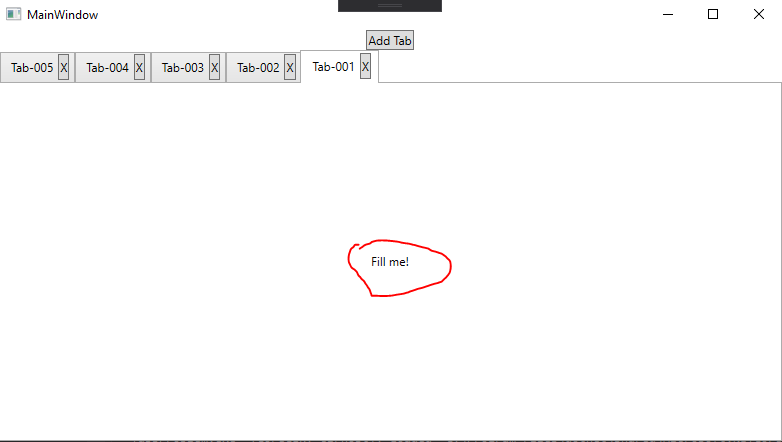
SelectingTab-005:

Closing Tab-005:
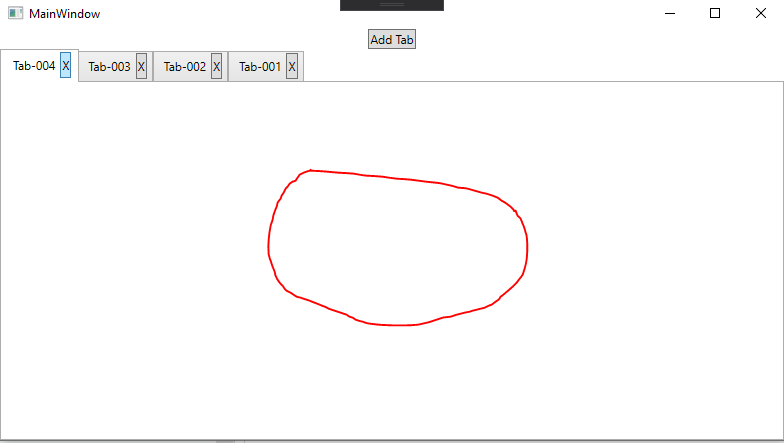
If you switch back and forth, the content appears again
KingKnecht
on 15 Oct 2019
Sorry, I missed that change in the ContentTemplate, and probably every time I actually looked at the window, it was blank.
I googled, and found https://stackoverflow.com/questions/22925060/wpf-tabcontrol-not-showing-tabitem-content-until-selection-changes, and indeed this seems to work quite well.
<TabControl Grid.Row="1" ItemsSource="{Binding Tabs}" SelectedItem="{Binding SelectedTab, Mode=OneWayToSource}">
But not well enough. When there are no tabs, and you Add Tab, then the first tab is not selected, and the content doesn't show.
My suggestion for a fix for that, is that if you add a tab when Tabs is empty, then you explicitly set the selected tab. Remember, again, that you need to kick that last task to a new step/message. I'm only taking a guess here.
BentTranberg
on 15 Oct 2019
I finally had a chance to look at this. The solution is actually deceptively simple, as long as one is familiar with Elmish. Gimme a sec and I'll post the solution.
cmeeren
on 15 Oct 2019
General Elm(ish) rule of thumb: Never duplicate state in your model. Keep everything normalized, and refer to entities by ID (in messages and other places in the model). Check the "Recommended resources" in the readme for details.
In this particular case:
- Give each tab an ID (e.g. a random GUID upon creation - in this case we could also use the name, but a dedicated ID is more clear; in fact, in a serious app, I'd consider creating a
TabIdsingle-case union) - Use only a Guid in
SelectedTab(otherwise, what if you need to update the tab object, then if it's selected you have to update it in two places since it's immutable) - Make the
SelectTabmessage case contain just the GUID - Instead of
SelectedItem, useSelectedValuetogether withSelectedValuePath(much more Elmish friendly since you can use IDs instead of ViewModels - thesubModelSelectedItembinding is just there for the few controls that don't supportSelectedValue/SelectedValuePath)
No Cmds or duplicate RemoveTab messages needed.
Code with the solution below. Note that I also cleaned up a few other bindings.
@KingKnecht Feel free to close this issue if you find the solution adequate.
cmeeren
on 15 Oct 2019
@cmeeren, thanks a lot. This example will help me solve many issues I'm having with my now quite old code made with v 2 or v 1.
BentTranberg
on 15 Oct 2019
Sorry guys, something is still not correct with that solution:
I get:
System.Windows.Data Error: 17 : Cannot get 'Id' value (type 'Object') from '' (type 'ViewModel`2'). BindingExpression:Path=Id; DataItem='ViewModel`2' (HashCode=5425146); target element is 'TabControl' (Name=''); target property is 'NoTarget' (type 'Object') InvalidOperationException:'System.InvalidOperationException: Der Eigenschaftspfad ist ungültig. "System.Dynamic.DynamicObject+MetaDynamic" besitzt keine öffentliche Eigenschaft mit dem Namen "Items".
at CallSite.Target(Closure , CallSite , Object )
at System.Dynamic.UpdateDelegates.UpdateAndExecute1[T0,TRet](CallSite site, T0 arg0)
at MS.Internal.DynamicPropertyAccessorImpl.GetValue(Object component)
at MS.Internal.Data.PropertyPathWorker.GetValue(Object item, Int32 level)
at MS.Internal.Data.PropertyPathWorker.RawValue(Int32 k)'
in the output window of VS after adding a tab.
And in the console:
[main] Setting selected VM to ValueNone
[main] PropertyChanged "SelectedTab"
[main] TryGetMember SelectedTab
[main.Tabs.{ Id = c212b0b8-e53c-4217-8972-e5b5e16e5ef3
Name = "Tab-001" }] TryGetMember Id
[main.Tabs.{ Id = c212b0b8-e53c-4217-8972-e5b5e16e5ef3
Name = "Tab-001" }] TryGetMember FAILED: Property Id doesn't exist
The SubModelSeq example in samples doesn't have that issue.
KingKnecht
on 16 Oct 2019
Sorry, my bad. You need to add
```f#
"Id" |> Binding.oneWay (fun (_, t) -> t.Id)
in the inner (tab) bindings, and change the SelectedTab binding to

```f#
"SelectedTab" |> Binding.twoWayOpt((fun m -> m.SelectedTab), SelectTab)
or something like that. After making those changes, I no longer get any errors.
In other words, here are the bindings:
f#
[
    "Tabs" |> Binding.subModelSeq((fun m -> m.Tabs), (fun s -> s), fun () ->
        [
            "Id" |> Binding.oneWay (fun (_, t) -> t.Id)
            "Name" |> Binding.oneWay (fun (_, t) -> t.Name)
            "Close" |> Binding.cmd (fun (_, t) -> CloseTab t.Id)
        ])
    "AddTab" |> Binding.cmd AddTab
    "SelectedTab" |> Binding.twoWayOpt((fun m -> m.SelectedTab), SelectTab)
]
cmeeren
on 16 Oct 2019
I have a fix for two more issues with the logic.
First, when no tabs exist prior to adding a new tab, the new tab will not be selected, and thus its content is not visible.
Second, additional new tabs will 1) not be the selected tab when added, and 2) will not be added to the end. It seems obvious to me that the original intention was to add tabs at the end, or else the :: operator might as well have been used.
This is my suggested change. It will add new tabs at the end, and will make the new tab the selected tab.
| AddTab ->
let newGuid = Guid.NewGuid ()
let newTab = { Id = newGuid; Name = "Tab" + createTabId () }
{ m with Tabs = List.append m.Tabs [ newTab ]; SelectedTab = Some newGuid }
edit: Removed Cmd.none at the end there, so that this change is relative to the code in the last complete sample in TabsProblem-solved.zip above.
BentTranberg
on 17 Oct 2019
Related issues
TysonMN
·
7Comments
TysonMN
·
10Comments
cmeeren
·
13Comments
TysonMN
·
7Comments
BentTranberg
·
4Comments
Most helpful comment
Sorry, my bad. You need to add
```f#
"Id" |> Binding.oneWay (fun (_, t) -> t.Id)
or something like that. After making those changes, I no longer get any errors.
In other words, here are the bindings:
f#
[
    "Tabs" |> Binding.subModelSeq((fun m -> m.Tabs), (fun s -> s), fun () ->
        [
            "Id" |> Binding.oneWay (fun (_, t) -> t.Id)
            "Name" |> Binding.oneWay (fun (_, t) -> t.Name)
            "Close" |> Binding.cmd (fun (_, t) -> CloseTab t.Id)
        ])
    "AddTab" |> Binding.cmd AddTab
    "SelectedTab" |> Binding.twoWayOpt((fun m -> m.SelectedTab), SelectTab)
]