Elmish.wpf: Design time DataContext fails with "Method not found .. Elmish.WPF.Utilities.ViewModel.designInstance .."
My WPF user controls have their design time DataContext set like this. Some relevant lines shown.
<UserControl x:Class="TdClient.Views.AboutPane"

        xmlns:models="clr-namespace:TdClient.Models;assembly=TdClient.Models"

        d:DataContext="{x:Static models:AboutPane.designTimeViewModel}"
The designTimeViewModel looks like this. Some relevant lines shown.
namespace TdClient.Models

module AboutPane =

    let designTimeViewModel =
        let m = {
            VersionString = "1.2.3.4"
            }
        Elmish.WPF.Utilities.ViewModel.designInstance m (bindings())
Some months ago I started getting this error message in all the controls that use a design time model, and the design time data does not show in the designer.
Method not found: 'Elmish.WPF.Internal.ViewModel'2<!!0,!!1> Elmish.WPF.Utilities.ViewModel.designInstance(!!0, Microsoft.FSharp.Collections.FSharpList'1 <Elmish.WPF.Internal.BindingSpec'2<!!0,!!1>>)'.
(I had to replace backticks with plain ticks in the error message, to make the markup happy.)
This error message is displayed in a box above the line with DataContext in the XAML. That entire line is also underscored with a wavy blue line.
VS 2017, latest update. Elmish.WPF 2.0.0-beta-8
 BentTranberg
All 14 comments
I have seen errors like those before (link 1, link 2). It may be a design-time binding redirect issue, but I have no idea why it should happen with Elmish.WPF. In any case, it is almost guaranteed to be something on your end.
I recommend manually cleaning your project folder. Shut down VS, delete all bin and obj folders, and also delete the .vs folder.
If that does not help, try cloning this repo and run the samples. If you can run the samples, you at least have something to work on.
 cmeeren
on 14 Feb 2019
cmeeren
on 14 Feb 2019
I check out a clean solution quite frequently, and certainly when debugging problems like this one. There's no problem with dirty temporaries. I also play around with the samples a lot, and there's no problem with them.
I do use Elmish.WPF in a perhaps not so ordinary manner, but can't see why that should cause problems like this one. The application is a C# project, using an F# project with the models. One reason is that I need the XAML in a C# project so that it gets BAMLed, or else using DevExpress components will fail. They cheat with the XAML, and FsXaml can't handle that.
It could be something on my end, but the fact is that everything worked perfectly for a long time. I believe the same source is suddenly having this problem. That points to some update being the cause. It could be Elmish.WPF or any other library including FSharp.Core, or VS. I have a feeling now, not sure why, that it's not, or not only, Elmish.WPF causing it.
This isn't a showstopper for me right now, and I can't afford to spend time on investigating this at the moment. It the problem persists long enough, I probably will find the time later to figure out what's going on, or at least make a repro of the problem.
BentTranberg
on 14 Feb 2019
Btw, I am also interested in any known alternative way to set the datacontext when using Elmish.WPF, that perhaps avoids the problem I'm having. I'm not asking for somebody to do research for me, but only whether somebody already has found some alternative that works.
BentTranberg
on 14 Feb 2019
Given the error and my limited experience with similar-looking problems, it's very possible that an update is indeed a contributing factor. Have you tried downgrading Elmish.WPF? Or FSharp.Core?
As for setting the design-time DataContext, the only alternative I can think of at the moment is subclassing ViewModel with a type that has a parameterless constructor. I don't remember exactly the XAML syntax for it, but you can probably find it easily.
cmeeren
on 14 Feb 2019
Yes, I looked into the design time functionality a year or two ago, and there's plenty of material to google. Should I succeed in finding an elegant replacement that avoids this issue, I'll tell.
I tried downgrading to beta-7, with the same result. Then to beta-6, but that depended on a version of Elmish that wasn't available. It was at that point I decided to stop further research for now.
BentTranberg
on 14 Feb 2019
There used to be a sample of this working. It used the following:
d:DataContext="{d:DesignInstance Type=local:Model, IsDesignTimeCreatable=False}"
Not sure if that will work with the way you are using Elmish.WPF. If your views are in a separate project referenced by your Elmish.WPF code, then it won't work since it would require a circular dependency.
 2sComplement
on 14 Feb 2019
2sComplement
on 14 Feb 2019
The dependencies are reversed in my solution, so that's ok, but designTimeViewModel is a 'let' within a module, and I get a message saying nested types are not supported. Not sure if there's a way around that.
BentTranberg
on 14 Feb 2019
Ok, solved my design time issue. It finally struck me - I don't have to use Elmish.WPF's design time support. I simply use a class. Perhaps not quite as elegant, but it seems equally effective. Not much that class has to do, except deliver some sample data.
d:DataContext="{d:DesignInstance models:AboutPaneDesign, IsDesignTimeCreatable=True}"
@cmeeren and @2sComplement, thanks for helping and inspiring me to find a solution. Hopefully the reported problem will also be solved at some point, though I'm possibly the only one bothered by it.
BentTranberg
on 14 Feb 2019
Happy that it got solved! :)
Since we have no repro and the problem is likely local in some form or another, I'm closing this, but anyone feel free to re-open/comment if they experience the same problem.
cmeeren
on 15 Feb 2019
While changing some of my design time models to work with DesignInstance (see my latest post above), I discovered that the design windows for WPF were not happy about functions that returned (m, Cmd.none).
It is the models init functions that return Model * Cmd<Msg> with just Cmd.none when run, and I use fst to throw away Cmd.none. Still the designer windows complain.
The C# project with the XAML do reference Elmish.WPF and FSharp.Core, so I'm not sure what that is about.

I solved my problem easily enough by creating functions that doesn't return tuples with Cmd.none, so no problem. I'm posting this because I'm thinking maybe this can give a hint about the original issue in this thread.
BentTranberg
on 25 Feb 2019
Thanks! If you can give me a minimal repro solution (zip or GH repo) I'll happily take a look at it. :)
cmeeren
on 27 Feb 2019
In the attached, if I use FSharp.Core v.4.6.2, I get the error. If I use v.4.5.4, I do not get the error.
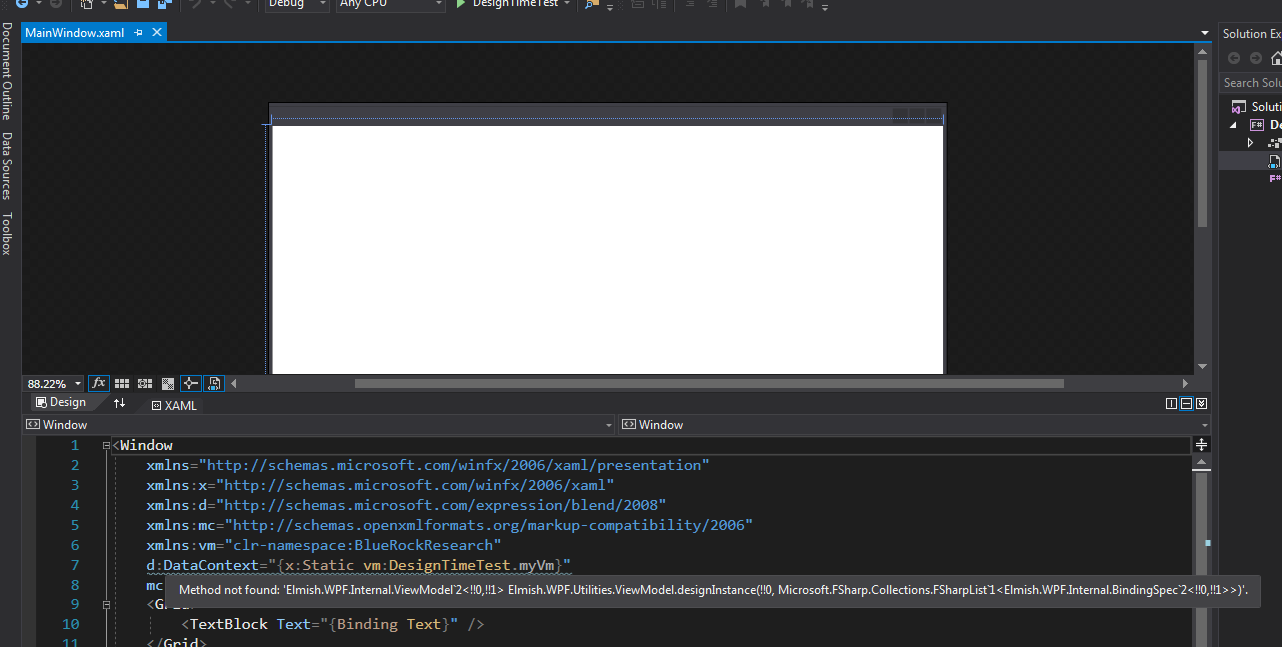
And I just downgraded my _real_ project back to v.4.5.4. The design time vm started working for it too.
 WallaceKelly
on 22 Mar 2019
WallaceKelly
on 22 Mar 2019
That sounds exactly like https://github.com/Microsoft/visualfsharp/issues/5655. The fix is tracked in https://github.com/Microsoft/visualfsharp/issues/6014; it seems it is fixed in VS 2019.
I'm 99% sure that if you download the Elmish.WPF source and include that as a project in your solution, instead of referencing it via nuget, so that it's built against the same F# version as your other projects, it will work fine no matter the F# version. (In other words, that's another workaround.)
cmeeren
on 22 Mar 2019
2.0.0-beta-9 has been released with a dependency on FSharp.Core 4.6.2, so the problem should disappear.
cmeeren
on 23 Mar 2019
Related issues
 TysonMN
·
13Comments
TysonMN
·
13Comments
 Evangelink
·
7Comments
cmeeren
·
13Comments
Evangelink
·
7Comments
cmeeren
·
13Comments
 KingKnecht
·
6Comments
TysonMN
·
7Comments
KingKnecht
·
6Comments
TysonMN
·
7Comments
Most helpful comment
Ok, solved my design time issue. It finally struck me - I don't have to use Elmish.WPF's design time support. I simply use a class. Perhaps not quite as elegant, but it seems equally effective. Not much that class has to do, except deliver some sample data.
d:DataContext="{d:DesignInstance models:AboutPaneDesign, IsDesignTimeCreatable=True}"@cmeeren and @2sComplement, thanks for helping and inspiring me to find a solution. Hopefully the reported problem will also be solved at some point, though I'm possibly the only one bothered by it.