Eleventy: bug: trying to create a file with any extension other than html
Describe the bug
I'm trying to output different files with extension .css or .xml using the syntax:
---
permalink: /assets/css/styles.css
---
---
permalink: /feed.xml
---
Expected behavior
I'm expecting to find the created files but I get these errors:
> The "data" argument must be of type string or an instance of Buffer, TypedArray, or DataView. Received undefined

`TypeError` was thrown:
    TypeError [ERR_INVALID_ARG_TYPE]: The "data" argument must be of type string or an instance of Buffer, TypedArray, or DataView. Received undefined
Environment:
- OS and Version: Windows 10 and Linux (Ubuntu 20.04)
- Eleventy Version: 0.11.0
Do I need to set something in the .eleventy.js? How can I debug this "undefined" data?
 riccardogiorato
All 21 comments
Same error is happening with the example file: https://www.11ty.dev/docs/permalinks/#custom-file-formats
permalink: "index.json"
---
<%- JSON.stringify(collections.all) -%>
More complete error is:
> The "data" argument must be of type string or an instance of Buffer, TypedArray, or DataView. Received undefined
`TypeError` was thrown:
TypeError [ERR_INVALID_ARG_TYPE]: The "data" argument must be of type string or an instance of Buffer, TypedArray, or DataView. Received undefined
at writeFile (fs.js:1356:5)
at go$writeFile ("...path_project"\node_modules\graceful-fs\graceful-fs.js:139:14)
at "...path_project"\node_modules\graceful-fs\graceful-fs.js:136:12)
at "...path_project"\node_modules\fs-extra\lib\output\index.js:18:27
at "...path_project"\node_modules\universalify\index.js:23:46
Done in 2.77s.
hi @Giorat , I am not an expert, so I don't know the answer to your question but I can export to XML file normally here. Perhaps there is something in my 11ty config file that you can try? I am using wins10 as well.
 khoivan88
on 10 Jul 2020
khoivan88
on 10 Jul 2020
hi @Giorat , I am not an expert, so I don't know the answer to your question but I can export to XML file normally here. Perhaps there is something in my 11ty config file that you can try? I am using wins10 as well.
which node version are you running on?
riccardogiorato
on 10 Jul 2020
I have node v14.5.0
khoivan88
on 10 Jul 2020
I'm not having this issue if I try to output the same file as an HTML file and the content is identical but when I change the permalink to "filename".xml everything crashes down.
@zachleat what could lead to "ERR_INVALID_ARG_TYPE"? Even with DEBUG on the message doesn't tell which file of eleventy is throwing this exception and why. This might be also related to this other issue where it wasn't possible to understand what was giving an undefined reference error: https://github.com/11ty/eleventy/issues/595
riccardogiorato
on 12 Jul 2020
Here's what I'd do.
First, try to produce a css/xml with a constant value. If that works, the issue is with how you call data, not the Eleventy being able to "bake" xml/css files. I do believe it's the former — I am producing xml files for rss/atom, Eleventy works fine (provided that the correct values are addressed at the first place, of course).
Second step; if/once you are able to build a file with static content, first find out what keys does the object has. In JS, if you had unknown object and didn't know where data sits inside, you'd use something like: console.log(Object.keys(mysteryObject))? Same way, I use a dump filter:
In .eleventy.js, create a new filter:
eleventyConfig.addFilter("dump", function(code) {
return JSON.stringify(Object.keys(code), null, 4);
});
then, you can explore what keys does the each object have, for example, build your css file with {{ collections | dump }} or {{ collections.all | dump }} and go level-by-level deep. If needed, google some location references for common things.
Also, check out the XML example in xity.
I do agree with your sentiment, the stack traces could be improved. Normally, if I cause a throw error on watch mode, it's the last file in the list, for example in this case, src/tags.njk:
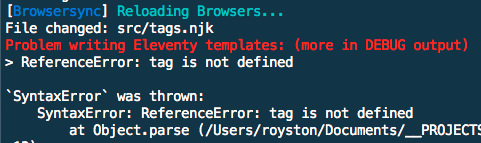
It doesn't tell on which line it fails, only what fails. I tend to combat this working in small steps and committing constantly. Also good boilerplate helps, check out xity.
All the best luck and please update how it goes 👍
 revelt
on 20 Jul 2020
revelt
on 20 Jul 2020
Here's what I'd do.
First, try to produce a css/xml with a constant value. If that works, the issue is with how you call data, not the Eleventy being able to "bake" xml/css files. I do believe it's the former — I am producing xml files for rss/atom, Eleventy works fine (provided that the correct values are addressed at the first place, of course).
It wasn't working even with constant values like:
<?xml version="1.0" encoding="utf-8"?>
<feed xmlns="http://www.w3.org/2005/Atom">
<title>Test</title>
</feed>
At the end I had to convert the files from .html with a NodeJS script to .css or .xml extensions.
riccardogiorato
on 20 Jul 2020
I see. So we have two options: 1) try to troubleshoot this situation — for which we need error logs from the terminal or ideally, access to a repo; OR 2) you could port old content onto a fresh boilerplate. That's extra work but guaranteed.
What do you think?
revelt
on 20 Jul 2020
Was there any update to this issue? I'm facing what I think is a similar problem.
When I try and create a .xml or .json file from my Liquid template by specifying extension in the permalink property I get a file where the content is only:
 phazonoverload
on 30 Aug 2020
phazonoverload
on 30 Aug 2020
@phazonoverload I had no luck on being able to solve this. I made a simple workaround, I created the page with html extension, as normal, and then I simply renamed the page to .xml or .json with a custom node.js script, after the build was completed.
riccardogiorato
on 30 Aug 2020
Feels a bit hacky with the fact that this should work according to the docs. Thanks a bunch for the update though - is appreciated!
phazonoverload
on 30 Aug 2020
this is my sitemap.njk and it works right out of the box with my .eleventy.js. In case it might help, I know you said you use Liquid!
khoivan88
on 30 Aug 2020
We've basically got this same setup which is why I'm confused. My permalink is set to feed.xml. I've also tried /feed.xml and feed.xml/
phazonoverload
on 30 Aug 2020
maybe you have to set htmlTemplateEngine: "liquid"?? as on this line in my .eleventy.js
khoivan88
on 30 Aug 2020
That doesn't solve it, unfortunately
phazonoverload
on 30 Aug 2020
Interesting. It seems to work in my super-simple test case at https://github.com/pdehaan/11ty-1311
If I run eleventy using [email protected] I get the following files in my output dir:
www/liquid.xml
<?xml version="1.0" standalone="yes" ?>
<root>
<title>liquid XML test</title>
<version>0.11.0</version>
</root>
www/nunjucks.json
{
"root": {
"title": "nunjucks JSON test",
"version": "0.11.0"
}
}
 pdehaan
on 30 Aug 2020
pdehaan
on 30 Aug 2020
Very peculiar. I'll take another look, in more depth, tomorrow and feedback if I discover anything
phazonoverload
on 30 Aug 2020
I was using html-minifier and it was returning undefined if the file didn't end with .html, which the .xml file wasn't. In my code I updated it from:
eleventyConfig.addTransform('htmlmin', (content, outputPath) => {
    if (outputPath.endsWith('.html')) {
      return htmlmin.minify(content, {
        useShortDoctype: true,
        removeComments: true,
        collapseWhitespace: true,
        keepClosingSlash: true
      })
      return content
    }
  })
To this:
eleventyConfig.addTransform('htmlmin', (content, outputPath) => {
    if (outputPath.endsWith('.html')) {
      return htmlmin.minify(content, {
        useShortDoctype: true,
        removeComments: true,
        collapseWhitespace: true,
        keepClosingSlash: true
      })
    } else {
      return content
    }
  })
It now works
phazonoverload
on 30 Aug 2020
Right, your old js has problem because you have second return statement still inside the if block.
khoivan88
on 30 Aug 2020
thanks @phazonoverload, I was having the same problem with a custom transform and your code helped me see the problem (I also wasn't returning the original content when my initial condition didn't match).
 johnpuddephatt
on 14 Oct 2020
johnpuddephatt
on 14 Oct 2020
This will be more obvious with https://github.com/11ty/eleventy/issues/1487 shipping with Eleventy 1.0
 zachleat
on 30 Oct 2020
zachleat
on 30 Oct 2020
Related issues
 michrome
·
3Comments
michrome
·
3Comments
 smaimon
·
3Comments
smaimon
·
3Comments
 nebrelbug
·
3Comments
nebrelbug
·
3Comments
 sonniesedge
·
3Comments
michrome
·
3Comments
sonniesedge
·
3Comments
michrome
·
3Comments
Most helpful comment
I was using
html-minifierand it was returning undefined if the file didn't end with.html, which the.xmlfile wasn't. In my code I updated it from:To this:
It now works