Eleventy: Unexpected output from getting started tutorial when using Powershell
Describe the bug
Working through the getting started tutorial, it does not seem to parse index.html correctly.
Instead of a webpage, I get the html printed as text.
To Reproduce
Steps to reproduce the behavior:
- Work through the getting started tutorial up to here in Powershell
- Run npx @11ty/eleventy --serve
- Visit http://localhost:8080/
Expected behavior
For a webpage to display just "hi"
Screenshots

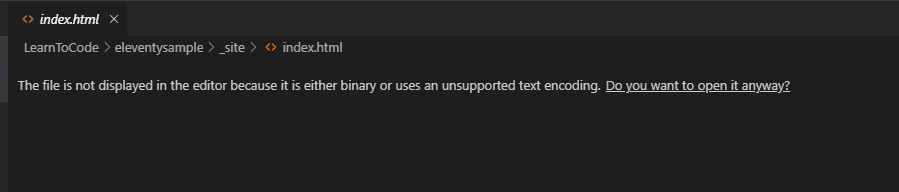

Environment:
- Windows 10
- Eleventy 0.9.0
- Browser is Google Chrome, and am running in the terminal in VS Code (Powershell 5.1)
Additional
I deleted both index.html (source and built), and tried creating my own manually and typing the html into the file (instead of using echo), and this worked fine. I then tried in git bash, and it also worked (using echo to create the file exactly as in the tutorial). According to this StackOverflow answer, echo in Powershell is aliased to Write-Output I assume the source of the problem lies somewhere in the behaviour of Write-Output.
Suggestion
Either include alternative commands for Powershell, or advise users to work in Bash (git bash on Windows seems fine)
 StarfallProjects
>All comments
I managed to reproduce this using the following environment:
- windows 10
- eleventy 0.10.0
- node.js 12.16.1
I think the problem is related to the character encoding from the tutorial website, specifically step 4 of getting started
If you copy and paste the lines to the command line, it will produce the extra characters seen here, might be some hidden characters related to formatting?. I managed to reproduce this using powershell, git bash, and node.js shell (cmd).
When I deleted README.md and index.html and manually typed them in vscode, everything works fine.
 koutbo6
on 22 Feb 2020
koutbo6
on 22 Feb 2020
Related issues
 zac-heisey
·
3Comments
zac-heisey
·
3Comments
 veleek
·
3Comments
veleek
·
3Comments
 nebrelbug
·
3Comments
nebrelbug
·
3Comments
 ndaidong
·
4Comments
ndaidong
·
4Comments
 michrome
·
3Comments
michrome
·
3Comments
Most helpful comment
I managed to reproduce this using the following environment:
I think the problem is related to the character encoding from the tutorial website, specifically step 4 of getting started
If you copy and paste the lines to the command line, it will produce the extra characters seen here, might be some hidden characters related to formatting?. I managed to reproduce this using powershell, git bash, and node.js shell (cmd).
When I deleted README.md and index.html and manually typed them in vscode, everything works fine.