Eleventy: Environment function is not working
If I see right until 8.x the environment function is not working.
https://www.11ty.io/docs/data-js/#example%3A-exposing-environment-variables
I see that doc page and I create the same but it is not working for me.
My files
- /src/site/_data/mywebsite.js (content is same like before the tutorial)
- /src/site/_includes/head.njk
{% if mywebsite.environment == "production" %}
    <script async src="https://www.googletagmanager.com/gtag/js?id=UA-40167679-4"></script>
    <script>
      window.dataLayer = window.dataLayer || [];
      function gtag(){dataLayer.push(arguments);}
      gtag('js', new Date());

      gtag('config', 'UA-1234567-1');
    </script>
  {% endif %}
After if id rub the build with production arg, the code is not builded:
ELEVENTY_ENV=production eleventy
 csakiistvan
All 12 comments
mywebsite.js is not a global data file. The example that you refer to uses a global data file to expose the environment. If you want to use a directory-specific data file (like in your example), you have to adjust how you refer to the content of that data file accordingly.
See https://www.11ty.io/docs/data-template-dir/ for the rules on how to create directory-specific data file.
 kleinfreund
on 22 May 2019
kleinfreund
on 22 May 2019
@kleinfreund are you sure it isn't? I store my global data files in exactly the same place - /src/site/_data
@csakiistvan can you share your mywebsite.js file or a reduced version?
 edwardhorsford
on 22 May 2019
edwardhorsford
on 22 May 2019
@edwardhorsford the mywebsite.js content is
module.exports = {
  environment: process.env.ELEVENTY_ENV
};
@csakiistvan Have you modified the config's directory defaults? (especially config.dir.data)
 jevets
on 23 May 2019
jevets
on 23 May 2019
@csakiistvan is your repo public? That might be the easiest thing to debug
 zachleat
on 29 May 2019
zachleat
on 29 May 2019
Hey, @zachleat and @jevets. I used eleventyone boilerplate made by Phil Hawksworth and I got a similar problem as @csakiistvan has. In src/site/_data I have file named site.js and inside it:
module.exports = {
  environment: process.env.ELEVENTY_ENV
};
Here is my config in short:
module.exports = function(config) {
  let env = process.env.ELEVENTY_ENV;
  return {
    dir: {
      input: "src/site",
      output: "dist",
      data: `_data/${env}`
    },
    templateFormats : ["njk", "md"],
    htmlTemplateEngine : "njk",
    markdownTemplateEngine : "njk",
    passthroughFileCopy: true
  };
};
I don't have a problem with reading process.env inside config, however I cannot read it anywhere else...As far as I read in docs I should be able to use the variable from site.js file in templates like {{ site.environment }} but I always got undefined. I tried to import this file to my js core script but also I got undefined every time. ELEVENTY_ENV is defined in package json. When I add hard-coded value to environment attribute it is readable -> it seems the problem lays in process.env itself. What is more - _data dir is successfully created in dist folder so it's like config is working... maybe You guys know how to solve this problem? Regards!
 TomekKosakowski
on 10 Jun 2019
TomekKosakowski
on 10 Jun 2019
You set your global data directory to _data/${env} based on your Eleventy environment so your data file should be placed inside src/site/_data/${env}, too.
kleinfreund
on 10 Jun 2019
@kleinfreund thanks for the fast reply and sorry because I posted wrong path above and indeed my full path to site.js file is src/site/_data/dev so it matches global data directory
TomekKosakowski
on 10 Jun 2019
Hey @TomekKosakowski can you file a different issue? It’s very likely we’re dealing with two different things here.
zachleat
on 26 Jun 2019
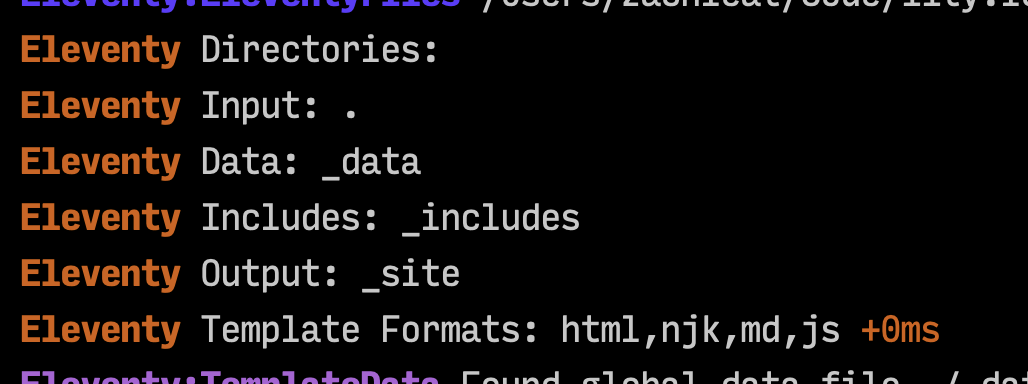
@csakiistvan Can you provide your Eleventy Directories entries from debug output?
Debug output: https://www.11ty.io/docs/debugging/
Here’s what that might look like
zachleat
on 26 Jun 2019
@zachleat I am closing my issue because I dealt with it - @kleinfreund has right I made some issues with data saving in eleventy.js file :) thanks for the reply!
TomekKosakowski
on 26 Jun 2019
cc @csakiistvan
This is an automated message to let you know that this issue requires additional input from the original poster and for the health of the repository issue tracker the issue will be closed. This is to help alleviate issues hanging open waiting for a response from the original poster.
Do not let the issue’s closing deter you. After you’ve supplied the required information, the issue will be reopened. Thanks!
zachleat
on 18 Jan 2020
Related issues
 DirtyF
·
3Comments
DirtyF
·
3Comments
 aaronstezycki
·
3Comments
aaronstezycki
·
3Comments
 zac-heisey
·
3Comments
zac-heisey
·
3Comments
 nebrelbug
·
3Comments
nebrelbug
·
3Comments
 veleek
·
3Comments
veleek
·
3Comments
Most helpful comment
@zachleat I am closing my issue because I dealt with it - @kleinfreund has right I made some issues with data saving in eleventy.js file :) thanks for the reply!