Eleventy: How to display first image in post Collection?
Hi all,
I read the docs and had a go but can't seem to achieve this by myself. Is there a way to do this without creating a specific collection or is that inadvisable?
Visually, this is how I intend it to show:
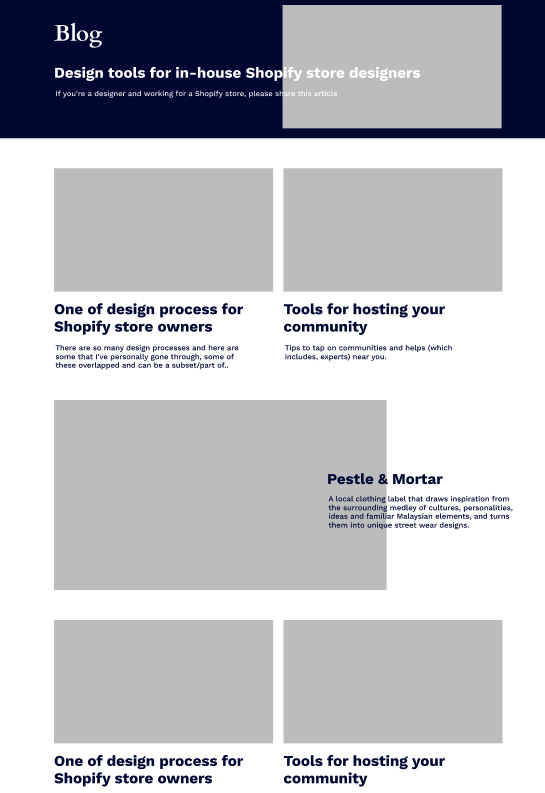
I am using this with Netlify admin, so perhaps having a featured image section might be better but I don't want to overcomplicate things since I am the only one that will be using it: https://github.com/ajmalafif/tsuwave/blob/master/_includes/components/postslist.njk
 ajmalafif
All 7 comments
I would try using a shortcode first. In your post listing, you would call it passing the post object as a parameter. In the shortcode, you can access the property templateContent and with that, you can search for the first image and return its markup.
Does that sound right? If you want, I can provide you with an example shortcode later. Currently on my phone.
 kleinfreund
on 16 Sep 2018
kleinfreund
on 16 Sep 2018
hey @kleinfreund thanks for the pointer. I am not familiar but I'll take a stab at it!
No worries at all, I appreciate the help and in the mean time i'm trying to get that to work. Thanks again!
ajmalafif
on 16 Sep 2018
Something along these lines. I haven’t tested it, but it should give you an idea. :)
<ol>
{%- for item in pagination.items %}
<li>{{ first_image item }}</li>
{% endfor -%}
</ol>
.eleventy.js:
module.exports = function (eleventyConfig) {
eleventyConfig.addShortcode('first_image', post => extractFirstImage(post));
// …
};
/**
* @param {*} doc A real big object full of all sorts of information about a document.
* @returns {String} the markup of the first image.
*/
function extractFirstImage(doc) {
if (!doc.hasOwnProperty('templateContent')) {
console.warn('❌ Failed to extract image: Document has no property `templateContent`.');
return;
}
const content = doc.templateContent;
if (content.includes('<img')) {
const imgTagBegin = content.indexOf('<img');
const imgTagEnd = content.indexOf('>', imgTagBegin);
return content.substring(imgTagBegin, imgTagEnd + 1);
}
return '';
}
Oh, interesting! You’re trying to extract the <img> tag from your template content?
Just keep in mind on shortcodes that in nunjucks they use the {% shortcodename %} syntax:
<ol>
{%- for item in pagination.items %}
<li>{% first_image item %}</li>
{% endfor -%}
</ol>
Please reopen if you have more questions!
 zachleat
on 19 Sep 2018
zachleat
on 19 Sep 2018
hey @kleinfreund thanks so much for this. I tried few times across the days but seems like this one is a bit over my head for now.
I tried exact code and also brute force trial and error (by replacing for item in pagination.items to for post in collections.posts) and so far i can't seem to find anything that works.
@zachleat yeah that's my request, but my intention was actually to have a featured image for each post, but since i'm also using netlify CMS, i guess it's a bit too much of an ask so this hacky way would do for me now.
ajmalafif
on 19 Sep 2018
Okay, let’s see.
How are you displaying your individual posts? Are you using a pagination or are you iterating over a collection?
A first debugging step would be having the shortcode just log what it gets:
module.exports = function (eleventyConfig) {
  eleventyConfig.addShortcode('first_image', post => console.log(post));

  // …
};
Are there huge objects filling up your terminal when you run this? If not, the shortcode is not called.
kleinfreund
on 19 Sep 2018
@kleinfreund OMG it works!
So because it was a collection instead of a pagination, and there's already a for loop so all I had to include was
{% first_image post %}
and it works! Thanks so much @kleinfreund !
ajmalafif
on 19 Sep 2018
Related issues
 proog
·
3Comments
proog
·
3Comments
 smaimon
·
3Comments
smaimon
·
3Comments
 zellwk
·
3Comments
zellwk
·
3Comments
 nebrelbug
·
3Comments
nebrelbug
·
3Comments
 DirtyF
·
3Comments
DirtyF
·
3Comments
Most helpful comment
Okay, let’s see.
How are you displaying your individual posts? Are you using a pagination or are you iterating over a collection?
A first debugging step would be having the shortcode just log what it gets:
Are there huge objects filling up your terminal when you run this? If not, the shortcode is not called.