Element-web: Can't reset security passphrase
Description
I'm trying to reset the encryption keys as I forgot the passphrase or set it up wrongly somehow. I don't have any encrypted rooms fortunately. But it doesn't work. I recorded a video: https://youtu.be/Bf1GGQ6mO30
Steps to reproduce
- try to reset the keys and/or cross-signing
- Element doesn't accept the key it just generated and fails to set it all up
Logs being sent: yes
Version information
- Platform: desktop and web
For the web app:
- Browser: Chrome 86.0.4240.111
- OS: Debian Linux testing
- URL: develop
For the desktop app:
- OS: Debian Linux testing
- Version: 1.7.10
 rkfg
rkfg
All 17 comments
indeed: Element doesn't accept the key it just generated and fails to set it all up
so what are my next steps to restore the ability for the user?
 github-tomster
on 24 Oct 2020
github-tomster
on 24 Oct 2020
Thanks for including the video, that's very helpful and it makes it very clear which steps you are taking. I'll dig into the debug logs here to see if I can spot the issue or request more info as needed. Thanks for your patience.
 jryans
on 26 Oct 2020
jryans
on 26 Oct 2020
i have been able to reproduce this behavior as well, prompted by one of my users running into it. i discovered that when it asks for you to enter your key or upload it at the end of your video, it was asking me for an old key, which presumably is lost and that is why you are resetting the key in the first place. because i was testing extensively, i was able to identify that it was asking for an old key (not the _previous_ key, mind you, it was asking for the third key back!)
i'm happy to supply a video of my testing as well. https://youtu.be/TVs_wlC9ygg
 williamkray
on 26 Oct 2020
williamkray
on 26 Oct 2020
i've subsequently produced a _different_ issue with a brand new account, where the key reset appeared to work fine but logging in prompted for my key and the new key was rejected. the old key worked. then another key prompt came up, and the old key was rejected, but the new key worked.
the issues seemed (in my experience) to stem from the user logging in and "skipping" the verification process (presumably because they lost their key/passphrase) and then trying to reset their key from that session.
just seems like every time i try to reproduce this issue reliably, i run into some other version of it that's different than before.
williamkray
on 26 Oct 2020
@williamkray your video also shows another bug: Element asks for the security phrase twice for some reason while saying the session has been verified after you entered it the first time.
rkfg
on 27 Oct 2020
@rkfg If you open DevTools in either the browser or desktop (Ctrl-Shift-I), then go to Application -> Storage -> IndexedDB -> matrix-js-sdk:crypto -> account, do you have any entries there? If yes, which ones?
Here's an example:
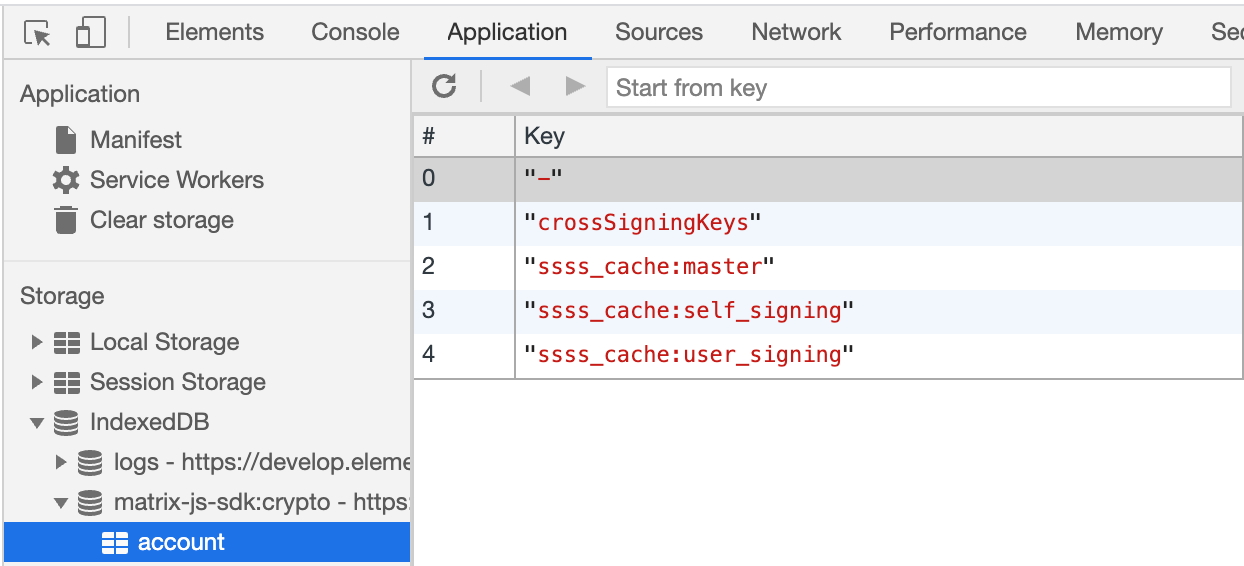
Note: Please do not share the _values_ column here, as those are your private keys.
jryans
on 27 Oct 2020
i've subsequently produced a _different_ issue with a brand new account, where the key reset appeared to work fine but logging in prompted for my key and the new key was rejected.
@williamkray Let's keep this issue focused on trouble with _resetting_ specifically, as it will get too confusing if we try to diagnose and resolve multiple things in one issue. Please open a new one for this and attach debug logs.
jryans
on 27 Oct 2020
@jryans here's all I have: 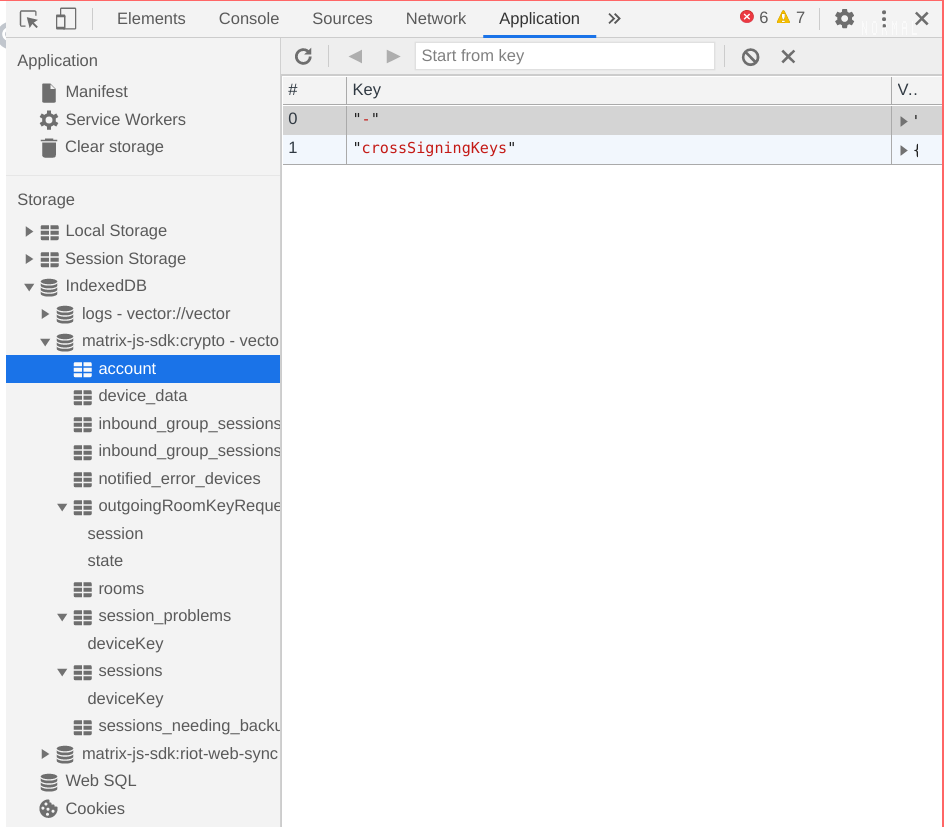
rkfg
on 27 Oct 2020
Thanks all, I believe I have reproduced this and have a fix up for review now. Will ask for verification once it merges to develop.
jryans
on 27 Oct 2020
@rkfg This is now on https://develop.element.io, so it would be great if you can verify the fix there.
- Consider exporting room keys to a file as a backup in an existing session via top left menu -> Settings -> Security -> Export E2E room keys (but you've said you don't have encrypted rooms at the moment)
- If you don't have an existing develop session, it should be fine to login and skip any verification prompts
- Reset secure backup first (this should now succeed without confusingly asking for previous keys)
- Reset cross-signing keys (this may prompt for security key / phrase, it's expecting the new one you just made in step 2)
- On other sessions, you should be able to either verify the new session and receive new keys or go to Settings and "setup" Secure Backup (green button instead of the red "reset"), which maybe prompt for the new security key / phrase as part of downloading your keys
Assuming it works well for you, I'll put out a release with this fix.
jryans
on 28 Oct 2020
@jryans looks good to me, however there's another unrelated but annoying issue that might be worth fixing before release. I can open a new issue but it's when you login and Element asks to verify the session and you choose "Use recovery key" but then press "Go Back". Not only you need to press it 3 times, you get stuck forever at "Verify this login" message with a spinner.
rkfg
on 28 Oct 2020
there's another unrelated but annoying issue that might be worth fixing before release. I can open a new issue but it's when you login and Element asks to verify the session and you choose "Use recovery key" but then press "Go Back". Not only you need to press it 3 times, you get stuck forever at "Verify this login" message with a spinner.
Hmm, okay, please do open a new issue. I agree that sounds frustrating itself, but we already a have a few fixes queued for release that might be best to go out first... In any case, let's track it with a new issue.
jryans
on 28 Oct 2020
15584
rkfg
on 28 Oct 2020
i've tested with my demo accounts and confirm everything looks good here. thank you! looking forward to this release.
williamkray
on 28 Oct 2020
Worked for me as well. Thank you for the fix.
 cloudwitch
on 28 Oct 2020
cloudwitch
on 28 Oct 2020
Thanks all, it's great to have confirmation it's working well! 😄
jryans
on 28 Oct 2020
Thanks for the fix. Worked for me to. Hope this lands in stable soon.
 pReya
on 31 Oct 2020
pReya
on 31 Oct 2020
Related issues
 lampholder
·
3Comments
lampholder
·
3Comments
 turt2live
·
3Comments
turt2live
·
3Comments
 richvdh
·
3Comments
richvdh
·
3Comments
 NotAFile
·
3Comments
NotAFile
·
3Comments
 nvbln
·
3Comments
nvbln
·
3Comments
Most helpful comment
i have been able to reproduce this behavior as well, prompted by one of my users running into it. i discovered that when it asks for you to enter your key or upload it at the end of your video, it was asking me for an old key, which presumably is lost and that is why you are resetting the key in the first place. because i was testing extensively, i was able to identify that it was asking for an old key (not the _previous_ key, mind you, it was asking for the third key back!)
i'm happy to supply a video of my testing as well. https://youtu.be/TVs_wlC9ygg