Element-web: Resetting secure storage results in "Unable to set up secret storage"
Description
I'm trying to reset cross signing and secret storage and i fill out out all required fields and when i hit finish, it only shows
"Unable to set up secret storage"
Steps to reproduce
- Reset cross signing in Settings/Security & Privacy
- fill out the new security passphrase, next, next, finish
Version information
- Platform: web (in-browser) or desktop?
Tried both. Same result.
For the web app:
- Browser: Chrome 85.0.4183.102
- OS: Fedora 32
- URL: private server riot version v1.7.7
For the desktop app:
- OS: Fedora 32
- Version: Element version: 1.7.7
 Marwel
All 15 comments
Thanks for the report, I'll work on fixing this now.
@Marwel, to help me confirm I understand the issue correctly, can you tell me what you see when you open browser DevTools, and go to Application tab -> IndexedDB -> matrix-js-sdk:crypto -> account, and then what values do you see in the "key" column? (Please don't post the "value" column, those are private!)
For example, do you see something like:
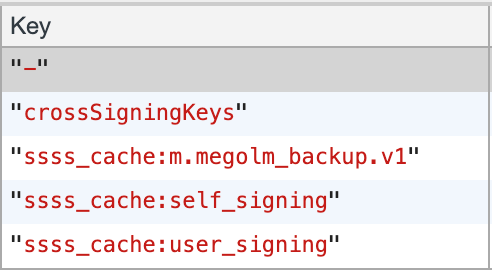
...or do you have a different list?
 jryans
on 18 Sep 2020
jryans
on 18 Sep 2020
I've got the same issue.
There's just the - key and sss_cache:m.megolm_backup.v1
in another browser there's just - and nothing else.
 mk-hs
on 18 Sep 2020
mk-hs
on 18 Sep 2020
@jryans
There is not much.
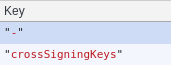
And cross-signing is already empty.
Marwel
on 19 Sep 2020
@Marwel https://develop.element.io now has a fix applied for this, please test there and let us know if you're able to reset.
jryans
on 21 Sep 2020
Nope, sorry to disappoint, but it still shows the same message.
Marwel
on 21 Sep 2020
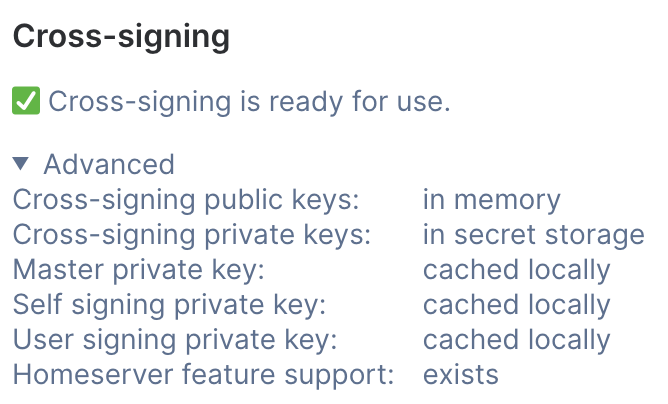
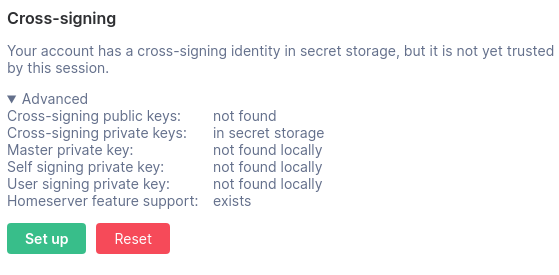
Hmm, okay, thanks for trying. @Marwel, what do you have currently on develop in the advanced section of cross-signing settings? For example, I have:
jryans
on 21 Sep 2020
Marwel
on 22 Sep 2020
@Marwel Looking at your previous debug logs from 5 days ago, it seems like you tried the following actions:
- Clicked "Set up" in the cross-signing section, but this failed when trying to access secret storage
- Clicked "Reset" in the secret storage section, but failed when trying to copy local cross-signing keys into new secret storage (because they don't exist)
- This part is what I attempted to fix in https://github.com/matrix-org/matrix-js-sdk/pull/1472
Could you please try the following steps?
- Go to https://develop.element.io, logging in if needed, and open Settings -> Security
- Click "Reset" in the secret storage section first (if this still fails, it's likely a new, different issue than last time)
- Click "Reset" in the cross-signing section to create fresh keys and store them in the new secret storage you just made
- If there are any problems, please submit debug logs from this session on develop
Even if you end up seeing the same messages in the UI, we may learn new things from the debug logs. Thanks for your help with this!
jryans
on 23 Sep 2020
Uploaded logs from the development version with the same "Unable to set up secret storage" error.
 nbuechner
on 23 Sep 2020
nbuechner
on 23 Sep 2020
@jryans Yeah, you're right, this happens, when i try to finish step 2.
So i skipped step 3 and uploaded the logs. It seems to me, that the reset from cross signing does both.
Thank you for your effort on this.
Marwel
on 24 Sep 2020
Thanks for the additional logs! I can see now there is indeed an additional issue: secret storage reset attempts to sign key backup with cross-signing keys that are not present. According to logs, @Marwel, @nbuechner, and @PeterBadzhakov all seem to be affected by the same issue, so hopefully fixing that will help everyone. 😄
jryans
on 25 Sep 2020
@Marwel, @nbuechner, and @PeterBadzhakov, the latest fix is now merged to develop. If you could test https://develop.element.io once again, that would be very helpful! The steps in https://github.com/vector-im/element-web/issues/15230#issuecomment-697346986 should be a good reference.
jryans
on 28 Sep 2020
Resetting both secure storage and cross-signing is working now on the develop client, thanks a lot!
mk-hs
on 28 Sep 2020
Okay, i'm late to the "it works" party, but i have to disapoint again.
I tried on develop and it still gives me the same error on resetting secure storage.
I already uploaded the logs.
Marwel
on 30 Sep 2020
@Marwel Sorry to hear that 😖 It's a bit puzzling, as that seems to be exactly the error I thought I had fixed in the second round. I created a fresh issue to track the remaining problems since we've already shipped fixes on this one.
jryans
on 30 Sep 2020
Related issues
 bagage
·
3Comments
bagage
·
3Comments
 nvbln
·
3Comments
nvbln
·
3Comments
 ara4n
·
3Comments
ara4n
·
3Comments
 t3chguy
·
3Comments
t3chguy
·
3Comments
 MurzNN
·
3Comments
MurzNN
·
3Comments
Most helpful comment
Resetting both secure storage and cross-signing is working now on the develop client, thanks a lot!