Element-web: Links ending in dot are not linkified correctly
https://en.wikipedia.org/wiki/A.T.O.M.
Take this link for example. The linkifier doesn't count the last dot as part of the link on Desktop at least
 Rares95
All 7 comments
They are not linkified here either for a reason. I am not sure of a good solution. Example: Foo: https://bar.baz.. In this case the URL would be https://bar.baz., it becomes part of the URL. Two workarounds for this: https://bar.baz ., or reword the sentence so that the dot is not at the end.
What solution would be the best of both worlds? We already have the formatter and we could probably make links and send them as-is (linkified) while hiding the implementation details, but I am not sure that is the way to go. Heck, I brought up how I cannot write and send - because it gets formatted automatically and turns it into an element of a list which, IMO, is problematic. I would love to have the option to turn that off.
 odiferousmint
on 7 Aug 2020
odiferousmint
on 7 Aug 2020
because it gets formatted automatically and turns it into an element of a list which, IMO, is problematic. I would love to have the option to turn that off.
Completely unrelated to this issue.
This issue about linkification which happens on receipt
Markdown parsing (commonmark) happens on send and you can use /plain to not have it applied.
 t3chguy
on 8 Aug 2020
t3chguy
on 8 Aug 2020
On Microsoft Edge for Windows 10 it works fine. On Firefox Focus or Edge on Android it does not
Can you show an example of what you mean? Screenshots are great.
t3chguy
on 11 Aug 2020
Completely unrelated to this issue.
Not to my half-assed proposal though. :P That was just an example, but my point was that it is definitely doable to do links that way. As far as Markdown parsing is concerned, I definitely would like to have an option to disable it altogether so I will not have to type /plain all the time. :P (Yes, this is unrelated, not sure if the issue is still opened or not.)
But yeah, I am not sure if this is going to work. Currently , and . and perhaps other special characters are not considered as being part of the URL, which is the best way to go, IMO. My half-assed solution was to be able to insert links and send them as-is, with those special characters. So by default (without using the formatter), https://foobar. would send https://foobar, but with the formatter it would send https://foobar..
I hope it makes sense, I am exhausted.
odiferousmint
on 13 Aug 2020
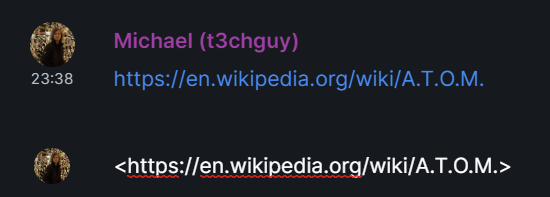
You can use the commonmark URL syntax <URL> which works with trailing dots:
t3chguy
on 13 Aug 2020
Yup, that is what I had in mind. Seems like it is implemented!
odiferousmint
on 16 Aug 2020
Closing as a non-issue.
Often people put a link at the end of a sentence and would hate for every link to be broken by the appended .
This is typical behaviour elsewhere such as here on github too. If you want to explicitly mark the dot as part of the link you can either use link [text](url) syntax or use the explicit URL <url> syntax
t3chguy
on 17 Aug 2020
Related issues
 PureTryOut
·
3Comments
PureTryOut
·
3Comments
 bagage
·
3Comments
bagage
·
3Comments
 richvdh
·
3Comments
richvdh
·
3Comments
 lukebarnard1
·
3Comments
lukebarnard1
·
3Comments
 ara4n
·
3Comments
ara4n
·
3Comments