Element-web: Review session ("Review where you're logged in") provides no help about what to do
Description
When opening the webapp, I get a popup asking me to "Review where you're logged in":
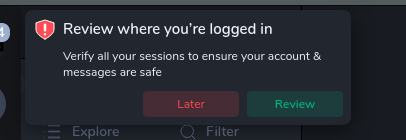
I believe this happens whenever you open the app and have any unverified sessions.
When I click "Review", I end up in the home screen, with a device list opened in the sidebar:
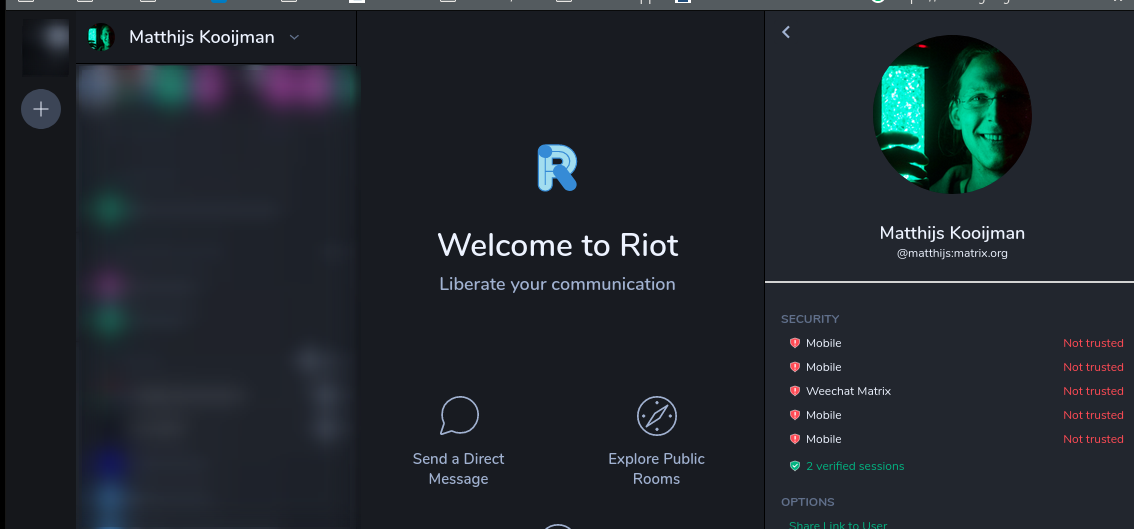
Since the device list is in the sidebar, it is not immediately clear that action is required there. Also, there is no guidance about what to actually needs to be done, why it should be done and how it should be done.
Possible improvements would be to:
- Move the interface into the center, so the focus is more clear
- Add more information on what needs to happen
- Maybe make the interface a bit more clear (maybe add verify/remove/information buttons directly in the device list, rather than having to click a device first). See also #13187, which suggests allowing deleting devices from this list.
Version information
- Platform: Web
- Browser: Firefox 78
- OS: Ubuntu 19.10.
- URL: riot.im/app
 matthijskooijman
All 6 comments
One additional observation: From the device list, it is not directly clear what the current session is. I've opened #14344 for this.
Also, when choosing sessions to verify, it is now hard to distinguish the sessions. In the account "Security & Privacy" settings section, there is a "last seen" column which helps separating old sessions from current sessions. Including that information in this "verify session" UI would also be helpful.
I've also noticed that the identifiying information for mobile clients is a bit limited, it just says "Mobile". It would be clearer if this could also indicate e.g. Riot vs RiotX vs Riot iOS, or maybe even the mobile device name or model (e.g. "RiotX on Samsung X10" or "Riot on Matthijs' phone").
matthijskooijman
on 6 Jul 2020
I considered this a bit more, and I wonder if the "profile page" is actually the right place for the "Review where you're logged in" toast to redirect to. In essence, the profile page seems to be intended to view other users' profiles, not your own sessions per se (resulting in confusion such as #14345 and #14344). I think that, conceptually, it would be a lot better if this would just redirect to the Security & Privacy settings, as that is also a place that is easy to get back to later.
For this to work, the settings should allow verifying settings, which is discussed in #11221. That also suggests to allow renaming sessions, which would solve part of my previous comment as well.
matthijskooijman
on 6 Jul 2020
It gets worse when you have more devices:
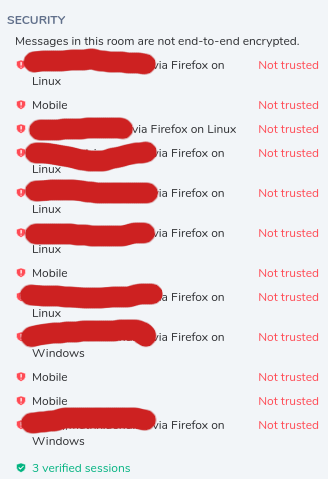
Say I no longer care about one of those, can I revoke it?
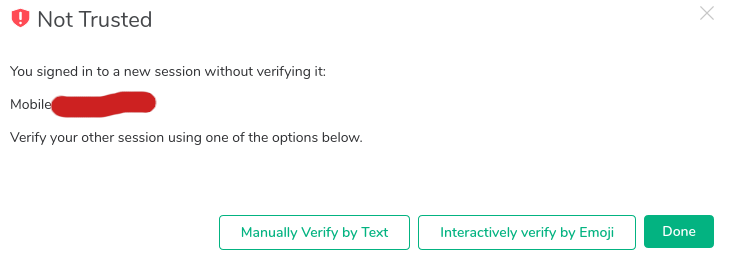
Nope.
This means I have to authorize every device, including one https://riot.im/app/ that I don't recall using, or to delete the conversation.
 lnicola
on 15 Jul 2020
lnicola
on 15 Jul 2020
Say I no longer care about one of those, can I revoke it?
Yes, Settings > Security & Privacy.
 t3chguy
on 15 Jul 2020
t3chguy
on 15 Jul 2020
Likewise, I have 8 sessions simply called 'mobile'. It would be helpful to have a 'last seen' record so that I can scrub the really old ones (I see this exists in settings, but isn't shown here). Similarly, it would be helpful if I could more explicitly name my sessions so that it's easier to work out which is which.
 maxgrenderjones
on 17 Sep 2020
maxgrenderjones
on 17 Sep 2020
Similarly, it's not clear what 'delete sessions' actually does (beyond maybe get rid of the popup nagging). Does it mean that E2E messages sent from those sessions will no longer be readable? What happens if I do try to log in from one of the devices that created those sessions at some point in the future? Will it create a new session?
maxgrenderjones
on 17 Sep 2020
Related issues
 lampholder
·
3Comments
lampholder
·
3Comments
 n-o-o-b
·
3Comments
n-o-o-b
·
3Comments
 niedzielski
·
3Comments
niedzielski
·
3Comments
 richvdh
·
3Comments
richvdh
·
3Comments
 NotAFile
·
3Comments
NotAFile
·
3Comments
Most helpful comment
Yes, Settings > Security & Privacy.