Element-web: Restore backup doesn't work across Android Riot and Web Riot
Description
When I enable key backup on my Android or web device, I can't press "Restore keys" on the other device because it'll then either ask for my "Recovery passphrase" that is always considered incorrect, or "Recovery key" that is also always considered incorrect.
(I used clipboard sync and two other channels to make sure I get the exact same data into the fields)
Given that Keybase was just bought I probably am not the first Keybase "refugee" and I won't be the last. I really think Riot could take look at Keybase's UX and copy a few things from them, it really works much better.
Steps to reproduce
- Set up key backup on Riot Web
- Try restoring that backup on Android
- It'll ask for Recovery Key, the one you just downloaded from Riot Web is not accepted
Alternatively
- Set up key backup on Android
- Try restoring that backup on Web
- It'll ask for Recovery passphrase that is always considered incorrect.
Describe how what happens differs from what you expected.
The key backup succeeds. It would be even better if I didn't have to deal with this stuff at all, if I verify a device, it should just make sure it all works, seamlessly, without asking.
Version information
Latest of both
For the web app:
- Browser: Chrome, latest snap
- OS: Ubuntu
- URL: riot.im/app
For the Android app:
- OS: MIUI11
 TaaviE
All 24 comments
riot-android is no longer updated so doesn't support the new variant of key backup that riot-web uses
you should try RiotX
 t3chguy
on 3 Jun 2020
t3chguy
on 3 Jun 2020
Okay then this is just very bad UX. The very least the unmaintained app should be unlisted. Not to mention, either of them could warn me/users against this or throw a clearer error ("Oh your backup's now not recoverable from this client").
What would one even do when they had their phone die and would want to restore backups, they can't restore :open_mouth:?!?
TaaviE
on 3 Jun 2020
RiotX is still in Beta and does not have feature parity
t3chguy
on 3 Jun 2020
Okay, but this doesn't address the fact that the maintained web client lies in the error message. The very very least that should be changed.
TaaviE
on 3 Jun 2020
So chatting over this, setting up key backup on riot-android and then connecting to it on riot-web should work.
t3chguy
on 4 Jun 2020
I did try that, but the web client didn't accept the recovery passphrase or the key I entered.
TaaviE
on 4 Jun 2020
I tried to reproduce and was unable.
- created a new account on riot-android
- created a new room
- enabled encryption
- sent a message
- enabled key backup on riot-android in settings
- logged out of riot-android
- opened riot.im/app and logged in
- was prompted to upgrade security
- confirmed upgrade security
- was prompted to enter my account password again
- entered successfully
- was prompted to enter my key backup passphrase
- entered my key backup passphrase wrongly
- tried again with the one I entered on riot-android successfully
- got logged in and met with the encrypted message which I sent earlier:
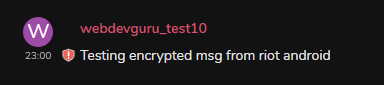
t3chguy
on 5 Jun 2020
I just did this:
- created an account on riot android
- set up key backup, entered a recovery passphrase it asked
- waited for the keys to back up
- opened riot.im/app, pressed "Restore from backup"
- entered the exact same recovery passphrase
- key restoration fails
TaaviE
on 5 Jun 2020
opened riot.im/app, pressed "Restore from backup"
So the difference may be I was prompted at login to upgrade to cross-signing which upgrades the legacy backup, will investigate in the morning if that happens with the Restore from backup flow also!
t3chguy
on 5 Jun 2020
https://riot.ovh/_matrix/media/r0/download/riot.ovh/CeluVklAVSslXPAWGWxaNQul shows my 2nd successful attempt using the Restore from backup flow.
Can share a screencast of my test on riot.im (riot-android) too if that helps.
t3chguy
on 5 Jun 2020
The primary difference in the flow seems to me that I haven't been prompted about encryption upgrades, I haven't logged in again. I kinda didn't dare if the backup might have any bugs.
Plus, the button for me says "Restore from Backup" and not "Bootstrap ..."
TaaviE
on 6 Jun 2020
Mine said Connect this session to key backup
which is what happens if that current session does not have key backup enabled.
t3chguy
on 6 Jun 2020
It works exectly like @TaaviE described.
I spent 2 days trying to make them work together.
Web/desktop version can't restore backup created in riot-android and vise versa.
Besides, I haven't found anything like "upgrade to cross-signing".
 lych
on 29 Jun 2020
lych
on 29 Jun 2020
@lych did you watch the video at https://github.com/vector-im/riot-web/issues/13912#issuecomment-639433717
t3chguy
on 29 Jun 2020
@t3chguy twice :)
There is anything like "Upgrade your encryption" in my desktop/web version.
Maybe the difference is my user wasn't created in riot-android, it was created in terminal via "register_new_matrix_user".
If I reset backup in riot-android then create a new one, I can't restore it in riot web/desktop
lych
on 29 Jun 2020
What version of synapse and riot web/desktop?
t3chguy
on 29 Jun 2020
Synapse: 1.15.1
riot-web: 1.6.2
riot-web(desktop): 1.6.6
lych
on 29 Jun 2020
Anything >1.6 should have it, though you should update 1.6.2 as there are multiple cross-signing fixes
t3chguy
on 29 Jun 2020
I'll update 1.6.2.
However 1.6.6 doesn't work either.
lych
on 29 Jun 2020
My video was from 1.6.4 so it should work in 1.6.6, where you register your account shouldn't matter.
t3chguy
on 29 Jun 2020
Got it! Probably :)
It works like in your video as long as Backup version is 1.
After reseting the backup it stops working.
lych
on 29 Jun 2020
@t3chguy could you confirm?
lych
on 30 Jun 2020
I can't
I don't know about the underlying mechanisms, best if someone else picks it up
t3chguy
on 30 Jun 2020
I have the exact same problem: Using the latest version of Riot for Android (0.91.4, I believe it's identical to RiotX by now) I have created a key backup.
When I sign in to a new session on app.element.io, it says that it's using the key backup:
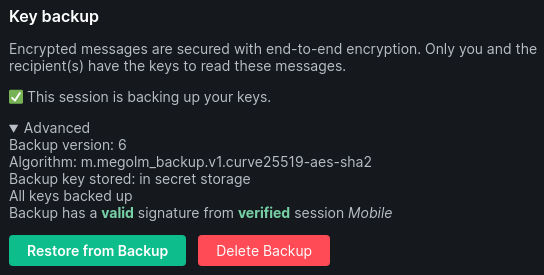
However, no keys get actually restored:
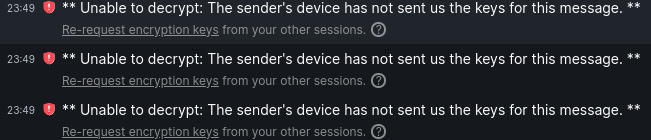
Every attempt (with passphrase or security key) to manually restore the backup is deemed invalid (logging Error restoring backup Error: Error decrypting secret m.megolm_backup.v1: bad MAC to the JS console).
 hho
on 16 Jul 2020
hho
on 16 Jul 2020
Related issues
 anoadragon453
·
3Comments
anoadragon453
·
3Comments
 arthurlutz
·
3Comments
arthurlutz
·
3Comments
 niedzielski
·
3Comments
t3chguy
·
3Comments
niedzielski
·
3Comments
t3chguy
·
3Comments
 ara4n
·
3Comments
ara4n
·
3Comments
Most helpful comment
I just did this: