Element-web: Broken cross signing state after RiotX crash during bootstrap
Yesterday, I tried to setup cross signing with the new version of RiotX from GPlay. It crashed while it said it was publishing keys or something similar. I sent in an Android crash report yesterday and a rageshake today when RiotX crashed again for another reason.
Since then, RiotX says that cross signing is active, Riot Web says it's not. Riot Web offers to verify the session, but that fails, see below for details.
User nagua in the Polynomial Supporters seems to have the exact same problem. They logged out in RiotX, but that left Riot Web in the same state as before (asking for session verification), and there's no client anymore with successfully active cross signing to do a verification.
What I tried:
- Go to sessions in RiotX and try to verify the Riot Web session there. I'm getting the emojis on both sides, and after accepting them, RiotX says the verification was successful, Riot Web says the other end cancelled the verification. The Riot Web session is not marked as verified on the RiotX side afterwards. From the Riot Web console:
Verification completed! Marking devices verified:
Array [ "zTohT5...", "BWS..." ]
vendors~init.js:2:950859
Checking key backup status... vendors~init.js:2:950859
Own device BWSIRVGACP marked verified: signing vendors~init.js:2:950859
Checking key backup status... vendors~init.js:2:950859
PUT /sendToDevice/m.key.verification.cancel/m1589005979529.23
Object { "@zottel:matrix.zottel.net": (1) […] }
vendors~init.js:2:950859
Verification failed TypeError: "First argument must be a string, Buffer, ArrayBuffer, Array, or array-like object."
    l https://vector.zottel.net/bundles/9f769ac7a648e2ec9507/vendors~init.js:2
    l https://vector.zottel.net/bundles/9f769ac7a648e2ec9507/vendors~init.js:2
    from https://vector.zottel.net/bundles/9f769ac7a648e2ec9507/vendors~init.js:2
    y https://vector.zottel.net/bundles/9f769ac7a648e2ec9507/vendors~init.js:2
    getFromSecretStorage https://vector.zottel.net/bundles/9f769ac7a648e2ec9507/vendors~init.js:2
vendors~init.js:2:950859
Ignoring signature from unknown key ed25519:KAN... vendors~init.js:2:950859
Ignoring signature from unknown key ed25519:LIK... vendors~init.js:2:950859
Ignoring signature from unknown key ed25519:ZZG... vendors~init.js:2:950859
Ignoring signature from unknown key ed25519:DRO... vendors~init.js:2:950859
Backup version 1 still current
- Verify session in Riot Web. I'm getting a dialog where I assume there should be some device I could ask for verification:
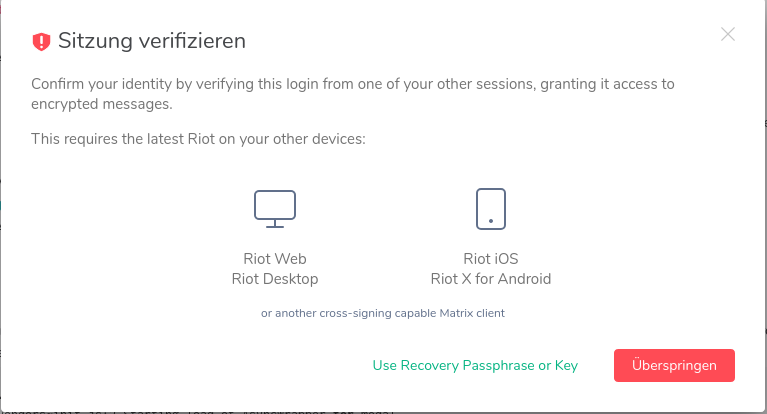
When I say I want to use the recovery passphrase, I'm asked to enter my account password:
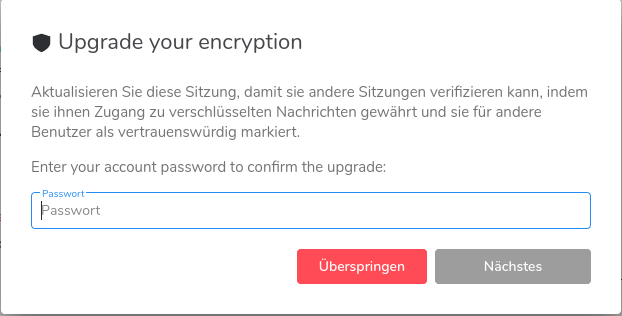
If I do, I'm just presented with the same dialog again.
From the console:
Starting load of AsyncWrapper for modal vendors~init.js:2:950859
Ignoring signature from unknown key ed25519:KAN... vendors~init.js:2:950859
Ignoring signature from unknown key ed25519:LIK... vendors~init.js:2:950859
Ignoring signature from unknown key ed25519:ZZG... vendors~init.js:2:950859
Ignoring signature from unknown key ed25519:DRO... vendors~init.js:2:950859
Bootstrapping Secure Secret Storage vendors~init.js:2:950859
Secret storage default key not found, using key backup key vendors~init.js:2:950859
Starting load of AsyncWrapper for modal vendors~init.js:2:950859
restoreWithCachedKey failed: Error: "Couldn't get key"
    restoreKeyBackupWithCache https://vector.zottel.net/bundles/9f769ac7a648e2ec9507/vendors~init.js:2
vendors~init.js:2:950859
Starting load of AsyncWrapper for modal
- Log in to a new session with Chromium: Before I can even see any rooms, I get the same dialog as above. When I enter my account password, the following happens:
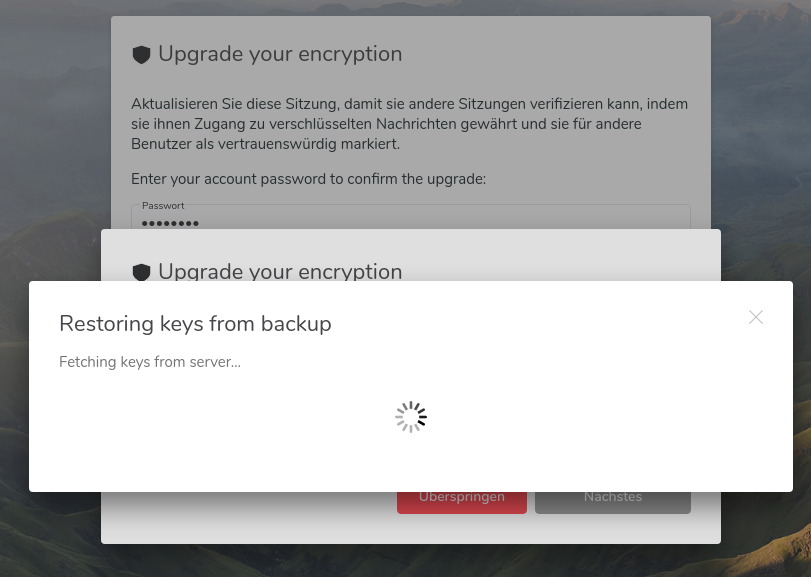
The spinner never stops spinning. From the console:
Starting load of AsyncWrapper for modal
vendors~init.js:2 restoreWithCachedKey failed: Error: Couldn't get key
    at I.restoreKeyBackupWithCache (vendors~init.js:2)
    at async hc._restoreWithCachedKey (vendors~init.js:2)
    at async hc._loadBackupStatus (vendors~init.js:2)
vendors~init.js:2 Starting load of AsyncWrapper for modal
vendors~init.js:2 Ignoring signature from unknown key ed25519:KAN...
vendors~init.js:2 Ignoring signature from unknown key ed25519:LIK...
vendors~init.js:2 Ignoring signature from unknown key ed25519:ZZG...
vendors~init.js:2 Ignoring signature from unknown key ed25519:DRO...
matrix.zottel.net/_matrix/client/unstable/keys/device_signing/upload:1 Failed to load resource: the server responded with a status of 401 (Unauthorized)
I can't recover any encryption keys because I'm always told to upgrade my encryption.
- Manually verify the new Chromium session by text using RiotX. RiotX crashed again, I just sent a rageshake. Tried again, crashed again.
What can I do now?
Is there something I can do for you to get more information?
 zzottel
All 16 comments
Hey, I'm the mentioned nagua in the post above.
Essentially I have the exact same problem. I can't upgrade the my Riot account to use Cross-Signing.
These are the account data entries in the postgres server for may account:
@nagua:2hg.org  m.accepted_terms
@nagua:2hg.org  m.megolm_backup.v1
@nagua:2hg.org  m.direct
@nagua:2hg.org  org.matrix.preview_urls
@nagua:2hg.org  m.secret_storage.key.xxxxxxxx-xxxx-xxxx-xxxx-xxxxxxxxxxxx
@nagua:2hg.org  im.vector.web.settings
@nagua:2hg.org  im.vector.riot.breadcrumb_rooms
@nagua:2hg.org  m.widgets
@nagua:2hg.org  im.vector.setting.breadcrumbs
If you need more information, or something I can do to reset my cross-signing state again, please ping me.
 nagua
on 9 May 2020
nagua
on 9 May 2020
@bwindels Would your bootstrapping robustness work help here?
 jryans
on 12 May 2020
jryans
on 12 May 2020
@zzottel and @nagua Thanks for your bug report! Could you please both submit debug logs from the help & about page in the settings?
 bwindels
on 12 May 2020
bwindels
on 12 May 2020
@bwindels Would your bootstrapping robustness work help here?
Potentially, should be able to say more once we have debug logs.
bwindels
on 12 May 2020
Ok, I have done so now with riot-desktop on linux.
nagua
on 12 May 2020
Did so, too, from my Chromium instance.
Also, I've sent another rageshake from RiotX because it now displays there are new keys for messages, with a link to the key backup which is already active. I'm not sure what that message is supposed to mean. That there are new keys in the backup from some other Riot instance, and I should restore? That there are new keys to save, and RiotX somehow thinks that the key backup isn't active?
zzottel
on 13 May 2020
I downloaded the new RiotX version from GPlay.
Trying to verify other sessions using emojis still shows the same behaviour (RiotX says succesful, but badge stays black, Riot Web says the other end cancelled the verification).
Manual verification using text doesn't crash RiotX anymore, but it now says "Cannot sign from this account, public and/or privateKey Unknown" followed by a number of chars that are probably a key?
What can I do to nuke that failed bootstrapping? If there's some way to do it via DB meddling, no problem, just tell me what to do.
I also sent another rageshake from RiotX.
zzottel
on 15 May 2020
I downloaded the new RiotX version from GPlay.
Trying to verify other sessions using emojis still shows the same behaviour (RiotX says succesful, but badge stays black, Riot Web says the other end cancelled the verification).
Manual verification using text doesn't crash RiotX anymore, but it now says "Cannot sign from this account, public and/or privateKey Unknown" followed by a number of chars that are probably a key?
What can I do to nuke that failed bootstrapping? If there's some way to do it via DB meddling, no problem, just tell me what to do.
You can hit "Reset cross-signing and secret storage" under "Security and Privacy" in the settings. Note that this will clear all your previous verifications, if you had any.
bwindels
on 26 May 2020
I'm also experiencing this issue and I'm unable to see the "Reset cross-signing and secret storage" option, is there any other way to reset?
 alexjg
on 27 May 2020
alexjg
on 27 May 2020
Same here. Riot Web tells me I should bootstrap cross signing, which doesn't work, and as it thinks it wasn't bootstrapped yet, it doesn't show the "Reset cross-signing and secret storage" button (or so I assume). RiotX, which thinks cross-signing was set up successfully, doesn't have such a button.
zzottel
on 27 May 2020
I also have the exact same behavior as @zzottel described in his last post.
nagua
on 28 May 2020
I've created https://github.com/vector-im/riotX-android/issues/1509 now, hoping that the nuke button will be implemented in RiotX, too.
zzottel
on 19 Jun 2020
I tried to initialize cross signing again with the newest Riot-web version and I was indeed able to initialize it. I was also able to cross-sign all my devices. So it seems that the problem is now at least solved for me.
nagua
on 21 Jun 2020
The latest riot-web also seems to have fixed things for me as well (via the riot-desktop Arch package which I am using).
alexjg
on 22 Jun 2020
@zzottel Any chance things have improved for you as well?
jryans
on 22 Jun 2020
Ah, yes, it worked! \o/ I had tried last Friday with Riot 1.6.5 before I opened the RiotX ticket, and it didn't work, but now that I tried again (with Riot 1.6.6) I think I may have entered the wrong password on Friday. X-)
Thanks a lot, I'll close the ticket.
zzottel
on 25 Jun 2020
Related issues
 grahamperrin
·
3Comments
grahamperrin
·
3Comments
 ara4n
·
3Comments
ara4n
·
3Comments
 n-o-o-b
·
3Comments
n-o-o-b
·
3Comments
 richvdh
·
3Comments
richvdh
·
3Comments
 turt2live
·
3Comments
turt2live
·
3Comments