Element-web: Reactions: Mix of color, non-color emojis and boxes in reaction bar
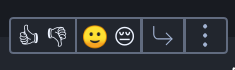
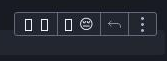
Description
I'm getting an interesting mix of color and non-color emojis in my reactions bar, which kind of make it look like I've already selected 'Like' when I haven't.
Version information
- Platform: web
- Browser: Chromium
- OS: Debian Linux
- URL: independent build of riot.im/develop
 anoadragon453
All 17 comments
Ah, the fun world of native emoji... 😭
 jryans
on 8 May 2019
jryans
on 8 May 2019
If there's a way to detect whether at least one emoji won't be rendered properly in the current browser, it may be worth reverting to simpler emotes.
anoadragon453
on 8 May 2019
let’s just shove svg in there; of all the things to be consistent, these are pretty important
 ara4n
on 8 May 2019
ara4n
on 8 May 2019
Which SVG would we use...? Whatever we pick, they won't match the platform's native emoji, which seems like it would be visually surprising.
jryans
on 8 May 2019
On electron using archlinux soru just gets boxes for emojis. it seems to be working in webbrowser (firefox) fine, though
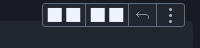
 Sorunome
on 21 May 2019
Sorunome
on 21 May 2019
This seems to have now gotten even worse:
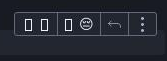
Chromium web, Debian Linux, latest develop
anoadragon453
on 21 May 2019
_Should_ be fixed as of ~30 mins ago with the new emoji font...
jryans
on 21 May 2019
_Should_ be fixed as of ~30 mins ago with the new emoji font...
This is from a clean develop build ~10 mins ago
EDIT: as in, including https://github.com/matrix-org/matrix-react-sdk/commit/30a485bdddf646bf4d614e011689501c40eae87e
Sorunome
on 21 May 2019
Works in Firefox 67.0 on latest /develop, where previously it was broken
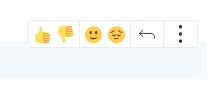
 f0x52
on 21 May 2019
f0x52
on 21 May 2019
Ah sorry, I was reacting specifically to @anoadragon453's version. I would expect it at least fixed in modern browsers. There may indeed still be an issue with Electron.
jryans
on 21 May 2019
Correction, getting the following on latest develop:
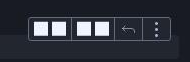
anoadragon453
on 21 May 2019
Correction, getting the following on latest develop:
@anoadragon453, what version of Chromium?
jryans
on 21 May 2019
Correction, getting the following on latest develop:
Crap, I see the same on Chromium 73 on Fedora 30.
 bwindels
on 21 May 2019
bwindels
on 21 May 2019
changing the font-family to Nunito, 'Noto Color Emoji', 'Twemoji Mozilla', Arial, Helvetica, Sans-Serif renders emojis with the native font for me, so chromium does colored emojis, it just doesn't seem to like the Twemoji woff2 file ...
bwindels
on 21 May 2019
Oddly enough this says that COLR support should have been shipped in version 71.
bwindels
on 21 May 2019
Might be a problem on macOS as well, see linked issue.
bwindels
on 21 May 2019
As a counterpoint, Chromium 73 on Ubuntu 18.04 from Ubuntu's package repo appears to display the emoji correctly.
jryans
on 21 May 2019
Related issues
 n-o-o-b
·
3Comments
n-o-o-b
·
3Comments
 turt2live
·
3Comments
turt2live
·
3Comments
 lampholder
·
3Comments
lampholder
·
3Comments
 bagage
·
3Comments
bagage
·
3Comments
 lukebarnard1
·
3Comments
lukebarnard1
·
3Comments