Element-web: Desktop client: Paste files into chat window as a way to upload
Description
It would be very useful to be able to go to the windows explorer, "CTRL + C" a text file, word document, jpg image, etc, and have them uploaded on the current chatroom by just pressing "CTRL + V" when the window is in focus, currently, we can only upload "clipboard images" that way, not even jpg or png files, just "image data" that is on the clipboard, like when you take a screenshot with the "PrntScrn" key, but if i copy an image file from windows explorer and try to paste it in the desktop client, nothing happens.
Version information
- Platform: Desktop
- OS: Windows 7 x64
- Version: 0.12.2
 Edszx
Edszx
All 24 comments
I'm not sure how feasible this is,
re copying an image file, open the file then right click copy the image itself
or you could drag and drop it into riot
 t3chguy
on 27 Aug 2017
t3chguy
on 27 Aug 2017
Thank you for mentioning those alternatives, i'm already aware of them, but changing windows constantly, moving them and drag and dropping files really dulls the flow of work in the program, specially on lower resolutions, i'm just making the suggestion because instant pasting/uploading of files would really help with the efficiency of my team, because we are constantly uploading pictures and small files.
Edszx
on 27 Aug 2017
@Edszx do you know of any webapp that has this functionality out of interest?
t3chguy
on 27 Aug 2017
As far as I can tell, the HTML spec doesn't allow for it
https://stackoverflow.com/a/8710277
and pasting a file can only lead to the filename being read (not even the full path)
t3chguy
on 27 Aug 2017
I don't know of any webapp with this functionality, sadly, if it's not supported then nothing we can do about it, thanks for your time!
Edszx
on 27 Aug 2017
I know one: Discourse. The forum software allows for image pasting.
E.g. Ctrl+c a jpg in Windows Explorer, start a new post in Discourse, and then Ctrl+v -> Image is uploaded.
 StefanBrand
on 17 Sep 2017
StefanBrand
on 17 Sep 2017
@StefanBrand I tried and it does not paste the image in.
t3chguy
on 17 Sep 2017
If I open it in photos and then Copy and Paste it does work though, just like Riot and Github and more
t3chguy
on 17 Sep 2017
Can't be... I'm on Firefox 55.0.3 and Windows 10 Pro. It works as described.
StefanBrand
on 17 Sep 2017
I'm on Chrome 60
t3chguy
on 17 Sep 2017
It even works in Riot this way, though.
StefanBrand
on 17 Sep 2017
I just tried on 55.0.3 FF Freshly installed and also did not work, neither Discourse nor Riot
t3chguy
on 17 Sep 2017
What's your OS?
StefanBrand
on 17 Sep 2017
Windows 10 v1703
t3chguy
on 17 Sep 2017
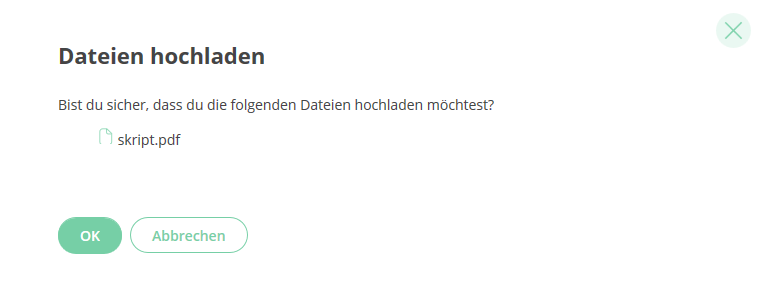
That comes up after I have copy-pasted the file from Windows Explorer.
My Windows version is 10.0.15063
Edit: Okay, here is the catch: You first have to click into the text box...
StefanBrand
on 17 Sep 2017
You're either magic or Windows hates me
t3chguy
on 17 Sep 2017
Why are Windows image clipboard contents always uploaded as PNG if you insert them via ctrl+v? Please give option to change this to JPEG with compression factor.
 makedir
on 22 May 2018
makedir
on 22 May 2018
This feature works in desktop and in Firefox and Safari.
I think this can be closed @ara4n.
 aaronraimist
on 29 Sep 2018
aaronraimist
on 29 Sep 2018
Why are Windows image clipboard contents always uploaded as PNG if you insert them via ctrl+v? Please give option to change this to JPEG with compression factor.
makedir
on 30 Sep 2018
I don't use Windows but probably because Windows takes screenshots as a PNG. You should probably use some other utility to convert them if you want a JPEG.
aaronraimist
on 30 Sep 2018
That doesnt make any sense and is the typical being ignorant solution to everything for devs. If you use clip tools in Windows to share stuff into client, it is just retarded to post them as 2-4MB sized pictures everytime instead of using proper JPEG or other compression.
makedir
on 30 Sep 2018
@aaronraimist yup, we fixed it with the move to slate.
@makedir: i would be pretty pissed off if i wanted to send someone a PNG and the app randomly reencoded it to be a JPG. For instance, any transparency you have (like on macOS screenshots) would get lost. Feel free to file a feature request to optionally JPEG everything before upload to save bandwidth, but i doubt it will get prioritised very high (especially if you call us retarded).
 ara4n
on 30 Sep 2018
ara4n
on 30 Sep 2018
@ara4n THATS WHY AS A GOOD APP DEVELOPER YOU GIVE OPTIONS. OPTIONS. AND DONT FORCE ANYTHING. There just has to be a simple PNG/JPEG slider in the frame when you ctrl+v into the client...
I am NOT TALKING about file upload I am talking about CLIPBOARD PASTE.
makedir
on 30 Sep 2018
as i said, if you want an optional feature to recompress images at upload (whether that is by pasting them or uploading them or whatever) go file a request rather than trying to hijack a bug about the clipboard being broken.
ara4n
on 30 Sep 2018
Related issues
 arthurlutz
·
3Comments
arthurlutz
·
3Comments
 n-o-o-b
·
3Comments
n-o-o-b
·
3Comments
 PureTryOut
·
3Comments
PureTryOut
·
3Comments
 lukebarnard1
·
3Comments
lukebarnard1
·
3Comments
 bagage
·
3Comments
bagage
·
3Comments