Element-web: photo with exif orientation is not rotated
I just uploaded a portrait photo taken by my camera via file upload of vector-web. In the chat view as well as when I click on the thumbnail to display the photo as full screen, it is displayed in landscape mode.
I checked that the exif orientation is correct with:
> identify -verbose <photo.jpg> | grep exif:Orientation
exif:Orientation: 8
which is the right setting according to the diagrams at http://sylvana.net/jpegcrop/exif_orientation.html.
According to this stackoverflow answer, at least firefox supports a css property to rotate the image according to the exif orientation.
Similar issue for vector-android: https://github.com/vector-im/vector-android/issues/409
 florianjacob
All 19 comments
Good point. iOS & Android work around this now i think by pre-rotating the image before upload, but we don't do this on vector-web.
This is a slightly sensitive subject: https://matrix.org/jira/browse/SPEC-85 is the attempt to formalise handling EXIF in Matrix, but it's never landed yet. Thanks for flagging it for Vector. Volunteers would be welcome to implement this properly....
 ara4n
on 27 Aug 2016
ara4n
on 27 Aug 2016
The issue has been migrated to github https://github.com/matrix-org/matrix-doc/issues/483
I'd like a fix for this too...
 arthurlutz
on 3 May 2017
arthurlutz
on 3 May 2017
Still existing problem.
Riot-Web will ignore the EXIF-data and show wrong rotation (while browser might show the correct rotation after you download the image).
Riot for Android seems to rotate the image and remove the Exif-Info.
 Flexmaen
on 7 Feb 2019
Flexmaen
on 7 Feb 2019
Took a picture with my smartphone, downloaded it from Google Photos and uploaded it through riot web ui. Its orientation is broken.
I'm surprised this doesn't isn't fixed.
 Siegfriedk
on 10 Jul 2019
Siegfriedk
on 10 Jul 2019
I agree with @Siegfriedk. While this is not a blocking point, but it is somewhat surprising this has not been fixed since 2016.
 schopenhauer
on 13 Apr 2020
schopenhauer
on 13 Apr 2020
it’s simply not got to the top of the todo list relative to more painful issues.
ara4n
on 13 Apr 2020
Still... having this as minor issue within 4289 issues will mean that it still might be open in 5 years.
So it might be a factor how complicated it is to fix an issue that still is annoying.
BTW: Today in a chat I experienced the bug mentioned in https://github.com/vector-im/riot-web/issues/10903 that was merged into this issue.
So sometimes the image will be rotated, but will have the wrong proportions.
Flexmaen
on 28 Apr 2020
image-orientation: from-image is deprecated but still widely supported, so could be an easy fix for now.
 bwindels
on 29 Apr 2020
bwindels
on 29 Apr 2020
A solution for me was to install "Scrambled Exif" (which removes exif information and thus has to apply the rotation setting from it because it would be gone otherwise), which works fine.
I like this behaviour because exif reveals hidden information when sending with the pic.
Maybe the spec should be extended to require that? Like "The sending client must apply rotation information from exif" and clients could/should have a setting to purge exif data entirely.
 emdete
on 29 Apr 2020
emdete
on 29 Apr 2020
Hm, reading the comments here, it sounds like on Android the problem is automatically fixed during upload. But: I just took a selfie with my smartphone cam and uploaded it with RiotX. It looked perfectly normal there. On the Riot desktop client (Linux) the same photo appears rotated. So, it seems the photo is rather automatically rotated for display on Android, right?
 rgpublic
on 19 May 2020
rgpublic
on 19 May 2020
I did test with the old Riot-Android, not with RiotX. Maybe RiotX can handle it while Riot-Web can't. That would explain the behaviour.
However, I tried to reproduce this but figured out that Riot-Web 1.6 seems to display it correctly now. So either this just fails with some kind of rotation info or maybe this is already fixed?
Flexmaen
on 19 May 2020
Hm, reading the comments here, it sounds like on Android the problem is automatically fixed _during upload_. But: I just took a selfie with my smartphone cam and uploaded it with RiotX. It looked perfectly normal there. On the Riot desktop client (Linux) the same photo appears rotated. So, it seems the photo is rather automatically rotated _for display_ on Android, right?
@rgpublic I am not able to reproduce. Would you be able to provide an image where the problem occurs for you?
I have tried uploading all the images from https://github.com/recurser/exif-orientation-examples and displaying worked fine on riot-web (FF77 & Chromium 81), riotx and riot android. Uploading worked everywhere apart from riotx, for which I have filed https://github.com/vector-im/riotX-android/issues/1482
bwindels
on 15 Jun 2020
I have this photo that opens well with correct orientation in Eye of GNOME (eog) :
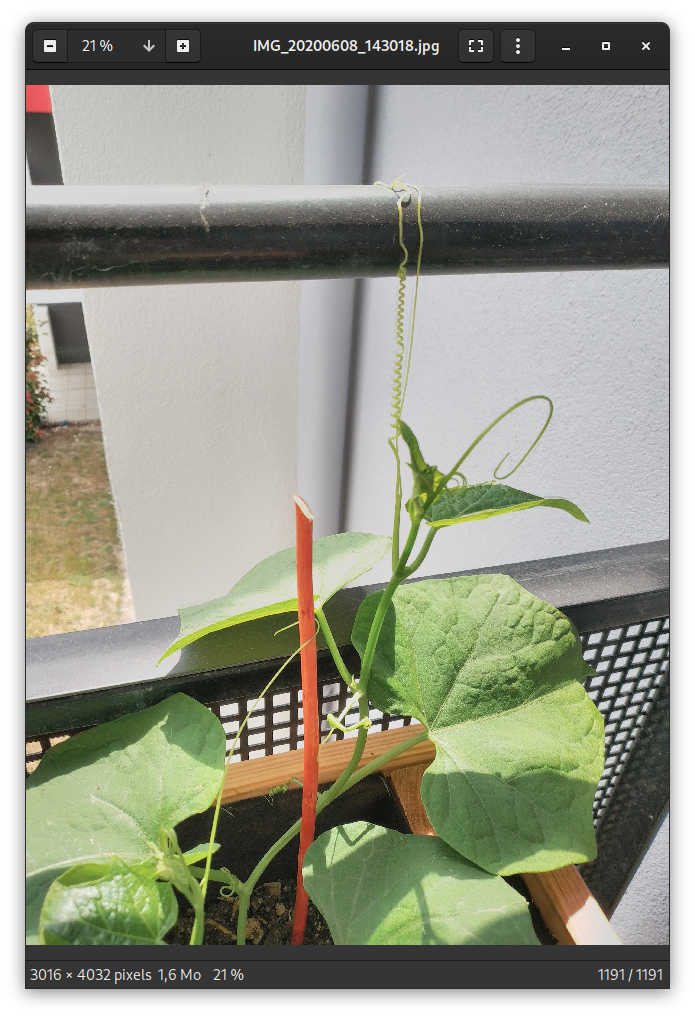
But here is the result when uploaded using riot-web 1.6.4, and visualized using the same riot-web :
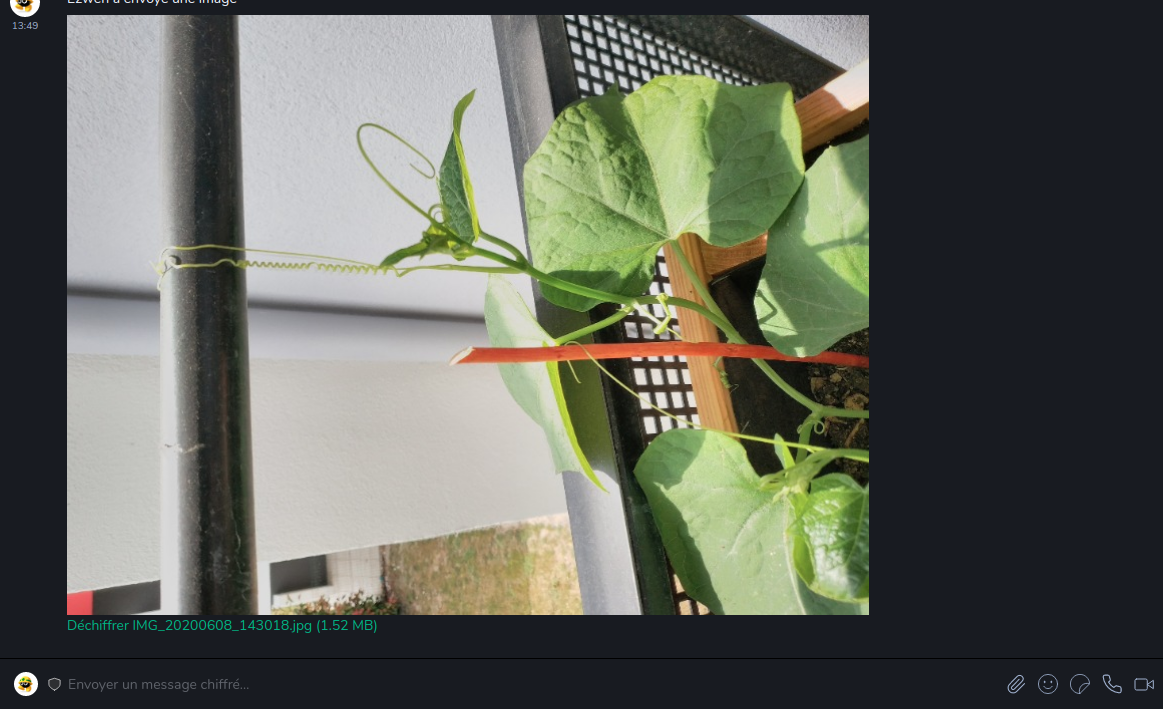
Here is the original photo : https://drop.infini.fr/r/fVBQ6FCWMN#sXJggzxQcLqyNfljtVogIpGJ5frZ6J7DcEsc6i2oSaU=
 Ezwen
on 15 Jun 2020
Ezwen
on 15 Jun 2020

@bwindels I can definitively reproduce it. I just took a selfie (it's not me, obviously, LOL) with my phone's camera and shared it via RiotX on Android. It looked normal even after posting in the message pane. Then I went to my desktop PC, opened Riot, and the photo appears 90° degrees rotated CW. I've downloaded the file on the desktop PC via Riot (hope Riot doesn't change anything already during upload so it should be the original) and attached it for reference.
rgpublic
on 15 Jun 2020
@rgpublic Thanks for the image, it seems to be specific to riot-desktop, having a look ...
bwindels
on 15 Jun 2020
Looks like electron 8.0.3 (at least on Linux) doesn't handle these images in the same way as Chrome and is ignoring the exif rotation, and it also does not seem to support image-orientation at all...
bwindels
on 15 Jun 2020
According to CanIUse this is supported in Chrome since v81. Electron 8.0 is based on Chromium v80 according to the ElectronBlog. On that same page, you can find that Electron 9.0 is based on v83. Consequently, if Riot Desktop would be upgraded to Electron 9.0, this bug would be fixed.
rgpublic
on 15 Jun 2020
@bwindels We have now merged the Electron 9 upgrade and it seems to have stuck, so should be possible to try again I think.
 jryans
on 19 Jun 2020
jryans
on 19 Jun 2020
Yeah, works like a charm now.
bwindels
on 22 Jun 2020
Related issues
 anoadragon453
·
3Comments
anoadragon453
·
3Comments
 grahamperrin
·
3Comments
grahamperrin
·
3Comments
 PureTryOut
·
3Comments
ara4n
·
3Comments
PureTryOut
·
3Comments
ara4n
·
3Comments
 turt2live
·
3Comments
turt2live
·
3Comments
Most helpful comment
@bwindels I can definitively reproduce it. I just took a selfie (it's not me, obviously, LOL) with my phone's camera and shared it via RiotX on Android. It looked normal even after posting in the message pane. Then I went to my desktop PC, opened Riot, and the photo appears 90° degrees rotated CW. I've downloaded the file on the desktop PC via Riot (hope Riot doesn't change anything already during upload so it should be the original) and attached it for reference.